
Reolink Argus MagiCam Review
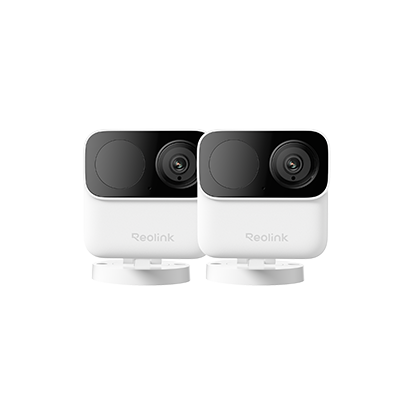
- What is the Reolink Argus Magicam
- How Easy Is it to Install the Reolink Argus Magicam?
- How Long Does the Reolink Argus Magicam's 9-Month Battery Life Last?
- Is The Reolink Argus Magicam's 2MP Video Good Enough?
- How to Install Reolink Argus MagiCam?
- Comparison with Other Compact Reolink Cameras
- Which Reolink Camera Should You Buy?
- FAQs
- Verdict: Should You Buy the Reolink Argus MagiCam
What is the Reolink Argus Magicam
The Argus MagiCam is a small 2MP, IP67-rated cube camera built for both indoor and outdoor use, powered by two replaceable AA lithium batteries or a direct USB-C connection.
At 108g without batteries, it weighs about as much as the two AA batteries it runs on, light enough to sit on a shelf, tuck into a glove box, or fit in the palm of your hand. The box includes the camera, two AA batteries, a magnetic mounting pad, a rotary bracket, a USB-C cable, and mounting instructions.
It's a camera gaining huge traction in Reolink's mini wireless magnetic security camera lineup, built for people who need security fast and temporary rather than permanent and wired. It has also gained the attention of people who are looking for the smallest security camera with high quality performance for its size.
Key Specifications
Pros:
- Full smart detection: Person, vehicle, and animal detection now works on battery power, not just when plugged into USB-C
- Dual-band 2.4/5GHz Wi-Fi: Its dual-band Wi-Fi ensures smooth and reliable performance, while offering excellent battery life. You won't see any lag in live feeds.
- Real-Time Live View & Playback: You can check the real-time live on the app from any location and play recorded videos whenever you want.
- Two-way Audio: The two-way audio allows you to remotely talk to the person in front of the camera. It facilitates direct communication through the app.
- IP67 Weatherproof: With the IP67 weatherproofing, it works in all weather conditions, including rain and snow.
- Works with Google Assistant and Alexa: It's compatible with Google Assistant and Alexa. You can use voice commands to operate the camera.
Cons
- Rotary mount isn't magnetic: Installation with this mount will require screws.
Best for:
- Travel and temporary setups: hotel rooms, RVs, and travel trailers, where a portable security camera that doesn't need permanent mounting is the whole point
- Renters and short-term stays: magnetic mounting means zero holes when you move out
- Discreet-but-not-hidden placement: small enough to sit on a bookshelf, in a bird box, or in a corner without standing out, without being a disguised spy camera.
- Open indoor monitoring, including as a nanny cam: the two-way audio lets you talk directly to whoever's on camera, which is the key difference between an exposed nanny cam like this one and a hidden nanny cam. Reolink's nanny cam guide covers the legal distinction between the two types in more detail.
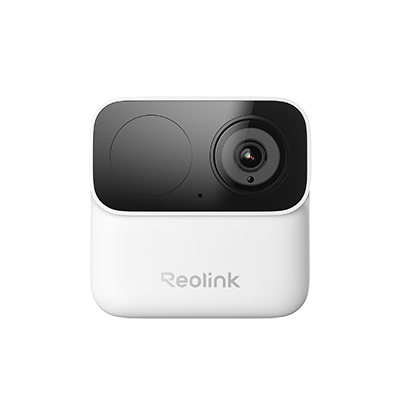
2MP Wireless Power-Efficient Camera
Magnetic Mounting for Easy Installation, Max. 9-Month Battery Life, Dual-Band 2.4/5GHz Wi-Fi, No Monthly Fees.
How Easy Is it to Install the Reolink Argus Magicam?

As the Reolink Argus Magicam has a magnetic mounting pad for mounting, it can easily snap onto any metal surface, and the included adhesive/screw-backed pad extends mounting to wooden, drywall, or glass surfaces. For angled placement, there is also the screw-backed rotary bracket which adds 360° horizontal and 180° vertical adjustment. These screw-backed brackets typically take few tools and can be installed within 5 to 10 mins, including moments of adjustment.
Pro Tip: For a fully tool-free setup on a non-metal surface, adhesive strips rated for at least 108g work as a no-drill alternative to screwing in the bracket.
How Long Does the Reolink Argus Magicam's 9-Month Battery Life Last?

The Reolink Magicam Battery life is rather durable. On low traffic use on AA lithium batteries, it can last up to 9 months. According to community tests, users have put standard alkaline or NIMH batteries and have claimed 12-20 days in active use, while lithium AAs stretched to roughly seven weeks in a high-traffic indoor setting. Plugging into USB-C power removes the battery question entirely and unlocks continuous 24/7 recording, a combination Reolink's own mini wireless magnetic camera guide calls a rare capability at this size and price.
What Do You Actually Get With Reolink's Argus Magicam's 132° Field of View?
The 132° diagonal field of view is wide enough to cover a small spaces such as a doorway or a single parking space from a dashboard mount or a shelf if there's no desire to mount anywhere. It's not built to watch a wide driveway or backyard the way Reolink's wider dual-lens cameras are.
Is The Reolink Argus Magicam's 2MP Video Good Enough?


According to an independent reviewer, daytime image clarity of the Reolink Argus Magicam is "great for the size," with no glare even in direct afternoon sun, and motion detection sensitive enough to pick up movement across the street.
For casual indoor and short-range outdoor monitoring, that's enough. For license-plate or face-ID detail at range, it isn't, and the Argus 4 Pro or E1 Zoom are the better pick.
Is The Reolink Argus Magicam Outdoor Ready?

The IP67 rating means the camera's housing is dust-tight and rated for temporary submersion up to 1 meter, well beyond simple splash resistance, so rain, snow, and wet weather left unattended are all within its operating range. That makes it a genuinely suitable option for a portable security camera for travel, a campsite, or an RV, in addition to indoor use.
How to Install Reolink Argus MagiCam?
Magnetic Mounting
- Peel and stick the magnetic mounting pad wherever you want.
- Attach the camera to the pad.
Wall/Ceiling Mounting
- Place the mounting plate at the location and drill the required holes.
- Insert anchors and attach the base. Secure it with screws.
- Mount the camera on the base and adjust its angle.
Tabletop Placement
- Place the magnetic bracket on the tabletop
- Attach the camera and adjust the angle.
Comparison with Other Compact Reolink Cameras
The Argus MagiCam isn't the only compact camera in Reolink's lineup. Where it lands according to you will come down to how much resolution, coverage, and continuous power you're willing to give up for price and portability. Here's how it stacks up against two other compact Reolink cameras.
The Reolink Argus 4 Pro sits a step up. This is a battery/solar-powered Wi-Fi 6 camera with dual lenses for a 180° panoramic view, 4K resolution, and ColorX night vision. Reolink's own lab testing puts it at 30% more battery life and roughly 12 extra standby days versus a comparable IR night-vision camera. For video quality and coverage width, the Argus 4 Pro wins outright as the MagiCam trades that resolution for a lower price and a magnet instead of a solar panel.

4k 180° Wire-free Color Night Vision Camera
4K UHD 180° Blindspot-free View; Color Vision Day and Night; 30% More Battery Life; Dual-band Wi-Fi 6; Smart detection.
The Reolink E1 Zoom is a 4K indoor camera with 355° pan and 50° tilt motion, 3x optical zoom, and detection for people, pets, and crying. It supports Wi-Fi 6 for smooth performance but has no battery option at all, it's a plug-in camera. For anyone who needs to cover a full room from one fixed spot, the E1 Zoom wins on coverage; the MagiCam wins on portability.

PTZ Wireless Smart Home Camera
Smart, Powerful and Affordable All-Round Home Protection. 355° Pan and 50° Tilt; 4K Ultra HD, 3X Optical Zoom, Two-Way Audio, 2.4/5 GHz WiFi, with Google Assistant Integration.
Verdict by dimension: For price, portability, and installation speed, the MagiCam wins by a wide margin, and it's the only one of the three built to move with you rather than stay put. For raw video quality and coverage, the Argus 4 Pro and E1 Zoom both beat the MagiCam outright.
Which Reolink Camera Should You Buy?
The comparison above covers specs head-to-head. Here's the same choice framed around your specific situation instead:
FAQs
Is the Reolink Argus MagiCam worth it?
For renters, travelers, or anyone who needs a camera that mounts without tools and moves easily, yes. At 2MP resolution and a locked bitrate, it's not the pick for detailed video or wide outdoor coverage, where the Argus 4 Pro or E1 Zoom fit better.
Is the Argus MagiCam a hidden camera?
It's a small, visible cube camera that can be hidden but it's not a disguised spy device. Its compact size does let it sit unobtrusively on a shelf or in a corner, which is why it also works well as an exposed nanny cam or pet cam.
Does the Argus MagiCam require a subscription?
No. Local storage through a microSD card or the Reolink Home Hub series is included with no monthly fee.
Does the Argus MagiCam work without Wi-Fi?
No. It's a Wi-Fi camera that specifically needs a 2.4GHz or 5GHz network connection to stream, send alerts, and sync recordings to the Reolink app.
Can the Argus Magicam record 24/7?
Yes, but only when connected to USB-C power. On AA batteries alone, it records motion-triggered clips to conserve battery life.
Verdict: Should You Buy the Reolink Argus MagiCam
The Argus MagiCam earns its place for one reason. It's the fastest, most flexible way to add a security camera anywhere without tools, cables, or a subscription. For a 2K security camera for the size, it's the best pick for renters, travelers, and quick indoor monitoring rather than detailed outdoor surveillance.
If you'd like to find out more, head to the Reolink Argus MagiCam product page. If you have any questions, be sure to leave them down in the comments section and we'll help answer your queries!
Search
Subscribe for the Latest Updates
Security insights & offers right into your inbox