
PoE vs. PoE+ vs. PoE++ Switch: Key Differences Explained
If you’re in the market for a Power over Ethernet (PoE) switch, you might have come across terms like PoE+, PoE++, or even just PoE. But what do these terms mean, and how do you choose the right one for your needs?
In this article, we’ll look at the differences between PoE, PoE+, and PoE++ and compare their typical applications and areas of use. So, whether you’re setting up a home network or outfitting an office, read on to find out which PoE switch is the best fit for you.
PoE vs. PoE+ vs. PoE++: Basics of Them
What is PoE?
PoE switches (Type 1) comply with the IEEE 802.3af standard, which specifies the maximum power delivered over Ethernet cables.
The standard specifies that PSEs can supply up to 15.4 watts of power per port, while PDs can consume up to 12.95 watts. PoE switches are commonly used for simple devices like VoIP telephones, stationary cameras, sensors, etc.
Dual-lens security cameras now also use the PoE standard. Reolink, a leading name in surveillance field, ingeniously merges Power over Ethernet technology with a 16MP resolution in their latest model, the Duo 3 PoE. This new release promises a significantly improved monitoring and surveillance experience.

Groundbreaking 16MP Dual-Lens PoE Camera
16MP UHD, Dual-Lens, Motion Track, 180° Wide Viewing Angle, Power over Ethernet, Color Night Vision.
What is PoE+?
PoE+ (IEEE 802.3at), also known as PoE plus or Type 2, is an enhanced version of PoE that provides higher power delivery capabilities. PoE+ switches supply up to 30 watts of power per port, about twice the power supplied by the base PoE standard. The ports have a voltage range of 50-57V.
PoE+ switches can power remote pan, tilt, and zoom (PTZ) surveillance cameras, IP phones, alarm systems, and other devices.
What is PoE++?
PoE++ (IEEE 802.3bt, Type 3) is the latest version of PoE and has even more remarkable power delivery capabilities than PoE+. PoE++ switches can supply up to 60 watts of power per port, with a voltage range of 52-57V.
This variant offers the highest power capabilities of all PoE types. Type 4 PoE switches supply up to 100 watts of power per port with the same voltage range as Type 3.
Switches with PoE++ standards are ideal for gate and building access controls, small computers, TVs, remote patient monitoring devices, etc.
What is UPoE?
UPoE (IEEE 802.3bt, Type 4) is a variant of PoE++ that provides even higher power delivery capabilities. UPoE devices can supply up to 100 watts of power per port, which is almost seven times the power provided by the original PoE standard. This increased power delivery enables the powering of devices with extremely high power requirements, such as multi-radio access points and building automation systems.
Key Difference between PoE vs PoE+ vs PoE++
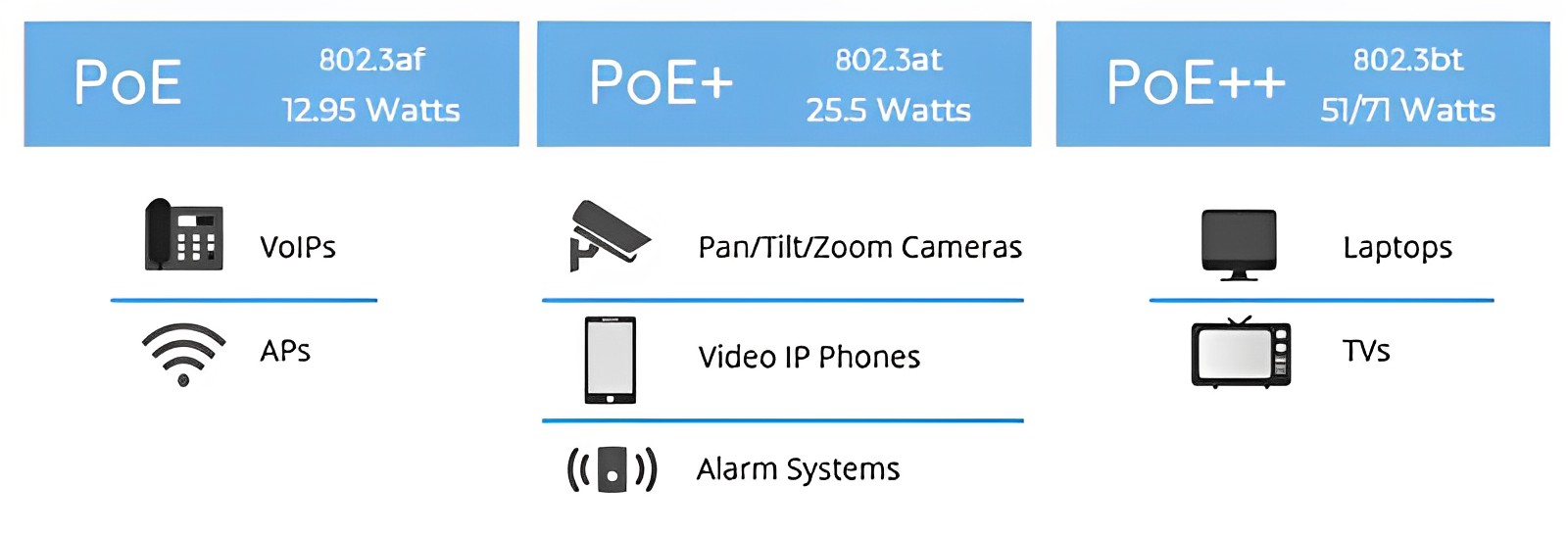
PoE+ (802.3at) supports up to 30W of power at the source, delivering roughly 25.5W to the end device. In contrast, PoE++ (802.3bt) significantly increases output, offering up to 60W (Type 3) or 100W (Type 4), with 51W to 71W reaching the device.
While both standards remain backward compatible, the primary distinction lies in PoE++’s ability to power high-demand hardware like laptops and digital signage by utilizing all four pairs of a network cable, whereas PoE+ operates on only two pairs.
Check out the breakdown of the significant differences between the different PoE standards:
- The IEEE standard for the base PoE switches is 802.3af, 802.3at for PoE+, and 802.3bt for PoE++.
- PoE and PoE+ transmit power over two pairs of twisted-pair wires in their cables, while the PoE++ variants use four pairs of twisted-pair wires.
- The maximum power provided per port is different for each switch. PoE delivers up to 15.4 watts of power, PoE+ provides up to 30 watts, and PoE++ provides up to 60 or 100 watts depending on the type.
- Each PoE standard supports different devices. The higher the PoE type, the more powerful and sophisticated devices they can power.
Check the table below for a side-by-side comparison of the different standards.
PoE vs. PoE+ vs. PoE++: Comparison Table
To give you a quick glance at what the main differences between these three standards are, we've made three tables of comparison.
Table 1. Comparison of Parameters of PoE, PoE+ and PoE++
The comparison dimensions of PoE, PoE+ and PoE++ include IEEE standards, power of switches port, supported cables, etc. This table below has compared main differences between these three PoE standards.
Table 2. Comparison of Operating Conditions of PoE Parameters
Each PoE parameter has its own operating conditions. To work properly, it requires stable power currency, voltage, right power management, modes and comfortable temperatures, as Table 2 shows:
Table 3. Devices Supported By the PoE and PoE+ and PoE++
Different PoE standards match and have their own supported devices. Choosing the right device is the first step to apply for PoE standards. The table below shows you the devices supported by different PoE standards.
What to Consider When Choosing Between PoE, PoE+, and PoE++?
Based on the amount of power provided, you could say the PoE++ is the best. However, choosing the best for YOU is a different matter.
Below are some factors to consider when picking the most suitable PoE switch for your needs:
- Power requirements: The PoE switch must provide enough power for all powered devices (PDs). Compare the total power consumption of your PDs to the PoE switch’s power budget. Your total PD consumption should be less than the power budget.
- Port density: PoE switches offer various numbers of ports, using 8, 12, or 16 ports in smaller networks. Large enterprise and institutional network systems typically require 24, 48, or more ports to manage demand.
- Data rate: Calculate the data rate based on the amount of data and the speed required for upload and transmission. Different PoE switches support standard Ethernet network speeds (10 Base T networks), Fast Ethernet (10 Base T and 100 Base T networks), Gigabit Ethernet (1000 Base T networks), and higher speeds (1/10G). The selected PoE switch must transmit uninterrupted data without power or signal loss.
- Additional products: Determine if other products, such as injectors, converters, or fiber optic cables, are required to support longer-range activity and higher bandwidth.
- Device Compatibility: Not all switches can work with all powered devices. Confirm compatibility between your PDs and the switch you want to buy. For instance, a PoE++ device cannot work with a PoE+ switch.
- Managed vs. Unmanaged switch: Managed switches allow users to adjust the switch’s configuration and provide control over ports, bridges, and network protocols via the management console or a browser-based web interface. On the other hand, unmanaged switches cannot be modified.
When to Upgrade PoE to PoE+ or PoE++?
Upgrading your PoE switch when possible is almost always a good decision. You may find that your current PoE switch setup provides less wattage than your PDs require; that is a good reason to upgrade.
You also don’t lose anything when you upgrade (except money) since PoE standards are backward compatible, meaning a PoE++ switch can support PDs with earlier standards (but a PoE switch cannot power PoE+ and PoE++ devices.
Here are other reasons you may need to upgrade:
Device Compatibility
Perhaps you just got an IP camera(PoE++) unsupported by your PoE+ switch. You will need to upgrade to a PoE++ switch before you can use the camera. The new switch will also likely work with any new devices you plan to buy.
Better Device Performance
Higher PoE standards generally cause better performance in connected devices. For instance, some devices' faster network speeds result in better performance.
Efficient Power Usage
Higher PoE standard switches are better at reducing power loss during transmissions which can help you cut electricity costs.
If your current PoE is sufficient for your needs, you may not need to upgrade. Upgrading to a higher standard switch can be costly, especially if you run a large network.
How to Check PoE Standards for Reolink PoE Cameras?
Once you understand the differences between PoE, PoE+, and PoE++, you might wonder how to check the PoE standards of various devices, such as Reolink PoE cameras. Here are some simple ways to find out:
- Visit the product page: Navigate to the “Specs” section and look under “Power Requirements” to get the full PoE information for our cameras. For example, here is the PoE standard for the Duo 3 PoE.
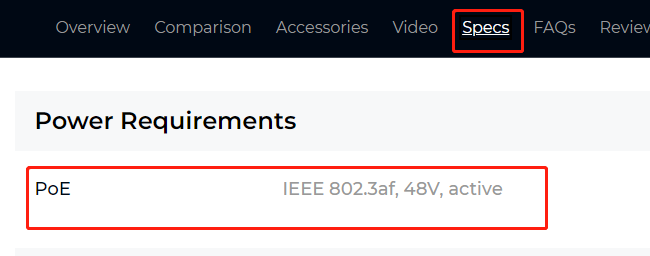
- Download the product specification sheet: This can also be found on the product page under the "Specs" section.
- Contact support team: If you have any more questions about the PoE requirements for your cameras, feel free to reach out to our support team for assistance!
FAQs
Is PoE++ backwards compatible with PoE+?
Yes, PoE++ is backward compatible with PoE+ and PoE. It automatically adjusts power based on the device’s needs, so lower-powered devices stay safe while maintaining full compatibility.
Do I need PoE+ or PoE++?
PoE standards supply power and data through Ethernet cables to devices such as cameras and phones. PoE+ delivers higher power than standard PoE, and PoE++ offers the greatest output for more demanding devices.
Can I plug a PoE+ device into a PoE++ port?
Yes, you can plug a PoE+ device into a PoE++ port. The PoE++ port will detect the device’s power needs and only supply the right amount. It is safe and fully compatible.
How many watts is PoE or PoE+ or PoE ++?
PoE++ (802.3bt) provides up to 60 watts of power to each port in Type 3 and up to 100W on each PoE port in Type 4. This is significantly higher than the power provided by PoE (802.3af) and PoE+ (802.3at), which provide up to 15.4 watts and 30 watts of power, respectively. The higher power levels of PoE++ allows it to power high-performance devices such as building management devices and small computers.
How far can PoE ++ carry power?
PoE++ can carry power up to a distance of 100 meters (328 feet) over standard Ethernet cables, such as Cat5e, Cat6, or higher. This distance is defined by the IEEE 802.3bt standard and applies to both Type 3 (60W) and Type 4 (90W) PoE++ power levels.
Can cat 6 handle PoE++?
Yes, Cat6 cables support PoE++ (up to 100W), depending on cable quality and installation conditions. For higher power loads, using shielded Cat6 is recommended.
Conclusion
Wrapping up, we’ve learned the various standards for PoE switches, and a significant difference is the amount of power each standard provides.
Understanding the differences among the poe vs poe+ vs poe++ standards can help you make an informed decision when choosing the best option for your needs. Remember, you don’t need to upgrade to a higher standard if your current PoE switch is sufficient and you don’t plan on adding new devices to your network.
Search
Subscribe for the Latest Updates
Security insights & offers right into your inbox