
PoE Switch vs NVR: What’s the Difference and Which Do You Need?
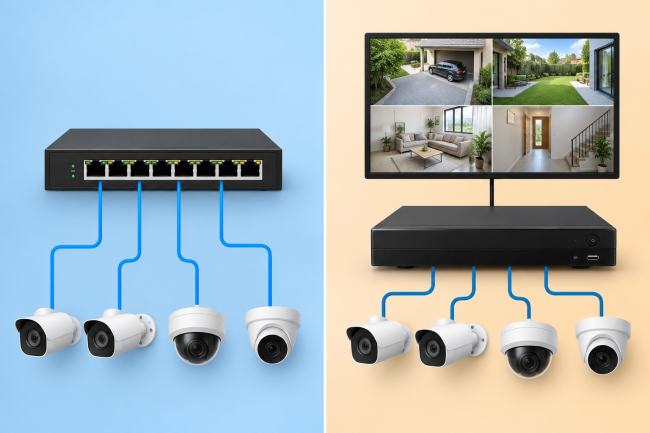
A PoE switch powers PoE cameras and connects them to the network, while an NVR records, stores, and manages camera footage. A PoE NVR can also power cameras through built-in PoE ports. You may need only an NVR for a simple system, or both devices for larger or more flexible installations.
- What Is a PoE Switch?
- What Is an NVR?
- PoE Switch vs NVR: Key Differences
- PoE Switch vs PoE NVR: How Do They Work Differently?
- Do You Need a PoE Switch If You Have an NVR?
- Can You Use a PoE Switch and NVR Together?
- Do You Need a PoE Switch, NVR, or Both?
- Reolink PoE Solutions for Different Security Setups
- FAQs About PoE Switch vs NVR
- Conclusion
What Is a PoE Switch?
A Power over Ethernet switch sends electrical power and network data through Ethernet cables. It connects several PoE cameras while powering them through those same Ethernet cables. This setup cuts cable needs because one cable carries both power and data.
Every PoE switch has a port count and a total available power budget. Port count limits connections, while power budget limits power for all connected devices. Check each camera’s power needs before choosing a switch for your camera network. A nearby switch can also reduce long cable runs back toward the recorder.
What Is PoE Power Budget?
A PoE switch's power budget is the total amount of power it can supply across all PoE ports. For example, an 8-port switch with a 120W budget cannot necessarily provide the maximum supported wattage to all eight ports simultaneously. Add the maximum power requirements of your cameras and keep the total within the switch's available PoE budget.
Can a PoE Switch Record Security Camera Footage?
A standard PoE switch does not record or store security camera video footage. It moves data and supplies power, while another device handles the actual recording. Recording can use an NVR, computer, NAS, server, video software, or camera microSD card.
What Is an NVR?
An NVR means Network Video Recorder and records video received from compatible IP cameras. It also supports live viewing, playback, video searches, storage, and central camera management. The recorder keeps footage in one place, which makes access and review easier.
Some NVRs include built-in PoE ports that connect and power compatible cameras directly. These models receive video through the same Ethernet cable that also supplies power. NVRs without PoE ports need another power source for connected PoE security cameras. That source can be a PoE switch, PoE injector, or another supported option.
Does an NVR Provide PoE to Security Cameras?
A PoE NVR can supply camera power through its built-in compatible PoE ports. A non-PoE NVR cannot power cameras directly through its standard network connection ports. However, it can record supported cameras connected through the same local network connection.
PoE Switch vs NVR: Key Differences
Primary Purpose
A PoE switch connects network devices and supplies power to supported PoE equipment. An NVR receives camera video and saves it for viewing, playback, and management.
PoE Compatibility
Both PoE switches and PoE NVRs have limits for their available camera power. A PoE NVR connects cameras directly, while switches connect them through the network.
Storage Capacity
A PoE switch does not provide storage for recorded security camera video files. An NVR usually includes or supports hard drives for storing recorded camera footage. Recording time depends on camera count, resolution, frame rate, schedules, and video settings.
Usage Scenarios
PoE switches suit flexible placement, extra ports, wider networks, and future camera expansion. NVRs suit central recording, playback, storage, remote viewing, and full camera management needs. Larger camera systems often use both devices because their main functions remain different.
PoE Switch vs PoE NVR: How Do They Work Differently?
A PoE NVR combines camera power, network access, recording, and storage in one unit. Each compatible camera connects directly to one of the NVR's available PoE ports. The NVR then powers the camera and receives its video for local recording.
A separate PoE switch divides the network and recording tasks between different devices. Cameras connect to the switch, which provides power and sends their video onward. The video travels through the network before reaching the NVR or another recorder. The NVR then handles recording, storage, playback, and camera management.
This setup gives more freedom because camera cables do not all reach one NVR. It also keeps camera networking separate from the system's main recording and storage tasks.
In the first setup, the NVR handles camera power and recording. In the second, the PoE switch handles camera power and network connectivity while the NVR remains responsible for recording and management.
Is an NVR Channel the Same as a PoE Port?
No. An NVR channel represents one camera the recorder can manage or record, while a PoE port is a physical Ethernet connection that can power and connect a compatible camera. An NVR can therefore support more camera channels than it has built-in PoE ports, depending on the model and network configuration.
Can a PoE Switch Extend Security Camera Distance?
A standard Ethernet cable run is generally limited to about 100 meters (328 ft) between network devices. Placing a PoE switch closer to distant cameras can create another network segment and reduce the need to run every camera cable directly back to the NVR.
Do You Need a PoE Switch If You Have an NVR?
You do not always need a separate PoE switch with a PoE NVR. The NVR may already provide enough PoE ports and power for every camera.
You May Not Need a PoE Switch When:
You may skip one when the NVR has enough ports for every connected camera. Direct wiring also works when all camera cables can easily reach the main recorder. This approach suits users wanting fewer network devices and a simple central installation.
You May Need a PoE Switch When:
A PoE switch helps when the NVR lacks enough ports for all cameras. It also helps when cameras spread across a large home, office, or building. Local switches reduce difficult cable runs between distant cameras and the main recorder.
They also support flexible network layouts for cameras installed across separate property areas. Extra PoE power helps when the NVR power budget cannot support every camera. A switch also makes future expansion easier when you plan to add cameras.
Can You Use a PoE Switch and NVR Together?
Yes. Connect PoE cameras to the switch for power and network access, then connect the switch and compatible NVR to the same network. The switch powers and connects the cameras, while the NVR records and manages their video. This setup is useful when cameras are distributed across a large property.
Do You Need a PoE Switch, NVR, or Both?
Reolink PoE Solutions for Different Security Setups
For Centralized Recording: Reolink PoE RLN16-410 NVR
The Reolink RLN16-410 supports direct PoE connections and centralized recording for security cameras. Reolink's current hardware has 16 built-in PoE ports and supports up to 16 wired cameras. It supports storage up to 16 TB through 2 internal hard drive connections. This setup can reduce switch needs when cameras connect directly to NVR ports.
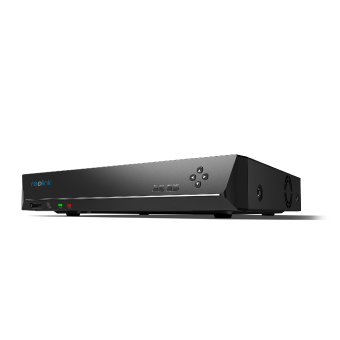
16-Channel PoE Security NVR
3TB Built-in HDD; Work with All Reolink 5MP/4MP Cameras for 24/7 Video Recording, Monitoring, and Management; Plug and Play.
For Expanding a PoE Camera Network: Reolink PoE Switch RLA-PS1
The Reolink RLA-PS1 includes 8 PoE+ ports and 2 separate network connection ports. Reolink lists a total PoE power budget of 120W for this switch. Each PoE port can provide up to 30 W for one supported camera device.
This switch suits installations needing camera power farther away from the main NVR. It also supports flexible camera placement across an existing local network system layout.
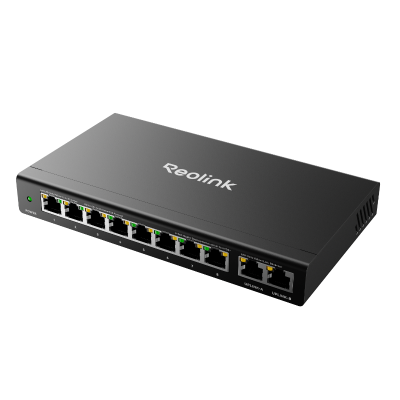
8-Port Gigabit PoE+ Switch with 120W Power Budget
8 PoE+ Ports & 30W Per Port, Gigabit Uplink and Downlink Speed, Power Management, Recovery Mode and Extend Mode
For a Complete PoE System: Reolink RLK16-1200B8-A
The Reolink RLK16-1200B8-A pairs eight 12MP PoE cameras with a 16-port PoE NVR. Reolink includes a 4 TB hard drive with this complete camera system package. The NVR supports storage expansion up to 16 TB for longer recording needs. This package can simplify matching because cameras and the recorder come together already.
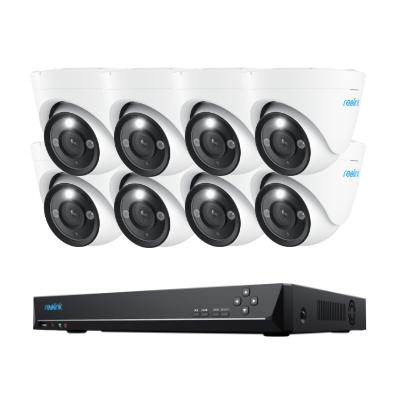
12MP PoE Security System with Color Night Vision
12MP Ultra HD, Person/Vehicle Detection, Power over Ethernet, 16-Channel NVR.
FAQs About PoE Switch vs NVR
Can I Connect a PoE Camera Directly to an NVR?
Yes, when the NVR has compatible PoE ports and supports your selected camera. One Ethernet cable can then carry both power and camera data between devices.
Can I Connect a PoE Switch Directly to an NVR?
Yes, many systems connect switches to the NVR or the same local network. The right method depends on recorder design, network layout, and camera compatibility requirements.
Do I Need an NVR If I Have a PoE Switch?
You need another recording option when you want to save security camera footage. A PoE switch does not replace an NVR because it cannot record video. Storage can instead use supported cameras, servers, computers, network storage, or recording software.
Can a PoE Switch Work Without an NVR?
A PoE switch can operate without an NVR and still power connected cameras. However, cameras still need another storage option when you want recorded video saved. Options include camera microSD cards, servers, computers, or compatible network storage systems instead.
Is It Better to Connect Cameras to an NVR or PoE Switch?
Direct NVR connections are usually simpler for smaller systems with centralized wiring plans. A PoE switch helps when cameras spread across several areas of the property. It also helps when NVR ports are limited or future expansion seems likely.
Conclusion
A PoE switch and an NVR handle different parts of camera security systems. The switch supplies power and network connections, while the NVR records and stores video. It also provides viewing, playback, and management tools for supported connected security cameras.
A PoE NVR may be enough when cables reach it with enough available ports. A PoE switch helps when cameras spread out or need more power and ports. Larger systems often use both for flexible networking, recording, storage, and later expansion.
Search
Subscribe for the Latest Updates
Security insights & offers right into your inbox