
What Is a PoE Switch? Types, Features & Buying Guide
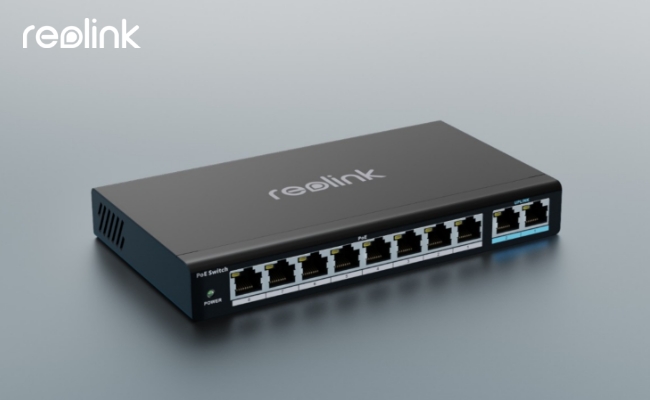
A Power over Ethernet (PoE) switch delivers network data and electrical power through a single Cat5e or Cat6 cable up to 328 feet (100 meters). By powering devices like IP cameras, access points, and VoIP phones directly over the network line, a PoE switch eliminates the need for dedicated electrical outlets at every installation point.
Selecting the right model depends on your specific setup—specifically your total power budget, required port count, and whether your network calls for managed controls or simple plug-and-play operation.
This guide breaks down the basics of PoE switches, their benefits, functionality, and common applications in modern networks.
What Is a PoE Switch?
A Power over Ethernet (PoE) switch is a specialized network switch designed to transmit both data and electrical power through a single Ethernet cable. By supplying continuous power to compatible hardware—such as IP security cameras, wireless access points, VoIP phones, and IoT devices—it eliminates the need for separate power adapters or dedicated electrical outlets near each installation point.
In multi-device network deployments, a PoE switch functions as a central hub, streamlining cable management while improving overall installation efficiency and placement flexibility.
How Does a PoE Switch Work?
A PoE switch delivers up to 48V of DC power alongside network data across standard Ethernet cables (such as Cat5e or Cat6). Before transmitting high-voltage electricity, the switch performs an automated hardware handshake to verify device compatibility and determine exact power requirements, ensuring non-PoE hardware is never damaged.
Here is how the transmission process works step by step:
-
Signature Detection (The Handshake): When a device like an IP camera or access point is plugged in, the switch sends a harmless low-voltage signal to detect whether the endpoint supports PoE standard protocols.
-
Power Classification: Once compatibility is verified, the connected device responds with its power class, signaling its exact wattage requirements to the switch.
-
Power and Data Delivery: The switch energizes specific wire pairs inside the Ethernet cable with the requested wattage while simultaneously transferring data packets across the remaining lines.
-
Continuous Monitoring: The switch actively measures power draw during operation to cut power instantly if a short circuit or overload occurs.
What Are Common Types of PoE Switches?
Selecting the right PoE switch comes down to two primary dimensions: port capacity (how many devices you need to connect) and power standards (how much wattage each endpoint requires).
Types of PoE Switches by Port Number
Port count determines network scalability and physical layout options.
-
4-Port to 8-Port PoE Switches: Built for small-scale deployments, home offices, or isolated monitoring zones. An 8-port switch typically powers up to 8 PoE-enabled devices. Ideal for basic security camera setups or small retail spaces.
-
16-Port to 24-Port PoE Switches: Designed for medium-sized networks, multi-room offices, and school facilities. A 24-port switch centralizes connection and power delivery for growing surveillance systems, multiple Wi-Fi access points, and IP phone banks.
-
48-Port PoE Switches: Engineered for enterprise environments, commercial buildings, and data centers requiring high-density device connectivity from a single central rack.
Types of PoE Switches by PoE Standard
PoE standards define maximum power delivery per port, directly impacting which hardware devices the switch can support.
Note: Always match your switch's overall power budget—the total wattage across all ports combined—with the cumulative power draw of all connected endpoints to prevent mid-operation shutdowns.
6 Key Features to Consider When Choosing the Best PoE Switch
Selecting the right PoE switch requires balancing power supply limits, network bandwidth, and management features to ensure all connected devices function reliably. Below are six critical factors to evaluate before buying.
Factor 1: Endpoint Power Consumption & PoE Standards
Power requirements vary significantly depending on the device. Standard fixed security cameras or VoIP phones may draw under 5W, whereas motorized pan-tilt-zoom (PTZ) cameras can consume up to 20W due to internal motors and IR illuminators.
When evaluating PoE standards, account for real-world cable power dissipation:
-
IEEE 802.3af (Standard PoE): Delivers up to 15.4W at the port, supplying roughly 12.95W of usable power at the device.
-
IEEE 802.3at (PoE+): Delivers up to 30W at the port, transmitting approximately 25.5W of usable power in real time.
Always check your camera's technical spec sheet to ensure the switch supports its specific wattage requirement.
Factor 2: Total PoE Power Budget
A switch's power budget is the total maximum wattage it can supply across all ports simultaneously. If total connected camera consumption exceeds this budget, devices may suffer performance degradation, video loss, or unexpected reboots.
If your total power requirement approaches the switch's limit, upgrade to a model with a higher total power capacity or reduce the number of power-hungry PTZ cameras on that switch line.
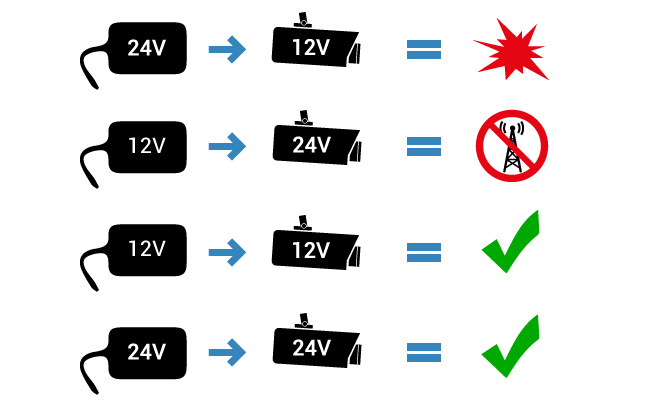
Factor 3: Power Supply Voltage
Connecting an IP camera to an incorrect voltage source can fry internal circuitry or leave the device underpowered.
To prevent hardware damage, choose an active, IEEE-compliant PoE switch. Active switches feature auto-sensing functionality that automatically detects connected hardware, verifies voltage requirements (such as 12V or 24V compatibility), and delivers the precise voltage level needed.
Factor 4: Port Count vs. Power Allocation
Switch port counts generally scale from 4, 8, and 16 ports up to 24 or 48 ports. However, total power capacity limits how many ports can run at full power simultaneously.
Example: A 24-port PoE switch with a 370W total power budget can easily power 24 standard 802.3af devices (drawing ~15.4W each). However, if powering high-draw 802.3at PoE+ devices (drawing 30W each), that same 370W budget can only supply 12 devices concurrently.
Factor 5: Fast Ethernet (10/100) vs. Gigabit Speeds
Because a PoE switch routes data alongside power, network bandwidth matters. A 10/100 Mbps switch can quickly become a system bottleneck when handling multiple high-bitrate 4K IP security cameras. Opting for a Gigabit PoE switch ensures high-resolution video streams and local data transfers move smoothly without network congestion.
Factor 6: Unmanaged vs. Managed Switches
The choice between an unmanaged and managed PoE switch comes down to control needs versus cost:
-
Unmanaged PoE Switches: Plug-and-play devices requiring zero configuration. They offer an affordable solution ideal for most home surveillance setups and small office environments.
-
Managed PoE Switches: Allow network administrators to configure advanced traffic management protocols, set up virtual LANs (VLANs), and monitor bandwidth via features like IGMP Snooping.
Best PoE Switch for Different Usage Scenarios
Reolink PoE Switch for Security Camera
When building a reliable, continuous video surveillance network, pairing IP security cameras with a dedicated PoE switch eliminates power line clutter and simplifies local installation. Designed specifically to meet the continuous bandwidth and power requirements of multi-camera setups, Reolink PoE switches deliver centralized data management and plug-and-play power delivery over a single Ethernet cable per device.
Best PoE Switch for Security Cameras: Reolink RLA-PS1
If you are expanding a home or business surveillance setup, the Reolink RLA-PS1 is a purpose-built PoE switch engineered for high-bitrate video delivery. Supporting both IEEE 802.3af (15.4W) and IEEE 802.3at (30W) standards, the RLA-PS1 automatically negotiates and delivers the exact wattage required for each port, eliminating the need for separate electrical outlets or dedicated power adapters at every camera location.
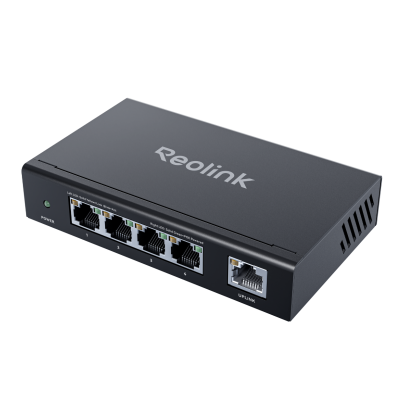
Why the RLA-PS1 Stands Out for Reolink Security Setup?
-
Plug-and-Play Installation: The RLA-PS1 is an unmanaged, zero-configuration switch. Simply connect your Ethernet cables, and the device handles network routing and power allocation automatically without requiring IP setup or technical expertise.
-
Device Compatibility: Built to support both standard low-power fixed cameras and high-draw hardware, it seamlessly powers standard Reolink bullet/dome cameras, pan-tilt-zoom (PTZ) units, and ultra-high-resolution models—such as the 16MP Reolink Duo 3 PoE.

Groundbreaking 16MP Dual-Lens PoE Camera
16MP UHD, Dual-Lens, Motion Track, 180° Wide Viewing Angle, Power over Ethernet, Color Night Vision.
-
Built-in Circuit Protection: IEEE-compliant auto-sensing technology ensures voltage is only delivered after verifying that the connected endpoint supports PoE, protecting non-PoE hardware from electrical overload or accidental damage.
-
Network Expansion Capability: Acts as an ideal expansion hub for central NVR setups. By placing an RLA-PS1 switch in a secondary zone (such as a detached garage or top floor), you can run a single main cable back to your recorder instead of pulling individual wires for every single camera.
Recommended Scenarios for Reolink Switches
To help determine how a Reolink PoE switch fits into your surveillance architecture, evaluate your setup against these common deployment scenarios:
FAQs
Do I need a PoE switch for security cameras?
It depends on your specific requirements because installing a PoE switch isn't mandatory for a security camera setup. If you have a small setup with only a few cameras or if your cameras come with individual power adapters and you are satisfied with your current setup, you might not necessarily require a PoE switch. However, a PoE switch offers scalability if you plan to expand your surveillance system.
How can I find the best PoE switch?
To find the best PoE switch, you can start by assessing the scale of your network. For example, you can consider the number of PoE devices you have or plan to connect, their power requirements, and the budget you're working with. You must also ensure the switch meets necessary standards (e.g., IEEE 802.3af/at) and offers sufficient power budget and port capacity to accommodate your current and future network expansion.
What is the difference between a PoE switch and a standard switch?
A Power over Ethernet (PoE) switch differs from a standard switch primarily in its ability to deliver power alongside data through Ethernet cables. While a regular switch only transmits data, a PoE switch can supply power to compatible devices like IP cameras or access points without requiring separate power sources.
Conclusion
A PoE switch simplifies network setups by seamlessly integrating data and power delivery through a single Ethernet cable. Implementing a PoE switch facilitates scalability and centralized power management and offers reliability and flexibility in modern network architectures. Reolink also introduces its own PoE switch product to enhance the functionality of Reolink PoE security cameras.
Would you like to use PoE switches in your daily life? Please share your thoughts with us in the comment section below! Let's discuss them together!
Search
Subscribe for the Latest Updates
Security insights & offers right into your inbox