
Panoramic Security Camera vs Multiple Cameras: Which Is Better?
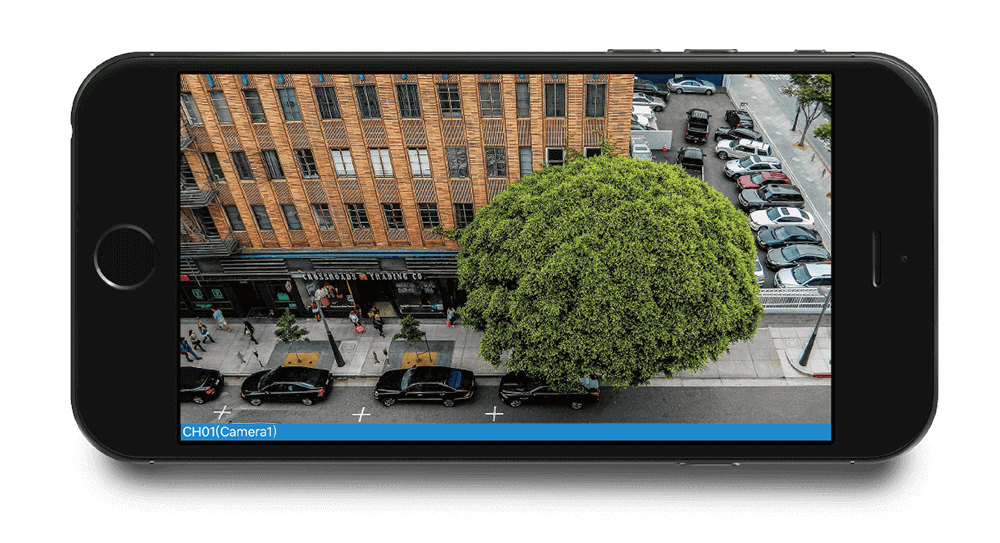
A panoramic security camera is better for covering one large, open area with fewer devices, while multiple cameras are better for monitoring separate zones, different angles, or targets at different distances.
For properties that need both a wide overview and detailed views of key areas, combining panoramic and fixed or PTZ cameras is usually the most flexible approach.
Key Takeaways:
- Choose panoramic: one open area, fewer blind spots, fewer cameras.
- Choose multiple cameras: separate zones, obstacles, or greater detail at distance.
- Choose both: wide overview + detailed monitoring of important areas.
- What Is a Panoramic Security Camera?
- What Does a Multiple-Camera Security Setup Mean?
- Panoramic Security Camera vs Multiple Cameras: Key Differences
- Coverage: Is One Panoramic Camera Enough?
- Which Provides Better Image Detail?
- Which Setup Has Fewer Blind Spots?
- Panoramic Camera vs Multiple Cameras: Installation and Wiring
- Which Is Better for 24/7 Recording?
- Which Uses More Storage and Bandwidth?
- Panoramic Camera vs PTZ Camera vs Multiple Cameras
- Which Is Better for Different Locations?
- Which Setup Costs Less?
- How to Choose Between a Panoramic Camera and Multiple Cameras?
- Best Reolink Cameras for Panoramic and Multi-Camera Setups
- FAQs
- Conclusion
What Is a Panoramic Security Camera?
A panoramic security camera captures a broader scene than a standard fixed camera. Depending on its design, it can provide about 180-degree coverage or a full 360-degree view from a central position.
These cameras use wide-angle lenses to reduce coverage gaps across driveways, yards, parking areas, entrances, stores, and warehouse floors.
How Do Panoramic Security Cameras Work?
Dual-lens panoramic cameras capture two nearby views and combine them into one wide image. This design suits walls, driveways, fence lines, and entrances.
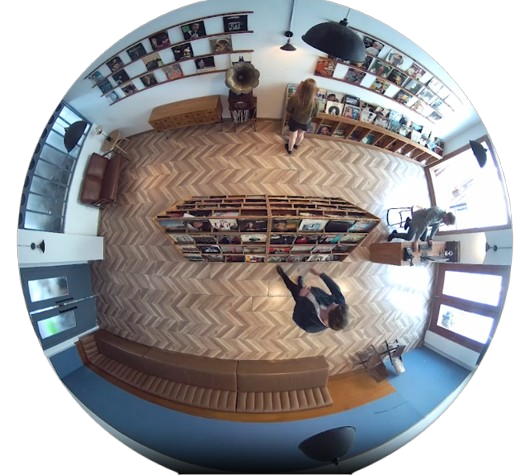
Fisheye cameras use an ultra-wide lens to capture a 360-degree scene. The original view can look curved, so software can flatten parts of the image for easier viewing.
What Does a Multiple-Camera Security Setup Mean?
A multiple-camera security system uses two or more cameras to monitor different directions, zones, or distances. Each camera can focus on a specific area with its own angle, height, and camera type.
A home may cover the front door, driveway, and backyard with separate cameras. A business may cover an entrance, loading area, and parking lot. Many wired systems connect these cameras to a network video recorder, or NVR, while some supported cameras can also connect to a Home Hub or local network.
Panoramic Security Camera vs Multiple Cameras: Key Differences
Coverage: Is One Panoramic Camera Enough?
One panoramic camera can replace two conventional cameras in some open areas, but it cannot always replace a full multi-camera system. The result depends on layout, distance, and objects that block the view.
When One Panoramic Camera Works Well
One panoramic camera can suit a wide driveway, front yard, open backyard, parking entrance, large room, or warehouse floor. These locations often have one main viewing direction.
When Multiple Cameras Are Still Needed
Multiple cameras suit separate sides of a building, several entrances, different floors, detached buildings, and long property lines. They also help when one camera watches a nearby doorway while another covers a distant gate.
Panoramic Camera vs Two Cameras
A panoramic camera provides one continuous wide view, while two cameras can point independently at different areas. One panoramic view suits a single open scene, while two cameras give more freedom when areas sit apart or need different viewing distances.
Two cameras can overlap their views and provide another angle on important activity. A panoramic camera is simpler to align, but edge detail may be lower than detail from cameras aimed directly at those areas.
Which Provides Better Image Detail?
A panoramic camera spreads its resolution across a wider field of view. Multiple cameras place more pixels on smaller target areas, so they often show distant people, vehicles, doors, or objects more clearly.
Wide Coverage vs Pixel Density
A 4K panoramic camera does not automatically show the same subject detail as two 4K cameras covering narrower scenes. A panoramic camera does not necessarily have lower resolution, but its available pixels are distributed across a wider field of view.
As a result, a person or vehicle at the same distance may occupy fewer pixels than it would in a narrower camera view. Higher-resolution panoramic cameras can help compensate for this trade-off.
Consider resolution together with field of view, distance, mounting position, and lighting.
Which Setup Has Fewer Blind Spots?
Panoramic cameras reduce blind spots across one open area, while multiple cameras handle corners, obstacles, and separated zones better. Neither design can guarantee that every point stays visible.
A panoramic camera can reduce gaps between side-by-side views. Multiple cameras can cover corners, different heights, and areas hidden by walls, trees, or buildings.
Panoramic Camera vs Multiple Cameras: Installation and Wiring
Panoramic Camera Installation
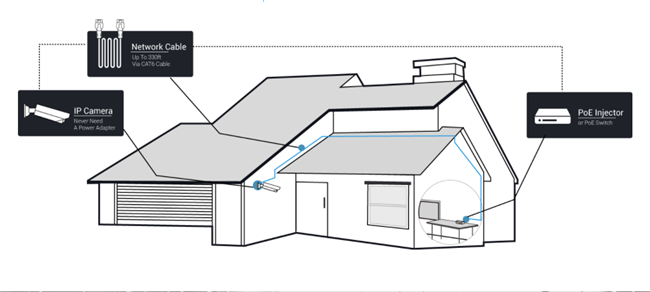
A panoramic camera usually needs fewer mounting points and cable runs because one device covers more width. In a Power over Ethernet, or PoE, setup, one Ethernet cable can carry power and network data. Fewer cameras may also use fewer NVR channels.
Multiple Camera Installation
A multiple-camera setup needs more mounts, cable routes, and connections, but each camera can target a specific angle or distance. The added installation work gives you more freedom to place each camera where it has a clear view.
Which Is Better for 24/7 Recording?
Both setups can support 24/7 recording with compatible wired cameras, recording hardware, and enough storage. PoE cameras with an NVR are a common option for continuous local recording.
One panoramic camera may record one broad stream, while three cameras create three streams. The recorder needs enough channels, network capacity, and storage.
Which Uses More Storage and Bandwidth?
Multiple cameras usually use more total storage and network bandwidth because several video streams record at the same time. A panoramic camera may reduce the number of streams, although high-resolution panoramic video can still use considerable storage.
Storage use depends on resolution, frame rate, compression, recording schedule, and scene activity.
Panoramic Camera vs PTZ Camera vs Multiple Cameras
A pan-tilt-zoom, or PTZ, camera can move its viewing direction and zoom toward activity. The three options serve different coverage needs.
Which Is Better for Different Locations?
Can One Panoramic Camera Replace Multiple Security Cameras?
Yes, one panoramic camera can sometimes replace two conventional cameras when both cameras would otherwise monitor the same open area. However, it cannot fully replace a multi-camera system when you need coverage around corners, on different sides of a building, or at different distances.
Consider the layout, obstacles, target distance, identification needs, resolution, and nighttime lighting. If one mounting point can see the full area at a useful distance, a panoramic camera may be enough. Walls, corners, or long distances usually favor multiple cameras.
Which Setup Costs Less?
A panoramic camera can lower installation costs when one device replaces several cameras in the same open area. It can reduce mounts, cables, connections, and NVR channels. Since the camera itself may cost more, compare the total system cost.
A multi-camera setup needs more hardware and installation work, but it gives you more control over each view. Compare coverage, detail needs, wiring, recorder capacity, and storage before choosing.
Is One Panoramic Camera Cheaper Than Two Cameras?
It can be. One panoramic camera may reduce the number of cameras, mounts, cable runs, and NVR channels needed to cover an open area. However, panoramic cameras can cost more per device, so compare the total cost of the camera, installation, recorder channels, storage, and required coverage rather than camera price alone.
How to Choose Between a Panoramic Camera and Multiple Cameras?
Choose a panoramic camera when one mounting point can clearly see the entire area and wide coverage matters more than long-distance detail. Choose multiple cameras when you need to monitor separate zones, see around obstacles, or capture more detail at different distances. Use both when you need a continuous overview plus dedicated views of high-priority areas.
Choose a Panoramic Security Camera If:
- You need to cover one large open area.
- You want fewer cameras and cables.
- You prefer one continuous wide view.
- You need to reduce side-to-side gaps.
Choose Multiple Cameras If:
- You need to monitor separate areas.
- You want more detail at different distances.
- You have objects that block one camera's view.
- You need different camera types for different locations.
Use Both If:
Use both when you need a broad overview plus closer evidence from selected areas. This setup suits parking lots, warehouses, farms, large homes, and businesses.
Best Reolink Cameras for Panoramic and Multi-Camera Setups
For 180-Degree Panoramic Coverage: Reolink Duo 3 PoE
The Reolink Duo 3 PoE fits driveways, front yards, parking areas, and broad entrances. Reolink lists it with 16MP resolution, a 180-degree horizontal field of view, and two lenses that combine their views into one panorama. This design can reduce the need for two side-by-side cameras in one open area.

Groundbreaking 16MP Dual-Lens PoE Camera
16MP UHD, Dual-Lens, Motion Track, 180° Wide Viewing Angle, Power over Ethernet, Color Night Vision.
For Wide Coverage with Flexible Tracking: Reolink TrackMix PoE
The Reolink TrackMix PoE suits locations where movement tracking and closer detail matter. Reolink lists it as a 4K dual-lens PTZ camera with wide-angle and telephoto views plus auto-tracking. It can show an overview and a closer view of a tracked subject at the same time.
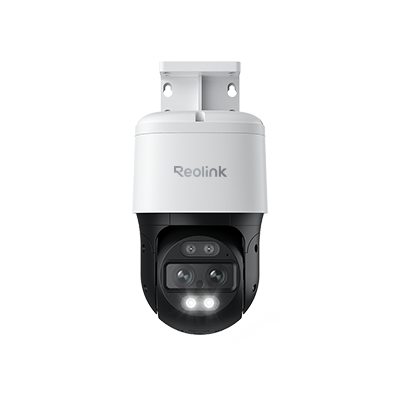
4K Dual-Lens PTZ Camera with Dual Tracking
4K 8MP Ultra HD, Wide & Telephoto Lenses, Pan & Tilt, Auto-Tracking, Person/Vehicle Detection, Power over Ethernet, Two-Way Audio.
For Whole-Property Coverage: Reolink Multi-Camera Systems
A Reolink NVR-based system suits homes and businesses that need front, rear, side, and entrance views. Reolink offers PoE NVR systems for continuous local recording, with channel capacity that varies by recorder. A mixed setup can pair a panoramic camera with fixed or PTZ cameras for other zones.
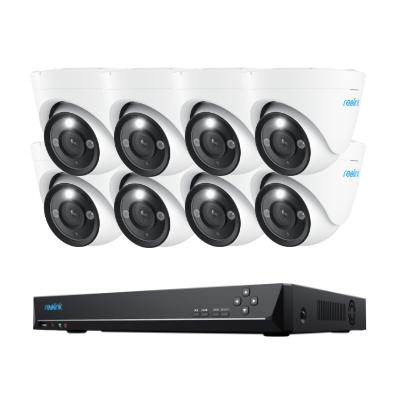
12MP PoE Security System with Color Night Vision
12MP Ultra HD, Person/Vehicle Detection, Power over Ethernet, 16-Channel NVR.
FAQs
Is a panoramic camera better than two cameras?
A panoramic camera is better for one open scene and fewer devices. Two cameras are better when the areas need different angles, distances, or mounting positions.
Can one 180-degree camera replace two security cameras?
Yes, it can replace two cameras when both would cover the same open area. It cannot replace cameras that need to watch separate sides of a building or blocked areas.
Is 360-degree or 180-degree better for security cameras?
A 180-degree camera works well along a wall, driveway, entrance, or property edge. A 360-degree camera works better from a central position where activity can happen in every direction.
Do panoramic cameras have blind spots?
Yes. Panoramic cameras can reduce blind spots across a wide open scene, but walls, corners, objects, and poor placement can still block parts of the view.
What is the difference between panoramic and PTZ cameras?
A panoramic camera keeps a wide area visible at once. A PTZ camera can pan, tilt, and zoom toward a subject, but it may not keep every direction visible.
How many security cameras do I need for my property?
The number depends on the layout, entrances, property size, obstacles, target distances, and detail needs. Mark each area that needs coverage, then decide if a panoramic camera can combine nearby zones or if each zone needs its own camera.
Conclusion
A panoramic security camera works best for one large open area where wide coverage and fewer devices matter. Multiple cameras suit properties with separate zones, obstacles, or different viewing distances. Larger sites often benefit from both.
Use this decision rule: one open area favors a panoramic camera, several separated areas favor multiple cameras, and a site that needs a wide overview plus closer detail should use both.
Search
Subscribe for the Latest Updates
Security insights & offers right into your inbox