
Office Security Cameras: Laws, Top Choices, Selection & Installation Tips
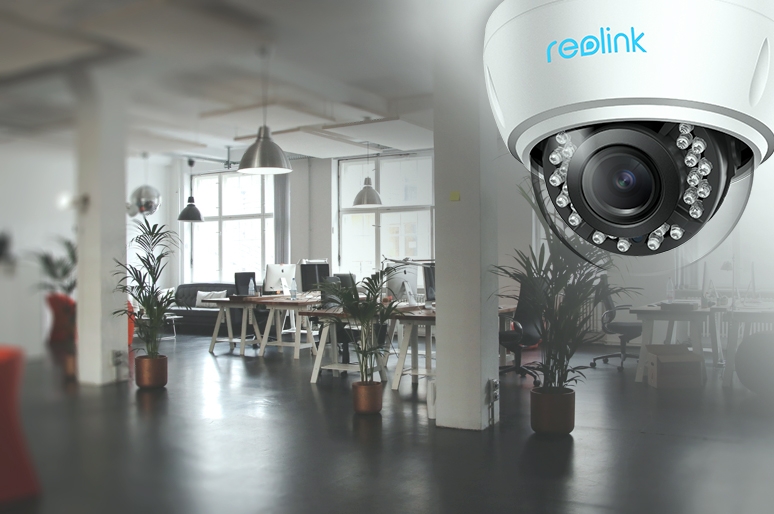
Office security cameras are fundamental to ensure your employees’ security, prevent outer/inner theft and enable you to check your workplace wherever you are.
However, security cameras in your office sometimes may lead to privacy invasion if not installed properly.
So before you buy security cameras for your office, it’s important to know the workplace surveillance laws to avoid unnecessary trouble. After that, you can be off to purchase the best office security cameras.
Disclaimer: While this guide reflects current data privacy frameworks, workplace surveillance laws vary significantly by state and local jurisdiction. Always consult with legal counsel before deploying a new workplace monitoring system.
Are Office Security Cameras Legal?
Yes, video-only surveillance in the workplace is generally legal across the United States, provided it serves a legitimate business purpose (such as preventing theft or ensuring employee safety) and does not infringe upon an employee's reasonable expectation of privacy.
However, modern workplace privacy laws have become significantly more stringent. Below is a breakdown of how to legally deploy office security cameras under current regulations.
Key Legal Frameworks & Compliance
1. Notice and Consent (The Shift Toward Transparency)
While federal law historically allowed hidden video-only recording in public business spaces, state-level laws have shifted drastically.
-
Mandatory Disclosure: States like New York, Connecticut, and Delaware explicitly require employers to provide prior written notice before monitoring employees with video or audio.
-
The "No-Surprise" Rule: Even in states without explicit notice laws, secret recording is highly discouraged. To limit legal liability, businesses should display visible signage at all entrances and public zones stating that the property is under video and audio surveillance.
2. Strict Limits on Audio Recording
Audio recording is governed by much stricter wiretapping laws than video recording.
-
Federal and State Wiretap Acts: Recording workplace conversations requires consent. In "one-party consent" states, at least one person in the conversation must agree to the recording. In "all-party consent" states (such as California, Florida, and Illinois), everyone being recorded must agree.
-
Best Practice: Unless you have signed consent forms from every staff member and clear visitor warnings, disable the built-in microphones on your office security cameras.
3. Prohibited Areas (Reasonable Expectation of Privacy)
Federal and state privacy laws strictly prohibit video surveillance in spaces where employees have an inherent expectation of privacy. Cameras are illegal in:
-
Restrooms and locker rooms.
-
Employee break rooms and lounges (in many jurisdictions).
-
Changing areas or lactation rooms.
4. NLRB Restrictions on Union Monitoring
The National Labor Relations Board (NLRB) strictly regulates surveillance regarding labor organizations. It is a violation of federal law to use security cameras to monitor, record, or intimidate employees engaging in union activities, strikes, or protected concerted communications.
While any physical lock can be bypassed, a strategically placed and legally compliant office security camera system adds a powerful layer of defense to your workplace. To keep your business safe without facing costly privacy lawsuits, ensure your cameras are restricted to public/open work areas, turn off audio recording by default, and clearly notify your staff in writing.
Best Office Security Cameras & Systems Worth Your Money
Finding the right security cameras for an office environment means balancing high video clarity, smart functionality, and an affordable price. Below are the top-rated Reolink options tailored for different workplace layouts.
1. Best Dual-Lens Wireless Camera for Small Offices: Reolink Argus 4 Pro
If you own a small business—such as a medical clinic, retail shop, or dental practice—you don't necessarily need a sprawling, multi-device security system. A standalone wireless camera is often more than enough to monitor main waiting rooms or cash registers.
The Reolink Argus 4 Pro is ideal for small offices thanks to its compact footprint and innovative 180-degree ultra-wide dual-lens design. It delivers full-room coverage with a single device, eliminating the blind spots common with traditional single-lens cameras.
What the Experts Say (PC Mag):
"Easy installation, sharp dual-lens coverage, and reliable local storage make the Reolink Argus series a premier choice for businesses seeking zero-wire deployment without sacrificing situational awareness."
Key Specifications:
-
Resolution: 4K Ultra HD Dual-Lens (Seamlessly stitched 180° view)
-
Power Source: 100% wire-free (Battery-powered or optional Solar Panel)
-
Night Vision: Color Night Vision without harsh spotlight glare
-
Audio: Two-way audio with built-in microphone and speaker
-
Smart Detection: AI-powered person, vehicle, and animal filtering
-
Storage: Onboard microSD card slot (Supports local recording)

4k 180° Wire-free Color Night Vision Camera
4K UHD 180° Blindspot-free View; Color Vision Day and Night; 30% More Battery Life; Dual-band Wi-Fi 6; Smart detection.
2. Best Standalone Commercial-Grade Wired Camera: Reolink OMVI 3i PoE
For businesses that require rock-solid reliability and extensive viewing flexibility, a single-cable Power over Ethernet (PoE) camera is the gold standard.
The Reolink OMVI 3i PoE stands out as a commercial-grade powerhouses. Featuring a unique stacked architecture, its upper 10MP dual-lens module locks onto a fixed 180-degree panoramic view of your office floor, while its lower 4K 8MP Pan-Tilt camera dynamically rotates to zoom in and track moving targets across a full 360-degree coverage.
Key Specifications:
-
Resolution: 18MP total processing output (10MP+8MP)
-
Connectivity: Power over Ethernet (Data and power over a single network cable)
-
Smart Tracking: SyncTrack allows the upper lenses to automatically hand off targets to the lower tracking camera
-
Audio: Dynamic two-way audio for direct communication
-
Durability: Heavy-duty, IP66-rated weatherproof housing (Great for office entrance perimeters)
-
Storage: Local micro SD card storage up to 512GB or integration with an NVR
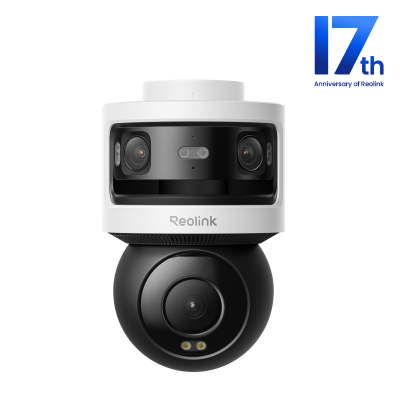
🎉 17th Anniversary NEW Release: 10MP+8MP Triple-Lens 360° Panoramic Pan-Tilt Camera
- 10MP Dual-Lens 180° View & 4K 360° Full Coverage
- PoE Connectivity & Local Storage
3. Best Enterprise System for Full Office Coverage: Reolink RLK16-1200D8-A
If you manage a large corporate office space, warehouse, or a multi-room facility, a centralized security system is your best choice to simultaneously monitor server rooms, conference halls, and exterior entrances.
The Reolink RLK16-1200D8-A is an enterprise-grade 16-channel PoE system built for seamless 24/7 recording. The kit features a dedicated Network Video Recorder (NVR) packaged with 8 high-resolution 12MP dome cameras, designed to sit unobtrusively in office ceiling corners.
What the Experts Say:
"This 12MP kit brings massive resolution and advanced AI local video searching to commercial spaces, completely removing subscription fees from the enterprise equation."
Key Specifications:
-
Resolution: Flawless 12MP Ultra HD per camera
-
System Capacity: 16-Channel NVR (Includes 8 dome cameras, expandable up to 16)
-
Local Storage: Massive pre-installed 4TB security-grade HDD (Expandable up to 16TB)
-
Smart Analytics: Local AI Video Search (Quickly locate footage by filtering tags like "Person in blue shirt")
-
Active Deterrence: Integrated motion spotlights and built-in warning sirens
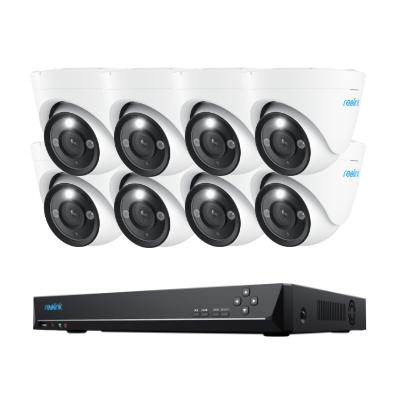
🎉 17th Anniversary Featured: 12MP UHD PoE Security System with Advanced Perimeter Protection
- 12MP UHD resolution with vivid color night vision
- Perimeter protection for smarter intrusion alerts
Offline Security Tip: Even if your office internet goes down or encounters network interference, the cameras and NVR communicate via a closed, proprietary network line, meaning your 24/7 video security never stops recording to the hard drive.
What to Consider When Choosing the Best Security Camera for Office?
With so many choices of office security cameras available, here are some insider tips to help you land on the most suitable ones.
- Depending on the installation location and your local laws, you need to decide whether a visible or hidden security camera is ideal for your office.
- Scalability of security cameras in offices also matters also you may need to add more small office security cameras as time goes on.
- Check what’s required in the setup process of office security cameras? Can you install the camera on your own or do you need to hire an installer? Will there be any extra hidden fees you need to pay?
- Does the security camera for office you are looking at offer encryption or other privacy features to prevent prying eyes (like Reolink cameras?
- If audio recording is not allowed in your place, you can also disable audio recording of the office building security cameras from the device settings.
Best Places to Install Your Office Security Cameras & Systems
With proper placement, you can get the most from your office security cameras for exceptional protection of both your employees and your property.
The benefits of optimal office security camera installation are two-fold:
Best locations for security cameras in your office ensure full coverage of events in case that an incident occurs.
With appropriate placement, you can minimize the number of security cameras in office buildings while improving overall video quality.
Below are the most common locations where small business owners install office building security cameras.
1. Office Entrances/Exits
By installing security cameras for your office entrances and exits, you can keep a track of who is entering and leaving the office, and whether their entry is authorized.
Besides that, some HD security cameras in office entrances/exits are capable to capture clear human faces, which would be helpful should you need pinpoint suspects.
2. Office Reception/Waiting Areas
Your office reception area could be one of the high-traffic zones in your office. And that’s why it’s essential to install security cameras there.
If you are worried that your guests or visitors stepping into your office will be uncomfortable with video surveillance, you may choose those small office security cameras to keep a low profile.
3. Office Supply and Storage Rooms
It’s definitely a must to install office security cameras for your supply and storage rooms, where the confidential files/documents and expensive devices are stored.
With the security cameras in office, you can see who accessed the confidential files without authorization from anywhere on your phone or computer. And it’s also a good way to watch out for the employees who might steal from you.
If you’ve got some good ideas about the best places to install security cameras in office, please share your ideas with us and we’d like to hear from you.
FAQs
Can I put a security camera in my office?
Yes, you can install a security camera in your office for safety and theft prevention. Just avoid placing cameras in private areas like bathrooms, and follow local workplace privacy laws and employee notification rules.
What is the best security camera for a small business?
The best security camera for a small business is usually one with HD video, night vision, motion alerts, and remote viewing. PoE systems are great for reliability, while wireless cameras work well for simpler setups.
Can your employer watch you on camera while you work?
Yes, employers can often use security cameras in work areas for safety and security. However, they generally cannot record private spaces, and employees usually must be informed about surveillance. Laws vary by location.
Conclusion
Investing in a modern office security camera system is about more than just asset protection—it is about cultivating a safe environment for your employees and clients alike. Whether you opt for a flexible, standalone unit like the Argus 4 Pro, a specialized dual-housing solution like the OMVI 3i PoE, or a sweeping 16-channel network system, the key to successful deployment lies in transparency.
By choosing high-definition hardware, keeping your software updated, and strictly adhering to local data privacy laws with clear signage, you can secure your workplace footprint while maintaining complete operational compliance.
Search
Subscribe for the Latest Updates
Security insights & offers right into your inbox