
Mini Wireless Camera Buying Guide: Features, Uses & Benefits
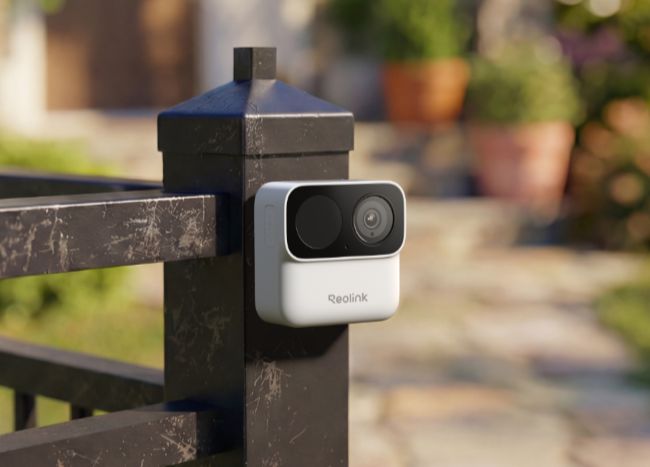
Mini wireless cameras offer a practical way to monitor homes and spaces without heavy wiring. Many people know these devices as mini camera wireless or small camera for home setups. This guide explains their features, operation, types, benefits, uses, and buying factors clearly.
- What Is a Mini Wireless Camera?
- How Do Wireless Mini Cameras Work?
- What Are Common Types of Mini Wireless Cameras?
- Why Choose a Mini CCTV Camera?
- What Are Common Use Cases for Wireless Mini Cameras?
- What to Consider When Choosing the Best Mini Wireless Camera?
- Are Small Wireless Cameras Safe and Secure?
- How Far Can a Mini Wireless Wi-Fi Camera Work?
- Best Mini Camera Options for Different Wireless Scenarios
- FAQs
- Conclusion
What Is a Mini Wireless Camera?
People use a mini wireless camera as a small device that records video and sends it over Wi-Fi to a phone or computer right away. It needs no video cables and it often needs no power cord at all. Many people select a small WiFi camera for easy home use and flexible placement options.
The main components include:
-
Lens: Focuses light from the viewed area in front of the camera unit.
-
Image sensor: Turns light into video signals for processing without any delay.
-
Wireless transmitter: Sends signals to the home router without any extra wires.
-
Battery and storage: Powers the unit and saves video on a card or cloud service.
How Do Wireless Mini Cameras Work?
While they may look small from the outside, wireless mini cameras house a sophisticated pipeline of hardware designed to turn physical light into a digital stream. This entire process happens in a fraction of a second, moving data smoothly from the camera lens straight to your smartphone screen.
Here is exactly how that data journey unfolds:
1. Image Capture: Lens & Sensor Activation.
The camera's optical lens focuses ambient light onto a digital image sensor (typically a CMOS sensor). This sensor instantly converts the light waves into an uncompressed digital video signal, capturing the raw visual data of the room.
2.Data Compression: Onboard Processing.
Raw high-definition video files are massive and would instantly choke your internet bandwidth. To prevent this, an internal microprocessor immediately compresses the video using efficient codecs (like H.264 or H.265). This shrinks the file size while preserving sharp image details.
3. Wireless Transmission: The Wi-Fi Link.
Once the video is compressed, the camera’s internal Wi-Fi transmitter broadcasts the data packets over local radio frequencies (2.4GHz or 5GHz bands) directly to your home or office Wi-Fi router.
4.Network Routing: Cloud or Local Gateway
Your router acts as the traffic controller. It directs the encrypted video stream through your internet gateway. Depending on your settings, this data is routed either directly to a local storage device (like a MicroSD card) or up to a secure cloud server.
5.User Decoding: App Rendering
When you open the companion security app on your smartphone, tablet, or PC, the app requests the stream from the cloud or local storage. The app decodes the compressed data in real time, serving you a smooth live feed or a recorded clip on your screen.
Note on Power Supply: While the data transmission is completely wireless, remember that "wireless" refers to the network connection. Unless the mini camera explicitly features a rechargeable battery, it will still require a physical connection to a power outlet or a USB source to keep this internal pipeline running continuously.
What Are Common Types of Mini Wireless Cameras?
Mini wireless cameras come in designs for different places and needs. Groups include those by usage, features, and power source.
By Usage Scenario
-
Indoor Mini Wireless Cameras: Fit living rooms, bedrooms, and offices in homes. They mount simply and connect to home Wi-Fi without any issues. Many add two-way audio for room communication during daily use.
-
Mini Outdoor Wireless Cameras: Resist weather with sealed cases for protection. Users place them at yards and entrances for better security coverage. Most include night vision and motion detection for continuous coverage all day.
-
Mini Wireless Spy Cameras: Models hide in objects and run on batteries for power. They stay unnoticed for secret or temporary checks during their time in use.
Note: Before using a spy camera, make sure you understand and follow the laws and regulations in your area.
By Features
-
Mini Wireless Cameras with Night Vision: Switch modes in low light conditions. Infrared versions make black and white video without visible light from the unit. Color versions keep full color to identify details at night without problems.
-
Pan-and-Tilt Mini Cameras: Move the lens by app control from a phone. Motors turn the view left, right, up, and down without manual effort. PTZ unit covers more space and cuts the need for extra cameras in rooms.
-
Mini Wireless Cameras with Local Storage: Save video on an internal microSD card. This avoids cloud fees in many cases for long-term savings. Users view files in the app or on a computer after card removal.
By Power Source
-
Battery-Powered Mini Wireless Cameras: Need no outlet for operation in any spot. Rechargeable batteries last days or weeks based on use and settings. These suit spots without easy power access during installation and daily monitoring.
-
Solar-Powered Mini Wireless Cameras: Charge via a small panel in daylight hours. The panel collects daylight energy for the battery during sunny periods. This supports long outdoor operation without manual charging in most weather conditions.
Why Choose a Mini CCTV Camera?
When weighing security options, mini wireless CCTV cameras offer a distinct set of advantages over traditional, hardwired surveillance setups. They bridge the gap between robust protection and low-profile aesthetics.
1. Hassle-Free, Tool-Less Installation
Traditional wired systems require drilling through drywall, running coaxial or Ethernet cables back to a central digital video recorder (DVR), and often hiring an expensive technician. In contrast, wireless mini cameras operate on a true plug-and-play model. Because they rely on Wi-Fi for data, physical setup typically involves nothing more than applying heavy-duty mounting tape or securing a single magnetic bracket. Most users can unbox a unit and have it fully synced to their network via a mobile app in under 30 minutes.
2. High-Flexibility Placement Options
Without the constraints of physical video cables, your placement strategy is dictated entirely by your Wi-Fi coverage. A mini camera can easily be tucked away on a high bookshelf, mounted tucked under the eaves of a roof, or shifted from the living room to the nursery as your daily needs change. This mobility allows you to eliminate security blind spots that are often left unaddressed due to the difficulty of running wires to remote corners of a property.
3. Real-Time Remote Accessibility
Modern wireless mini cameras turn your smartphone into a portable security control room. Because the camera streams data directly to local network storage or secure cloud servers, you can pull up a crystal-clear live feed from anywhere in the world. Whether you are at the office or traveling out of state, a quick glance at your companion app provides immediate visual confirmation of your space.
4. Low-Profile, Discreet Integration
Large, visible security cameras can sometimes feel imposing to guests or disrupt the carefully designed interior design of a home. Mini CCTV cameras are specifically engineered with a compact footprint and neutral color palettes to blend seamlessly into their surroundings. They can sit quietly among books, plants, or decor without taking up much space.
5. Intelligent Motion Alerts
Older security systems were notorious for triggering false alarms every time a shadow shifted or wind blew through a tree. Modern mini cameras feature advanced edge-computing algorithms that can differentiate between a passing animal, blowing debris, and an actual human presence.
By customizing your detection zones and adjusting sensitivity levels in the app, you ensure that you only receive push notifications on your phone for events that genuinely require your attention.
What Are Common Use Cases for Wireless Mini Cameras?
Wireless mini cameras have become go-to solutions for homeowners, renters, and business owners alike. Because they bypass the need for intensive hardwiring, these compact devices offer the flexibility to monitor spaces that traditional, bulky security systems can't easily reach.
Residential & Home Security
-
Property Perimeter & Entryway Monitoring: Homeowners frequently place these compact cameras near primary entry points, like front doors or ground-floor windows. Because they blend in easily, they can discreetly record activity and send instant motion alerts to a smartphone without altering the home's curb appeal.
-
Apartment and Rental Property Safety: Traditional security systems often require drilling and permanent wiring, which violates standard lease agreements. Mini wireless cameras are a favorite for renters because they can be mounted with temporary adhesive or set on a shelf, making them entirely damage-free and easy to move to a new apartment.
Family & Pet Care
-
Indoor Family Monitoring: Caregivers utilize indoor mini cameras to keep a casual eye on children or elderly family members in separate rooms. Models equipped with two-way audio allow for quick, real-time check-ins during daily routines without interrupting the household.
-
Dedicated Pet Cams: Pet owners rely on these devices to monitor anxious dogs or cats while away at work. The small footprint means they can be tucked into a bookshelf or counter to capture a wide view of the living space, letting owners check in or use audio to soothe a pet remotely.
Business & Workspace Protection
-
Home Office and Remote Work Security: With the rise of remote work, protecting sensitive client data and expensive work equipment has become a priority. A mini camera dedicated to a home workspace ensures that equipment remains secure and logs anyone entering the room during off-hours.
-
Small Business & Retail Safeguards: For small business owners, massive CCTV setups can be cost-prohibitive. Placing a few wireless mini cameras near cash registers, back offices, or inventory shelves provides high-definition footage and live mobile viewing, allowing owners to audit stock or check on the shop after closing.
-
Warehouse and Inventory Management: In larger storage spaces or warehouses, blind spots are common. Multi-camera wireless configurations allow managers to oversee remote blind spots, track incoming deliveries, and run quick inventory visual checks directly from a phone app.
What to Consider When Choosing the Best Mini Wireless Camera?
Buyers review features that affect video quality and ease of use in daily operation. The points below cover the most important factors before any purchase.
Video Resolution
Video resolution sets image sharpness for clear viewing on phones and screens. 1080p works for most homes with moderate storage needs on cards. 2K shows more detail for faces during identification in recorded clips. 4K gives top clarity but needs more space and strong internet at all times.
Night Vision
Night vision records in dark conditions without any extra lights in most cases. Infrared makes black and white video with invisible light from the camera unit. Color versions keep color and need some light or a camera light for best results.
Motion Detection and AI Alerts
Motion detection and AI alerts limit notifications to important events only. Basic detection starts on any move in the camera view during monitoring. AI identifies people or vehicles and alerts only then for a better user experience. Users set zones to ignore constant motion areas like trees or roads.
Battery Life
Battery life controls charging frequency for outdoor and remote camera units. Longer life reduces maintenance for remote cameras in hard-to-reach spots. Some last weeks on motion mode during normal daily operation. Solar panels maintain outdoor batteries automatically in good sunlight conditions.
Local Storage and Cloud Storage
Local storage and cloud storage offer save options for recorded video files. Internal cards avoid fees and work during outages in many situations. Cloud allows any-place access but often needs payment for full features. Many cameras use both for backup and easy viewing on multiple devices.
Two-Way Audio
Two-way audio lets users speak and listen through the camera speaker and mic. It helps with deliveries or family checks in other rooms of the home. Users can respond quickly to events shown in the live video feed.
Mobile App Compatibility
Mobile app compatibility ensures phone support for live views and settings. The app must show video and settings clearly on the user screen. It must work on major systems with regular updates from the maker.
Are Small Wireless Cameras Safe and Secure?
Small wireless cameras include protections for video and accounts from outside threats. Proper setup blocks unauthorized access in most home and business settings.
Data Encryption
Data encryption codes video before sending over the network to the app. Only the app decodes it for viewing on the phone or tablet. This stops signal interception from revealing content to anyone without the key.
Password Protection
Password protection needs a strong mix of characters at setup for safety. Users change defaults immediately and avoid reuse on other accounts or devices. This step prevents easy access by people who guess simple passwords.
Secure Wi-Fi Setup
Secure Wi-Fi setup uses strong router passwords and current standards for protection. A separate camera network adds safety against attacks from other devices. Central router placement keeps steady signals for reliable camera operation every day.
Privacy Best Practices
Privacy best practices direct cameras at owned property only for legal reasons. They avoid neighbor or public private areas to respect the privacy of others. Users inform household members and follow local recording laws in their area.
How Far Can a Mini Wireless Wi-Fi Camera Work?
Mini wireless Wi-Fi camera range depends on the setting and hardware in the home. Key factors include signal obstacles and the conditions around the installation site.
-
Walls and metal between camera and router weaken signals in many homes.
-
2.4 GHz band travels farther through obstacles than 5 GHz in daily use.
-
Other devices on the same band cause interference with the camera signal.
-
Antenna design and position affect reception from the router in the house.
-
Weather extremes impact outdoor camera performance during rain or heat waves.
Best Mini Camera Options for Different Wireless Scenarios
Finding the right compact security setup depends heavily on where and how you plan to use it. Whether you need something for hotel security, indoor monitoring, or rugged outdoor surveillance, matching the camera type to your specific scenario is key.
Best Portable Mini Camera for Travel
When traveling, you want a camera that is completely wire-free, compact enough to slip into a suitcase, and quick to deploy. Battery-powered mini cameras are ideal for this, allowing you to monitor hotel room entryways or valuable items without fumbling with power cords. For instance, compact, battery-operated travel models like the Reolink Argus Series offer a lightweight design and fast setup that fits seamlessly into a temporary travel routine.
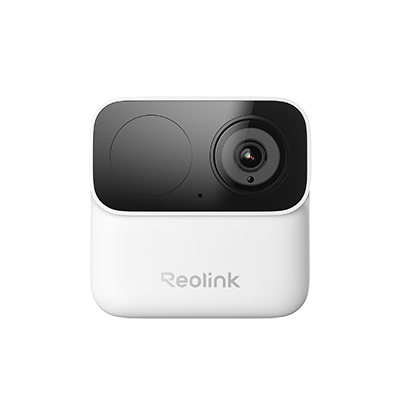
2MP Wireless Power-Efficient Camera
Magnetic Mounting for Easy Installation, Max. 9-Month Battery Life, Dual-Band 2.4/5GHz Wi-Fi, No Monthly Fees.
Best Indoor Mini Wi-Fi Camera
For indoor monitoring—like keeping an eye on pets or children—versatility is everything. A great indoor Wi-Fi camera should offer flexible viewing angles and sharp resolution to catch close-up details across a room. A pan-tilt model with optical zoom, such as the Reolink E1 Zoom, serves as a great example of this setup, connecting easily to home networks and allowing users to adjust the camera lens directly from a smartphone app.

PTZ Wireless Smart Home Camera
Smart, Powerful and Affordable All-Round Home Protection. 355° Pan and 50° Tilt; 4K Ultra HD, 3X Optical Zoom, Two-Way Audio, 2.4/5 GHz WiFi, with Google Assistant Integration.
Best Battery-Powered Mini Wireless Camera for Outdoors
Outdoor wireless security requires a balance of weatherproofing, strong Wi-Fi range, and a dependable power source. Choosing a wire-free, weather-resistant camera ensures you don't have to drill through exterior walls for installation. Advanced options in this category, such as the Reolink Argus 4 Pro, highlight how modern outdoor units combine extended battery life with wide-angle, high-definition video to keep yards and driveways secure in any weather condition.

4k 180° Wire-free Color Night Vision Camera
4K UHD 180° Blindspot-free View; Color Vision Day and Night; 30% More Battery Life; Dual-band Wi-Fi 6; Smart detection.
FAQs
Are Mini Wi-Fi Cameras Legal?
Mini Wi-Fi cameras are legal for personal property use in most places. Check local audio recording laws for consent rules before any audio use. Avoid private neighbor or public areas without permission from the people involved.
Are Mini WiFi Cameras Any Good?
Mini WiFi cameras work well for security with good resolution and setup. They give clear video and phone access for live views at any time. Quality varies, so review specs and feedback for each model before purchase.
Can a Mini Camera Work Without Wi-Fi?
Some mini cameras record to memory cards without Wi-Fi in basic mode. Live views and alerts still require Wi-Fi or a network connection for full use. Most models depend on Wi-Fi for full app features and remote access.
Conclusion
Mini wireless cameras combine small size, wireless function, and useful features for monitoring. They enable easy setup, flexible placement, and remote phone access for users. Buyers who check resolution, night vision, storage, and security can match a camera to their needs.
People who choose and set up these cameras carefully gain practical benefits for home security, pet monitoring, travel, and other situations.
Search
Subscribe for the Latest Updates
Security insights & offers right into your inbox