
How To Test Ethernet Cable?
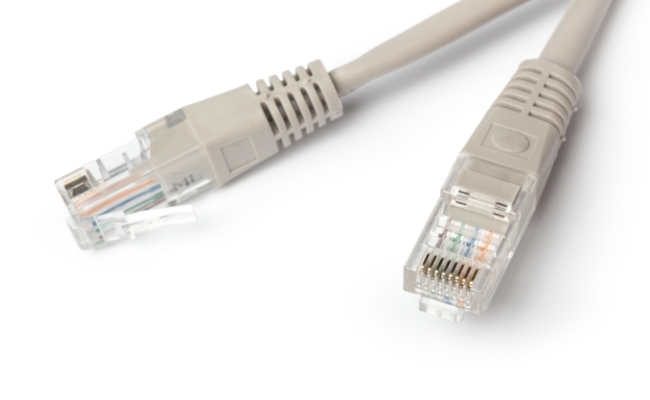
If any of the wires inside an Ethernet cable are damaged, incorrectly connected, or if there is any other issue, it will affect the performance. In most cases, the connection will not be established between the devices.
In this article, we will discuss how you can test an Ethernet cable. We will share the step-by-step process of using a cable tester and how you can test the cable without it.
Why To Test An Ethernet Cable?
Ethernet cable testing is done for multiple reasons.
Test Continuity
It can be used to test the continuity and wire mapping. It ensures all the wires are intact and connected to the correct pins in the correct order.
Detect Physical Damage
Often, it is used to find physical faults, such as broken wires, cuts, split pairs, or damaged connectors. It indicates the issue and improves performance.
Ensure Optimal Performance
To guarantee exceptional performance, testing an Ethernet cable is mandatory. It checks for signal attenuation or crosstalk. It ensures the cable’s performance meets the standard speed and reliability. However, it’s done using an advanced tester.
Solve Speed & Connectivity Issues
Lastly, if you are facing any kind of issue, such as slow speed or a connection problem, cable testing is the way to find the issue and resolve it.
How To Test An Ethernet Cable With A Cable Tester?
What Is A Cable Tester?
A cable tester is a device used for the diagnosis of Ethernet cables. It determines the correct wiring arrangement and helps to check whether the eight conductors are properly connected. The tool is essential for the network engineers, helping them in quick diagnosis and also ensuring that the wire is working or not.
With a cable tester, an early analysis could be performed to see if it meets the quality standards. Some basic cable testers only show the continuity of electric signals via light or a beep sound. The advanced ones show the complete status on the display and help the user detect the faulty spot on the cable.
How To Test An Ethernet Cable?
There are a few fundamental steps that you need to learn to test an Ethernet cable using a cable tester.
- You must ensure RJ5, RJ11, or RJ12 connectors are properly clamped and that there is no dirt on them.
- The tester has two ends; one end is known as the Main Unit, and the other is called the Remote Unit.
- Attach one end of the cable to the main unit and the other to the remote unit. Power the tester on and check that the LED or display is working.
- Once you run the test, the electric signals will start flowing from one end to the other, and you will check if the cable is receiving them.
- You will get the results via LED with a beep sound or on the display. This will help you diagnose the faults, such as a shortage, no signals, or any pin detached from the connector.
How To Test an Ethernet Cable Without a Tester?
If you want to check the Ethernet cable on your own, at first, you can visually inspect the cable condition. See if any major damage to the cable or exposed wires is obvious. Also, check the RJ45 clip and make sure it looks clean.
Another approach is to look at the router LEDs; if the port light or the internet LED is blinking, it means the cable is working perfectly. You can check the Ethernet cable directly by connecting it to the computer. You can also check the router status and connectivity by running the IP address, like 192.168.0.1, on your browser.
Common Problems You Might Find When Testing an Ethernet Cable
Here are some of the common problems you could find when testing an Ethernet cable.
- There could be an open circuit, which means a broken wire or loose connection inside the connector.
- You can come across a short circuit, which means two wires touching each other due to insulation damage,
- There can be miswiring. The wires could be connected in the wrong order.
- A serious problem is a split pair, in which the wires of a single twisted pair are terminated on different pins at the connector.
- Or there could be any physical damage, such as cuts, abrasions, sharp bends, broken connectors, etc.
Bonus: Recommended Security Cameras Connected With Ethernet Cables
Reolink Duo 3V PoE
Duo 3 PoE is a 16MP UHD vandal-proof security camera. With its dual sensors, it captures a 180⁰ panoramic view. It can automatically track the motion of objects and send real-time alerts to the connected devices. It offers exceptional clarity and rich details that you can even read license plates of parked cars up to 16 meters away.
It has dual night vision to capture clear and colored videos at night. It supports up to a 256GB microSD card and Reolink NVR](https://store.reolink.com/nvr-security-system/) for flexible storage. It is ideal for outdoors because of the protective dome and IP67 weatherproofing.

16MP Dual-Lens IK10 Vandal-Proof PoE Camera
16MP Ultra HD, 180° Panorama, Motion Track, IK10 Vandal-Proof, color night vision.
Reolink TrackMix PoE
TrackMix PoE is a PTZ security camera with dual lenses. It captures wide-angle and close-up views, and you can see both at the same time through dual viewing. It automatically tracks the objects with both lenses to capture every moment. It covers 360⁰ and offers 6X hybrid zoom for exceptional details.
It’s a 4K security camera that records colored videos all day. It smartly detects people, pets, and vehicles and sends notifications without any fees. Other than that, it offers dual-warning, two-way audio, flexible storage, and smart playback.

4K Dual-Lens PTZ Camera with Dual Tracking
4K 8MP Ultra HD, Wide & Telephoto Lenses, Pan & Tilt, Auto-Tracking, Person/Vehicle Detection, Power over Ethernet, Two-Way Audio.
FAQs
1. How do I know if my Ethernet cable is working?
You must connect the cable to your computer or laptop to see the port LED blinking. You can also check the router’s LED if it is blinking; your cable is fully operational.
2. Can an Ethernet cable go bad?
Yes, it can go bad after a few years due to harsh weather conditions. It might get cuts, or internal wires might be damaged due to excessive bending.
3. How do you tell if you need a new Ethernet cable?
If you see clear signs of connection or speed losses, you will need a new Ethernet cable. For advanced diagnosis, you can call professionals to check it using a cable tester.
4. What is the lifespan of an Ethernet cable?
It usually lasts for 5-10 years if the quality of the cable is good. It would last longer if the environmental damage were not frequent.
Conclusion
Ethernet ensures reliable connectivity, but if there is any issue with the wires in the cable or the connector, it will ruin the experience. We have explained how you can use a cable tester to test the cable and find the issue. It will help in quick diagnosis and solving the problem right away.
Search
Subscribe for the Latest Updates
Security insights & offers right into your inbox