
How Much Sunlight Does An Outdoor Solar Security Camera Need

Most outdoor solar security cameras need at least 2 to 4 hours of direct sunlight a day to stay reliably charged, and that's the number to test against before you spend a dollar. Direct sunlight means unobstructed rays hitting the panel, not the bright but shaded corner of a yard, and not a cloudy afternoon of ambient daylight.
How much sunlight your outdoor solar security camera actually needs comes down to battery size, panel wattage, how often it records, and what your winters look like. Get those right and a solar-powered security camera runs indefinitely without touching a wall outlet. Get them wrong, and you're recharging it by hand every few months.
With this guide, figuring out which category your home falls into should take just about ten minutes and one free calculator, not an electrician's visit. Here's how to check your own spot before you commit.
- The Short Answer: 2 to 4 Hours of Direct Sunlight, Not Just Daylight
- Direct Sun vs. Bright Light: Not the Same Thing
- What Actually Determines How Much Sun Your Solar Security Camera Needs
- How Your Climate and Season Affect the Equation
- How to Check Your Spot Before You Commit to a Solar Camera
- When the Sun Doesn't Cooperate
- FAQs
- Conclusion
The Short Answer: 2 to 4 Hours of Direct Sunlight, Not Just Daylight

Manufacturers build these cameras to run on 2 to 4 hours of direct sunlight a day. That number only counts peak sun hours, when sunlight hits the panel straight-on at full strength, not the total time the sky happens to be light out.
Peak sun hours are the block of the day when sunlight is strongest and most direct, typically late morning through mid afternoon. A 10-hour summer day might only contain 2 peak sun hours if the sun spends most of its arc low and weak.
That distinction matters because manufacturers rate a panel's wattage output on those direct, high-intensity hours alone. Shade or a bad mounting angle cuts into that number fast. A camera in a bright yard with its panel tucked under a gutter shadow, or angled away from the sun, can receive far fewer charging hours than its owner assumes, even though the yard looks plenty sunny.
Direct Sun vs. Bright Light: Not the Same Thing

A solar panel mounted under a roof overhang (even in a bright yard) may charge at less than half the efficiency of a panel sitting in direct sun. In winter, it may not charge at all.
Direct sunlight means the sun's rays hit the panel with nothing in the way. Ambient light looks different up close. The sky is bright, but the panel sits in shade from an overhang or a stand of trees, with no direct ray reaching the cells.
That gap is steep. Ambient light typically charges at well under half the rate of direct sun, and in winter a shaded panel can generate close to zero usable power. This is exactly why solar panels for outdoor cameras need a real site check, not a guess based on how sunny the yard looks.
The most common installation mistake we've witnessed is picking the camera's location based on what needs watching, mounting the panel right next to it, and not checking whether that spot gets direct sun. Many solar cameras solve this by shipping the panel on a separate cable, positioned wherever the sun actually lands. We'll talk more about that below.
What Actually Determines How Much Sun Your Solar Security Camera Needs

There are four variables that push your camera's sunlight need above or below that 2 to 4 hour baseline.
Battery Capacity
A larger battery buys a bigger buffer on low-sun days, coasting through cloudy stretches without dropping critically low.
The Reolink Altas illustrates the upper end of that range. Its 20,000mAh battery runs up to 540 days in motion detection mode, needing as little as 10 minutes of direct sun daily to stay charged indefinitely in that mode.
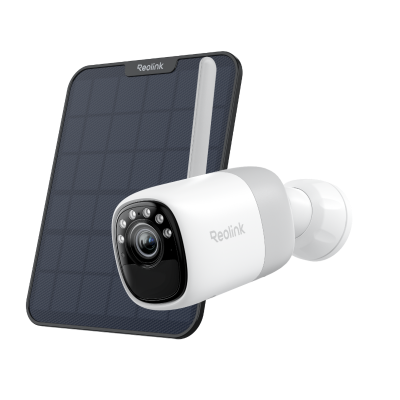
2K Pre-recording Bullet Camera with a Long Lasting Battery
2K 10s Pre-recording ; ColorX Night Vision; 20,000mAh Battery; Dual-band Wi-Fi 6.
Panel Wattage
A bigger solar panel collects more energy per hour of direct sun, shortening how long it needs to sit in the light each day. Solar panels work by converting sunlight into electrical current, and a higher wattage rating means more cells doing more work per hour.
Daily Activity Level
How often your camera records affects its power draw more than any other setting. Night recording carries its own cost, too. For example, the Reolink Argus 4 Pro uses ColorX night vision instead of an infrared spotlight, which saves about 2 watt-hours per hour of use. That adds up to roughly 12 extra days of standby compared to a similar IR camera. The table below shows the range.

4k 180° Wire-free Color Night Vision Camera
4K UHD 180° Blindspot-free View; Color Vision Day and Night; 30% More Battery Life; Dual-band Wi-Fi 6; Smart detection.
Wi-Fi Signal Quality
A weak Wi-Fi connection drains the battery faster than almost any recording setting, since the camera burns extra power holding onto a struggling signal. Both Reolink's Argus 4 Pro and the Altas use dual-band Wi=Fi 6, which stays stable at a lower power cost than older standards.
How Your Climate and Season Affect the Equation

A camera that stays fully charged all summer can easily struggle once winter arrives because of shorter days. A lower sun angle and cold temperatures all cut into charging at the same time.
Peak sun hours drop hard in winter almost everywhere outside the tropics, and locations at higher latitudes can see their daily peak sun hours cut by more than half between summer and the depths of winter. The sun also sits much closer to the horizon during winter months, so a panel angled correctly for summer captures noticeably less direct sun once winter arrives.
A panel facing true south (true north in the southern hemisphere) and tilted close to your latitude tends to hold up best across all four seasons, balancing both extremes instead of favoring one.
Cold weather adds a second penalty on top of the seasonal drop. Lithium-ion batteries typically retain only about half their rated capacity at –18 degrees Celsius (0 degrees Fahrenheit) compared to room temperature, so a battery rated for 5,000mAh can behave like a 2,500mAh one in a hard freeze. Cameras like the Reolink Altas, rated to negative 20 degrees Celsius with a 20,000mAh buffer, handle that penalty far better simply because they have more capacity to spare.
Miami is a notable exception to this pattern. Its dimmest stretch falls during its rainy summer rather than winter, since cloud cover from the wet season cuts into what should be its sunniest months. The table below reflects real seasonal data city by city, not the usual summer-high, winter-low assumption.
Source: NLR's PVWatts calculator, reflecting average June (summer) and December (winter) values for each city.
Condition vs. Charging Status
How to Check Your Spot Before You Commit to a Solar Camera

The National Laboratory of the Rockies (NLR)'s free PVWatts calculator tells you exactly how many peak sun hours your address receives month by month, so run it before you buy anything and check your worst-case winter month specifically.
Most buyers pick a location based purely on what needs watching, only to find out how much sunlight it actually gets after installation. Sometimes, it happens only after noticing the camera won't stay charged. A three-step check beforehand avoids that entirely.
Step 1: Enter your address into NLR's PVWatts calculator to pull up monthly peak sun hour figures for your exact location.
Step 2: Walk out to the planned mounting spot around solar noon (roughly 12 to 1pm) and look straight up at where the panel would sit. Anything blocking that view, such as eaves or a tree canopy will cut into your real numbers.
Step 3: Check your worst-case month, typically December or January in the Northern Hemisphere. If PVWatts shows under 1.5 peak hours for that month, plan on a power-saving configuration or a 12W panel from the start rather than discovering the shortfall later.
Pro Tip: International readers outside the US can pull the same kind of location-specific data from the Global Solar Atlas instead.
When the Sun Doesn't Cooperate

If your ideal camera spot gets limited direct sun, the best fix is separating the solar panel from the camera. Mount the camera where you need the coverage and let the panel sit wherever the sun actually reaches. That single change solves more sunlight problems than any software workaround.
Pro tip: Reolink's Solar Panel 2S ships with a 4m cable, about 13 feet of separation between panel and camera. In most homes, that's enough slack to reach a sunny fascia board or roofline while the camera stays mounted at your ideal coverage angle. Longer cables are available separately for bigger gaps.
A few power-saving adjustments help in marginal spots too. This could be simply dropping resolution from 4K to 2K where full resolution isn't essential, shortening clip length, tightening the PIR detection zone to cut false triggers, and limiting live streaming.
For genuinely low-sun locations like north-facing walls or yards under heavy tree cover, a high-capacity battery does more heavy lifting than any panel upgrade. The Reolink Altas runs up to 540 days in motion mode on its 20,000mAh battery, stretching manual charges from weeks into over a year. Both the Argus 4 Pro and the Altas also support USB-C charging, so a seasonal top-up covers an extended low-sun stretch.
Once your setup is sorted, the harder question is picking the right camera. Our complete buying guide breaks down weatherproof ratings and compares Wi-Fi against non-Wi-Fi options side by side, so you can match a model to your exact spot instead of guessing.
FAQs
How much sunlight does an outdoor solar security camera need?
Most models need 2 to 4 hours of direct, unobstructed sunlight a day to stay reliably charged. That number shifts with your specific setup: a larger battery or higher-wattage panel needs less, while frequent recording, a weak Wi-Fi signal, or a shaded panel all push the requirement higher.
Do solar security cameras work on cloudy days?
Yes, but at reduced efficiency, since output typically drops 70 to 90 percent on heavily overcast days. The camera pulls from its battery reserve, and a few consecutive cloudy days are manageable with a reasonable buffer.
Do solar cameras need direct sunlight, or will shade work?
Direct sunlight is essential for reliable long-term charging, and shade is not an adequate substitute. If the sun casts a sharp, well-defined shadow around midday, the panel is getting real direct exposure. A soft or barely visible shadow means it's picking up ambient light only, which won't hold a charge through winter.
How long will a solar camera last if the panel gets no sun at all?
It depends almost entirely on battery capacity and activity level. A 5,000mAh camera like the Reolink Argus 4 Pro may need a manual recharge anywhere from a few weeks to several months without solar input, depending on how much motion it detects. The Reolink Altas, with its 20,000mAh battery, can run 540 days on minimal daily recording instead.
Can I move the solar panel to a sunnier spot away from the camera?
Yes, and it's usually the most effective fix when the mounting spot doesn't get enough direct sun. Run the panel's cable to wherever the sun actually lands, keep the connector joint protected from rain, and mount the panel on its own bracket so you can angle it independently of the camera itself.
Do solar cameras work in winter?
They can, with the right setup, and knowing how much sunlight your winter months actually get is the deciding factor. Key pieces include a south-facing panel orientation, adequate wattage, enough battery capacity, and conservative activity settings. Cameras seeing fewer than 2 peak sun hours in winter benefit most from a 12W panel or a large-capacity battery like the Altas's 20,000mAh.
Are solar-powered security cameras worth it?
Yes, as long as your installation spot clears the 2 to 4 hour daily sunlight baseline, even in winter. At that point, the camera runs indefinitely with no manual charging and no nearby outlet required, something a plug-in camera simply can't offer in a spot without existing wiring. Even a marginal spot isn't a dealbreaker, since a larger battery or a separately mounted panel usually closes the gap. Worth it really just comes down to checking your numbers first instead of guessing.
Conclusion
Check your spot before you check out. Two to four hours of direct sun on your worst winter day is really the only number that matters here. Everything else like battery size, panel wattage, and recording habits, is just how you close the gap if your spot falls short of it.
Run your address through PVWatts and look at that worst-case month specifically. If the number holds up, buy with confidence. If it doesn't, a bigger battery or a panel mounted somewhere sunnier still gets you there with no electrician required. Last but certainly not least, if this guide has give you more clarity on solar security cameras, our complete solar camera buying guide can help you match the right model to what your spot actually gets.
No worries if you still have doubt. Feel free to leave down any questions or comments if you have anything in mind. Our team will be here to help you understand anything you need regarding solar power and security cameras!
Search
Subscribe for the Latest Updates
Security insights & offers right into your inbox