
Home Hub With Argus Eco Ultra Review: Premium Security Without Monthly Fees
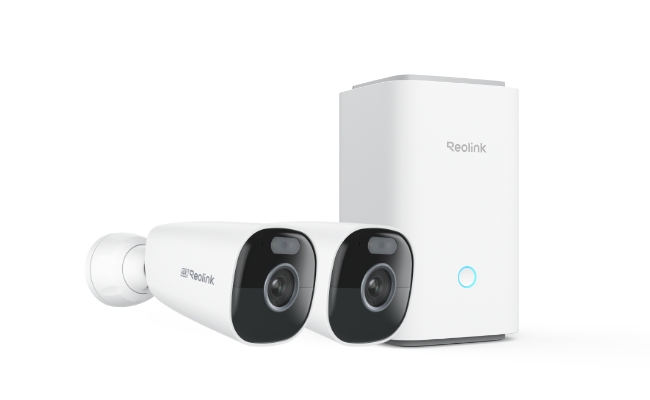
Reolink Argus Eco Ultra
Reolink Home Hub
Pros:
- 4K resolution captures clear detail for face and licence plate identification
- Fully wireless solar setup with no cable runs required for power or storage
- Local encrypted storage with no monthly subscription fees at any tier
- Expandable to up to 8 Reolink cameras from a single hub, with 6 slots open in the starter kit
- Color night vision with spotlight illumination delivers full-colour footage in complete darkness
- Built-in alarm siren and LED indicator for immediate deterrence on motion detection
Cons:
- Non-removable battery. The camera must be unmounted for manual charging if solar input is insufficient
- Cold or overcast climates may see shorter battery intervals between charges
- The Home Hub requires a wired Ethernet connection to your router, so placement is limited by cable reach
Best for:
- Homeowners who want outdoor 4K coverage without running power cables; the solar panel eliminates wiring to the camera mounting point
- Locations that receive at least 3-4 hours of direct sunlight per day, including during the shortest winter days
- Buyers who specifically want local-only storage with no cloud subscription and no footage leaving their property
- Users who plan to expand, as the Home Hub's 8-camera capacity means you are not locked into a two-camera system as needs grow
- What is the Reolink Home Hub with Argus Eco Ultra Kit
- Reolink Home Hub with Argus Eco Ultra Kit Key Features
- App Experience: Managing Cameras Through the Home Hub
- How the Argus Eco Ultra Compares in the Reolink Lineup
- Which Setup Is Right for You?
- How to Set Up the Reolink Home Hub With Argus Eco Ultra
- FAQs
- Conclusion
What is the Reolink Home Hub with Argus Eco Ultra Kit

The Reolink Home Hub with Argus Eco Ultra Kit is a fully wireless 4K security kit built for homeowners who want local recording without a monthly subscription. The kit pairs two outdoor cameras with solar charging and a central storage hub, making it a practical fit for locations where running power cable is impractical.
Reolink Home Hub
The Home Hub is a compact rectangular unit with rounded edges and a matte white finish, small enough to sit alongside a router without drawing attention. An LED indicator on top shows system status at a glance, and the built-in siren is housed inside the same enclosure. The compact footprint makes placement flexible: on a shelf, on a desk, or mounted flat against a wall near your router.
Reolink Argus Eco Ultra
The Argus Eco Ultra is a bullet outdoor camera with an adjustable mounting bracket. The design is IP66-rated, meaning it is sealed against dust ingress and resistant to powerful water jets from any direction, which means rain, garden hose overspray, and dusty outdoor environments are all within its operating range. It comes in black or white. The kit includes the camera body, a solar panel with connecting cable, and all mounting hardware.

Wireless Security System with 4K Wi-Fi Solar/Battery Standalone Camera Without Monthly Fees
4K Color Footage Day & Night, 1 Year of Local Storage, Exclusive Anti-Theft Algorithms, 360° All-Around Coverage, Expandable System Up to 8 Reolink Cams.
Reolink Home Hub with Argus Eco Ultra Kit Key Features
4K Color Footage Day and Night
The Argus Eco Ultra records at 4K (8MP), enough resolution to clearly identify faces and read vehicle number plates at typical residential distances. Color night vision is delivered through an integrated spotlight that activates on motion detection, supplemented by infrared for longer-range visibility in complete darkness.
The color spotlight footage is a meaningful upgrade over standard IR-only night vision. The full-color image makes it easier to distinguish clothing colors and vehicle colors at a glance, without needing to zoom into a greyscale frame.
Pro Tip: The spotlight can be configured to trigger only on person or vehicle detection, reducing activations from trees, animals, and passing headlights.
Battery Life and Solar Panel Performance

The Argus Eco Ultra runs on a built-in rechargeable battery that powers motion-triggered recording. The included solar panel handles recharging automatically in the right conditions.
In temperate climates with consistent sunlight, the solar panel is designed to maintain the battery at or near full charge throughout the day, effectively making the camera maintenance-free year-round. In cold climates or locations with limited winter sun, the battery will require more frequent manual charging during peak winter months, as lithium-ion cells lose capacity at lower temperatures.
What this means in practice: If your mounting location receives at least 3–4 hours of direct sunlight per day, the solar panel will sustain continuous operation. If you are in an overcast climate or the panel will be partially shaded, budget for occasional manual charging during the darker months.
Pro Tip: For maximum solar charging efficiency, mount the solar panel at a 45° angle facing south (northern hemisphere) or north (southern hemisphere), with no objects casting shade during midday hours.
Local Storage With No Monthly Fees
The kit includes a 64GB microSD card installed in the Home Hub, capable of storing up to a year of motion-triggered recordings under typical home use (approximately 10–20 motion events per day at 20 seconds each). High-traffic locations will cycle through storage faster. This is when the Reolink Home Hub makes it easy to scale your storage as it is expandable to 1TB total using two 512GB microSD cards - ideal if you have high-traffic locations or multiple cameras recording simultaneously.
All storage is local, encrypted, and password-protected. Recordings remain intact even if your internet connection drops, and the data is inaccessible if the hub is physically removed. For privacy-conscious buyers who specifically want no cloud account and no footage leaving their property, this is the kit's clearest value proposition.
AI Motion Detection and Alarm Center

The Argus Eco Ultra uses PIR-based motion detection with AI-powered person and vehicle classification, reducing false alerts from trees, animals, and passing headlights. When a trigger occurs, the Home Hub activates its built-in siren and flashes the LED indicator simultaneously, then sends a push notification to your phone.
The alarm response is immediate, making the system useful as an active deterrent rather than a passive recording device.
Dual-Band Wi-Fi Connectivity

The Argus Eco Ultra supports both 2.4GHz and 5GHz WiFi bands. The 2.4GHz band provides longer range through walls and obstacles; the 5GHz band delivers faster throughput where the signal is strong. The Home Hub itself connects to your router via Ethernet for a stable wired backbone, and cameras communicate to the hub over Wi-Fi.
Expandable to 8 Cameras
The Home Hub supports up to 8 Reolink cameras simultaneously, managed from a single interface. The two cameras included in the starter kit leave six slots open for future expansion, useful if you want to add cameras to additional entry points or outbuildings without buying a separate system. Note that 4G Reolink cameras are not compatible with the Home Hub.
Google Home Integration
The kit is compatible with Google Home for voice command access to live feeds and smart home automation. For the current list of supported platforms, check the Reolink Argus Eco Ultra product page, as smart home integrations are updated periodically via firmware.
App Experience: Managing Cameras Through the Home Hub

Using the Argus Eco Ultra through the Home Hub is a noticeably different experience from a standard standalone camera setup, and understanding this difference matters while you consider if this kit is right for you.
With a standalone Reolink camera, the app connects directly to each camera. With the Home Hub in the chain, cameras connect to the hub first, and the hub acts as the local management layer. This means:
- Live view and playback are routed through the hub, which stores footage locally rather than relying on cloud servers. Remote access still works when you are away from home; the hub handles the connection over your internet.
- The multi-camera dashboard lets you view both Argus Eco Ultra cameras simultaneously from a single screen, with the option to toggle between full-screen and tiled views.
- Motion alert management is centralised: detection zones, sensitivity settings, and alert schedules for all cameras are configured from the same menu, rather than switching between individual camera settings.
- Local playback retrieves footage directly from the microSD card via the hub. Timeline scrubbing on motion-triggered recordings is smooth, though downloading longer clips to a phone takes more time than cloud-based retrieval, as files transfer from a local storage card over your home network rather than a remote server.
Note: The Reolink app requires an active internet connection at your home for remote access when you are away. The Home Hub stores footage locally regardless of your internet status, but remote viewing requires the hub to be reachable online.
How the Argus Eco Ultra Compares in the Reolink Lineup
The Reolink Home Hub with Argus Eco Ultra occupies a specific position: a solar-powered, locally managed wireless system for buyers who want no cloud dependency and no monthly fees. Here is how it compares against the standalone Argus Eco Ultra and the RLK8-800B4 NVR kit, the two most natural alternatives depending on whether you want to remove the hub from the equation or step up to 24/7 wired recording.
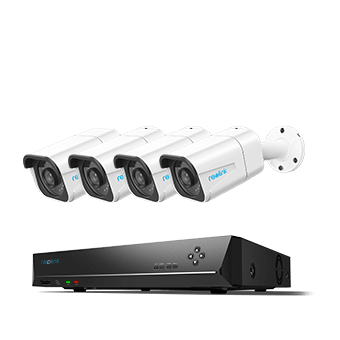
4K 8-Channel PoE Security System
4 pcs 4K Ultra HD Security Cameras; 2TB HDD 8-Channel NVR for 24/7 Recording; Person/Vehicle Detection; Plug & Play; 2 Network Solutions.
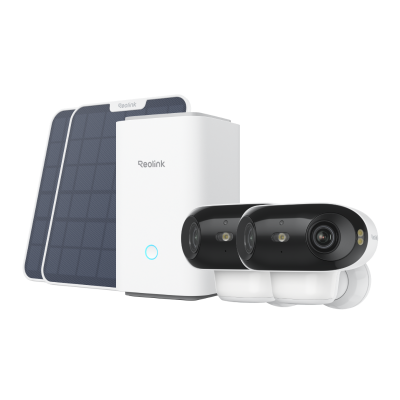
Considering more coverage options? The Reolink Home Hub with Argus 4 Pro delivers 180° blindspot-free coverage, ColorX true full-color night vision, and Wi-Fi 6 connectivity in the same hub architecture, at $439.99.
Reolink Home Hub with Argus 4 Pro4K UHD Wi-Fi 6 Security System with 180° Blindspot-Free View
ColorX Night Vision, 1 Year of Local Storage, Exclusive Anti-Theft Algorithms, 180° Blindspot-Free Coverage, Expandable System Up to 8 Reolink Cams.
Which Setup Is Right for You?
How to Set Up the Reolink Home Hub With Argus Eco Ultra

Setup takes most users under 20 minutes. The Reolink app guides you through each step.
- Connect the Home Hub to power and plug it into your router using the included Ethernet cable. Wait for the LED indicator to confirm it is online.
- Open the Reolink app on your phone and follow the in-app prompts to add the Home Hub to your account.
- Tap the "+" button and scan the QR code on the first Argus Eco Ultra camera. When prompted, select "Use with Home Hub" to pair the camera through the hub rather than directly to your router.
- Repeat for the second camera.
- Mount the cameras and solar panels at your chosen locations. Confirm each camera shows a live feed in the app before securing the final mount. The QR code pairing process is straightforward.
FAQs
What does the Reolink Home Hub do?
The Reolink Home Hub is the central management device for your camera system. It stores footage locally on a microSD card, connects and manages up to 8 Reolink cameras from a single interface, and handles motion alerts and alarm responses. It replaces the need for a cloud subscription by keeping all recordings on-site and encrypted.
Does Reolink Home Hub record 24/7?
It depends on the cameras connected. PoE and plug-in Wi-Fi cameras can record continuously 24/7. Battery-powered cameras like the Argus Eco Ultra are designed for motion-triggered recording; they activate on detected motion rather than running continuously, which preserves battery life.
What is the effective range of cameras on the Reolink Home Hub?
The Home Hub connects cameras over your home Wi-Fi network via your router, and the hub itself does not set a fixed range. Cameras can be placed anywhere your router's signal reaches reliably. For cameras at the edge of your router's coverage, a Wi-Fi range extender will maintain a stable connection.
Does the Argus Eco Ultra require a subscription?
No. The Argus Eco Ultra stores all footage locally on the microSD card inside the Home Hub. There is no cloud subscription required at any level, and no ongoing fees to access your recordings.
How long does the Argus Eco Ultra battery last?
Battery duration varies by location and climate. With the included solar panel and consistent direct sunlight (at least 3-4 hours per day), the battery maintains a continuous charge without manual intervention. Without solar, or in cold and overcast conditions, expect to recharge the battery manually every few weeks, depending on how frequently the camera triggers.
Conclusion
The Reolink Home Hub with Argus Eco Ultra earns its place as a genuinely subscription-free solar kit for homeowners who want local 4K coverage without ongoing costs. It is a strong fit for sunny outdoor locations where running cable is impractical, and the Home Hub's 8-camera capacity means you are not locked into a two-camera system as your needs grow.
Search
Subscribe for the Latest Updates
Security insights & offers right into your inbox