
Understanding FHD vs 4K: Pros, Cons, and Key Differences
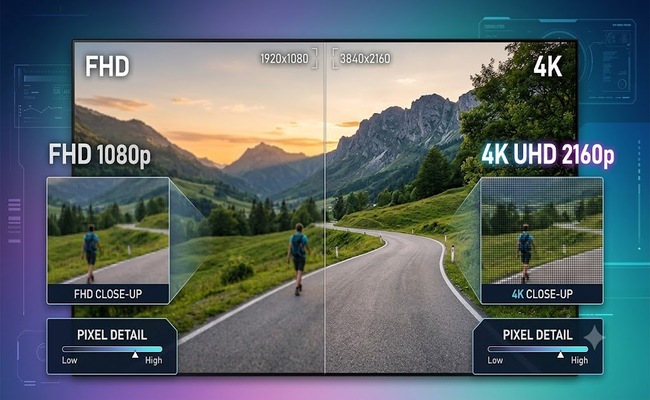
FHD and 4K are two common resolutions used for TVs, monitors, security cameras, and other displays. 4K is definitely better than FHD in terms of resolution, but it doesn't mean you always need it.
Let's understand the difference between FHD and 4K. We will share their pros and cons to help you decide which one is better in your case.
FHD vs 4K: Key Difference
The key difference between FHD vs 4K is pixel count. Full-HD TVs have a resolution of 1920×1080 pixels spread across the screen. Ultra-HD 4K televisions have a resolution of 3840×2160 pixels, exactly four times as many pixels. This allows for a more detailed picture, as well as more scope for accurate colors and contrast.
However, resolution alone does not determine picture quality. The LED technology, screen size, and other factors also matter. OLED technology features self-lighting pixels that turn on and off individually, delivering perfect black, infinite contrast, and vibrant colors regardless of resolution. A 4K TV with poor contrast can look worse than a well-made FHD TV with excellent color accuracy.
HDR (High Dynamic Range) expands the range of brightness and color the screen can reproduce, making highlights look brighter and shadows more detailed. Most modern TVs support Dolby Vision, which is one of the leading HDR formats.
What Is FHD? Pros and Cons
FHD (Full High Definition) has a resolution of 1920×1080 pixels. It has been the standard for TVs, monitors, and video content for over a decade. Popular TV screen sizes of around 32 to 43 inches are usually available in Full-HD resolution, which delivers decent picture quality at that size. Most broadcast and cable TV content still maxes out at 1080p.
Pros of FHD:
- FHD TVs cost significantly less than 4K models, especially in smaller size
- Cable TV, news, and sports are still primarily broadcast in 1080i or 720p
- Streaming FHD uses less data, about 5-8 Mbps vs 15-25 Mbps for 4K
- At 40 inches and below, the difference from 4K is negligible at normal viewing distances. At 32 inches, FHD looks sharp, while 4K looks excellent, but the difference may not justify the cost
- Gaming at 1080p requires a much less powerful graphics card than 4K
Cons of FHD:
- On 50-inch screens and above, individual pixels become visible, making the image look soft. At 55-65 inches, FHD looks only "Good" while 4K looks "Sharp and detailed."
- Cannot display Ultra-HD content from Netflix, Prime Video, or Disney+ in native resolution
- At larger sizes, text and fine details appear less sharp
- As 4K content becomes more common, FHD screens will show their age sooner
What Is 4K? Pros and Cons
4K, also called Ultra HD, has a resolution of 3840×2160 pixels—exactly four times the pixels of FHD. 4K amounts to roughly 8 million pixels, making it stunning to see in person. Modern streaming services like Netflix, Prime Video, and Disney+ offer extensive libraries of 4K HDR content.
Pros of 4K:
- At typical living room distances, 4K looks noticeably sharper than FHD on 55-inch and larger screens. At 55-65 inches, 4K looks sharp and detailed.
- You can see fine textures, individual hairs, and background details that are blurred on FHD
- As 4K content becomes the standard, your TV will be ready
- Most 4K TVs support HDR (High Dynamic Range), which dramatically improves color and contrast
- On 65-inch and above, 4K is not a luxury but a necessity. At 75 inches and above, 4K is the right choice.
Cons of 4K:
- 4K TVs and monitors cost significantly more than FHD equivalents
- Watching 1080p content on a 4K TV requires upscaling, which can look soft
- Streaming 4K requires 15-25 Mbps internet, which not all households have
- On 43-inch screens and below, 4K offers little visible improvement at normal viewing distances. At 32 inches, while 4K looks "Excellent," the practical benefit over FHD ("Sharp") is minimal for most users
- 4K gaming requires a high-end graphics card (RTX 3080 or better)
FHD vs 4K: Which TV or Monitor You Should Choose?
Choosing between Full-HD and Ultra-HD comes down to screen size, viewing habits, and budget. The most important factor is how large your screen is. Resolution and screen size are directly connected. As the screen gets larger, the pixels spread across a bigger area. With HD or FHD, this means pixels become more visible at larger sizes. With 4K, the pixel density remains high enough that the image stays sharp even on very large screens.
For a FHD vs. 4K monitor decision, screen size is the first thing to consider. At 32 inches, FHD looks sharp while 4K looks excellent. Between 43 and 50 inches, FHD looks good while 4K looks excellent. At 55 to 65 inches, FHD looks good while 4K looks sharp and detailed. At 75 inches and above, FHD is only acceptable, but 4K is the right choice.
FHD vs 4K Camera: Which One to Choose?
Choosing between FHD vs. 4K camera resolutions for security depends on your coverage area, storage capacity, and how much detail you need to capture.
A 2K or FHD camera provides clear, reliable footage for monitoring small spaces like a front porch or back door. At close range, its resolution provides enough details. In contrast, a 4K camera delivers intricate details for larger properties where you need to zoom in on faces or license plates. It is suitable for parking lots, front yards, and commercial perimeters.
Reolink Solar Floodlight Cam offers 2K (4MP HD) resolution with a 150° ultra-wide view. It's a battery/solar-powered security camera with a built-in 1,000-lumen floodlight. 1 hour of sunlight is enough for a 24-hour operation, and once the battery is fully charged, it lasts up to 3 months. Its AI-based adaptive floodlight adjusts according to the detected objects.
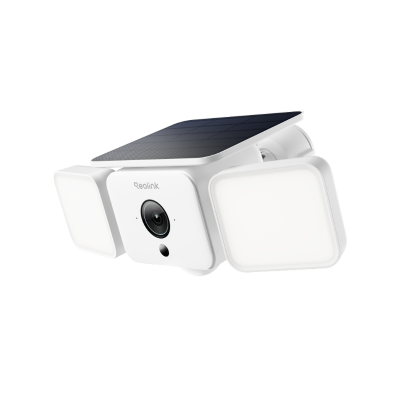
Smart 2K Solar Floodlight Security Camera
150° Ultra-Wide View, 2K 4MP HD Resolution, AI-Based Adaptive Floodlight, Endless Power with Reolink SolarEase™.
If you are looking for a 4K security camera, Reolink TrackFlex Floodlight is an excellent option. It delivers 4K (8MP) Ultra HD resolution with dual-lens auto-tracking. It combines a wide-angle lens for overall scene coverage and a telephoto lens for close-up details. It also has ColorX night vision for true full-color footage even in near-total darkness. The 3000-lumen dimmable floodlight illuminates the area and helps in deterring intruders at night.

Smart 4K 360° Coverage Wi-Fi Floodlight Security Camera
Local AI Video Search, 4K 8MP Ultra HD, 360° Coverage View, 6X Hybrid Zoom, Dual-Color Floodlight.
FAQs
QHD vs FHD vs 4K: What's the difference?
QHD (2560×1440) sits between FHD and 4K with about 3.7 million pixels. FHD has 2 million pixels. 4K has 8.3 million pixels. For a 27-inch monitor, QHD is the best option for sharpness without the GPU demands of 4K.
Is FHD better than 4K?
No, 4K is objectively sharper with four times the pixels. However, on screens smaller than 43 inches or at distances beyond 6-8 feet, your eyes cannot see the difference. In those cases, FHD can be the smarter choice.
Can the human eye tell the difference between 1080p and 4K?
Yes, but only under specific conditions. At a distance of 7 feet, you need a 55-inch screen or larger to see the benefit of 4K. On a 32-inch monitor viewed from 2-3 feet, the difference is easily noticeable.
Conclusion
FHD and 4K are two different resolutions commonly used in displays. The right choice depends on screen size, viewing distance, and what you watch. For TVs 43 inches or smaller, FHD delivers a perfectly good picture at a lower price. If you are going with a larger screen, 4K is necessary to enjoy the clarity and details. For security cameras, 2K balances detail and storage for most homes, while 4K dual-lens systems provide better coverage for wide areas. Match the resolution to your actual needs, and you will be happy with either choice.
Search
Subscribe for the Latest Updates
Security insights & offers right into your inbox