
FHD vs QHD: Which Monitor Resolution is Right for You
While shopping for a new monitor, you might have seen the boxes mentioning "FHD" or "QHD." Both are different resolutions and are suitable for different applications and scenarios, but choosing between them isn't easy if you aren't aware of their core differences.
Let's understand FHD vs QHD to help you choose the right option according to your budget, hardware, and how you use your screen. Here is everything you need to know.
What Is FHD?
FHD stands for Full High Definition. It provides a native resolution of 1920 x 1080 pixels, delivering approximately 2.1 million total pixels on screen with a standard 16:9 widescreen aspect ratio. FHD is also commonly called 1080p, where the "p" stands for progressive scan.
Pros of FHD Monitors:
- Affordable: Amongst the QHD vs FHD monitors, FHD displays are the most budget-friendly option on the market.
- Widely Available: You will find FHD screens in almost every size, form factor, and price range.
- Low Hardware Requirements: Runs smoothly on basic integrated graphics and older computer setups.
- Good for Everyday Use: Provides more than enough clarity for standard office work, web browsing, and media streaming.
Cons of FHD Monitors:
- Limited Screen Real Estate: You cannot fit as many windows side-by-side compared to higher resolutions.
- Lower Pixel Density: At larger screen sizes (27 inches and above), individual pixels can become visible, making text look less sharp.
- Less Detail for Professional Work: Photo editors and designers may find the resolution limiting for fine detail workflows.
Best Use Scenarios for FHD:
- Everyday Office Work: Spreadsheets, documents, email, and web browsing are perfectly clear on FHD.
- Casual & Competitive Gaming: FHD is the most common resolution for gamers because it delivers high frame rates without requiring expensive graphics cards.
- Budget-Conscious Buyers: If you want reliable image quality without spending a premium, FHD is a practical choice.
- Streaming and Media: Most online video content is still mastered in 1080p, meaning it scales natively on FHD screens.
What Is QHD?
Between FHD vs QHD, QHD stands for Quad High Definition. It provides a native resolution of 2560 x 1440 pixels, delivering approximately 3.7 million total pixels. It is sometimes called 2K or 1440p, though the official DCI 2K standard technically sits at 2048 x 1080.
QHD has four times the pixels of standard HD (720p) and roughly 77.8% more pixels than FHD. The term WQHD (Wide Quad HD) is also used to denote this same 2560 x 1440 resolution layout.
Pros of QHD Monitors:
- Sharper Image Quality: Noticeably clearer text, crisper lines, and defined images compared to FHD.
- More Screen Space: You can comfortably fit more windows, toolbars, and content on screen at once.
- Better for Creative Work: Designers, photographers, and video editors benefit significantly from the extra visible detail.
- Sweet Spot for Gaming: Provides sharper visuals than FHD without the extreme GPU processing demands of a full 4K display.
Cons of QHD Monitors:
- More Expensive: QHD monitors carry a noticeably higher cost than their FHD equivalents.
- Requires Upgraded Hardware: Gaming smoothly at QHD resolutions demands a dedicated graphics card.
- Scaling Considerations: On smaller screens (24 inches or less), text and icons may look too small without enabling OS scaling.
Best Use Scenarios for QHD:
- Professional Digital Art: The 77.8% increase in screen real estate allows artists to display reference images comfortably alongside their working canvas.
- Immersive Gaming: The added detail provides a more immersive experience, especially for first-person shooters and open-world games.
- Photo and Video Editing: Higher pixel density ensures more accurate, high-fidelity previews of high-resolution assets.
- Productivity Multitasking: QHD allows you to view documents, browsers, and communication apps side-by-side without overlapping windows.
FHD vs QHD: Which Monitor Should You Choose?
The choice between FHD and QHD comes down to your specific needs, hardware capabilities, and budget.
For most everyday users doing office work, web browsing, and casual gaming, FHD remains a perfectly capable and cost-effective choice. FHD runs smoothly on integrated graphics, requires no specialized hardware, and looks sharp on screens up to 24 inches. If you are on a tight budget or upgrading an older computer, FHD is the smarter pick.
However, QHD offers clear advantages for specific users. If you are a gamer with a mid-to-high-tier dedicated graphics card, QHD provides noticeably sharper visuals without the extreme hardware performance tax of 4K. For creative professionals like photographers, designers, and video editors, the extra pixels make a real difference in daily detail work and color precision. QHD's additional screen space also directly benefits multitaskers who keep multiple windows open simultaneously.
Screen size matters too. On a 24-inch monitor, FHD at 100% scaling offers a pixel density of approximately 92 PPI (Pixels Per Inch), which many users find perfectly acceptable. QHD on the same 24-inch screen pushes pixel density to about 122 PPI, delivering very sharp text, though some users may need to enable OS scaling (125-150%) to make user interface elements comfortably readable. On a 27-inch monitor and above, QHD becomes the recommended standard investment to avoid text pixelation.
FHD vs QHD: Which Security Camera Should You Choose?
Resolution metrics also dictate the performance of modern property surveillance setups. Higher pixel counts allow security grids to maintain clear facial details and license plate readability over greater distances.
Solar Floodlight Cam
Solar Floodlight Cam is a 2K (4MP) QHD-tier security camera integrated with a powerful floodlight. It offers a 150° wide field of view, helping cover expansive boundary lines. As a battery/solar-powered system, just 1 hour of sunlight is enough to power it for 24 hours, while a full charge can sustain performance for up to 3 months. The 1,000-lumen AI-Based Adaptive Floodlight customizes lighting based on the detected object to capture clear, colored nighttime images.
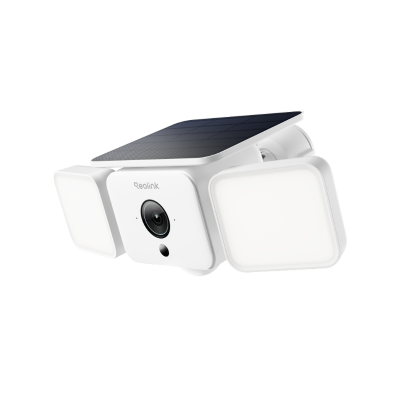
Smart 2K Solar Floodlight Security Camera
150° Ultra-Wide View, 2K 4MP HD Resolution, AI-Based Adaptive Floodlight, Endless Power with Reolink SolarEase™.
Altas PT Ultra
Altas PT Ultra is a premium battery/solar-powered security camera that records video in true 4K UHD resolution. It captures faraway objects with optimal clarity and rich details. The ColorX night vision ensures vivid, true-to-life colors even in total darkness without harsh spotlights. Featuring continuous pan and tilt motion, it automatically detects objects and tracks their movement, backed by a massive 20,000mAh battery lasting up to 500 days on PIR mode and modern Wi-Fi 6 compatibility for fast data transfer.
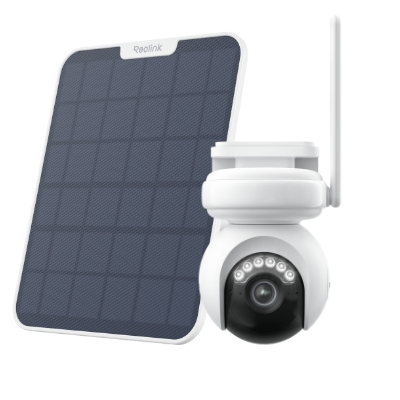
4K Battery-Powered PTZ Camera with Continuous Recording
👍 4K UHD video with continuous recording
👍 ColorX night vision in low light
👍 Pan, tilt, and automatic person tracking
👍 Local storage without monthly fees
OMVI 3i PoE
OMVI 3i PoE is an elite 18MP triple-lens security camera designed for robust, high-tier protection. Its dual-lens system covers a wide 180° panoramic view and captures the entire boundary scene in 10MP resolution, while a lower motorized pan-and-tilt lens tracks specific targets across a full 360° space in 4K resolution. Featuring SyncTrack to automatically frame moving objects, its local AI detection easily distinguishes between people, vehicles, and animals to eliminate false alerts while allowing users to search video archives instantly using keywords.
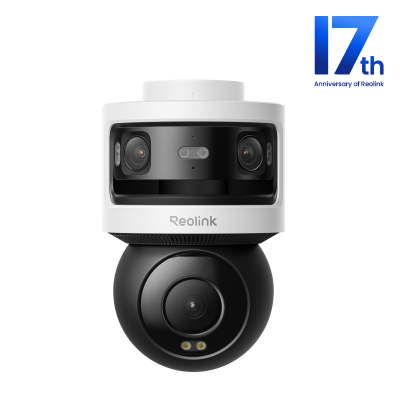
All-in-one Triple-Lens 180° Panoramic Pan-Tilt Security Camera
10MP Dual-Lens 180° View, 4K 360° Full Coverage, SyncTrack with auto framing & auto tracking, Local Storage (No Monthly Fees), Local AI Video Search.
FHD vs QHD vs UHD vs WQHD: What's the Difference?
Display resolution terminology can be confusing. Here is a complete breakdown of the most common terms you will encounter when shopping for monitors.
- WQHD (Wide Quad HD) is an ultrawide variant of QHD utilizing a cinematic 21:9 aspect ratio. Measuring 3440 x 1440 pixels, it offers roughly 5 million pixels total. This format is highly popular for panoramic workflows in video editing, music production, and heavy multitasking, allowing users to view extended timelines and toolbars side-by-side without a bezel blocking their view.
- 4K UHD (3840 x 2160) contains approximately 8.3 million pixels, packing four times the total detail of FHD. It stands as the premium standard for large monitors, but requires significantly more graphics processing power than QHD or FHD. For most desktop users, QHD represents the ideal sweet spot balancing affordability and clear visuals without taxing your system hardware.
FAQs
Which is better, QHD or FHD?
QHD is objectively better for image sharpness and usable screen space, delivering 77% more pixels than a standard FHD screen. However, FHD is more affordable and runs seamlessly on basic or older hardware. Choose based on your budget, monitor size, and computer specs.
Do pro gamers use 1080p or 1440p?
Competitive esports professionals often prefer 1080p (FHD) paired with ultra-high refresh rates (240Hz+ to 360Hz+) because it demands less GPU power, ensuring maximum frame rates and minimal input lag. Casual and enthusiast gamers increasingly choose QHD (1440p) for a balanced visual upgrade.
Is FHD outdated now?
No, FHD remains the most common monitor resolution in the world and is perfectly adequate for everyday office work, web browsing, and budget gaming. However, for premium experiences on larger screens (27 inches and above), QHD and 4K have effectively become the new baseline standards.
Is QHD just 2K?
QHD (2560 x 1440) is commonly called "2K" in monitor marketing campaigns, though the official DCI 2K cinema standard is 2048 x 1080. For consumer PC monitors and consumer electronics, the terms 2K and QHD are used interchangeably.
Conclusion
The choice between FHD vs QHD comes down to three primary factors: your budget, your existing computer hardware, and how you use your screen. For everyday office work and casual use, FHD remains a perfectly capable, cost-effective choice. For modern gaming, creative design work, or anyone who spends long hours multitasking in front of a monitor, QHD's sharper rendering and extra workspace are well worth the financial upgrade. Keep the screen size in mind: on a 24-inch monitor, FHD still looks great; on 27 inches and above, QHD is the smarter investment.
Search
Subscribe for the Latest Updates
Security insights & offers right into your inbox