
What's The Difference Between NVR vs DVR?
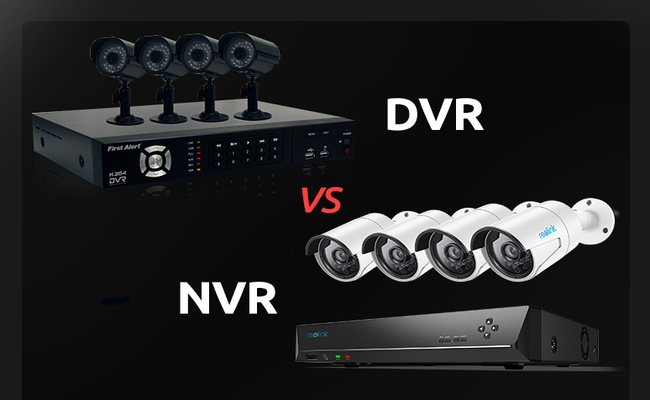
The main difference between NVR and DVR is how they process video data. DVR systems process the video data at the recorder, whereas NVR systems encode and process the video data at the camera. The NVR is for IP camera recording and the DVR is for analog or coax-based camera recording. You may be wondering DVR vs NVR, which is better. Keep reading and I’ll show you the pros and cons of them.
Key Takeaways:
- NVR systems work with IP cameras and process video at the camera, while DVR systems primarily work with analog cameras and process video at the recorder.
- NVR is generally the better choice for new installations, offering higher video quality, simpler PoE wiring, more advanced smart features, and greater scalability.
- DVR is still a practical choice for homes and businesses with existing analog cameras and coaxial cabling, especially when basic surveillance is sufficient.
- Both NVR and DVR systems can record locally without an Internet connection; Internet access is mainly needed for features such as remote viewing and alerts.
What's a NVR?
The NVR Meaning
The full name of NVR is Network Video Recorder. As the name suggests, NVR means recorders record videos from the network directly using Cat5 or Cat6 Ethernet cables with RJ45 plugs. The NVR system is used with IP (Internet Protocol) cameras.
There are two types of network video recorders: The PoE NVRs, generally with Ethernet ports to connect to PoE cameras, and the WiFi NVRs with no camera ports because it connects to WiFi cameras in a wireless way.
How Does a NVR System Work?
An NVR system consists mainly of IP cameras, a network connection, the NVR, and storage such as an internal hard drive. Each IP camera captures video and uses its built-in processor to encode and compress the footage before sending it across the network to the NVR. With a PoE NVR system, Ethernet cables can carry both video data and power between compatible cameras and the network, reducing the need for separate power wiring.
The NVR receives these digital video streams and manages recording, storage, playback, and camera access. Because most video processing takes place at the IP cameras rather than the recorder, an NVR can also work with network-connected cameras that are not plugged directly into its PoE ports.
What's a DVR?
The DVR Meaning
DVR stands for digital video recorder, which means that DVR recorders process uncompressed videos with coaxial cables and compress the videos to digital signal before sending them out. The DVR system works with analog cameras.
How Does a DVR System Work?
A DVR system typically consists of analog cameras, coaxial cables, separate camera power connections, the DVR, and an internal hard drive. Unlike IP cameras in an NVR system, analog cameras send their video signals to the DVR without performing the main digital video encoding themselves.
The DVR receives the analog signals through its coaxial inputs, converts them into digital video, compresses the footage, and stores it on the hard drive. Because the recorder performs the main video processing, the DVR's processing capacity and supported channels affect how many cameras, resolutions, and recording streams the system can handle.
What is the Difference between NVR and DVR?
The main difference between NVR and DVR is how they process video data.
We will list out the differences between NVR and DVR in the chart below to give you a whole image about how NVR and DVR systems work differently.
The Difference Chart Between DVR and NVR
As we said, the main difference between NVR and DVR is that, DVR systems process the video data at the recorder, whereas NVR systems encode and process the video data at the camera.
Working with Camera:
NVR can work with IP cameras, including PoE cameras and WiFi cameras, which both can convert the raw video data format to digital signals on their own, and transmit it to NVR for storing. While DVR can only work with analog cameras, which just generate raw analog format signal.
Recorder:
The NVR accepts data as a digital signal that has already been processed in IP cameras and does not need to be encoded again. But the DVR is different. It accepts the analog signal from the camera and needs to transcode the original analog signal into a digital signal, and then store it.
Port and Cable:
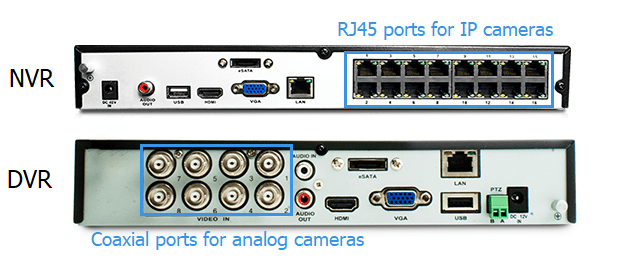
The camera interface of NVR is usually RJ45 ports for IP cameras, while the interface of DVR is usually coaxial ports for analog cameras.
This is because the NVR and cameras are connected by Ethernet cables or in a wireless way, and as we said before, these cables are responsible for transmitting data. DVRs need to transmit analog signals, so they use coaxial cables.
Image Quality:

NVRs are paired up with IP cameras, with a resolution starting from 2MP to 12MP (or higher), which is out of the question for analog cameras in a DVR security system.
Some security brands have produced 4K DVR security camera systems. However, with improved clarity, the DVR system will lose its price edge, since they need highly priced video processor chips to produce high quality images.
Audio:
You don’t have to worry about audio problems of NVR for IP camera itself recorded video footage natively integrated with sound. In most of Reolink's IP camera models, and even with integrated two-way voice intercom function, you can not only accept the sound of the environment in real time, and also use the speaker to talk to the outside world.
However, for the DVR, to record sound is difficult because the analog video signal does not support voice transmission, and to have sounds in the video, we need to add an audio RCA connector to the DVR, which requires additional installation.
Distance:
You can place the NVR virtually anywhere as long as the network is available. By contrast, the DVR CCTVs are rather limited by the coax cables, with a max transmission distance of about 300ft.
Cloud-Based Server:
As we said, the function of the NVR is closely linked to the network service, so most NVRs can certainly use cloud storage for surveillance video information storage. It can not only reduce the burden of local storage capacity, but also to protect the safety of the material, preventing hard disk damage caused by the loss of material.
DVRs, however, do not have cloud storage services.
User Experience:
Thanks to the P2P NVR security cameras, you may set up the NVR system with literally ZERO configuration. You can use it on your smart phone, PC and many other platforms easily.
You only need to download the network video recorder software, Reolink Client, for example, the IP cameras will automatically show up in the LAN network device list. Just add the cameras to the Client with your password, the setup is done!
No complex portforwarding and configuration.
DVR as a part of traditional CCTV system, you need some time to get familiar with the user interface and it doesn't have many fancy functions, everything on it is very basic and simple.
The Pros and Cons of DVR and NVR
NVR CCTV System: Pros and Cons
Pros
-
Flexible Camera Placement: IP cameras do not always need a direct cable connection to the NVR. They can connect through PoE switches or the local network, making it easier to cover different parts of a property.
-
Easier System Expansion: Additional IP cameras can be added through the network as surveillance needs grow, provided the NVR has sufficient channels and bandwidth.
-
Distributed Video Processing: Each IP camera handles its own video encoding and compression, reducing the amount of video processing that must be performed by the recorder.
-
More Recording Flexibility: Some IP cameras support onboard microSD storage in addition to NVR recording. This can provide an additional recording option if the NVR becomes unavailable.
Cons
-
More Network Configuration: An NVR system may involve IP addresses, network switches, bandwidth, and other network settings, which can make troubleshooting more complicated.
-
Camera Compatibility Issues: Not every IP camera works fully with every NVR. Mixing different brands can result in limited features or compatibility problems.
-
Higher Storage Requirements: High-resolution video from multiple IP cameras can consume significant hard drive capacity, particularly with continuous 24/7 recording.
DVR CCTV System: Pros and Cons
Pros
-
Reuses Existing CCTV Infrastructure: Properties that already have analog cameras and coaxial cabling can often continue using that infrastructure instead of replacing the entire system.
-
Straightforward System Architecture: Each camera connects directly to the DVR, making the basic signal path relatively easy to understand and troubleshoot.
-
Less Reliance on the Local Network: Camera-to-recorder video transmission does not depend on the property's IP network, so LAN congestion does not directly interrupt the video feed to the DVR.
Cons
-
More Difficult to Expand: Adding cameras generally requires available DVR inputs as well as additional cabling from each new camera to the recorder.
-
Less Flexible Camera Relocation: Moving a camera to another part of the property may require rerouting both coaxial and power cables.
-
Greater Dependence on the Recorder: The DVR handles central video processing and recording, so problems with the recorder can affect the entire surveillance system.
-
Harder to Migrate to IP: Moving from an analog DVR system to an IP-based system may require replacing cameras, the recorder, and potentially existing cabling.
NVR vs DVR, Which One to Choose
There is no single winner between NVR and DVR for every installation. The better option depends on the property, existing cabling, number of cameras, monitoring requirements, and plans for future upgrades. Here is how the choice changes in different security scenarios.
Homes
For most homeowners installing a security system from scratch, an NVR is the better choice. Residential systems increasingly use IP cameras, and an NVR makes it practical to combine cameras around the front door, driveway, garage, backyard, and other areas in one system. It also gives homeowners more freedom to add cameras later without rebuilding the entire setup.
A DVR becomes more attractive in an older home that already has analog cameras and usable coaxial cables. If the existing system still provides sufficient coverage, replacing the DVR while keeping the cameras and wiring can avoid an unnecessary full-system upgrade.
Offices
Office security often requires cameras across entrances, reception areas, hallways, parking areas, and multiple floors. An NVR is generally better for a new office installation because IP cameras can operate across the building's network infrastructure, making a larger camera deployment easier to manage and expand.
Existing infrastructure can change the decision. An older office building with analog cameras and coaxial cables already running to key locations may get more value from a DVR upgrade, particularly when basic surveillance is sufficient and there is no immediate need to replace the cameras.
Retail Stores
For retail stores, an NVR is more suitable when cameras do more than simply record footage. IP camera systems can support functions such as person detection, smart alerts, remote monitoring, and other analytics that are useful around entrances, checkout areas, aisles, and stockrooms.
A small store with only a few cameras may not need that level of functionality. If analog cameras and coaxial wiring are already installed, continuing with a DVR can provide straightforward recording without replacing a working CCTV system.
Warehouses and Large Properties
Camera count and infrastructure become more important in warehouses, farms, large homes, and other wide-area installations. An NVR can distribute IP cameras through Ethernet networks and PoE switches rather than requiring every camera to connect directly to the recorder. This can make it easier to cover entrances, storage areas, loading zones, parking areas, and separate sections of a large property.
However, Ethernet has a standard copper segment limit of 100 meters (328 feet). Longer runs may require PoE extenders, switches, fiber, or other network equipment. If a large property already has extensive coaxial infrastructure in place, a DVR system may therefore still be worth keeping rather than rewiring the entire site.
Schools and Campuses
Schools and campuses often need many cameras distributed across classrooms buildings, entrances, corridors, outdoor areas, and parking lots. For a new installation, an NVR is generally the more scalable option because cameras can be distributed across the site's network instead of relying entirely on direct point-to-point connections to one recorder.
For older schools with a large existing analog CCTV installation, the decision is less straightforward. A DVR can allow the school to continue using existing cameras and coaxial runs, while migration to an NVR can be carried out when cameras or sections of the infrastructure are due for replacement.
Sites with Restricted Internet Access
A requirement to keep surveillance footage off the public Internet does not automatically favor a DVR. Both DVR and NVR systems can record locally without Internet access.
A DVR can operate as a self-contained analog system, while an NVR and its IP cameras can operate on an isolated local network. For facilities with stricter security requirements, the choice should therefore be based on the required camera capabilities and network architecture rather than assuming that an NVR must use the cloud or public Internet.
Best NVR Security Camera System
Reolink offers NVR security camera systems for both wired PoE and wireless WiFi installations. Here are two options for different security needs.
Best NVR Security Camera System for Large Properties – Reolink RLK16-1200D8-A
For large homes, offices, stores, and other properties that need extensive camera coverage, the Reolink RLK16-1200D8-A combines eight 12MP PoE cameras with a 16-port PoE NVR. The cameras provide 12MP video, person, vehicle, and pet detection, two-way audio, and both infrared and color night vision.
The system is built for continuous recording, with a 4TB HDD included and storage expandable up to 16TB. It can support up to 24 Reolink cameras in total, while PoE and plug-in WiFi cameras combined should not exceed 16, giving users room to expand beyond the eight cameras included in the kit.
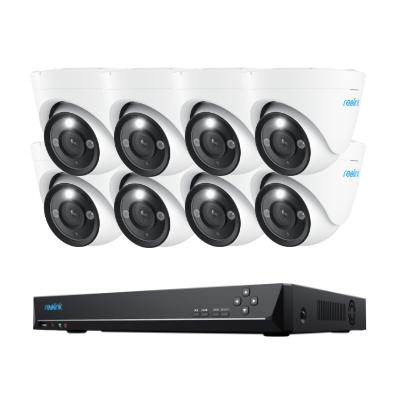
12MP PoE Security System with Color Night Vision
12MP Ultra HD, Person/Vehicle Detection, Power over Ethernet, 16-Channel NVR.
Best WiFi NVR Security System – Reolink RLK12-800WB4
For properties where running Ethernet cables between the cameras and NVR is inconvenient, the Reolink RLK12-800WB4 provides a WiFi-based alternative. It includes four 4K 8MP cameras and a WiFi 6 NVR with a built-in 2TB HDD for continuous local recording.
The system supports dual-band WiFi 6, person, vehicle, and animal detection, two-way audio, and color night vision. The NVR can also be expanded with additional compatible Reolink cameras, making it suitable for homes, stores, and other properties that want an NVR system with more flexible camera placement.
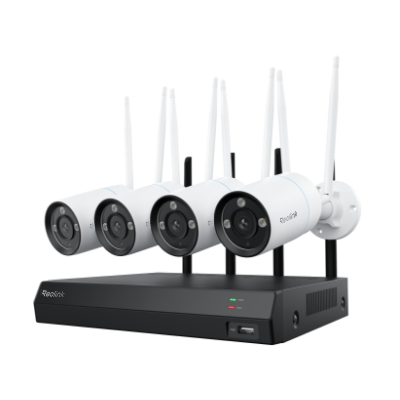
4K Security Kit with Next-Gen WiFi 6
4 pcs 4K Ultra HD Security Cameras; Dual-Band WiFi 6; 2TB HDD 12-Channel NVR for 24/7 Recording; Peron/Vehicle/Animal Detection; IP67 Weatherproof.
More Notes About NVR vs DVR CCTV Systems
1. NVR surveillance systems do NOT use more bandwidth than the DVR system.
Note that NVR camera systems do NOT need Internet to record and save footage.
The security systems will consume bandwidth only when you access it remotely via phone or PC software, which makes no difference between the DVR and NVR systems.
And some network-friendly brands like Reolink offers choices of fluent and clear video streams to save your bandwidth.
2. Buy the NVR and cameras from the same manufacturer to avoid compatibility issues.
Not all IP cameras will work with the network video recorder (NVR) from a certain brand. If you want to add more cameras or find a recorder for your cameras, remember to purchase from the same manufacturer to avoid compatibility issues.
3. If you are keen to WiFi NVR camera systems, choose the one with the dual-band WiFi signal.
Due to the dependency on the Internet, the wireless NVR may suffer a signal loss when you use other wireless electronic devices (like phones) at the same time. So choose a high-quality WiFi NVR system that features dual-band boosted WiFi signal is the best option.
4. Running cable is challenging for DVR systems.
The hard wiring is the biggest disadvantage of DVR security cameras.
First off, each camera will have two cables to deal with, one for power and one for audio and video. And it could be more difficult if your monitoring places are out of reach of the coax cable.
5. DVR CCTV systems deliver lower-quality videos.
Even though emerging technology has greatly improved the recording quality of analog cameras, it still can not catch up with the NVR cameras.
Some MPX (megapixel over coax) cameras could handle higher resolution, but they will cost you considerably, even more than NVR cameras.
6. The equipment needs to be closer in DVR security systems.
The DVR IP cameras could be placed no more than 300 feet away from the DVR in case of the decaying signal over the coax cable.
7. DVR camera systems have a higher maintenance cost.
As I mentioned, the DVR system transmits the signal via coax cables, which is much more vulnerable to the environments like the rain or strong wind with the passing of time. If they are exposed outside, you are much likely to pay an extra bill in fixing the cable issues.
8. Digital video recorders have lots of potential issues to deal with.
The DVR system, not to say it is outdated but it is definitely not something futuristic, gains decreasing market share every year.
And that will lead to many potential problems you might have never thought of. For example, some new house owners will find that there is no coax cable prewired to support the DVR system, and you may even find it difficult to get a local DVR system repair man in the future when it becomes truly outdated.
FAQs
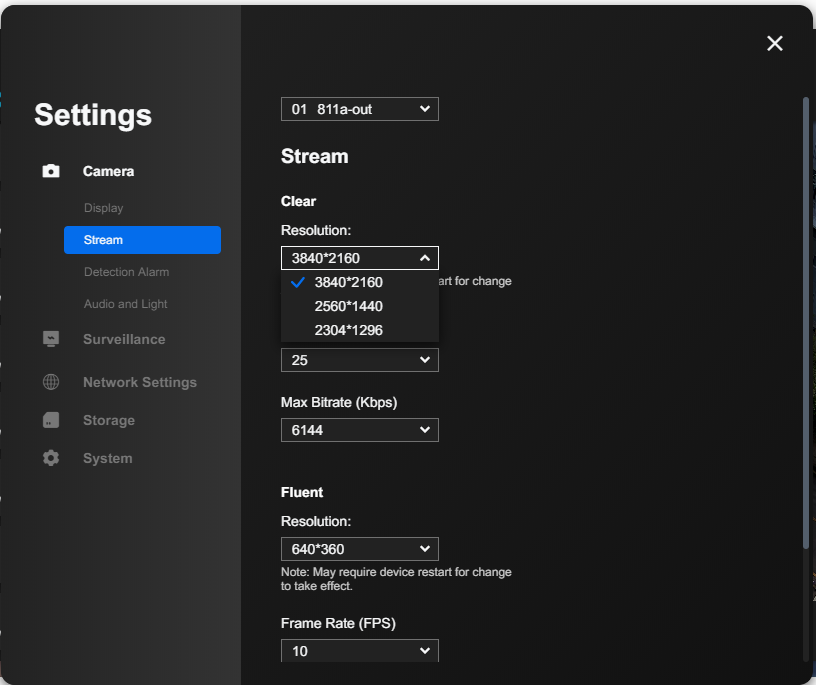
How can I tell if I'm able to get full 1080p on each channel given it's an 8ch or 16ch NVR?
You can easily check the video resolution for each channel via the resolution page of your NVR camera system.
Is there a battery backup for the video recorder in case the power is tripped or there is a blackout?
DVR and NVR security systems don't provide battery backups, but you can add a UPS to your digital or network recorder system to prevent these incidents. A battery powered security camera is also a good idea to act as a backup when the power is out.
Is there any network lag with the NVR camera systems?
Still hesitant about going the IP camera route and getting an NVR due to the network lag? You don't need to worry about it too much. A properly configured network will have no such problems at all.
For example, you can view the 8CH NVR IP camera system RLK8-410B4 at 4MP full resolution without any network lag with a stable 6-8Mbps upstream of bandwidth.
How far can the NVR and DVR camera systems work?
There is a major difference between the NVR and DVR camera systems concerning their transmission distance. For an NVR IP camera system, you are actually not limited by the wires. Well, for DVR camera system, it can typically receive signals within the range of 1000ft.
Can DVR or NVR work Without Internet Connection
Before we dig further into the difference between DVR and NVR, it could be good to know that both NVR and DVR security systems can work without the Internet connection!
If you want the NVR or DVR system to record videos to a hard drive so you can look back when needed, the NVR or DVR CCTV system doesn't need to connect to the Internet (no need to connect to your router). The DVR and NVR cameras will work on their own proprietary network once powered up.
The Internet is only needed if you want to live view the DVR/NVR camera system off site or receive push alerts.
Conclusion
Understanding the difference between NVR vs DVR is crucial for choosing the right security camera setup for your specific needs. Whether it's the processing of video data, the type of cameras they work with, or the overall cost and features, being well-informed will help you make the best decision for your security requirements.
Search
Subscribe for the Latest Updates
Security insights & offers right into your inbox