
Ultimate Guide to Buy Your Driveway Security Cameras in 2026

Choosing the best driveway security camera depends on several important factors, including video quality, night vision, motion detection, viewing angle, and installation type. To make your decision easier, this guide breaks down the key features to look for when comparing driveway cameras for homes, garages, gates, and long driveways.
We’ve also selected some of the best driveway security cameras and security systems for different needs and budgets, including wireless, PoE, long-range, and smart AI-powered options.
- What Is a Driveway Camera?
- Why Install Security Cameras for Your Driveway? Major Benefits
- What Are Key Features to Check When Buying a Driveway Security Camera?
- 3 Top Picks for Driveway Security Cameras
- Ideal Placement for Driveway Cameras
- How to Install Your Driveway Cameras: Step-by-Step Guide
- FAQs on Driveway Cameras
- Conclusion
What Is a Driveway Camera?
A driveway camera is a type of outdoor security camera designed to monitor driveways, garages, gates, and vehicles parked outside a home or business. These cameras help property owners improve security, watch for visitors, record suspicious activity, and receive alerts when motion is detected near the driveway.
How Do Driveway Cameras Work?
Driveway cameras use built-in image sensors and motion detection technology to monitor activity around a property. When movement is detected, the camera records video footage and can send real-time alerts to the homeowner through a mobile app.
Most modern driveway security cameras work through Wi-Fi or PoE (Power over Ethernet) connections.
Typical Driveway Camera Setup
A typical driveway security system may include:
- An outdoor camera mounted near the driveway
- A Wi-Fi router or PoE connection
- Local storage such as a microSD card or NVR
- A mobile app for live viewing and alerts
Why Install Security Cameras for Your Driveway? Major Benefits
A driveway security camera is one of the most effective ways to strengthen your home’s first line of defense. Since the driveway is often the main entry point for vehicles, guests, and even intruders, having real-time visibility helps you prevent incidents before they escalate.
Prevent Car Theft and Break-ins
A driveway is a common target for car theft, catalytic converter theft, and vehicle break-ins, especially at night or when the home appears unattended. A visible outdoor security camera for driveway acts as a strong deterrent and records any suspicious activity around your parked vehicles.
Modern cameras with AI motion detection can distinguish between people, vehicles, and animals, helping you receive accurate alerts instead of false alarms. In case of an incident, high-resolution footage (2K or 4K) can also provide critical evidence.
Key benefits:
- Deters vehicle theft and vandalism
- Captures clear license plate and activity footage
- Sends instant motion alerts to your phone
Monitor Visitors and Deliveries
Your driveway is also the first stop for guests, delivery drivers, and service providers. A smart driveway security system lets you see who is approaching your home in real time, even when you’re not there.
With features like two-way audio, you can communicate directly with visitors or instruct delivery personnel where to leave packages. This helps reduce missed deliveries and improves overall convenience.
Key benefits:
- Real-time visitor monitoring via mobile app
- Two-way communication with delivery drivers
- Reduced package theft risk (porch piracy prevention)
Improve Nighttime Security
Many security risks happen after dark, making night vision capability essential for any driveway camera. Advanced models use infrared night vision or color night vision to capture clear footage even in low-light conditions.
A well-positioned camera can illuminate blind spots around garages, gates, and driveways, ensuring continuous monitoring throughout the night.
Key benefits:
- Clear visibility in complete darkness
- Continuous 24/7 surveillance coverage
- Better detection of suspicious nighttime activity
What Are Key Features to Check When Buying a Driveway Security Camera?
You would need your driveway cameras for:
- Monitoring people who are coming and going in your driveway
- Deterring car thieves and preventing home break-ins
- Checking on your driveway via your iPhone or Android smartphones anywhere
- Identifying license plates and people’s faces
- Stopping someone parking in your driveway
All of your needs you want in your driveway alarms with cameras will be addressed in the following key features.
1. Choose Outdoor Models Waterproof Rating
Your security cameras for driveway should be able to handle harsh weather, like cold, rain or shine for outdoor use. For example, by installing a driveway gate camera with IP65 or IP66 rating, you can keep tabs on who is coming and going from your driveway.
IP rating defines the capability of a security camera enclosure protecting the camera from dust and water.
Take an IP65-rated model as an example. Under such weatherproof rating, this camera can withstand dust and water jets. So you can install this camera on your front-lawn, garage or any positions facing your driveway to check if everything is going smoothly.
2. Pick Driveway Security Cameras with Long Range Night Vision
Driveway surveillance cameras with long range night vision enables you to catch car thief from a long distance. Most driveway security cameras use infrared or color night vison, enabling you to check things clearly, like license plates, human’ faces, etc. even in low-light conditions, or in utter darkness.
For example most modern infrared night vision wireless driveway security cameras allow you to see things super clearly even from 100ft away.
A customer who bought Reolink infrared security camera shared a video how this camera stopped a car break-in. You can watch the below video below.
Some security cameras offer color night vision, that is much clearer than infrared type. You can take a look at the below video to see the color night vision of a starlight security camera.
There is another night vision security camera type for your driveway — security light systems with cameras. The lights will be turned on if there is someone approaching the detecting area.
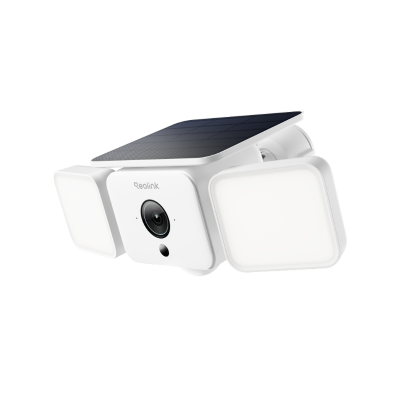
Smart 2K Solar Floodlight Security Camera
150° Ultra-Wide View, 2K 4MP HD Resolution, AI-Based Adaptive Floodlight, Endless Power with Reolink SolarEase™.
3. Buy Driveway CCTV Security Cameras with High Definition
For long driveways, image clarity is critical. You need a camera that can clearly capture faces, vehicles, and license plates even at a distance. That’s why modern Reolink driveway security cameras have been upgraded to 4K (8MP) and even 16MP ultra-high-definition resolution.
While older CCTV systems typically relied on 2MP, 4MP, or 5MP resolution, today’s Reolink cameras deliver a major leap in image quality. Higher resolution means more pixels, which translates into clearer zoom-in capability and better evidence capture when reviewing recordings.
For example, a 4K (8MP) driveway security camera already provides excellent clarity for most residential driveways. However, if you want full coverage of wide or long driveways with even more detail, 16MP dual-lens Reolink cameras can capture ultra-wide scenes while maintaining sharpness across the entire field of view.
In general, the higher the resolution, the better your ability to identify important details at distance—especially at night or in low-light conditions.
You can view sample footage from a Reolink high-definition driveway camera below:
For most long driveway setups, we recommend choosing at least a 4K Reolink camera system, while larger properties or gated entrances benefit most from 16MP ultra-wide security cameras for complete coverage and clearer detail retention.
4. Your Driveway Has No Internet, or Even No Power? You Can Still Get Cameras for Driveway Surveillance
If you have a long range driveway, like 600ft, or a rural driveway, the WiFi or Internet connection perhaps is not available. (In some cases, the power supply would be unavailable either) You can still get security cameras & systems for your driveway surveillance even without Internet.
Your driveway has power supply but has no Internet connection? 2 options for you:
-
Option 1. Get a complete security camera system: The cameras will connect to the NVR (for video storage) automatically with their own proprietary Internet after power them on. You can get 24/7 video surveillance for your driveway without Internet access. You can play back the recorded videos and back up the important events.
-
Option 2. Go for a 4G security camera: You can get remote access to your driveway, and get motion detection alerts pushed to your iPhone or Android mobile phones with this type of security camera. For example, the Reolink Go PT Ultra camera operates over cellular network, without relying on a dedicated router to get WiFi connection, which enables you to view and protect your driveway even without Internet and power supply.
3 Top Picks for Driveway Security Cameras
We’ve selected three Reolink driveway security cameras to suit different installation needs and budgets—covering PoE, WiFi, and battery-powered cellular options. Whether you’re protecting a suburban home, a long rural driveway, or a property with no internet access, these cameras deliver reliable, subscription-free security with free shipping.
Top Pick 1: RLC-810A PoE 4K Driveway Security Camera (Best for Stable Wired Protection)
The Reolink RLC-810A PoE camera is a powerful choice for homeowners who want a permanent, always-on driveway surveillance setup.
With a single Ethernet cable, you get both power and internet connection—making installation clean and reliable. Once installed, it provides continuous 4K recording of your driveway, garage entrance, or front gate without worrying about WiFi dropouts.
Best real-life scenarios:
- Suburban homes with long driveways leading to the garage
- Front yard monitoring for package deliveries and visitor arrivals
- Driveways exposed to street traffic where stable 24/7 recording is needed
- Homeowners who prefer wired, maintenance-free security
This is ideal if you want “set it and forget it” protection with ultra-clear 4K detail.
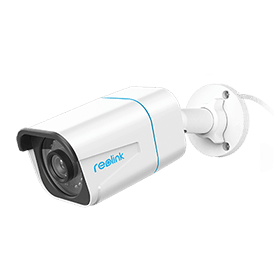
4K PoE IP Camera with Person/Vehicle Detection
Smart Person/Vehicle Alerts; 4K UHD Day; Night; 100ft Night Vision; Time Lapse; IP66 Certified Weatherproof; Audio Recording.
Top Pick 2: Reolink Go PT Ultra Cellular Battery Camera (Best for Remote or No-Internet Driveways)
The Reolink Go PT Ultra is for driveways where WiFi and power are not available.
It connects through a 4G LTE network and runs on a rechargeable battery, making it perfect for remote locations or temporary setups. You can install it almost anywhere in minutes—no wiring required.
Best real-life scenarios:
- Rural homes with long private driveways far from the main road
- Farms, ranches, or cabins with no WiFi access
- Monitoring parked vehicles, trailers, or equipment storage areas
- Wildlife monitoring or overnight activity detection near driveways
If your driveway is off-grid or hard to wire, this is the most flexible security option.
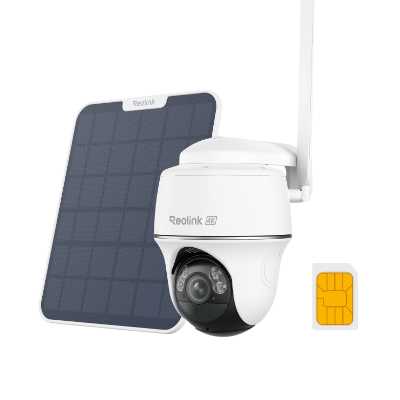
4K 8MP Wire-Free 4G LTE PT Battery Camera
4K 8MP; Smart Detection; 355° Pan & 140° Tilt; Battery/Solar Powered; Color Night Vision; Smart Real-Time Alert.
Top Pick 3: Reolink Argus PT Ultra + Home Hub (Best Smart Wireless Driveway System)
The Reolink Argus PT Ultra with Home Hub system is a smart wireless solution designed for full driveway coverage with flexible control.
With 4K resolution, pan-and-tilt movement, and WiFi 6 support, this setup allows you to actively monitor large driveways and adjust viewing angles remotely. The Home Hub adds centralized storage and system management for multiple cameras.
Best real-life scenarios:
- Homes with curved or wide driveways that need flexible viewing angles
- Properties with multiple entry points (garage + side gate + front yard)
- Families who want mobile control and real-time alerts
- Driveways where you want both live monitoring and smart playback in one system
This is ideal for users who want a modern, app-driven smart security experience with strong wireless performance.
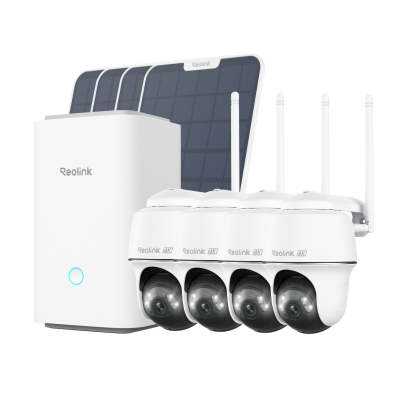
Wireless Security System With 4K PT Standalone Battery/Solar Wi-Fi Cameras
4K Color Footage Day & Night, 1 Year of Local Storage, Exclusive Anti-Theft Algorithms, 360° All-Around Coverage, Expandable System Up to 8 Reolink Cams.
Ideal Placement for Driveway Cameras
Proper camera placement is essential for getting clear footage, reducing blind spots, and maximizing the effectiveness of your driveway security camera. A well-positioned camera can help you capture faces, vehicles, and suspicious activity more accurately while improving overall home security coverage.
Above the Garage or Driveway Entrance
One of the best locations for a driveway surveillance camera is above the garage door or near the driveway entrance. This position provides a wide viewing angle and allows the camera to monitor vehicles entering or leaving your property.
Mounting the camera higher also makes it more difficult for intruders to tamper with or disable the device. For most homes, installing the camera about 8–10 feet above the ground offers a good balance between visibility and detail.
Best for:
- Monitoring parked cars
- Capturing visitors approaching the home
- Watching garage entrances and gates
Adjust the Angle for License Plate Visibility
If your goal is to identify vehicles, angle the camera toward the driveway so it can clearly capture license plates and vehicle movement. A slightly downward-facing angle often produces better detail than positioning the camera straight ahead.
For longer driveways, a camera with optical zoom or telephoto capability can help maintain image clarity at greater distances.
Placement tips:
- Avoid pointing directly at headlights
- Position the camera to capture vehicles slowing down or stopping
- Test footage both during the day and at night
Avoid Blind Spots and Sun Glare
Blind spots can leave important areas of your driveway unmonitored. Before final installation, check the camera’s field of view and ensure all entry points are visible.
You should also avoid placing cameras where direct sunlight, reflections, or bright headlights can create glare and reduce image quality. Positioning the camera slightly sideways instead of directly facing the street often improves visibility.
Common blind spot areas:
- Corners near fences or hedges
- Areas beside parked vehicles
- Side garage entrances and pathways
Choose a Weather-Protected Position
Since driveway cameras are exposed to outdoor conditions year-round, choose a location with some natural protection from heavy rain, snow, and direct sunlight. Installing the camera under an eave or roof overhang can help extend its lifespan and maintain clearer footage during bad weather.
For areas with extreme climates, look for cameras with a durable weatherproof IP rating such as IP65 or IP66.
Best practices:
- Keep cameras away from sprinklers and heavy water exposure
- Ensure stable mounting to reduce vibration from wind
- Regularly clean the lens for optimal image quality
How to Install Your Driveway Cameras: Step-by-Step Guide
You’ll get the step-by-step guides to set up and install your driveway security cameras, including PoE and plug-in WiFi and wire-free battery powered types.
Install PoE Driveway Security Cameras: Step-by-Step Guide
Here we’ll take Reolink PoE IP driveway security camera as an example to show you the complete installation guide.
- Pick a position for your driveway security camera.
- Mount the camera to the position, like the wall, that can monitor your driveway with a mounting template and the screws come with the camera.
- Run the Ethernet cable from the camera to your router. You may need to drill holes to fish the camera. If the distance between the camera and router is far away, you can add the Ethernet extension cable.
- Install and launch Reolink App on your iPhone or Android mobile. When your smartphone and your driveway CCTV camera is connected to the same router (in LAN), the camera will be added to your phone automatically. You can get live streaming at once.
A DIY lover shared a video about installing this security cameras to monitor the outside environment. You can get some insights in his DIY project.
2. Set up Plug-in Wireless Driveway Security Cameras: A Top-to-Bottom Installation Guide
Same as the above. We will take Reolink's WiFi driveway security camera to show you the A-to-Z installation guide.
- Choose the potion you want to install your WiFi driveway surveillance camera. Typically, a position that is close to a power outlet is a recommended placement.
- Plug in the camera into the power outlet. If the power outlet is unreachable by your driveway camera, you’ll need to run power cable for the camera. You can also opt to install a UPS (uninterruptible power supply) for your plug-in driveway wireless surveillance camera when the power outlets are unavailable.
- Install and launch Reolink App on your smartphone. Same as the above PoE type, the camera will be automatically added to your phone when your mobile phone and camera are connected to the same WiFi. Now you are free to access your camera to check your driveway anytime you want.
3. Install Battery Powered Driveway Security Cameras: A Super Easy Guide for You
You can check the below guide to install your battery operated driveway security camera, taking Reolink Argus series as an example.
- Install the rechargeable battery into this driveway wire free security camera. Make sure this camera is within in the WiFi range. You’ll get the verbal instructions to set up the camera.
- Download and launch Reolink App on your mobile phone.
- Name your camera and create a new password for it. Now you can get access to this camera! If you want to make it hidden, you can dress this camera with the skin.
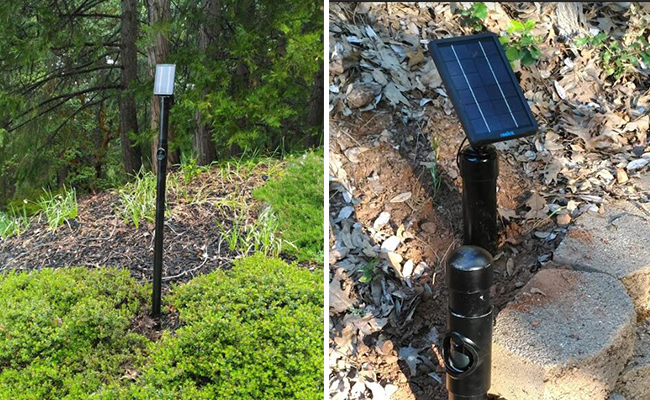
A genius made a hidden driveway camera with this camera and the solar panel. Check the DIY lover’s creative work in the above image.
FAQs on Driveway Cameras
Can my neighbor have a camera pointed at my driveway?
In many places, neighbors can legally use security cameras that capture areas visible from their property, including parts of your driveway. However, cameras generally should not invade private spaces like inside your home or windows.
How do I monitor my driveway?
You can monitor your driveway with a driveway security camera that offers live view, motion alerts, and night vision. Install the camera above the garage or driveway entrance for the best coverage.
Can you have a camera in your driveway facing a street?
Yes, most homeowners can install a driveway camera facing the street to monitor vehicles and activity near their property. Just avoid pointing the camera directly into private areas like neighbors’ windows.
Conclusion
A reliable driveway security camera can significantly improve your home security by helping you monitor vehicles, visitors, deliveries, and suspicious activity around your property. When choosing a driveway surveillance system, focus on important features like high video resolution, smart motion detection, night vision, weather resistance, and local storage options.
If you have any questions or insights about driveway cameras you wanna share with us, leave them in the comment below!
Search
Subscribe for the Latest Updates
Security insights & offers right into your inbox