
1080p vs 3K: Key Differences in Resolution and Video Quality

1080p and 3K are common video resolutions in security cameras, monitors, TV displays, etc. However, they have a significant difference in terms of video quality, clarity, and detail.
In this article, we will compare 1080p with 3K. We will explain what both of these resolutions are and share their key differences. We will also discuss which one to choose based on different scenarios.
What Is 3K Resolution?
3K resolution is an umbrella term used for all high-definition resolutions having a horizontal pixel count of approximately 3,000 pixels. The most common 3K resolution in a 16:9 aspect ratio is 2880 x 1620. This indicates there are 2880 pixels horizontally and 1620 pixels vertically. In total, there are 4,665,600 or 4.7 million pixels (MP), which is why it’s commonly called 5MP.
That’s why security cameras with 2880 x 1620 resolution are marketed as 5MP (Super HD) security cameras. They contain 5MP CMOS sensors to capture around 5 million pixels in a frame. 3K is a high-definition resolution. Its higher pixel density delivers sharper details and better digital zoom. It is perfect for covering a wider area without distortion. It can be used for monitoring front doors, driveways, garages, backyards, side gates, and even small storefronts.
What Is 1080p?
1080p or Full HD has a resolution of 1920 x 1080, which is a 16:9 aspect ratio. There are 1920 pixels horizontally and 1080 pixels vertically. The total number of pixels in a frame is 2,073,600, which is why it is known as 2MP.
It was the baseline standard for home and commercial CCTV systems years ago. But newer cameras offer far higher resolutions for better detail and clarity. However, 1080p security cameras are still used in some indoor cameras and doorbell cameras.
1080p vs 3K: What Are the Key Differences?
3K resolution contains 2.3 times more pixels than 1080p. Because of the big difference, both resolutions offer distinct levels of detail and clarity. It also results in different storage and bandwidth consumption.
Here’s a quick comparison.
Resolution and Pixel Count
The primary difference between 1080p and 3K is the resolution. 1080p is 1920 x 1080, which means 2MP (megapixels) only. On the other hand, 3K is approximately 5MP, which is 2.3 times more pixels than a 1080p (2MP) camera.
If you are monitoring a specific area, every square foot is mapped by more than twice as many pixels. That results in sharper object outlines, cleaner low-light textures, and reduced blur around moving subjects.
You can use 3K security cameras to cover the front yard, driveway, and even wider areas, such as the backyard. Because of the high resolution, there won’t be any loss of clarity. 1080p cameras are only limited to compact indoor areas, such as a mudroom, nursery, or hallway.
Digital Zoom and Detail Retention
Digital zoom enlarges the existing image and crops it. Normal zooming is fine, but if you zoom in too much, it will pixelate and lose all the details. You will see blocky objects, with no facial features or fine details. Therefore, it’s only suitable when you don’t want to zoom in, such as inside the living room to check who’s on the sofa or around.
A 3K image is quite detailed because of its high pixel density. Therefore, it can handle more zooming compared to 1080p without affecting image details and clarity. You can clearly see the facial features and clothing logos without any pixelation. That’s why it can clearly capture the vehicles in the driveway or people visiting your house.
File Size and Storage Requirements
A 1080p security camera requires less storage. At typical bitrates, continuous 24/7 recording consumes roughly 20 GB/day for 1080p (at 2 Mbps). You can store up to 64 hours (2.7 days) of continuous 24/7 recordings on a 64 GB card. A 128GB card can store up to 129 hours (5.4 days).
3K footage consumes 2-3 times more storage than 1080p because it packs more detail into the pixels. At 4–5 Mbps, it consumes roughly 43.2 to 54 GB per day. You can store 26 to 32 hours of video on a 64 GB card and 52 to 64 hours of video on a 128 GB card. It is an excellent upgrade over 1080p, but it consumes less storage compared to 4K. So, if you want rich details without spending too much on hard drives/storage, it’s a great option.
Bandwidth and Streaming Performance
3K video streams consume more network bandwidth than 1080p streams under the same recording settings. That’s because more than double the pixel data is being transmitted and encoded at a time. Wired PoE and strong Wi-Fi handle 3K effortlessly. They can stream several 3K cameras simultaneously. If the Wi-Fi strength is low, there can be buffering and delayed push-notification previews.
1080p requires lower internet upload speed. Live feeds load almost instantaneously on cellular data, overcrowded 2.4 GHz Wi-Fi, or through thick exterior walls. They allow you to pull up four to eight cameras simultaneously in a multi-view grid without lag or frame drops.
If 1080p requires 1.5–3 Mbps, a 3K stream will require 3–6 Mbps. If your network cannot handle high resolution, you can use 1080p smoothly. Otherwise, 3K offers better streaming quality.
1080p vs 3K Security Camera: Which Should You Choose?
Monitoring Distance: For close-range zones and when the subject passes close to the camera lens, such as hallways and small bedrooms, a 1080p camera provides sufficient clarity. But if you want to cover objects at a medium distance and capture wider areas like driveways, backyards, or open retail floors, a 3K camera is a better option.
Level of Detail Required: If you want to confirm whether someone entered a room, check on pets, or trigger motion alerts, 1080p gives you a clear overview. If you need to distinguish facial features or inspect parked vehicles using digital zoom, 3K provides noticeably sharper videos with more detail and clarity.
Network Bandwidth: If your camera relies on a weak 2.4 GHz Wi-Fi signal, a slow rural network, or a cellular hotspot, 1080p keeps live streams smooth with minimal buffering. If your cameras are within strong Wi-Fi range and your network can easily support 3K's higher data consumption, you can go with 3K security cameras.
Budget: When installing multiple cameras on a tight budget or recording 24/7 onto smaller microSD cards, 1080p is quite budget-friendly. If you can bear a modest increase in camera price and hard drive/microSD capacity, 3K delivers excellent clarity without the steep hardware and storage costs of a full 4K system.
Recommended Reolink 3K Security Cameras
Reolink OMVI 2i Ultra
Reolink OMVI 2i Ultra is not simply a 3K camera because it has two cameras in one device, delivering both 4K & 3K resolutions at the same time. It’s equipped with a PT (pan-and-tilt) upper cam and a bullet lower cam in one design. The wide-angle bullet cam records in 4K resolution and focuses on a specific area and the full scene. The PT camera monitors another scene with auto-zoom tracking ability on targets. That’s why it can cover 360°.
With SyncTrack, both cameras work together. When motion is detected by the upper camera, the lower PT camera coordinates automatically to keep a 360° track of the target. You can place this camera outdoors without any wires, as it’s powered by the built-in solar panel and battery and networked through Wi-Fi 6. You can secure your backyard, front door, walkways, driveway, garage, farm, restaurant entrance, or parking lot.
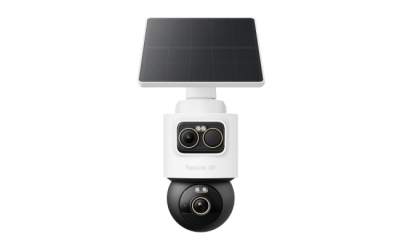
4K + 3K Dual-Lens PT & Bullet Wireless Security Camera
- 4K + 3K Dual-Lens with 360° Full Coverage
- SolarEase Endless Solar Power
- SyncTrack with Auto-Framing & Auto-Tracking
- AI Detection for Person, Vehicle & Animal
- Local Storage Up to 512GB microSD Card
FAQ
Is 3K higher than 1080p?
Yes, 3K has 2.3 times more pixels than 1080p. It offers sharper and more detailed images with clean digital zoom.
Is 1080p outdated now?
1080p is not outdated yet, but is now the entry-level baseline rather than the standard for outdoor surveillance. It’s still a budget-friendly option for close-range indoor monitoring.
Is 3K video quality good?
Yes, 3K video is of decent quality. It offers crisp clarity, reliable facial features, and up to 2-3X clear digital zoom.
Final Words
1080p was once considered a standard for security cameras, but now, it’s only the entry-level baseline. Higher resolutions have taken its place. 3K offers more than double the pixels compared to 1080p. It’s sharper, clearer, and more detailed. For most residential and entry-level commercial applications, 3K is a sweet spot as it offers excellent video quality without consuming heavy bandwidth and storage.
Search
Subscribe for the Latest Updates
Security insights & offers right into your inbox