
Pan and Tilt Security Cameras: Best Picks & Buying Guide 2026
- What Is a Pan and Tilt Security Camera?
- What Are Common Types of Pan Tilt Security Cameras?
- 7 Key Features to Look for in the Best Pan and Tilt Outdoor Security Camera
- 3 Best Reolink Pan and Tilt Security Cameras for Different Setups
- Pan Tilt vs Fixed Security Cameras
- How to Fix Common Pan and Tilt IP Camera Issues?
- Buyer's Decision Table
- FAQs
- Conclusion
What Is a Pan and Tilt Security Camera?
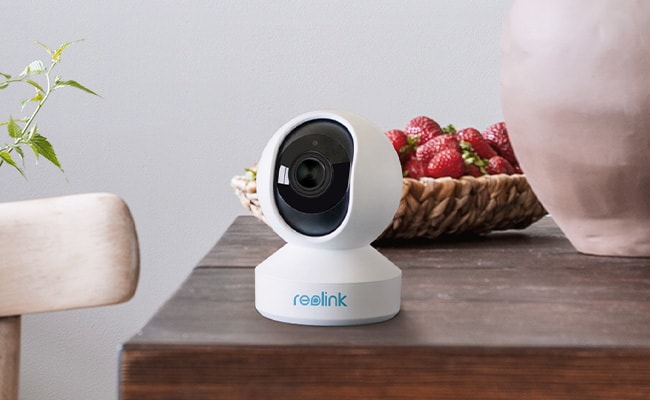
A pan and tilt security camera is a motorized camera that can move horizontally and vertically to monitor different parts of a room or outdoor area. Unlike a fixed camera, which points in one direction, a pan and tilt camera can be controlled remotely through an app or client to adjust the viewing angle without physically repositioning the device.
Many modern pan and tilt cameras also support features such as auto tracking, preset viewing points, patrol routes, digital or optical zoom, and remote live viewing.
What Does Pan Mean?
Pan refers to the camera's horizontal movement from left to right. A wider pan range allows the camera to monitor more of the surrounding area and makes it easier to check different zones remotely.
What Does Tilt Mean?
Tilt refers to vertical movement, allowing the camera to look upward or downward. Combined with panning, tilt helps a camera cover a much larger viewing area than a fixed camera.
What Is the Difference Between PT and PTZ?
A PT camera supports pan and tilt movement, while a PTZ camera adds zoom capability. PTZ cameras may use optical zoom to magnify distant subjects while preserving more image details.
How Does Auto Tracking Work?
Auto tracking allows a compatible pan and tilt camera to automatically follow a detected subject as it moves through the scene.
What Are Common Types of Pan Tilt Security Cameras?
Pan and tilt security cameras come in different designs for indoor and outdoor monitoring. The main differences are typically installation environment, power source, weather resistance, zoom capability, and tracking features.
Indoor Pan and Tilt Cameras
Indoor pan and tilt cameras are compact WiFi cameras designed to monitor rooms, pets, babies, and other indoor spaces. They typically offer remote pan-and-tilt control, two-way audio, motion or smart detection, night vision, and app-based live viewing.
Because one camera can change its viewing direction, an indoor PT camera can cover more of a room than a fixed camera. Models with auto tracking are especially useful for following pets, children, or other moving subjects.
Outdoor PTZ Cameras
Outdoor PTZ cameras are built for larger areas such as driveways, yards, parking lots, farms, and business properties. In addition to motorized pan and tilt movement, PTZ models add zoom capability for checking distant people, vehicles, or other details.
They commonly feature weather-resistant housings, long-range night vision, smart detection, auto tracking, preset positions, and patrol functions. Wired PoE PTZ cameras are well suited for continuous monitoring, while WiFi or battery-powered models provide more flexible installation.
7 Key Features to Look for in the Best Pan and Tilt Outdoor Security Camera
1. Pan and Tilt Range
Pan and tilt range defines how much physical area a single camera can monitor. A full 360-degree horizontal pan and minimum 90-degree vertical tilt eliminates blind spots around wide outdoor spaces like driveways or backyards.
A 355-degree pan range covers an entire yard in a single sweep. Pairing physical rotation with a wide-angle lens allows one camera to replace two or three static fixed-lens units.
2. Auto Tracking
Auto tracking uses AI algorithms to physically rotate the camera head and follow moving targets without human intervention.
Basic motion-triggered rotation often gets thrown off by blowing tree branches or passing pets. Advanced auto tracking relies on AI motion detection to lock onto specific entities—such as a person or vehicle—and keep them in the center of the frame as they move across your property.
3. Optical Zoom vs. Digital Zoom
Optical zoom uses physical glass lenses to magnify distant objects without reducing image quality. Digital zoom simply enlarges the pixels on screen, which quickly distorts the image.
A camera with 5x or 16x optical zoom allows you to read a license plate 50 feet away clearly. Digital zoom at that same distance turns the footage into an unreadable pixelated blur.
4. Resolution and Night Vision
High resolution combined with versatile night vision ensures usable, detailed video proof regardless of the lighting conditions.
While 1080p is adequate for indoor rooms, outdoor pan-and-tilt setups require 2K (4MP) or 4K (8MP) resolution to preserve clarity when zooming. For nighttime coverage, low-light sensors down to 0.001 lux generate full-color footage using ambient streetlights, while built-in spotlights provide color capture in complete darkness.
5. Wired, Wi-Fi, or Battery Power
Your installation location dictates your power needs; wired options offer uninterrupted 24/7 recording, while battery and solar options offer flexible placement.
-
PoE (Power over Ethernet): Delivers continuous power and reliable data transmission through a single cable, ideal for permanent, failure-free outdoor coverage.
-
Wi-Fi / Plug-in: Plugs into a standard outdoor outlet while transmitting footage wirelessly, though signal strength must be tested at the mounting point before drilling.
-
Battery & Solar: Eliminates all wires for convenient setup, though high-traffic motion events or freezing winter temperatures will increase battery drain.
6. Preset Points and Patrol
Preset points allow you to save specific view angles (like the driveway, side gate, or porch) and navigate directly to them with one tap.
Patrol mode automates this process by instructing the camera to cycle continuously through these designated preset points on a schedule. This provides active scanning across broad properties without requiring continuous manual panning from your phone.
7. Remote Viewing and App Control
App control gives you immediate remote management, real-time PTZ controls, and custom push notifications wherever you have an internet connection.
Look for software that supports customizable motion zones and low-latency live streaming. Local storage setups via microSD cards or NVRs integrate directly with the app, allowing you to review recorded motion events instantly without paying mandatory monthly cloud subscriptions.
3 Best Reolink Pan and Tilt Security Cameras for Different Setups
Here is the optimized product section restructured around high-intent scenarios, applying the BLUF rule, Entity Clarity principles, and the Reolink Plain-Spoken Expert voice:
Best Reolink Pan and Tilt Security Cameras for Different Setups
Finding the right pan and tilt security camera depends entirely on where you plan to mount it and how you want to power it. Below are the three top-performing setups matched to real-world scenarios.
1. Best for Flexible Indoor & Pet Monitoring: Reolink E1 Pro
You need total room coverage for an apartment, living area, or nursery without drilling holes or running network cables through walls.
The Reolink E1 Pro is a compact, plug-in Wi-Fi indoor pan-and-tilt camera. Its 355-degree pan and 105-degree tilt range eliminates indoor blind spots, letting you check on family members or pets anywhere in the room from your phone.
- Key Specs: 4MP Super HD resolution provides noticeably sharper detail than standard 1080p indoor cameras. Plugs directly into standard wall outlets for continuous power.
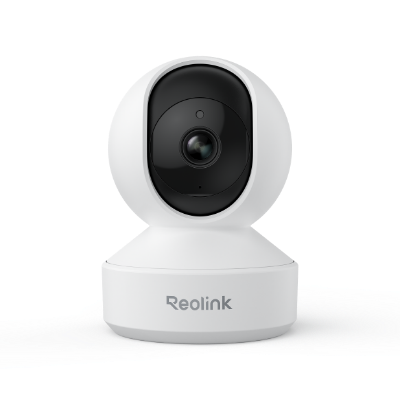
Smart 5MP Wi-Fi PT Indoor Security Camera
Crying Detection for Baby Monitoring; Smart Detection & Auto Tracking; 360° Coverage with Pan & Tilt; 5MP Super HD.
You can take a look at the video sample showing an earthquake in Greece, which is captured by this 4MP wireless smart home security camera (shared by a customer).
2. Best for Large Properties & High-Speed Outdoor Patrol: Reolink RLC-823S2
You need high-speed, continuous monitoring across a broad outdoor property like a large driveway, backyard, or commercial lot.
The Reolink RLC-823S2 is a commercial-grade, outdoor Power over Ethernet (PoE) dome camera. Designed for continuous 24/7 recording, it delivers endless 360-degree high-speed panning and 90-degree tilting controlled directly through the Reolink app.
- Key Specs: Receives both continuous power and data through a single Ethernet cable. Features high-performance infrared night vision reaching up to 100 feet in pitch-black conditions.
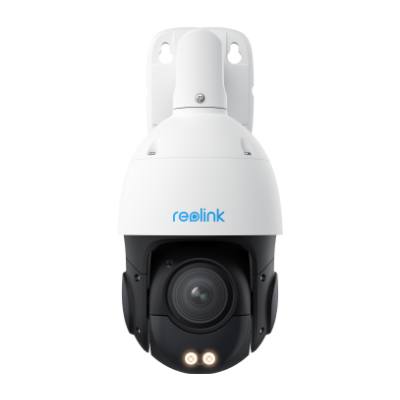
Smart 4K PTZ PoE Security Camera with 16X Optical Zoom
16X Optical Zoom, 360° Coverage in 4K UHD, Auto Tracking, Color Night Vision.
3. Best for Wire-Free Outdoor Tracking & No-Subscription Storage: Reolink Argus PT Ultra
You want advanced auto-tracking to cover a wide outdoor space—like a front yard or garage—without paying monthly subscription fees or running wires.
The Reolink Argus PT Ultra is a wire-free outdoor camera featuring battery or solar power flexibility. It uses a motorized camera body, keeping moving people or vehicles centered in high detail.
- Key Specs: Crisp 4K 8MP resolution with three automated tracking modes. Operates on rechargeable battery or solar panel power, saving all motion clips locally to a microSD card without requiring a monthly cloud plan.
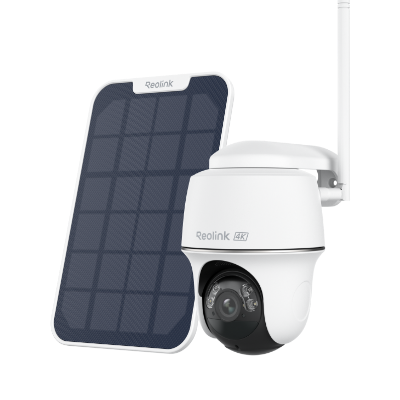
4k 100% Wire-Free PT Camera
4K 8MP Ultra HD; 5GHz/2.4GHz WiFi; Rechargeable Battery & Solar Powered; 355° Pan & 140° Tilt; IP65 Certified Weatherproof; Clear Night Vision; 2-Way Audio; 122° Wide Viewing Angle.
Pan Tilt vs Fixed Security Cameras
How to Fix Common Pan and Tilt IP Camera Issues?
If your pan and tilt camera does not move or respond to remote PT/PTZ controls, try these troubleshooting steps:
-
Check the PT/PTZ controls. Make sure you are using the correct pan, tilt, or zoom controls in the camera app or client and that the camera is online.
-
Use the manufacturer's official software. Some third-party apps or clients may not fully support pan, tilt, zoom, presets, or patrol functions. Test the camera with the official app or desktop client first.
-
Check the network connection. A weak or unstable WiFi connection can cause delayed or unresponsive remote controls. Confirm that the camera has a stable network connection before testing movement again.
-
Restart the camera. Power-cycle or reboot the camera to clear temporary software or connection issues.
-
Update the firmware and app. Install the latest camera firmware and software version to fix compatibility issues and known bugs.
-
Reset the camera if necessary. If the pan-and-tilt function still does not work, perform a factory reset and set up the camera again. Contact the manufacturer if the problem continues.
Buyer's Decision Table
To help bring further clarity to what’s best for you, compare choices with confidence using this quick guide:
FAQs
What does pan and tilt mean on a security camera?
Pan and tilt refer to a camera’s ability to move horizontally and vertically. Panning lets the camera look left and right, while tilting lets it look up and down. Together, these movements allow one camera to monitor a wider area than a fixed security camera.
Do pan and tilt cameras automatically follow people?
Some do. Pan and tilt cameras with auto tracking can detect a person, vehicle, or other supported subject and automatically move to keep it in view. Basic PT cameras may only move when you control them manually through an app or client.
Can I control a pan and tilt camera remotely?
Yes. Most IP pan and tilt cameras can be controlled remotely through the manufacturer’s mobile app or desktop client. You can typically move the camera left, right, up, or down, view live video, and access features such as presets or zoom when supported.
What is the best pan and tilt outdoor security camera?
The best outdoor pan and tilt camera depends on your needs. For reliable 24/7 monitoring, a PoE PTZ camera with weather resistance, auto tracking, night vision, and optical zoom is a strong choice. For locations without convenient wiring, a battery or solar-powered PT camera offers more flexible installation.
Conclusion
Choosing the best pan and tilt security camera brings advanced features to your surveillance. They move horizontally and vertically, covering large areas and reducing blind spots.
When buying pan and tilt security cameras, consider your specific needs. These cameras stand out as dynamic and intelligent, elevating your security with cutting-edge technology.
Search
Subscribe for the Latest Updates
Security insights & offers right into your inbox