
Best Wireless Security Camera Systems with Recorder in Australia
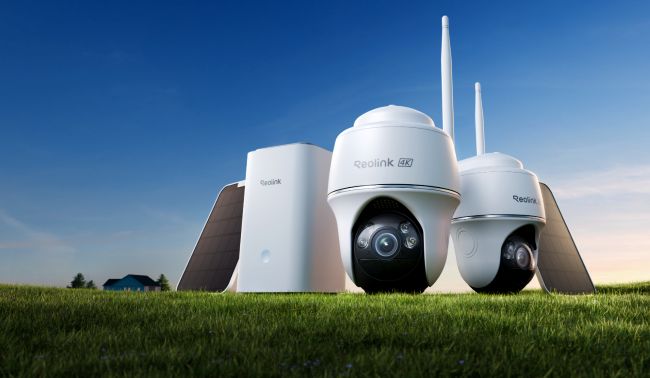
A wireless security camera system with recorder is a preferred option for homeowners, temporary setups, and even businesses. The reasons are convenience, easy installation, and no need to run long cables, all of which reduce installation cost and effort.
Let’s understand what a wireless security camera system with a recorder is and how it works. We will share some important factors to look at to select the right system for your property. We will also compare it with wired systems and share installation steps to make your decision easier.
Key Takeaways:
- A wireless security camera system with a recorder connects multiple cameras wirelessly over Wi-Fi.
- It’s easier to install and is a preferred option for temporary or hassle-free setups.
- All videos are stored in the recorder’s local storage, which works even when there is no internet.
- While choosing a wireless system, consider the recorder’s compatibility, camera capacity, storage, camera resolution, and other features.
- What is a Wireless Security Camera System with Recorder
- How to Choose a Wireless Security Camera System with Recorder in Australia
- Best Reolink Wireless Security Camera Systems with Recorders in Australia
- Wireless vs. Wired Security Camera Systems with Recorders
- How to Set Up a Wireless Security Camera System with a Recorder
- FAQ
- Conclusion
What is a Wireless Security Camera System with Recorder
A wireless security camera system with a recorder is a complete surveillance and monitoring setup that transfers data from the camera to the storage through Wi-Fi. The data transmission is wireless, but it does not imply a complete absence of cables. Some wireless cameras might require wired power.
The cameras capture the footage, and everything is recorded in the local storage of the recorder, which could be microSD cards, HDDs, etc. The video recorder generally needs wiring for both power and a network connection.
Please simplify this section and avoid repeating information between Core Components and How It Works. Clarify that wireless cameras transmit video over Wi-Fi but may still need power cables. Also, distinguish NVR storage from camera or hub storage, and explain the recording process in simple words
Core Components
Wireless Cameras: For video capturing and processing. They could be powered through an adapter, battery, or solar.
Home Hub or NVR: Home Hub or NVR work as a recorder in the system. They manage cameras and store videos in local storage.
Storage: Home Hub stores videos in microSD cards, while NVR stores in HDDs. The local storage is connected to the recorder.
Wi-Fi Router: Cameras are wirelessly connected to the recorder through Wi-Fi router. It carries the video signal and also provides internet access for remote viewing and similar features.
How It Works
Each camera in the wireless system captures video independently. It processes it and does the encoding and compression before transferring it to the recorder (Home Hub or NVR) through Wi-Fi.
Once the recorder receives the data, it saves the footage to storage. If it is continuous, it saves everything non-stop. If it is event-based, it records only when the camera detects a person, animal, or vehicle.
The recorder manages the storage for each camera. It indexes the video clips and overwrites them when it gets full. You can access the recorded videos and see the feed through the camera app or client.
How to Choose a Wireless Security Camera System with Recorder in Australia
Recorder Compatibility and Camera Capacity
Wi-Fi cameras require a compatible recorder to work with. Most consumer-brand NVRs and Home Hubs have a closed ecosystem that only accepts cameras from the same brand. However, you still need to check the compatibility of every camera model with the NVR or Home Hub.
Check whether you can connect wired Wi-Fi cameras or battery-powered Wi-Fi cameras to the recorder. Then, decide on the number of cameras you need. For a small to medium home, a Home Hub is an excellent option. You can connect 2 to 8 security cameras. It offers a unified storage space along with privacy and security.
For larger areas and future expansion, an NVR is a better option. Choose an NVR that has enough capacity or a bit more than your needs. If you have a large property, you probably need a 16-channel NVR. A commercial space or a multi-story building might need more capacity.
Recording Modes and Storage Capacity
In motion-triggered mode, cameras start recording when motion is detected. It’s perfect for saving storage, and you can use them indoors, in apartments, and in small homes. But if you need robust security and want to record 24/7, you need a camera and recorder that support continuous mode. It’s perfect for commercial spaces and sensitive areas. However, it consumes more storage.
The recorder’s storage capacity is based on the number of cameras, bitrate, recording duration, and the desired retention period. You can use the following formula to calculate it.
- Storage GB= Bitrate Mbps × 3600 × Hours/Day × Days × Cameras 8 × 1000
- Suppose we have 4 cameras, 4K resolution using H.265 (4 Mbps per camera), recording 24/7 continuously for 30 days.
- Storage GB=4 Mbps×3600×24×30×48×1000
- Storage GB=5.18 TB
That’s the exact storage you need. However, you should get at least 20% more storage to have enough space to prevent early overwrites.
Wi-Fi Coverage and Connection Stability
Australian buildings are made of exterior bricks, internal bricks, and foil-blocked insulation that reduce the Wi-Fi signal strength. To cover a wider area, you either need a strong Wi-Fi router or use a mesh network for reliable coverage at multiple locations.
Go with dual-band Wi-Fi options. 5 GHz offers high bandwidth for 4K video but fails through single brick walls. In contrast, 2.4 GHz penetrates materials better but suffers from congestion in dense suburbs. If you have dual-band, you can choose what works best in your scenario and set the right band for each camera.
Camera Resolution and Coverage
Higher resolution cameras capture rich details with clarity. But they consume more storage and bandwidth. Ideally, use 4K and higher resolution cameras where you need them the most, such as the front door and driveway to identify people and vehicles. But for indoors and non-sensitive locations, a 2K or 3K camera will also work and save some storage space.
If you want to focus on a specific area and have a longer range, you need a bullet camera, as they cover 90° to 110° horizontally. For a wider area, like a backyard or pool, you can select a dual-lens security camera with 180° coverage. PTZ cameras can cover 360°, as they have pan and tilt motion plus the zooming capability.
Smart Detection and Remote Monitoring
Smart detection enables a camera system to detect and identify objects. You get a real-time alert along with details of the object, such as a person, pet, or vehicle.
The primary advantage of a wireless security system with a recorder is centralised camera management and remote access. Users who have access to the camera can view multiple cameras on a screen or their phone at any location. They can search for the desired event/footage in the storage and manage everything.
It's also important to check whether smart detection and playback features remain available when cameras are connected to the recorder. Because sometimes recorders don’t support these camera features.
Best Reolink Wireless Security Camera Systems with Recorders in Australia
Home Hub with Argus PT Ultra—For Robust Outdoor Security
This wireless security system is excellent for outdoor security in Australia. Firstly, it has 4K security cameras with pan and tilt motion. They can cover 360° and offer detailed footage. Even at night, its dual night vision records clear videos. It’s a standalone battery/solar Wi-Fi camera system, so the cameras are charged automatically.
The cameras also have an aluminium casing, which is perfect for withstanding Australian weather conditions. The Home Hub can support up to 8 cameras. It’s a recorder with a 128GB microSD card (included), and it can also work as an alarm centre. You can increase the storage up to 2TB, which is enough for storing videos of all cameras.
Best for: Pool area, side yards, blind alleys, property corners, front porches, and back decks
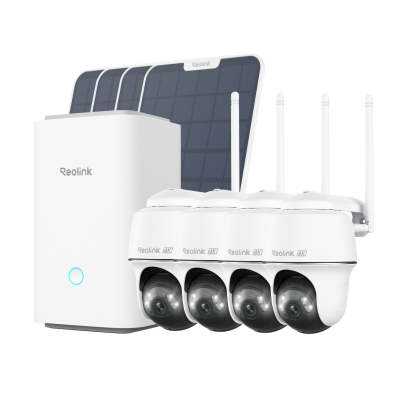
Wireless Security System With 4K PT Standalone Battery/Solar Wi-Fi Cameras
4K Color Footage Day & Night, 1 Year of Local Storage, Exclusive Anti-Theft Algorithms, 360° All-Around Coverage, Expandable System Up to 8 Reolink Cams.
Home Hub with Argus 4 Pro—Wider and Blindspot-free Coverage
If you want to cover a large area, such as a backyard, driveway, or large pool, Home Hub with Argus 4 Pro is a great option. The Argus 4 Pro is a dual-lens security camera that covers 180° without leaving any blind spots. You can monitor everything in 4K resolution. The notable part is its ColorX night vision technology, which records clear videos even in the darkest conditions.
The cameras are powered by solar panels. They offer reliable outdoor performance. The Home Hub can record videos without any monthly subscription. Plus, it offers storage encryption for privacy and works as a reliable alarm centre.
Best for: Driveway, front gate, yard corners, patio, parking lots, and open lawns
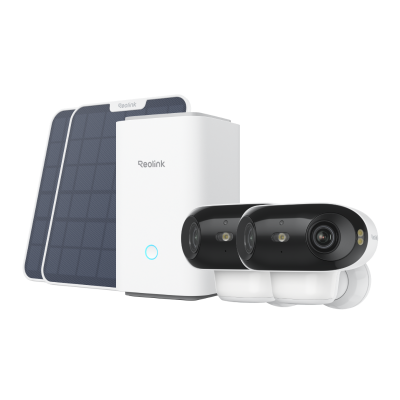
4K UHD Wi-Fi 6 Security System with 180° Blindspot-Free View
ColorX Night Vision, 1 Year of Local Storage, Exclusive Anti-Theft Algorithms, 180° Blindspot-Free Coverage, Expandable System Up to 8 Reolink Cams.
Home Hub with Altas PT Ultra—For 360° Outdoor Coverage
For covering larger spaces with fewer cameras, you can go with Home Hub with Altas PT Ultra. The cameras record in 4K resolution and cover 360°. The auto-tracking feature tracks the movement of objects and sends real-time alerts. The pre-recording technology starts recording the video before the event starts to capture every moment. You can remotely monitor your home, office, or business.
The cameras have a built-in battery and are powered by solar. With a 20,000mAh battery, they can last up to 500 days on a full charge. Thus, they work even in the cold Australian winters. The Home Hub offers offline data storage, supports two 1TB microSD cards, and ensures optimal privacy with anti-theft algorithms. You get all these things without any subscription or monthly charges.
Best for: High-traffic driveways, front gates, pool zones, outdoor storage areas, construction boundaries
Wireless vs. Wired Security Camera Systems with Recorders
Wireless camera systems are convenient and easy to install. There is no need for wiring and physical cables, so you can even use them in a rented home, apartment, or almost any location. In contrast, wired camera systems require a physical Ethernet cable to run from the camera to the recorder. They are difficult to install, but they offer reliable performance.
How to Set Up a Wireless Security Camera System with a Recorder
Let’s take a Reolink Home Hub system to understand how
Select Camera Positions: Decide on where you want to place the security cameras. Check the Wi-Fi signal strength there and mark the location.
Install the Cameras: Drill the required holes for the camera mount. Secure the mount and place the cameras over them.
Start the Hub: Power on your Home Hub using the given power adapter. Connect it to the nearby wall outlet. Use the given Ethernet cable to connect it to your Wi-Fi router.
Initialise the Hub: Connect your phone to the same Wi-Fi router. Download the Reolink app and create an account. Open the app and tap the “+” button. Scan the QR code on the Home Hub. Short-press the Hub Mini button to activate it. When you hear the 'Welcome to Reolink' from the device, tick the voice confirmation, then tap Next to continue. Set a name and password, and complete the initialisation setup.
Add Cameras: Tap the “+” button on the app and scan the QR code of the camera. Now, select Use with Home Hub. Follow the on-screen instructions and connect all cameras similarly. Once added, you will see all cameras in the Home Hub management.
Test Camera Angles and Recording: Once everything is connected, test the live feed. Adjust the camera angles if needed. Finally, check if all cameras are recording videos in the local storage. Also, play the recorded videos and event recordings.
FAQ
1. Do Wireless Security Camera Systems Come with a Recorder?
If you are buying a complete system or kit, then the cameras will come with a recorder or NVR. However, there are also wireless standalone devices that do not need a recorder and save videos on a microSD card or in the cloud.
2. Can a Wireless Security Camera System Record 24/7?
It depends on the camera you have. Wired Wi-Fi cameras can record 24/7 as they receive continuous power. Check the camera’s recording modes to confirm.
3. Can a Wireless Security Camera System Work Without Internet?
Wireless security camera systems can work without internet. They can store videos in local storage. However, they won’t be able to offer remote access, live feed, and other features that require internet.
4. Can I Add More Cameras to an Existing Wireless Security Camera System?
You can add more cameras to an existing wireless security camera system up to the recorder’s capacity. Check the number of channels that the NVR has to know the maximum number of cameras you can connect.
5. Do Wireless Security Camera Systems with Recorders Require a Monthly Subscription?
Not all wireless security camera systems with recorders require a monthly subscription, but some do. Reolink security camera systems are subscription-free, and users can use all advanced features without paying recurring charges.
Conclusion
A wireless security camera system with a recorder is an easy-to-install option. There is no wiring needed, and users can add multiple cameras to secure different locations. The videos of each camera are stored in the recorder, which offers a unified storage space and interface to control all cameras. We have explained some key factors to consider while buying a wireless security camera system with a recorder and shared some worthy options to make your selection hassle-free.
Search
Subscribe for the Latest Updates
Security insights & offers right into your inbox