
Best PoE Security Camera Systems in Australia
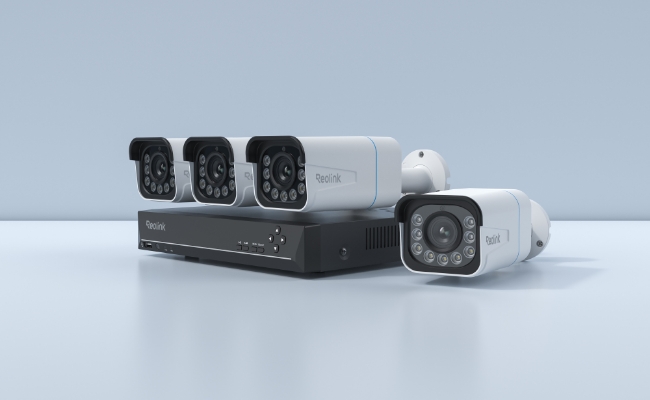
A PoE camera system is a reliable wired security camera setup. It’s an ideal option for Australians, as there is no need to worry about Wi-Fi dropouts, jamming risks, or large properties, as you can run the cable up to 100m. Whether it’s your home, rural property, or anywhere, it is suitable for 24/7 monitoring.
Let’s understand what a PoE security system is and how it works. We will discuss its core components and things to look at while buying one. We will also explain how you can install it to secure your premises.
Key Takeaways:
- PoE system is best for homeowners and businesses wanting reliable 24/7 monitoring
- One cable, no Wi-Fi limitations, consistent performance, and works on large properties
- The only limitation is that the installation requires Ethernet cables to be run
- Consider camera count, resolution, and NVR capacity according to the property
What Is a PoE Camera System?
A PoE camera system is a wired security setup for surveillance and monitoring. It consists of IP cameras that are powered and networked through a single Ethernet cable. Because of a wired network, the system ensures reliable performance and eliminates the need for a separate power cable.
Core Components
-
PoE Camera: Multiple PoE cameras are connected to monitor a wider area and different locations.
-
NVR: One platform to receive, process, and store digital footage captured by the cameras.
-
PoE Switch: An optional component that transfers power and data signals through the Ethernet cable. Often, NVRs have built-in switches.
-
Ethernet Cabling: One Ethernet cable is needed to connect the camera to the PoE switch or NVR.
-
Router: Connects the complete system to the internet. The NVR is directly connected to the router through an Ethernet cable.
How It Works
The PoE cameras capture video and process it. Then, they transmit the data through the Ethernet cable. The NVR receives the data and stores footage in its local storage. As the system is connected to the internet, you can access the footage remotely and even see the live feed of each camera.
How to Choose a PoE Camera System in Australia?
Number of Cameras
The number of cameras depends on the property type, area, and locations you want to cover. You can install the camera at the front door, backyard, living room, hallway, driveway, garage, pool, or any location where monitoring is required.
For small homes and apartments, 2-4 security cameras are enough. If you have a suburban house around 0.25 acres, it would require at least 4-6 cameras. For rural properties and large acreage, you need 6-10 or more security cameras, depending on the area.
NVR Capacity
The NVR capacity should be according to the cameras you want to mount. If you want to install four security cameras, you can go with an 8-channel NVR, which gives you some room to add more cameras in the future.
For a small home, a 4-channel NVR is suitable. For large properties, go with an 8-channel or 16-channel NVR. If there is a commercial property covering multiple places at once, a 32-channel NVR would be a better choice, as it also handles future scalability.
Camera Resolution
Choosing the right camera resolution relies on the application. For covering driveways, front door, and other sensitive locations, go with at least 4K resolution. They capture rich details with clarity. The same is the case with large and wide areas.
For indoor and general monitoring where you don’t need high resolution, you can go with 2K or 4MP security cameras.
Field of View & Camera Type
For large areas, you need a large field of view. Dual-lens cameras cover up to 180°, while PT cameras can cover up to 360° with pan and tilt motion.
If you require a focused field of view to cover the front door or specific areas, a bullet camera is fine. It offers a 90°-110° field of view, which is more than enough. Areas with a high risk of vandalism and tampering require a vandal-proof dome security camera.
NVR Storage Capacity
Event-only or motion-triggered recording requires less storage. In such a case, you can have at least 2-4TB of storage to store videos of 5-6 4MP security cameras for several weeks.
However, most PoE cameras are installed for 24/7 monitoring. Therefore, go with 4-8TB or higher, depending on the number of cameras you have.
Smart Detection
Smart detection features are a must to distinguish between objects and reduce false alerts. For general security and monitoring, person and vehicle detection are necessary.
If you monitor pets or wildlife, the camera should be able to detect them accurately. Similarly, if you are getting the camera for the front door or driveway, package detection is extremely useful.
Best PoE Camera Systems in Australia
RLK8-1200D4-A—Best for Glare-free Indoor/Outdoor Monitoring
For clear outdoor and indoor monitoring, RLK8-1200D4-A is an excellent choice. It consists of four dome security cameras that record video in 12MP resolution for exceptional clarity and detail. Whether it’s a human face or a license plate, the camera captures every minor detail. It works well in Australian bright sunlight as it avoids glare/reflection.
It can detect people, vehicles, and pets and send real-time alerts. You can use colour or infrared night vision for night security. It’s equipped with an 8-channel NVR, so you can add more cameras to cover more locations. The storage is a 2TB HDD, but you can increase it up to 16TB, which is more than enough.
RLK8-1200V4–Best for Protection Against Tampering
If you live in an area where tampering and vandalism are common, you can go with the RLK8-1200V4. It has four IK10 vandal-proof security cameras to withstand impacts. Because of the dome shape, it has a 145° super-wide viewing angle. Thus, it’s great for capturing wide areas of large Australian homes, like a driveway, backyard, and front porch.
It’s a good option for commercial premises and retail stores, and also apartments and shared spaces because of its discreet appearance. It comes with an 8-channel NVR with a 2TB HDD. You can connect more security cameras and increase the storage up to 16TB. It’s ideal for 24/7 outdoor recording, and it can withstand harsh weather conditions because of its IP67 rating.
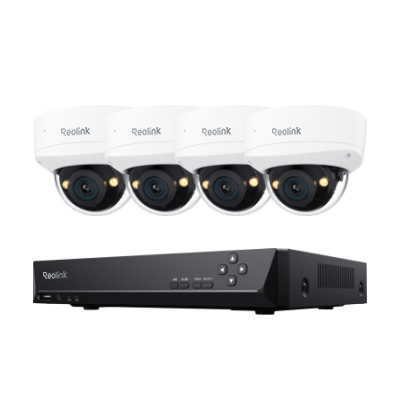
Smart 12MP IK10 PoE Surveillance System with 145° View
12MP UHD with Spotlight Night Vision; 145° Super-Wide Viewing Angle; IK10 Vandal-Proof; 8-Channel NVR with 2TB HDD.
RLK8-1200B4-A–Best for Deterring Intruders and Long Range
RLK8-1200B4-A is a PoE camera system with 12MP bullet cameras. It’s perfect for locations where you want the cameras to be visible to deter intruders. With the 12MP resolution, the cameras record exceptional detail with clarity. Even at night, they capture clear video with spotlight colour night vision.
The system has an 8-channel NVR that comes with a pre-installed 2TB HDD. You can expand the storage up to 16TB. It’s suitable for 24/7 continuous recording and robust security.
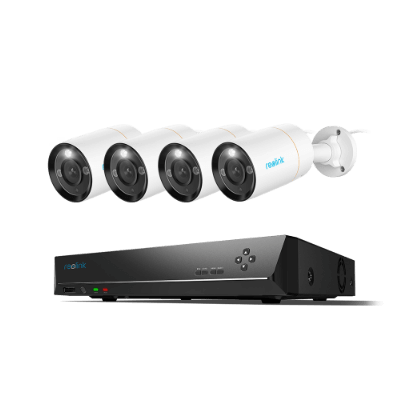
12MP 8-Channel PoE Surveillance Kit with Spotlights
4 pcs 12MP Ultra HD Security Cameras; 2TB HDD 8-Channel NVR for 24/7 Recording; Person/Vehicle Detection; Color Night Vision.
How to Install a PoE Camera System
- Planning: Before getting started, decide on the camera positions. Select the locations where you want to install the cameras. Secondly, plan the Ethernet cable routes, as you will have to lay a separate cable for each camera.
- Install Cameras: Drill the required holes at the camera locations. Use the mounting brackets and secure them. Secure all cameras.
- Connect the NVR to the Router: Connect the NVR to the router using an Ethernet cable. Also, connect the power adapter to a nearby wall socket.
- Lay Ethernet Cables: You need to connect all security cameras to the NVR. Lay Ethernet cables for each camera properly.
- Connect All Devices: Connect all cameras to the ports of the NVR. Ensure all devices are connected and powered. Turn them on and complete the setup.
- Completing app/client setup: Install the system applications on your phone or client on the computer. Connect the NVR and cameras to the app.
- Testing camera angles and recording: Once all cameras are connected, you will see the live feed. Test their angles and adjust if needed. Also, make sure all cameras are saving the videos to local storage.
PoE Camera System vs Wi-Fi Camera System
The primary difference between PoE and Wi-Fi camera systems is how they are powered and networked. PoE cameras require only one Ethernet cable for power and network. On the other hand, Wi-Fi cameras transfer data through Wi-Fi and can be powered through wire, battery, or solar.
FAQs
How much does a PoE camera system cost in Australia?
Entry-level systems are around $AUD 500-700. Mid-range systems are nearly $AUD 1,000-1,500, and the high-end or large system can cost around $AUD 1,500 to $AUD 3,500.
Do PoE cameras still need to be plugged into an outlet for electricity?
No, PoE cameras are powered through an Ethernet cable, which is also used for data transfer. You don’t need to plug them into an outlet.
Does a PoE camera system require a subscription?
No, PoE camera systems do not require a subscription. They record the video and save it to local storage. However, some manufacturers offer advanced features, such as smart detection, two-way audio, and remote access, through a subscription.
Should I buy a PoE camera kit or cameras and an NVR separately?
It’s better to buy a PoE camera kit because it includes security cameras and an NVR. You will not have any compatibility issues.
Conclusion
A PoE camera system offers utmost reliability and is the perfect option for 24/7 monitoring. You only need to run an Ethernet cable for each camera, and it will be used for power and data transfer. Running Ethernet cables is a bit difficult and costly, but it will offer exceptional speed, video quality, and performance. Consider the important factors we have shared to select the right PoE camera system for your needs.
Search
Subscribe for the Latest Updates
Security insights & offers right into your inbox