
Why Is My Internet So Slow on My Phone? Common Causes & Fixes
Many people open a website and stare at the spinning circle. The question “why my internet is so slow on my phone” pops up every day in support chats and store counters. Slow data feels like a flat tire; the ride still moves, but every action drags.
This article walks through the most common causes why the internet is slow on phone and gives clear, tested fixes that work on any phone sold in the United States.
Why Is My Internet So Slow on My Phone?
Before you blame the carrier, remember that a phone is a small computer. Every part, from the plastic case to the software update waiting in settings, can choke the flow of data. Below are the usual suspects of why is my phone so slow on the internet:
Weak Signal Bars
Three bars look fine, but one bar of LTE often gives less than one megabit per second. Walk outside or stand near a window. If the speed jumps, the building is the problem, not the tower. A cell booster or Wi-Fi calling can solve the issue without a new phone plan.
Crowded Tower
A stadium, a mall, or a busy highway can overload the nearest tower. Speed drops even when you show full bars. Run a speed test at 7 AM and again at 7 PM. If the night result is far lower, traffic is the cause. You cannot fix the tower, but you can move a few blocks away or switch to Wi-Fi until the crowd thins.
Data Cap Throttle
Most prepaid and many post-paid plans slow you down after you use a set amount of data each month. Open your carrier app and look for a line that says “high-speed data used.” If you hit the limit, the only quick cure is to buy more gigabytes or wait until the cycle resets.
Old Software
Phone makers ship updates that patch radio bugs. Go to Settings > System > Software Update. A ten-minute download can double in speed if the old code was faulty. This fix costs nothing and works on every brand.
Background Apps
Social media apps refresh in the background and chew data before you open them. On Android, open Settings > Network & Internet > Data Usage, then restrict background data for heavy apps. On iPhone, go to Settings > General > Background App Refresh and turn it off for non-essential programs. The change is instant and free.
VPN Overload
VPNs protect privacy, but a server in another country adds distance to every request. Disconnect the VPN and test again. If the speed returns, switch to a closer server or keep the VPN off when you need raw speed.
Full Cache
The browser keeps small pieces of every site. After months, the pile slows down the app. Open Chrome, tap the three dots, choose History, then Clear Browsing Data. Pick “Cached images and files” and clear it. Do this once a month, and pages start loading faster.
Broken SIM Card
A cracked or dirty SIM loses contact for milliseconds. The phone keeps asking for the tower again and again. Power off, pull the SIM tray, and look for cracks or gold corrosion. Clean with a soft eraser or ask the carrier for a free replacement. This five-minute swap fixes mystery slowdowns that no app can touch.
A faulty SIM card can affect not only phones but also the performance of 4G security cameras. Always double-check your SIM before inserting it.
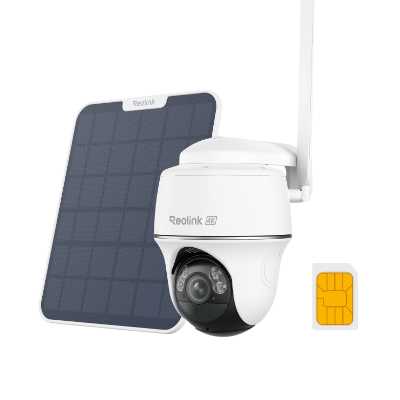
4K 8MP Wire-Free 4G LTE PT Battery Camera
4K 8MP; Smart Detection; 355° Pan & 140° Tilt; Battery/Solar Powered; Color Night Vision; Smart Real-Time Alert.
Why Is My Internet So Slow on My Android Phone?
Android gives the user more knobs to turn, and each knob can be turned the wrong way. If you typed “why is my phone so slow on the internet” into Google and you carry an Android, check these points first.
-
Battery Saver Mode: Android turns the CPU down and shuts off radios to save power. Pull down the top shade and turn off Battery Saver. Run a speed test again; many users see an instant jump.
-
Data Saver: Chrome has its own Data Saver switch. When it is on, Google compresses pages through a proxy. The setting cuts usage but also chops speed on fast sites. Open Chrome, tap the three dots, Settings > Data Saver > Off.
-
Auto-update Over Mobile: The Play Store can update forty apps while you sit in a café. Swipe down from the top, tap the gear, Network & Internet > Data Usage > App Data Usage > Google Play Store > Background Data > Off.
-
Bloatware: Cheap phones come with games that load ads on boot. These apps eat data before you unlock the screen. Go to Settings > Apps > Permissions and remove every app you did not install. If the Uninstall button is gray, at least disable the program.
-
Wrong Network Mode: An old phone may latch to 3G even when 4G towers stand nearby. Open Settings > Network > Mobile Network > Preferred Network Type and pick “4G/5G only.” Restart the radio by turning Airplane Mode on and off.
Why Is Internet So Slow on My iPhone?
Apple locks most settings, but a few hidden items still rob speed. Review the list below before you book a Genius Bar visit.
-
Low Data Mode: iOS 13 and later has a toggle that tells every app to use less data. Open Settings > Cellular > Cellular Data Options > Low Data Mode > Off.
-
Background Tasks: The Photos app can upload the whole camera roll when you leave the house. Go to Settings > Photos > Cellular Data and choose “None.” The upload pauses until Wi-Fi returns.
-
Wi-Fi Assist: When Wi-Fi is poor, the phone secretly jumps to LTE. The handover can stall both links. Disable it under Settings > Cellular > Wi-Fi Assist > Off.
-
Old Profile: Beta profiles or old carrier files break radios. Open Settings > General > VPN & Device Management and remove any profile you no longer need. Restart the phone.
-
Location-based Throttling: Some family plans throttle only the child lines after a quota. Check Settings > Cellular > Current Period Data and compare with the parent phone. If the numbers differ by gigabytes, the carrier has applied a cap.
How to Fix Slow Internet on Phone?
You now know the causes. Below are step-by-step instructions that take under ten minutes and cost zero dollars to fix why my phone internet so slow.
Restart the Phone
Press and hold the power button until the slider shows, then shut down. Wait thirty seconds and power back on. A restart flushes radio memory and forces the device to search for the strongest tower again. Do this first; it solves half of all tickets at carrier stores.
Reset Network Settings
Wrong passwords and old proxy entries pile up. Open Settings > General > Reset > Reset Network Settings on iPhone, or Settings > System > Reset > Reset Network Settings on Android. You will re-enter Wi-Fi passwords, but the phone builds fresh connection tables and often regains lost speed.
Update Carrier Settings
Carriers push small patches that tune towers. On iPhone, plug into power, go to Settings > General > About, and wait for a pop-up. On Android, open Settings > About > SIM Status and tap “Update Carrier Config.” Accept the file and reboot.
Run a Speed Test in Safe Mode
Third-party apps can install adware that eats bandwidth. Hold the power button, then long-press “Power Off” until “Reboot to Safe Mode” shows. Test speed in this clean state. If the numbers rise, uninstall the last few apps you added.
Switch DNS
The carrier DNS can be slow. Open Settings > Network > Private DNS and type ‘dns.google’ on Android. On iPhone, install the free “DNS Override” profile from Cloudflare. Pages start loading in half the time for many users.
How to Prevent Slow Internet on My Phone in the Future?
Prevention beats repair. Build these habits and you will ask why my phone's internet is so slow far less often.
-
Monitor Usage Weekly: Open your carrier app every Sunday and note how much data remains. Adjust video quality before you hit the throttle line.
-
Use Wi-Fi at Home and Work: Add trusted networks to the auto-join list. The less you demand from LTE, the more speed stays in the bucket for the road.
-
Keep Thirty Percent Storage Free: When the phone storage drops under one gigabyte, iOS and Android both pause background tasks, and radios work harder. Delete large videos once a month.
-
Auto-update Only on Wi-Fi: In both app stores, choose “Wi-Fi only” for updates. You avoid surprise gigabyte downloads that trigger caps.
-
Buy a Mid-band 5G Plan: Low-band 5G is barely faster than LTE. Ask the carrier for a plan labeled “C-band” or “Ultra.” The extra ten dollars a month removes the old speed ceiling.
FAQs
How do I fix a slow internet connection on my phone?
Start with a restart, then check for data cap and disable battery saver. Update software, clear cache, and test again.
How do I find out what is slowing down my phone?
Open Settings > Data Usage, sort by app, and look for heavy usage. Run a speed test in Safe Mode to spot rogue apps.
Why is my 4G so slow?
You may be on a crowded tower, past your data cap, or set to 3G mode. Move a block, buy more data, or switch network mode.
Conclusion
Slow phone internet steals time and patience. Weak signal, data caps, old software, and hidden app traffic are the main answers to “why my internet is so slow on my phone.”
Walk through each fix in order: restart, check settings, update, then test again. Most users regain full speed in under fifteen minutes without spending a dollar. If you found another cause or a new fix, share your experience in the comments so others can benefit.
Search
Subscribe for the Latest Updates
Security insights & offers right into your inbox