
Why Is My Ethernet Slower Than Wi-Fi? Understanding the Causes
An Ethernet connection is usually faster than Wi-Fi. If you are experiencing the other way round, it means there is an issue with your connection or network.
In this article, we will discuss why your Ethernet is slower than Wi-Fi. We will discuss the common reasons behind it to figure out the root cause. We will also share some methods to resolve the issue.
Why is My Ethernet Slower Than Wi-Fi?
Typically, your internet shouldn’t be slower than Wi-Fi. And if it is slow, it indicates a problem. The most common reason is cable damage. If any wire is broken or offers resistance to signals, it slows down the internet. People often use switches in the wired connections. Make sure it is compatible with the speed. Also, the connector could be damaged or improperly connected.
If the cable is perfect, there could be an issue with the router. Often, old routers have a cap on the usage of the Ethernet port. They do not allow higher speeds on the wired connections. The Ethernet cable also connects to the Network Interface Card (NIC). If it is old and does not support speeds over 100Mbps, replace it with the latest one. If all these things are perfect, the driver could be outdated.
Other than these, some other reasons are QoS settings, VPN, signal interference, malware, and ISP throttling.
How to Solve Ethernet Slower Than Wi-Fi?
-
Cable Inspection: Inspect the cable and look for any visible damage. If the cable is too old or outdated, it is better to get it replaced with at least Cat5e or better options, such as Cat6, to enjoy optimal speed.
-
Router/Switch Replacement: If the switch is limiting speed or is faulty, replace it with a better one. In case of an old or outdated router, get an advanced router that supports higher speeds.
-
NIC Updated: The NIC connected to your computer or device could be replaced with an advanced variant that works with the latest Wi-Fi standards and high-speed connections.
-
QoS Settings: Your router could be prioritizing the wireless connection. You can change it in the QoS settings to improve the Ethernet speed.
-
Update Driver: Update the NIC driver. An outdated drive could affect the speed. Download the driver from the manufacturer’s website and install it.
-
Anti-Malware: Run an anti-malware to find existing malware in the system and get rid of it.
Wi-Fi vs Ethernet: What's the Difference?
Wi-Fi is a wireless connection that offers convenience. Users can get connected in no time without any wiring mess. As long as you are within the Wi-Fi range, you can enjoy excellent internet speed. You can connect multiple devices just by entering the credentials. However, it could get slower because of physical obstructions, signal interference, and latency. Secondly, it’s vulnerable to interception.
An Ethernet connection requires proper wiring, but it offers incredible speed and reliability. It is much faster than Wi-Fi and offers low latency for real-time applications. There is no need to worry about signals and range, and it is more secure. The issues with Ethernet are the inconvenience, the limited number of devices, and the wiring mess.
Recommended Security Cameras with Fast Internet Speeds Without Latency
Wi-Fi 6 Security Camera: Reolink Altas
Reolink Altas is a dual-band Wi-Fi 6 security camera that offers incredible speed, reliable connectivity, and robust security. You can see a smooth live feed and get real-time alerts on the connected devices. It’s a battery-powered camera that can last up to 540 days and connects to a solar panel for automatic recharging.
The camera records videos in 2K resolution for exceptional clarity and detail. It has a 10-second pre-recording feature to record before the event starts. It is equipped with Reolink ColorX night vision, which captures true colors even in the darkest conditions. It supports up to 512GB SD card and offers IP66 rugged protection.
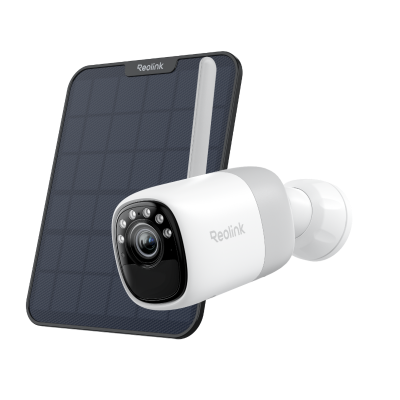
2K Pre-recording Bullet Camera with a Long Lasting Battery
2K 10s Pre-recording ; ColorX Night Vision; 20,000mAh Battery; Dual-band Wi-Fi 6.
Ethernet Security Camera: Reolink CX820
Reolink CX820 is a Dome PoE security camera. It’s a plug-and-play device that offers a reliable connection and fast speed. It captures videos in 4K resolution, which ensures intricate details. Its HDR technology offers vivid colors and makes darker areas clearer. It is equipped with F1.0 super aperture to record true colors at night.
The camera records at 25fps, which makes the live feed and videos smoother. It can detect persons, pets, and vehicles and reduce false alerts. It also offers perimeter protection for enhanced security. Its 3000K spotlights are neighbor-friendly and can also deter intruders.
FAQs
1. Is Ethernet faster than Wi-Fi?
Ethernet is usually faster than Wi-Fi. It creates a direct connection between the router and device and offers higher speeds than Wi-Fi with low latency.
2. Why is my Ethernet slower than Wi-Fi Xbox?
Use a better Ethernet cable that supports higher speeds. Use an advanced router with a high bottleneck on the Ethernet port. Update the Xbox firmware and prioritize Ethernet in QoS settings.
3. Why is my Ethernet not getting full speed?
Check the QoS settings and give priority to the Ethernet connection. Use Cat5e or better Ethernet cables and install newer routers that support speeds over 100Mbps.
4. How to change Ethernet speed?
Open Device Manager. Under Network Adapter, right-click on the Ethernet adapter and click Properties. Go to Advanced > Speed & Duplex and enter the speed value you want.
Conclusion
Your Ethernet connection should be fast, and if you are facing slow speeds, you need to find the root cause to solve the issue. We have explained some common reasons behind slow Ethernet speed. Figure out the issue with your connection and implement the solutions we have discussed.
Search
Subscribe for the Latest Updates
Security insights & offers right into your inbox