
Security Camera that Connects to Phone without WiFi: No Wi-Fi? No Problem
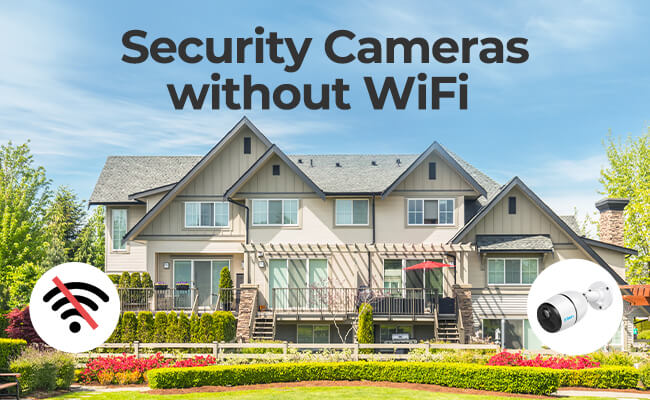
If you're looking for security cameras without WiFi or a security camera that connects to phone without WiFi, your first option should be a 4G wireless camera. These cameras work independently with a data plan, so you can keep an eye on your property even when you're not home.
There are also some other options out there, you can save footage from local storage, like an NVR security system or SD card ,We'll go over each of these solutions in detail, so you can find the perfect security camera for your needs when you don't have a WiFi or Internet access.
- Is There a Security Camera that Works without WiFi?
- What Are the Common Types of Security Cameras Without Wi-Fi?
- Where to Use Security Cameras that Connect to Phone without WiFi?
- How to Connect a Security Camera Directly to a Phone Without WiFi
- Step-by-Step Guide: How to Install a Non-WiFi Security Camera Off-Grid
- WiFi vs. Non-WiFi Security Cameras: What's the Difference?
- Real-World Feedback on Security Cameras without WiFi
- Frequently Asked Questions
- Conclusion
Is There a Security Camera that Works without WiFi?
Yes—security cameras can completely bypass traditional Wi-Fi networks and still transmit data directly to your phone. These systems are specifically engineered for off-grid properties, rural areas, or as a reliable backup during local internet and power outages.
How Non-WiFi Security Cameras Work
When a security camera cannot rely on a standard Wi-Fi router, it uses one of three distinct foundational technologies to record data or communicate with your phone:
-
Cellular Modems (4G/5G LTE): The camera features an internal cellular chip and SIM card slot. It operates exactly like a smartphone, transmitting encrypted video data over cellular towers directly to cloud servers, which then route the feed to your mobile app.
-
Localized RF Wireless / AP Mode: The camera acts as a standalone wireless access point. It broadcasts a short-range, local radio frequency or localized Wi-Fi signal that your phone can connect to directly when you are within physical proximity.
-
Hardwired Local Networks (PoE & NVR): The camera utilizes physical Ethernet cables to transmit video data directly to a local Network Video Recorder (NVR) hard drive. This keeps all data transmission entirely offline and off the airwaves.
Can Security Cameras Connect to a Phone Without WiFi?
Yes. If you choose a camera equipped with 4G/5G LTE cellular connectivity, it will connect directly to your smartphone app anywhere in the world. This approach replicates the exact functionality of a standard smart home camera, allowing you to:
-
Stream high-definition live video remotely through a mobile app.
-
Receive instant, real-time motion detection push notifications.
-
Maintain constant surveillance during grid failures, as cellular towers frequently run on backup generator power.
What Are the Common Types of Security Cameras Without Wi-Fi?
While mainstream smart home security heavily relies on Wi-Fi, the market offers robust alternatives for off-grid properties, rural structures, or high-security applications where wireless networks are absent or untrusted.
When shopping for an internet-free surveillance setup, you will primarily choose between three common types of security cameras:
1. 4G/5G Cellular Security Cameras (Best for Mobile Remote Access)
Cellular security cameras bypass Wi-Fi entirely by utilizing mobile network towers to stream video and send alerts. These devices feature an integrated cellular modem and operate via a dedicated SIM card. Because they are designed for locations completely devoid of infrastructure, they are almost always paired with high-capacity rechargeable batteries and dedicated solar panels for continuous, off-grid power.
-
How Connection to Your Phone Works: The camera sends compressed video data over cellular frequencies to a cloud server, allowing you to access a live stream, configure settings, and use features like two-way audio from your smartphone app anywhere in the world.
-
Key Advantage: It is the only standalone wireless type that offers real-time push alerts and remote viewing when miles away from the camera.
-
Hidden Cost: You must maintain an active mobile data plan for the SIM card. Data is consumed strictly during live-streaming, app configuration, or cloud backups.
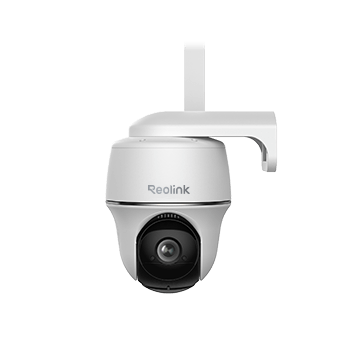
Wire-Free 4G LTE PT Security Camera
No WiFi or Power Connection Needed; Rechargeable Battery or Solar Powered; Person/Vehicle Detection, 355° Pan & 140° Tilt, 2K Super HD.
2. Standalone Local Storage Cameras (Best for Budget-Friendly Offline Recording)
These are standard security cameras configured to run completely offline by storing footage onto an onboard MicroSD card. Unlike internet-tied cameras that freeze up or stop working when disconnected from a network, offline local storage models require zero data connections to perform their basic job: detecting motion and capturing evidence.
-
How Connection to Your Phone Works: Because there is no internet, you cannot check these cameras remotely. To view your footage, you must either stand next to the camera and connect to its built-in short-range wireless access point (AP Mode), or physically remove the MicroSD card to read it on a smartphone, tablet, or computer.
-
Key Advantage: 100% free operation with zero monthly data subscriptions, zero contract fees, and total protection against remote digital hacking.
-
Limitation: No real-time alerts. If an incident or break-in occurs, you will only discover the footage after inspecting the card retroactively.
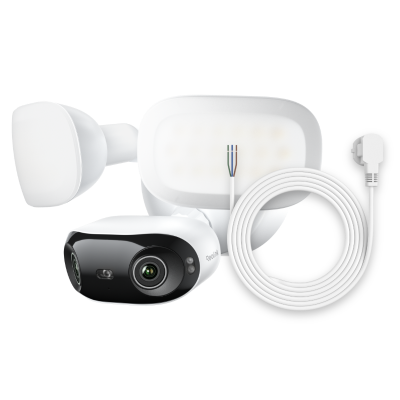
4K 180° Ultra-Wide Wired Floodlight Security Camera
3000-Lumen Dimmable Lighting, Adjustable Color Temperature, Local AI Video Search, Local Storage, Dual-Band Wi-Fi 6.
3. Hardwired NVR (Network Video Recorder) Systems (Best for 24/7 Continuous Monitoring)
An NVR system is a comprehensive, multi-camera solution ideal for large residential properties, commercial job sites, or complexes without Wi-Fi. Instead of transmitting individual signals through the air, multiple cameras are physically linked via Ethernet cables (Power over Ethernet, or PoE) to a central hardware recording hub containing a high-capacity hard drive.
-
How Connection to Your Phone Works: Out of the box, an NVR system operates completely offline, feeding video directly to a local TV or monitor for 24/7 localized viewing. However, if you want phone access, you can plug the NVR central hub into a local router. Your smartphone can then connect to that router's localized network to stream footage directly to your phone while you are inside the building—all without utilizing a single drop of outside internet bandwidth.
-
Key Advantage: Supports constant 24/7 high-definition loop recording across multiple cameras simultaneously, without ever bogging down airwaves or draining batteries.
-
Limitation: Requires physical cable routing and installation from each camera location back to the central recorder unit.

12MP PoE Security System with Color Night Vision
12MP Ultra HD, Person/Vehicle Detection, Power over Ethernet, 16-Channel NVR.
Where to Use Security Cameras that Connect to Phone without WiFi?
Security cameras that do not require an active Wi-Fi network are essential for environments where internet infrastructure is non-existent, unreliable, or a security liability. Understanding the specific environmental challenges of each location will help you deploy the correct architecture.
1. Remote Properties (Farms, Barns, Ranches)
-
Challenge: Massive acreage, lack of localized power outlets, and standard Wi-Fi signals that cannot travel more than a couple hundred feet from a farmhouse.
-
Best Selection: Solar-powered 4G/5G cellular cameras placed on high vantage points (like utility poles or windmills) to track perimeter gates and livestock.
For indoor barn locations where metal roofing heavily degrades cellular signals, a hardwired NVR system is superior. You can run external cables to an outdoor antenna or simply rely on 24/7 local loop recording to monitor horse stalls or expensive machinery without needing an active uplink.
2. RVs, Motorhomes, and Boat Docks
-
Challenge: Constant movement through varying cellular coverage zones, combined with a strict need to conserve 12V battery banks when parked off-grid.
-
Best Selection: A cellular camera offers the best piece of mind for remote monitoring while you are away from the vehicle or vessel.
Look for cameras that feature an advanced standby or "sleep" mode. True off-grid cameras only wake up and consume battery power when their passive infrared (PIR) sensors detect actual physical heat signatures (like a human or animal), ensuring your vehicle's house batteries aren't drained by constant video encoding.
3. Construction Sites and Critical Industrial Zones
-
Challenge: High risk of opportunistic theft, zero fixed infrastructure, heavy dust, and a layout that changes dynamically as buildings go up.
-
Best Selection: Heavy-duty, weatherproof 4G LTE pan-tilt-zoom (PTZ) cameras mounted directly to temporary poles or fences.
Construction sites are frequently targeted by tech-savvy criminals using portable Wi-Fi jammers. Because 4G cellular cameras and hardwired PoE/NVR systems operate on completely different frequencies or physical wires, they are virtually immune to standard consumer wireless signal jamming devices, keeping your expensive materials secured overnight.
4. Hunting, Wildlife, and Deep-Woods Monitoring
-
Challenge: Absolute lack of electricity, dense tree canopies that block solar panels, and the critical need to prevent animals or trespassers from spotting the device.
-
Best Selection: Dedicated cellular trail cameras or camo-wrapped cellular security units.
Standard smart cameras emit a visible red glow from their infrared (IR) LEDs at night (typically utilizing the 850nm spectrum) which can scare off wildlife or alert intruders to the camera's presence. For deep-woods monitoring, source cameras that utilize 940nm invisible "No-Glow" IR LEDs so the camera remains completely stealthy in total darkness.
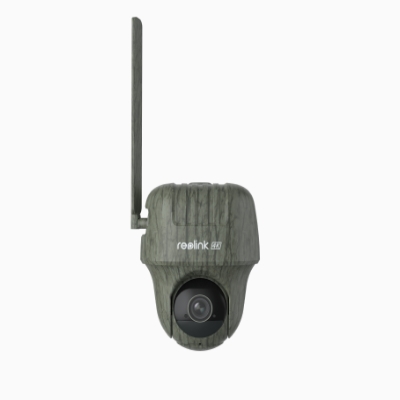
4K 4G LTE Wildlife Camera with 360° All-Around View
4G LTE Network, 4K 8MP Ultra HD, No-Glow IR LEDs, Person Detection, Animal Detection, Two-Way Audio, Battery/Solar Powered.
Checklist for Choosing Non-WiFi Security Cameras
-
No Power + No Wi-Fi + Clear Skies: 4G LTE Cellular Camera + Solar Panel accessory.
-
No Power + No Wi-Fi + Dense Woods/No Signal: Camouflaged Trail Cam running on AA batteries with a high-capacity MicroSD card.
-
Fixed Power + No Wi-Fi + Maximum Privacy: Multi-camera PoE wired setup writing directly to a local hardware NVR.
How to Connect a Security Camera Directly to a Phone Without WiFi
If you do not have a standard home router or internet connection, you can still bridge the gap between your security camera and your smartphone. Depending on your camera's internal hardware capabilities, you can use one of the following four direct-connection methods:
Method 1: Camera AP (Access Point) Mode
Many modern offline and cellular security cameras feature a built-in wireless chip capable of broadcasting a localized, short-range network signal. This is known as AP (Access Point) Mode or Direct Link. Instead of the camera and phone connecting to a third-party router, your phone connects directly to the camera.
-
Locate the physical "AP Mode" button on your camera (or toggle it via the app during initial setup).
-
Open your phone's Wi-Fi network settings. You will see a unique network name broadcast by the camera (usually containing the brand name or camera UID).
-
Input the camera’s default password to connect to this network.
-
Open the camera’s mobile app to view the live feed and download recordings.
This network does not grant your phone internet access, and the connection range is limited to roughly 30 to 50 feet (10–15 meters). It is ideal for pulling up to an off-grid barn or cabin and checking the footage from your car without removing the SD card.
Method 2: The Mobile Hotspot Method
If you have a standard smart home camera that strictly requires a Wi-Fi network to function, you can use your smartphone’s mobile hotspot to trick the camera into thinking it is connected to a home router.
Because a single phone usually cannot generate a hotspot and configure a brand-new camera at the same time, you will need a temporary second device (like a tablet or a friend's phone) for the initial configuration.
- Turn on the Mobile Hotspot on your primary Phone A.
- Connect your secondary Device B (tablet/phone) to Phone A’s hotspot.
- Open the camera app on Device B, select "Add New Device," and input Phone A’s hotspot name (SSID) and password when prompted.
- Once paired, the camera will permanently remember Phone A's hotspot. In the future, simply turning on your phone's hotspot will cause the camera to automatically sync and stream video directly to your app.
This is a heavy drain on your smartphone’s battery and data plan. It is best used as a temporary or emergency surveillance solution.
How to Connect Reolink WiFi Cameras to Your Phone’s Hotspot
Method 3: Bluetooth Pairing (Setup vs. Streaming)
An increasing number of security cameras come equipped with Bluetooth modules. However, there is a common user misconception regarding what Bluetooth can actually do for video surveillance.
- How to Connect: You simply turn on your smartphone’s Bluetooth, open the camera’s app, and the phone will automatically detect the camera over-the-air to establish an initial handshake.
Bluetooth lacks the data bandwidth required to stream continuous, high-definition video. Therefore, Bluetooth is used exclusively for the initial pairing process, changing low-bandwidth settings, or waking the camera up from a low-power sleep state. Once the handshake is complete, the camera will still require a cellular network, AP mode, or an SD card to handle actual video data.
Method 4: USB Camera Connection (OTG / Direct Wire)
For users who want zero wireless latency and absolute privacy, some specialized industrial cameras or commercial endoscopes support a physical, hardwired USB connection directly to a smartphone.
This requires a camera that supports UVC (USB Video Class) protocols and a smartphone that supports USB OTG (On-The-Go) data transfer.
-
Connect the camera to your smartphone's charging port using a compatible USB-C OTG cable or adapter.
-
Download a dedicated third-party UVC camera viewing app on your phone.
-
Grant the app permission to access the external USB device to instantly view a latency-free video stream.
Standard residential smart home cameras (like typical outdoor security or floodlight cameras) do not support this method due to firmware restrictions. This is predominantly used for specialized inspection cameras, dashcams, or handheld digital borescopes.
Step-by-Step Guide: How to Install a Non-WiFi Security Camera Off-Grid
Installing a security camera without Wi-Fi requires a different strategy than setting up a standard indoor smart camera. Because these cameras are often placed in remote, unmonitored locations, you must optimize them for power efficiency, signal strength, and physical security.
Step 1: Perform a "Signal & Access" Pre-Test
Before you mount any hardware or drill holes into a wall or pole, you must verify that the camera can actually communicate with your phone at that exact spot.
-
For Cellular Cameras: Take the camera to the exact mounting location, insert the activated SIM card, and power it on. Check your smartphone app to ensure the camera shows at least 2–3 bars of cellular signal. A weak signal will rapidly drain the camera's battery as the cellular modem struggles to maintain a connection.
-
For AP Mode/SD Card Cameras: Stand at your intended viewing spot (e.g., your driveway or gate entrance) and ensure your phone can successfully pair with the camera's localized Wi-Fi or Bluetooth signal.
Step 2: Optimize the Solar Panel Angle (For Wireless/Cellular Models)
If your non-Wi-Fi camera relies on a solar panel for perpetual power, placement is critical. A poorly angled panel will result in a dead camera within a week.
-
Direction: In the Northern Hemisphere, always face your solar panel True South. In the Southern Hemisphere, face it True North. This ensures the panel catches the maximum amount of daily sunlight.
-
Tilt Angle: Tilt the panel at a 30° to 45° angle. Do not mount it completely flat, or dirt, leaves, and rainwater will pool on the glass, blocking the solar cells.
-
Shade Mitigation: Ensure there is zero overhead canopy. Even a shadow from a single tree branch covering 10% of the panel can reduce its power efficiency by more than half.
Step 3: Implement Theft-Prevention Mounting
For offline cameras storing footage on a local MicroSD card, the physical camera is the bank vault. If a thief simply walks up and tears the camera off the wall, your evidence is gone forever.
-
Height: Mount offline and cellular cameras at least 9 to 10 feet (3 meters) high. This keeps them out of arm's reach and prevents casual vandalism or data tampering.
-
Angle Downward: Position the camera looking downward at a 15° to 30° angle. This optimizes the Passive Infrared (PIR) motion sensors, which catch movement best when objects cross across the lens field of view, rather than walking straight toward it.
Step 4: Wire Management (For Hardwired PoE/NVR Systems)
If you chose a hardwired system to avoid Wi-Fi entirely, protecting the physical lines is your top priority.
-
Drip Loops: When routing an Ethernet cable from the outdoors to the indoors, always create a drip loop (a small U-shaped dip in the wire right before it enters a wall). This forces rainwater to drip off the bottom of the wire rather than tracking along the cable directly into your building or camera port.
-
Conduit: For exposed outdoor runs, slide the Ethernet cables through PVC conduit pipes to protect them from weather, UV degradation, and property vandals equipped with wire cutters.
WiFi vs. Non-WiFi Security Cameras: What's the Difference?
A Wi-Fi camera and a non-Wi-Fi camera might look identical on the outside, but their internal architecture and communication methods are completely different.
The fundamental difference lies in how data travels from the camera lens to your viewing screen. Wi-Fi cameras rely on a localized internet router to upload footage to the cloud, while non-Wi-Fi cameras utilize alternative pathways—like cellular networks, physical cables, or local microchips—to capture and transmit video.
Real-World Feedback on Security Cameras without WiFi
Users in different communities, like Reddit and Facebook, emphasize that "no WiFi" usually falls into four categories depending on the user's technical setup and power availability:
SD Card/Local Storage (The "Offline" Method):
Many users suggest cameras with a built-in MicroSD slot. You can set them up, let them record to the card, and manually pull the card to review footage on a computer.
Pros: No monthly fees, works during internet outages.
Cons: No remote viewing or real-time alerts.
Trail/Game Cameras:
This is the most common recommendation for off-grid or power-free areas (like barns or construction sites). They are battery-operated, motion-activated, and designed to be rugged and camouflaged.
Reddit consensus: Use these if you have zero power and zero internet. Brands like Tactacam and Stealth Cam were noted.
Cellular (4G LTE) Cameras
For those who want remote access but lack WiFi/Starlink, 4G LTE cameras are the go-to. They use a SIM card and a data plan to "call out" to your phone.
- Facebook/Reddit consensus: These are ideal for remote cabins or job sites but require a monthly data subscription.
PoE (Power over Ethernet)
For users with power but who want to avoid the instability or security risks of WiFi, PoE cameras are highly recommended. They connect via a physical wire to an NVR (Network Video Recorder), keeping the video traffic entirely off the WiFi network.
Across multiple Reddit discussions, Reolink is one of the most frequently recommended brands for no-WiFi setups.
Users specifically highlight:
- Reliability and ease of use
- No subscription requirement
- Strong local storage options (SD card + NVR)
- Good video quality for the price
Some real user feedback includes:
“Reolink is a great consumer option. Easy to use, reliable.” - GummySearch
“Highly recommend PoE… Reolink cameras work great.”- GummySearch
“You may try the Reolink Go series… cellular security camera.” - Reddit
Frequently Asked Questions
Here are some of your biggest concerns when searching for security cameras without WiFi or Internet. Now you can get the answers quickly.
Is there an outdoor security camera without WiFi?
There are a few outdoor security cameras that work without WiFi. One option is to use a security camera that relies on 4G cellular service. Another option is to use a security camera that plugs into an Ethernet port (PoE) and records footage to a Network Video Recorder (NVR).
4G cellular cameras are your best choice. They work on 4G network and transmit data remotely, so that you can view live streams and access them at any time via your smartphone. If power isn't available, you can purchase a battery-powered 4G camera like Reolink Go Plus, which can be installed anywhere.
Can wireless cameras work with a mobile phone's hotspot?
Yes. Some wireless cameras can work with your mobile phone's hotspot, like Reolink's battery-powered WiFi camera. Your phone's hotspot serves as a WiFi provider. As long as your keep the WiFi camera connected to the hotspot, the camera can work as usual. But your phone's data usage may increase significantly. So, it's a good way to adopt for a while, but not cost-effective in the long run.
Can wireless cameras work without internet?
Yes! 4G Wireless cameras can work without internet as long as they are connected to a 4G network. This is great news for people who want to keep an eye on their home or office when they're not there, because it means they don't have to worry about whether or not their internet is working.
All you need to do to set up a wireless camera is connect it to your 4G network and download the app. Once you have the app, you'll be able to see what the camera is seeing in real-time, and you'll also be able to record footage and save it locally on your phone.
How to setup ip camera without internet?
You can set up your IP camera without the Internet by using your phone's hotspot. Because usually IP cameras need to be connected to the Internet for basic configuration when they are first turned on, some require the phone you are using to do the configuration.
- First, make sure that your phone has a data plan with enough hotspot bandwidth to support the camera.
- Next, open your phone's settings and create a temporary hotspot. Turn on your ip camera and link it to the WiFi signal corresponding to this hotspot name.
- Finally, you can now set up your camera as per the product manual.
Conclusion
So, even in scenarios where WiFi, Internet, or power outlets are scarce, safeguarding your loved ones and valuables remains within reach with security cameras without WiFi. By the end of this article, you'll be well-equipped to make an informed decision on the perfect camera for your needs. Now, I'd love to hear about your experiences with cameras without WiFi. Have you found a reliable solution that suits your requirements? Share your story in the comments below.
Search
Subscribe for the Latest Updates
Security insights & offers right into your inbox