
Security Camera Privacy Zones vs Detection Zones: What’s the Difference?
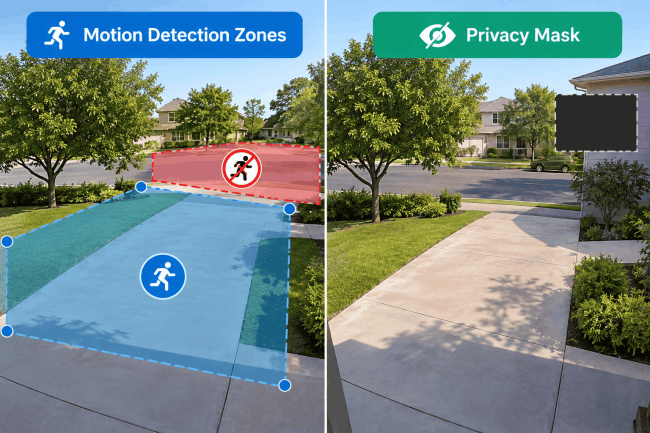
While privacy zones and detection zones can both target the same area in a security camera’s frame, they serve entirely different purposes. A privacy zone physically blocks out sensitive areas—such as a neighbor’s window—by masking them from live view and recordings. In contrast, a detection zone controls where the camera actively monitors for motion or specific events without hiding the footage. Understanding how these two settings operate ensures you maintain privacy without sacrificing essential security coverage.
- What Is a Security Camera Privacy Zone?
- What Is a Security Camera Detection Zone?
- Privacy Zone vs Detection Zone: Key Differences
- Privacy Zones vs Detection Zones: Real-World Examples
- When Should You Use Privacy Zones or Detection Zones?
- Reolink Detection Zone vs Privacy Mask
- How to Set a Reolink Non-Detection Zone?
- Does Privacy Mask Stop Motion Detection?
- Common Problems With Privacy and Detection Zones
- FAQs
- Conclusion
What Is a Security Camera Privacy Zone?
A privacy zone is a mask that blocks part of the camera view. Some brands use the term privacy mask for the same type of tool. You place the mask over any spot that you want to keep hidden. The mask then blocks that spot while the rest of the view stays clear.
What Is a Security Camera Detection Zone?
A detection zone sets which parts of the view the camera should watch. It can check for motion, people, cars, animals, or other supported events there. These zones help keep alerts tied to places that matter for your property. Unlike a privacy mask, a detection zone does not usually hide the view.
Privacy Zone vs Detection Zone: Key Differences
Privacy Zones vs Detection Zones: Real-World Examples
Driveway facing a busy street
Use a non-detection zone for the street while keeping the driveway active. This helps reduce alerts from passing cars without hiding the road in the video.
Camera facing a neighbor's window
Apply a privacy mask to the window. If the masked area still triggers alerts, also configure a non-detection zone where supported.
Front door near a sidewalk
Keep the entrance active for detection. Exclude the sidewalk from relevant detection events where supported, and test whether visitors approaching the door still trigger alerts.
When Should You Use Privacy Zones or Detection Zones?
Use a Privacy Zone When You Don't Want an Area Recorded
Use a privacy zone when part of the view should not be recorded. This may include a neighbor's window, nearby land, or a private indoor space. You may also block parts of shared scenes that you do not need. Keep each mask tight around the private spot so useful details stay clear.
Use a Detection Zone When You Don't Want Alerts From an Area
Use a non-detection zone when roads, sidewalks, or trees cause unwanted alerts there. The spot can stay in view while the camera ignores supported events there.
Use Both When You Don't Want an Area Recorded or Detected
Some spots should stay hidden and should also stop sending unwanted motion alerts. For those spots, set both a privacy mask and a non-detection zone together. The mask hides the view, while the other zone controls alerts from it.
Reolink Detection Zone vs Privacy Mask
1. How Reolink Privacy Mask Works
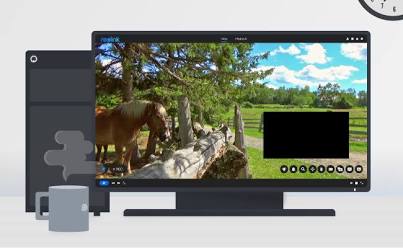
A Privacy Mask permanently redacts specific regions of your camera’s view at the sensor/stream level.
-
Live-View & Recording Behavior: Once applied, the camera draws solid black or grey blocks over the selected area. This block is permanently burned into the primary stream, secondary sub-stream, live monitoring, NVR recordings, local SD card clips, and snapshot downloads. The masked footage cannot be unmasked or recovered in playback.
-
Mask Shapes & Limits: Mask areas are drawn using resizable rectangular boxes. Most Reolink camera models allow you to create up to 3 to 4 independent rectangular masks per lens.
-
Supported Platforms: Configurable across all major Reolink ecosystems: Reolink Mobile App (iOS / Android), Reolink Client (Windows / macOS), Reolink NVR Interface, and direct Web Browsers (IP camera web UI).
How to Set a Reolink Non-Detection Zone?
A Non-Detection Zone (also referred to as Motion Detection Zone or Exclusion Zone) prevents the camera from triggering motion or AI alerts in specified areas.
-
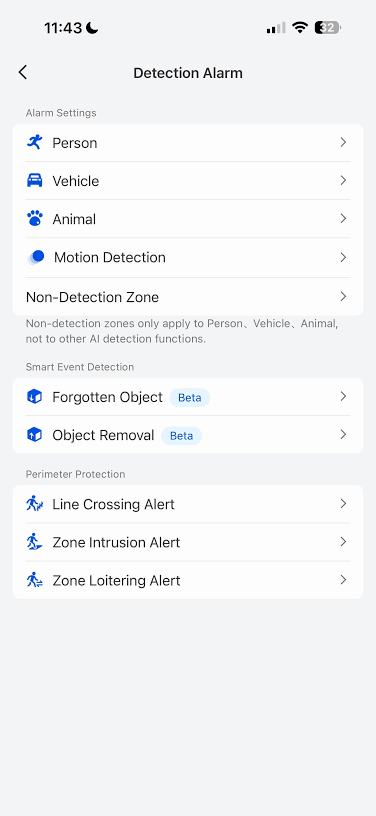
Navigate to Detection Settings: Open the Reolink App, tap the Settings (gear icon) on your camera feed, and select Detection Alarm (or Smart Detection).
-
Select Non-Detection Zone: Tap Non-Detection Zone. Select the specific alarm type you want to configure at the top (e.g., Person, Vehicle, Animal, or Motion/Others).
-
Paint the Ignored Area: Use the Pen tool to paint/grid over the area you want ignored (covered in grid/painted overlay). Use the Eraser to adjust.
-
Save Configuration: Tap Save in the top right corner to apply your changes.
Does Privacy Mask Stop Motion Detection?
Yes, Privacy Mask stops motion detection within the masked area.
Because a Privacy Mask covers video pixels with a solid, static black block, the video processor sees zero pixel changes underneath it.
-
Pixel-Based Motion Detection (PoE & Plug-In Wi-Fi Cameras): Since pixel changes under the black block are completely blinded, no motion can be calculated inside the privacy mask.
-
Battery-Powered Cameras (PIR Hardware Exemption): Battery-operated Reolink cameras rely on a physical Passive Infrared (PIR) sensor alongside pixel AI. While the AI camera feed will not see pixels moving under a privacy mask, a warm moving object (like a person or animal) passing through the masked area can still trip the hardware PIR heat sensor, waking the camera up.
Common Problems With Privacy and Detection Zones
-
Assuming a Privacy Mask Also Disables Detection: Do not assume privacy masks stop detection; check detection settings for each hidden spot.
-
Making Detection Zones Too Small: Do not make detection zones too small, or events near edges may be missed.
-
Leaving Gaps Around Roads or Sidewalks: Do not leave gaps near roads or sidewalks, because cars and people may trigger alerts.
-
Masking More of the Image Than Necessary: Do not make privacy masks too large, because useful nearby details may stay hidden.
-
Forgetting to Retest Zones After Moving the Camera: Retest all zones after moving the camera because objects shift within the video frame.
-
Assuming Every Camera Uses the Same Zone Settings: Check your camera guide because brands, models, updates, menus, limits, and checks can differ.
FAQs
Does a Privacy Mask Stop Motion Detection?
A privacy mask does not always stop motion checks in the covered spot. Reolink says masked spots may detect motion unless you also block detection there. Some AI checks may work differently on supported AI battery-powered Reolink camera models.
Does a Detection Zone Stop a Security Camera From Recording?
A detection zone usually controls event checks, not what the camera records there. It does not by itself stop recording in spots outside active detection zones. Full-time recording may still save all parts of the camera's full view there. Event-based recording may use detection rules to decide when the recording should start.
Can I Use a Privacy Zone and Detection Zone at the Same Time?
You can use a privacy zone and detection zone on the same spot. Use the mask to hide the view and detection settings to stop alerts.
Should I Mask My Neighbor's Property on My Security Camera?
A privacy mask can limit footage when your camera sees a neighbor's property. Privacy laws can differ by place, so check the rules where you live. Point the camera at areas that you have a sound reason to watch. Masking can reduce views of a neighbor's window or other private property parts.
How Do I Stop My Security Camera From Detecting Cars on the Street?
Put the street in a non-detection zone or remove it from active detection. Cover the full road area where passing cars can enter the camera view. Then test the zone and make sure street traffic no longer sends alerts.
Why Is My Reolink Camera Still Detecting Motion Outside the Detection Zone?
Check whether the non-detection zone covers the full unwanted area. Also review the camera's supported detection types and settings. Detection behavior can vary by Reolink model and firmware version. Test the zone again after saving changes.
Do Reolink Privacy Masks Work on Recorded Videos?
Yes. On supported Reolink cameras, privacy masks hide selected areas in both live view and saved recordings. The exact setup options and mask limits depend on the camera model and software version.
Conclusion
Privacy zones and detection zones solve two different problems in a camera system. A privacy zone hides chosen parts in both live view and saved video. A detection zone controls where the camera checks for motion and other events. Use both tools when the same spot should stay hidden and fully ignored.
Search
Subscribe for the Latest Updates
Security insights & offers right into your inbox