
Security Camera Integration in Australia: Systems & Solutions
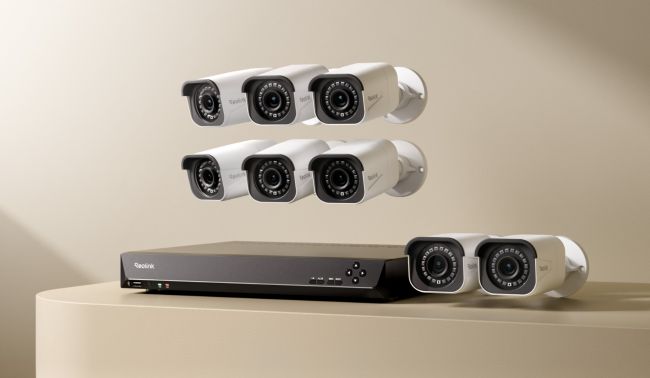
To enhance security and surveillance, security camera systems are integrated with other systems and devices like alarm systems, door sensors, and sales software. This allows the camera output to be used beyond monitoring, such as taking specific actions and collecting data.
Let’s understand what security camera integration is. We will take a look at different types of integration options and how they work. We will help you select the right security camera system and share some steps on how to integrate it flawlessly.
What is Security Camera Integration?
Security camera integration is a process of connecting the camera system to other security devices, software, or automation systems. That said, all the cameras, NVRs, and other devices and software create a unified network that’s easy to handle.
Suppose you have an alarm system and a security camera system. They both work independently. Monitoring both of them requires more effort, as you have to jump between the two systems. If we connect the security camera system to the alarm system and create a unified platform, it’s called security camera integration.
How Does It Work?
Let’s understand how a camera system is integrated with a smart home and automation system.
Compatible Devices: Firstly, you need compatible devices that can work together.
Connection: All devices are connected to the same network, such as home Wi-Fi.
Integration Platform: An integration platform is used to connect both systems.
Communication: All devices communicate through a protocol, such as ONVIF or RTSP.
Unified Dashboard: There is a single dashboard or software from which you can control both devices.
For instance, the camera detects a person in the driveway. After detection, it sends the message to the controller or integration platform. The controller turns on the lights in the driveway.
What Are the Different Types of Security Camera Integration?
Access Control Integration
The camera system integrates with the access control of the house or building to give access to people. The key components are magnetic door locks, credential readers (biometric/RFID), door controllers, and access-control software.
Through integration with the security camera, the access control system becomes more robust. It could spot credential fraud and ensure the security of the house or sensitive area.
Let’s say the data centre in a company is equipped with an RFID system. When authorised personnel use their RFID cards, the camera also captures their faces and ensures it’s the authorised person, not someone else using the card. After confirmation, it opens the door.
Alarm & Sensor Integration
When the camera system is connected to the sensors or alarm system, it can activate the siren/alarm or perform any other task based on the sensor output.
Let’s say if someone tries to open the window from the outside, the window sensor sends the signal to the integration device, which then commands the siren to start. Similarly, when an unknown vehicle tries to enter a property, the camera can detect it instantly and start the alarm.
The key components include alarm control panels, sensors, cameras, and the integration system.
Video Management Software (VMS)
Video management software collects all video streams in one place. Not only that, it manages storage across distributed servers, handles retention periods, and runs advanced video analytics. Suppose you want to know how many children entered a specific area; it’s possible to analyse the video and collect the details. It can even collect the number plates of vehicles that entered the premises.
It can be used for intrusion detection, access control, object classification, etc. The main components include a management server, recording server, database layer, storage, and the software or client interface.
Cloud and AI Analytics Integration
Through the integration of cloud and AI analytics, it is possible to analyse every moment, collect important data, and automate tasks.
Suppose you have videos stored in cloud storage. The data is given to a machine learning engine or AI to analyse it. It can identify the person and vehicle. It knows who visited the place and when. It can even identify males, females, and children. If you want to know how many women entered a space, it can answer instantly. It’s also possible to automate actions, like locking doors, sending notifications, and alerting security authorities.
The key components include AI cameras, a cloud interface engine, an AI/ML model, and a unified dashboard for analytics.
How to Choose the Right Security Camera System?
Camera Compatibility
For integration, you have to go with compatible security cameras. If your home has smart devices that use the ONVIF protocol, you need security cameras with the same protocol for seamless integration.
Based on that, you can select different types of cameras, such as PoE, battery-powered, or plug-in Wi-Fi cameras. For optimal reliability, PoE is an ideal option, but it requires proper Ethernet wiring for power and networking.
If you want to go wire-free, battery/solar-powered cameras are the way to go. They use Wi-Fi for networking. Plug-in Wi-Fi cameras lie in between, as they use wired power and network wirelessly.
Integration Options
Look at the integration options, such as the types of devices you can integrate with, the systems it supports, etc.
If you want to connect a security alarm system, you can pick a suitable camera system for that. Similarly, check whether the system can work with the devices and software you want to integrate.
For using home assistants for automation, you can use Home Hubs or NVRs. Confirm if they are compatible with Google Assistant or Alexa for hands-free control and automation.
If you want to connect an alarm system, check the I/O terminals on the NVR so that you can connect it physically to work with the camera, floodlights, and siren.
Recording and Storage
Cameras can record either in event-based mode or 24/7. For sensitive areas like the front door, POS, and access points, you can install a camera that can record continuously. Otherwise, motion-triggered or event-based camera systems are great for monitoring events that actually matter and save bandwidth and storage.
For optimal convenience and event-based recording, a microSD card is also enough. If you are recording continuously using multiple cameras, you need at least 2TB of HDD storage. You can opt for more storage options or expand the storage of the system, depending on the number of cameras, integration system, and other devices connected.
Some camera systems are compatible with cloud storage. You need to have an active subscription. For such systems, you must confirm the cloud storage is compatible with the integration or device you want to connect.
System Expandability
Every security camera system has a limited capacity to connect security cameras. If you are using an NVR, the channel count will determine the number of cameras you can connect. You can go with 4-, 8-, 12-, 16-, 32-, or 64-channel NVRs according to your requirements. Similarly, Home Hubs also connect from 2 to 8 security cameras, depending on their model.
For future expansion, you should have some PoE ports left or spare channels to connect more security cameras. This allows you to use the same system and just add more cameras to cover more locations.
Another important factor is the bandwidth limit. According to the system’s limit, you can connect security cameras and specific resolutions.
Smart Features
Smart detection is a necessary feature because it helps the camera detect people, animals, and vehicles. Once the camera accurately detects the object, it sends the message to the integrated system to take different actions, such as turning on lights, starting the alarm system, unlocking the door, etc. As it can detect objects precisely, it can reduce false triggers by native animals like possums, large fruit bats, cockatoos, etc.
Some cameras also allow users to customise intrusion zones. They can mark specific areas to monitor intrusion and get real-time alerts for any activity.
Installation and Costs
While buying the security camera system, you should have an estimate of the installation and costs. If you have the basic tools (drill machine, screwdriver, level, ladder) and skills, you can install some camera systems on your own, especially the wireless ones. You only need to connect the camera to a nearby power point via an adapter and then connect to the Wi-Fi network.
PoE systems are also like plug-and-play devices, but you have to run an Ethernet cable from the camera to the PoE switch or router. There is an additional cost of buying the Ethernet cables. If you can run the cable, the installation would be time-consuming but can be done. For professional installation, you might pay AUD $150 to $450 per camera, depending on the distance and effort required.
Best Security Camera Integration Solutions for Different Needs
RLK16-1200D8-A—Best for Intrusion Alerts and Large Properties
If you want to get 24/7 intrusion alerts on a large property, store, or sensitive area, the RLK16-1200D8-A is an excellent choice. It uses AI to detect objects and distinguish between them. It can smartly detect people, animals, and vehicles. You can customise the motion zone as needed to monitor specific areas. When any motion is detected, it sends real-time alerts to the connected devices.
It’s a 12MP PoE camera system with eight security cameras to cover a larger property and multiple locations. The 12MP ultra-high resolution unveils rich details, so you can even see facial features and number plates clearly, which is perfect for object identification. It’s equipped with a 16-channel NVR with 4TB storage (expandable up to 16TB), so you can connect up to 16 cameras in total.
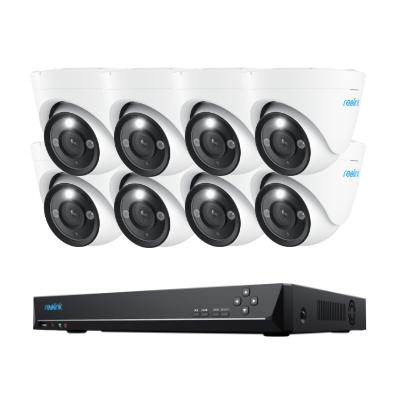
12MP PoE Security System with Color Night Vision
12MP Ultra HD, Person/Vehicle Detection, Power over Ethernet, 16-Channel NVR.
RLK8-811B4—Best for Deterring Intruders
RLK8-811B4 can deter intruders automatically and keep your property and premises safe. The cameras are equipped with spotlights and a siren that can turn on automatically when they detect a trespasser. Once the camera detects a person in a specific area at a specific time (such as at night), it turns on the spotlights and alarm to scare away the intruder.
It also sends real-time alerts on your device. You can check the live feed, talk to the person in front of the camera and give a warning. Not only that, its 4K resolution with 5X zooming capability allows you to take a closer look and identify people. It’s an IP67-rated system with built-in 2TB storage (expandable up to 16TB). You can connect up to eight security cameras and customise smart detection.
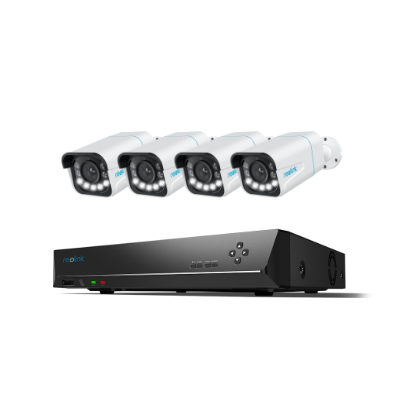
4K 8-Channel PoE Security System
4 pcs 4K Ultral HD Security Cameras; 2TB HDD 8-Channel NVR for 24/7 Recording; Person/Vehicle Detection; Plug & Play; 2 Network Solutions.
Home Hub with TrackMix Wi-Fi—Best for Motion Tracking and Alarm
This system is ideal for small to large homes. Not only does it work as a camera system but also as an alarm system. You can integrate the Home Hub Pro with smart cameras for efficient, centralised alarm management. When motion is detected, whether from people, vehicles, or animals, it triggers the hub's 120dB customizable siren for immediate alerts. You also get weekly insights into alarm events.
The TrackMix Wi-Fi camera is a dual-lens camera with a wide-angle and a telephoto lens. It can capture rich details with clarity and also has 6X hybrid zoom. Because of the pan and tilt motion, property owners can cover 360°, and it automatically follows the motion of objects. The Home Hub offers 2TB storage and can connect up to 8 Reolink IP cameras, and the Wi-Fi 6 compatibility makes the performance smooth and fast.
How to Integrate Security Cameras?
Let’s take an example of the Reolink RLN36 PoE NVR and integrate security cameras, sensors, and an alarm with it.
- After installing and setting up the NVR and security cameras, you can connect the alarm. The NVR has eight alarm inputs and four alarm outputs to support external devices.
- In the alarm-in (input), you can connect your sensor wires. It could be a door/window sensor, external PIR sensor, smoke or gas sensor, etc.
- In the alarm-out (output), you can connect external sirens, warning lights, gate controllers, or anything you want to operate.
- Now, you need to set up the devices. In the settings, go to Surveillance > Alarm Input Settings. Select a channel and name it. Choose Normally Open (NO) or Normally Closed (NC), depending on your sensor.
- Configure alarm outputs. Go to Surveillance > Alarm Output Settings. Choose an output channel, set the state type, and assign a trigger delay.
- Go to Daily Schedule under the Surveillance menu. Choose an input channel, enable it, and set the active schedule. Now, when the sensor is triggered, it commands the desired alarm or output.
FAQs
Is there an app that works with all security cameras?
There is no single app that works with all security cameras. Consumer brands have dedicated applications to control their devices.
Can I connect a security camera directly to a monitor?
You cannot directly connect an IP camera to a monitor. You will need an NVR or hub to connect. If you have an NVR, you can use an HDMI cable to connect the camera to the display.
Can I watch my security camera on my TV?
Yes, you can watch your security camera on your TV. Connect the HDMI cable from the NVR to the TV. Otherwise, you can cast the phone screen on the TV and watch the camera feed.
Can I Integrate Security Cameras from Different Brands?
Yes, you can integrate security cameras from different brands if they use the same communication protocol, such as ONVIF or RTSP. However, some advanced features, such as two-way audio and remote access, might not work properly.
Conclusion
Security camera integration enhances the use of cameras and recordings and uses them to empower other systems. It is possible to turn on lights, open the door, or even start the HVAC or alarm system by detecting a person through the camera. You can integrate smart devices, software, systems, etc. We have explained some integration options and how you can select the right camera system to make your selection easier.
Search
Subscribe for the Latest Updates
Security insights & offers right into your inbox