
Reolink Wireless Camera System Review
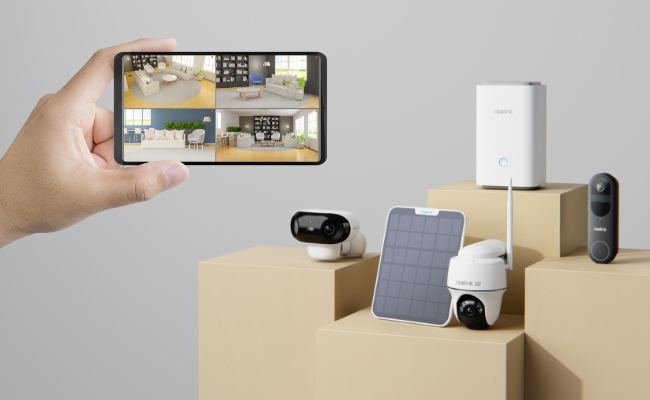
Reolink wireless camera systems are known for their robust performance, affordability, and incredible customer support. With these systems, users can ensure the security of their house or business.
In this article, we will give you a detailed Reolink wireless camera system review. We will talk about the types of these systems and their benefits and shortcomings. We will also explain how you can install them and share some excellent products you can consider.
- Types of Reolink Wireless Camera System
- Pros and Cons of Reolink Wireless Camera System
- Key Features of the Reolink Wireless Camera System
- Best Reolink wireless camera system recommendation
- How to Set Up a Reolink Wireless Camera System?
- Users Feedback of Reolink Wireless Camera System
- Buyer Decision Table
- FAQs
- Conclusion
Types of Reolink Wireless Camera System
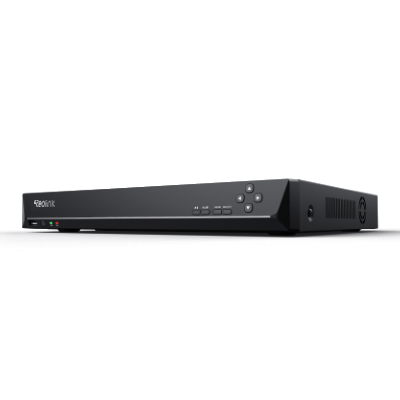
Reolink Wi-Fi NVR System
Network Video Recorder (NVR) is a commonly used device that works as a central hub to connect all your cameras to a single platform. The NVR itself is connected to the Wi-Fi router through an ethernet, while the cameras are connected to the NVR via Wi-Fi.
A Reolink Wi-Fi NVR System combines wireless security cameras(such as battery-powered WiFi camera) with a Network Video Recorder (NVR) to provide centralized management, local storage, and 24/7 recording. The cameras transmit video wirelessly to the NVR while remaining powered by a power adapter, making installation easier than traditional PoE systems. The users can also get remote access to the recordings on the Reolink app.
Reolink Wireless Home Hub System
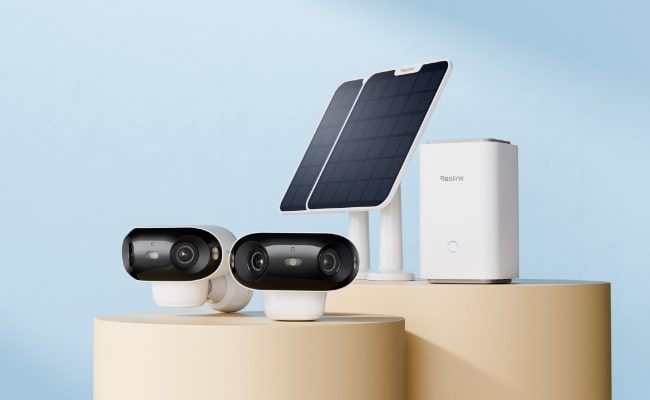
Home Hub is also a central hub for the camera system but sleek in design and requires less space to set up. All cameras are wirelessly connected through the Wi-Fi.
It offers more features than an NVR system. Firstly, it has an encrypted built-in storage with anti-theft algorithms to ensure users' privacy and data security. It can record even when the Wi-Fi is turned off, so you get 24/7 reliable surveillance. Moreover, it works as an alarm center and provides a detailed summary of all the connected devices.
What's the Difference between Reolink WiFi NVR System vs Home Hub System?
Pros and Cons of Reolink Wireless Camera System
Pros and Cons of Reolink Wi-Fi NVR System
Pros:
- Direct connection with ethernet ensures lag-free surveillance.
- NVR systems can be expanded to several channels.
- Supports high-quality footage up to 4K support.
- Users can remotely access the cameras.
- The NVR units usually have a large storage capacity.
Cons:
- NVR takes up a significant space.
- Heavier and bulky in design.
Best for: A Reolink Wi-Fi NVR System is best for homeowners and small business owners who want 24/7 recording and centralized monitoring without running Ethernet cables throughout their property. It's ideal for medium to large homes, offices, garages, and retail stores that require reliable multi-camera surveillance.
Pros and Cons of Reolink Wireless Home Hub System
Pros:
- Quick alarm system when any person is detected.
- Easy to set up and requires less space.
- Sufficient storage of up to 2TB to store your recordings.
- The Home Hub is also integrated with smart assistants for voice commands.
- Smart detection can easily recognize facial features.
Cons:
- Limited range for the camera connectivity
Best for: It's ideal for apartments, family homes, and users who prefer battery-powered or Wi-Fi cameras while keeping all recordings securely stored in one place.
Key Features of the Reolink Wireless Camera System
Wireless Setup
The wireless setup is one of the most highlighted features because it eases the installation process even for a new consumer. With the elimination of messy wiring setup, it makes your house look aesthetically good. The wireless setup also eliminates the labor cost and allows you to quickly install by following the instructions.
Two Way Audio
A two-way audio feature enhances the security system and helps in quick communication with the person in front of the cameras. You can ask important questions about his name or the purpose of his arrival. This ensures a pre-check or validation of the visitor before opening the door.
Remote Access
The users can remotely access cameras through the application installed on their phones. This provides a personalized option to focus on any specific footage and monitor the activity more attentively. With remote access, they will get notified when any suspicious activity is detected.
No Monthly Fee
There will be no hidden monthly fee to connect the cameras or store the footage. This will help users to gain trust. You are only requested to pay the amount when buying the camera system.
Various Storage
Reolink wireless camera systems allow you to store the recordings either on hard drives or microSD cards. Each model has different storage types which you can expand up to the required capacity. Additionally, the storage is highly encrypted to ensure data safety.
Smart Feature
The popular smart feature includes motion detection that senses the movement of objects, humans, and animals. It also sends you an alert when any suspicious activities are detected. It also has an alarming feature to alert you about any danger. You can set the activity zones to stop unnecessary alarms.
Weatherproof & Durable
The Reolink camera systems are durable and can work in all weather conditions. Some cameras are also IP-certified, which makes them highly resistant to harsh weather conditions. Also, the material is durable to continue functioning for longer periods. The cameras are specially designed for indoor conditions to perform robustly in heavy rains and dust storms.
Best Reolink wireless camera system recommendation
RLK12-800WB4
RLK12-800WB4 is a 4K camera system with spotlights to provide better surveillance in low-light conditions. It supports high-end Wi-Fi 6 technology to ensure smooth live streaming and high-quality recordings. The cameras offer 4K 8MP Ultra HD coverage with support for smart detection of persons, animals, and vehicles.
The camera system works with a 16-channel NVR that has a 2TB built-in HDD to secure all videos. The NVR has 4 external high-gain antennas which cover up to 1000 square meters of area.

4K Security Kit with Next-Gen WiFi 6
4 pcs 4K Ultra HD Security Cameras; Dual-Band WiFi 6; 2TB HDD 12-Channel NVR for 24/7 Recording; Peron/Vehicle/Animal Detection; IP67 Weatherproof.
Home Hub with Argus PT Ultra
Home Hub with Argus PT Ultra is a completely wireless standalone camera system to provide a sustainable solution. It consists of two Argu PT Ultra security cameras, two solar panels, and one Home Hub. Therefore, the cameras are charged automatically and offer reliable performance.
The cameras offer day and night color vision with 4K support for crystal-clear footage. They offer 360° coverage to monitor every blind spot nearby. The Home Hub has a 64 GB microSD card to store the recordings which you can extend up to 512GB 2x cards. The system is expandable with up to 8 IP cameras to mount on every critical spot.
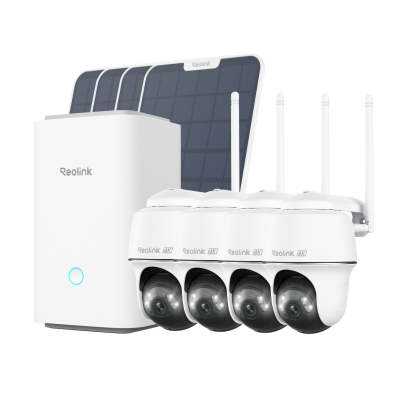
Wireless Security System With 4K PT Standalone Battery/Solar Wi-Fi Cameras
4K Color Footage Day & Night, 1 Year of Local Storage, Exclusive Anti-Theft Algorithms, 360° All-Around Coverage, Expandable System Up to 8 Reolink Cams.
Home Hub Pro with Lumus Pro
Home Hub Pro with Lumus Pro is a professional 4K surveillance system. The cameras are sleek in design and have an F1.6 aperture to deliver colorful and bright images even in the dark. With Wi-Fi 6 support, you can enjoy a seamless surveillance experience.
Home Hub Pro has an integrated 2TB HDD for unstopped 24/7 surveillance. It is also supported with AES-128 encryption to ensure data safety. The recordings will not be accessed until you enter the correct password. The cameras are efficient in detecting any object, person, or animal and quickly raise an alarm to notify the user.
How to Set Up a Reolink Wireless Camera System?
How to Set Up the Reolink Wi-Fi NVR System?
- Power the NVR with the adapter and connect the Ethernet cable from your router’s LAN port to the NVR port at the back.
- Launch the Reolink app on your phone and hit the + icon in the top right corner.
- Scan the QR code at the back of NVR or enter UID/IP manually which you can find below the QR code.
- Create a password for the security and name your device to complete the setup.
- Upon hitting the Next button you will see the live views of the cameras.
How to Set Up the Reolink Wireless Home Hub System?
- Connect the power adapter to the Reolink Home Hub and turn the switch on. Insert the ethernet cable in the port at the back for internet connectivity.
- Install and launch the Reolink app on your phone. Please follow the on-screen instructions to connect to the Home Hub.
- Tap the + icon on the top right corner and scan the QR code at the rear side of the camera.
- Tap Use With Home Hub to get the camera successfully connected. Similarly, add other cameras like this.
- After adding all the cameras, come to the home page and monitor the live preview on multiple windows.
Users Feedback of Reolink Wireless Camera System
Perfect Local AI & No Monthly Subscription Fees
"The primary reason I bought this wireless system is because I wanted high-end person and vehicle smart AI detection without being locked into an ongoing monthly cloud subscription plan. The smart processing happens locally on the camera itself, which makes motion notifications incredibly fast and accurate. Being able to pop in a MicroSD card and manage everything for free is a huge win." (Amazon / Reolink Store)
2. Reliable Solar Power & Dual-Band Performance
"I was skeptical about going completely wire-free, but the solar panel setup is incredibly efficient. Even during heavily overcast winter weeks, the battery stays near full charge. Having dual-band WiFi is also a massive plus—forcing the camera onto the 5 GHz band means I can stream crystal-clear 4K footage smoothly without any stuttering or digital pixelation." (Reddit)
3. Seamless Home Hub Integration
"The ecosystem synergy here is excellent. I easily synced a mix of battery-powered outdoor cameras and plug-in indoor wireless models directly to the Reolink Home Hub. It aggregates all my video feeds into a single centralized local storage backup without clogging up my main home router bandwidth. It is a brilliant, completely local security solution." (Reddit / Reolink Community)
Buyer Decision Table
Reolink Wireless System Configuration Recommendation Guide
FAQs
1. Is Reolink a good brand of security camera?
Yes, Reolink is considered one of the best security camera systems. It offers a complete security camera system with security cameras, solar panels, NVRs, Home Hubs, etc. The systems are affordable, reliable, and ideal for any purpose.
2. Can you use the Reolink camera without a subscription?
Yes, there are no monthly fees. You only need to buy the products with the local storage provided. You can enjoy all the advanced features without paying any recurring fee.
3. Is there a monthly fee with Reolink wireless camera system?
No. Most Reolink wireless camera systems do not require a monthly fee to function. You can store recordings locally on a Home Hub, or NVR and access live view, motion alerts, playback, and AI detection features without a subscription.
Conclusion
Reolink wireless camera systems are worth every penny. They are ideal to ensure the security and safety of your house or commercial place. With these systems, you can cover a massive area and get real-time alerts on the connected devices. They offer incredible performance, which gives you peace of mind.
Search
Subscribe for the Latest Updates
Security insights & offers right into your inbox