
Reolink Lumus Review: Is This the Best Budget Spotlight Camera?
Have you ever thought about boosting your home security without spending a fortune? If so, you’re in the right place. The Reolink Lumus aims to bring high-end features like color night vision and smart detection into an affordable package.
In this review, we’ll walk through its design, key functions, how easy it is to set up, real-world performance, pros and cons, and finally, our verdict. By the end, you’ll know if this budget spotlight camera hits the mark or if you should keep shopping.
Reolink Lumus Design & What's in the Box?
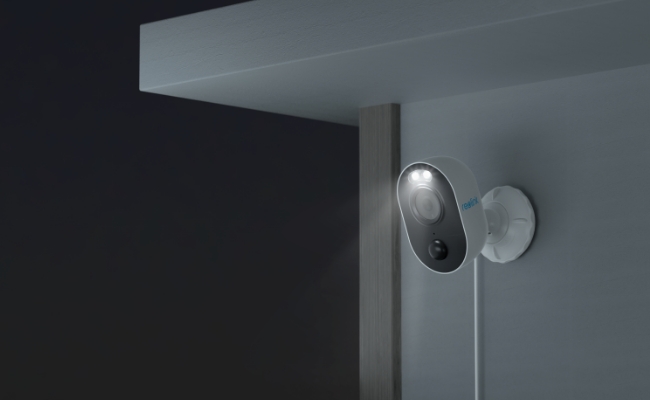
The Reolink Lumus sports a sleek, compact look with a sturdy body that feels built to last. Its all-white casing blends nicely against most walls. On the front, you’ll find dual spotlights flanking the 4MP lens, plus a motion sensor tucked beneath. The back has a secure mounting point and a weatherproof cover hiding the LAN port and power jack.
When you open the box, you get:
- The Reolink Lumus 2K camera head
- A mounting bracket with screws and wall plugs
- A quick start guide
- A USB power adapter and cable
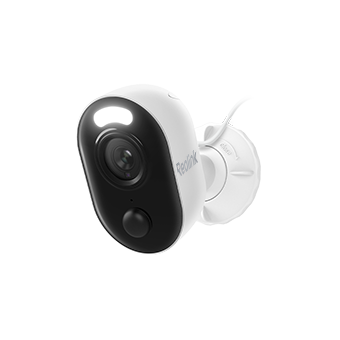
Outdoor WiFi Security Camera with Motion Spotlight
Bright, Motion-Activated LED Spotlight, Instant Siren Alarm, and Remote 2-Way Audio; 2K 4MP and Full Color Night Vision.
Key Features of Reolink Lumus
Now that you’ve seen the design and unboxed everything, let’s zero in on what really matters: the features. The Lumus packs a lot of punch for its price, from ultra‑clear video to smart alerts and vibrant night vision. Here’s a quick look at the highlights that set this camera apart.
- 2K 4MP Quad HD Clarity: Captures crisp footage thanks to the CMOS sensor, so you see sharp details in both day and night modes.
- Spotlight Color Night Vision: Two built-in spotlights light up dark scenes in full color, not just black and white.
- Person/Vehicle/Animal Detection: Advanced AI filters out false alarms by spotting humans, cars, and pets instead of just any motion.
- Dual-Band Wi‑Fi: Choose 2.4 GHz for longer range or 5 GHz for faster speeds, giving you a stable link no matter where you place the camera.
- Customizable Detection Zones: Pick specific areas to watch, so you only get alerts for the spots that matter.
- Two-Way Audio: Built‑in mic and speaker let you talk back through the Reolink app, perfect for greeting guests or warning off intruders.
- Multiple Storage Options: Store video on microSD cards (up to 256 GB), Reolink NVR, or via FTP/Cloud, so you never lose important clips.
- Easy App Control: Full access and control through the Reolink mobile or desktop app, letting you view, download, and tweak settings from anywhere.
Installation & Setup
Setting up the Lumus takes just a few minutes. Here is a simple and easy installation and setup guide:
- First, mount the bracket where you want—ideally under eaves or on a sturdy wall. Run the power cable through the waterproof cover.
- Snap the camera onto the bracket and point it where you want coverage.
- Next, download the free Reolink app on your phone. Open it, tap “Add Device,” and scan the QR code on the camera’s base.
- Choose your Wi‑Fi network (2.4 GHz or 5 GHz), enter the password, and hit “Connect.”
- The app will walk you through the rest, from naming your camera to setting detection zones.
Performance
The Lumus delivers solid daily performance that rivals pricier options. Let’s break down how it handles key tasks. First, a quick note: you’ll want to spend a minute in the app fine‑tuning detection zones and sensitivity to cut down false alerts. Once that’s done, the camera runs smoothly in day-to-day use.
Video quality: day vs. night
In bright daylight, the Lumus shines. You get clear, sharp images at 2K resolution, enough to read license plates and recognize faces at moderate distances. Colors look natural, not oversaturated.
The sunset triggers the spotlights to activate and transition to full-color night vision capabilities. The video displays bright colored images of grass and clothing, and other objects that replace the previous black-and-white, grainy footage. You can adjust the spotlights to activate black-and-white night vision or turn them off completely to choose black-and-white viewing.
Spotlight brightness
The built-in LEDs pack a punch. When triggered, they flood your yard or driveway with bright, white light. It’s enough to startle any would-be intruder and alert neighbors. You can adjust brightness levels in the app—low, medium, or high—depending on how much light you need and how discreet you want to be.
At full blast, these lights compete with standalone floodlights. And since they only fire up on motion, you won’t waste energy leaving them on all night.
Two-way audio
The two-way talk feature adds a human touch. Speak to visitors through the camera’s speaker, whether you’re in bed or halfway around the world. The mic picks up voices clearly up to a few meters away.
In tests, we used it to greet delivery drivers and warn off neighborhood cats. It’s not studio-quality, but it works well for simple chats or scaring off unwanted guests. Audio lags by half a second or so, but that’s normal for Wi‑Fi cameras.
Remote access via app
Live view and recorded clips stream right to your phone or PC. The app interface stays snappy, even on slower connections. You can switch between cameras, pan and tilt (if you have other Reolink models), and snap photos or record manual video clips with a tap.
Alerts pop up on your lock screen, letting you react fast. The app also lets you share temporary access with family, so they can check in when you can’t.
Storage options
Reolink Lumus supports microSD cards up to 512GB microSD card. You can choose between continuous, scheduled, or event-triggered recording to stretch that capacity further.
Clips are saved in individual files you can search by date or event. If you pair it with a Reolink NVR, you get centralized storage and more advanced playback tools. FTP and cloud options add off-site backup, which is handy if someone steals your camera.
Reolink Lumus: Pros and Cons
Pros:
- Delivers sharp 2K 4MP clarity in both day and night
- True color night vision beats most budget cams
- AI detection cuts false alerts for people, vehicles, and pets
- Dual-band Wi‑Fi gives you range and speed options
- Two-way talk lets you interact with visitors
- Easy app setup and intuitive controls
Cons:
- Spotlights can drain power quickly if always on
- No pan/tilt feature—fixed view only
- MicroSD card slot is a bit tight to access once mounted
Verdict
After a few weeks of testing, the Reolink Lumus stands out as one of the best budget spotlight cameras out there. It packs high-end features like color night vision, AI-powered alerts, and crisp 2K video into a wallet-friendly price point.
If you want a simple, effective security camera that shines—literally—when the sun goes down, the Lumus is hard to beat. It delivers on its promises without breaking the bank. For an affprdable price, you get a feature set that rivals more expensive models. We think the Reolink Lumus is worth buying if you need solid coverage, easy setup, and true color night vision on a budget.
Search
Subscribe for the Latest Updates
Security insights & offers right into your inbox