
Reolink Elite Pro Floodlight PoE Review: Pros, Cons & Real-World Performance
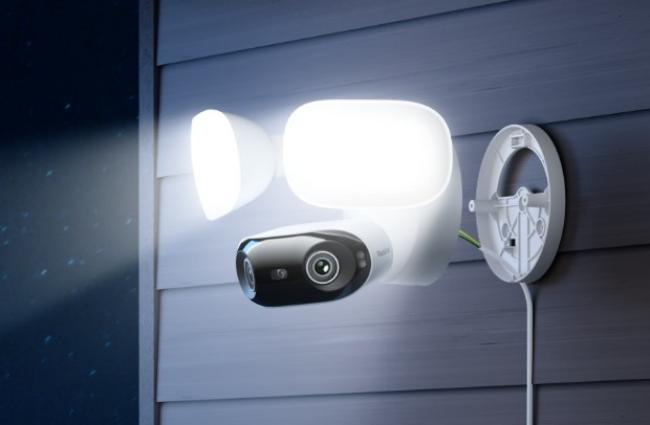
Security cameras with floodlights help people watch their homes. The Reolink Elite Pro Floodlight PoE stands out because it mixes high-quality video with bright lights. This review covers its features, how it performs in everyday situations, and whether it meets your needs. Many people look for the Elite Pro Floodlight PoE when they need strong outdoor safety.
Reolink Elite Pro Floodlight PoE Overview
The Reolink Elite Pro Floodlight PoE gives a clear picture with its 16MP dual-lens system. Each lens takes 8MP images, and the camera combines them for a 180-degree view. This setup watches large areas like driveways or backyards without missing spots. The view up and down reaches 55 degrees, and that suits most places, but might be limited in high areas.
The floodlights give up to 2800 lumens of light. You can change the light from warm 3000K to cool 6500K. This helps the light blend with your space. The lights reach up to 12 meters forward, and they help in dark spots. You can set the lights to stay on, turn on from evening to morning, or start only with motion.
This camera uses Power over Ethernet, or PoE, for power and data through one cable. It meets the IEEE 802.3at standard. Reolink recommends their NVR, injector, or switch for good results. The camera has an IP66 rating, so it deals with rain, dust, and heat from -10°C to 55°C. It spots people, vehicles, and animals in a smart way to lower wrong alerts. Other parts include two-way sound, a 105dB siren, and your own voice warnings.
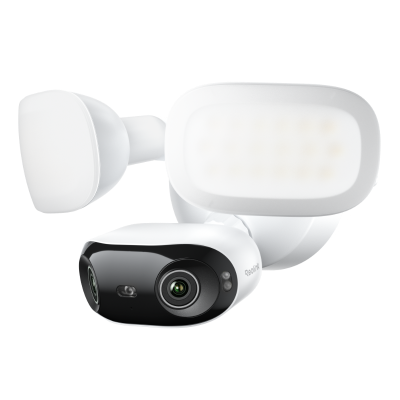
Smart 16MP PoE Dual-lens Floodlight Camera with 180° Panorama
16MP Ultra HD View, 180-Degree Ultra-Wide Panorama, 2800-Lumen Adjustable Floodlights, Adjustable Color Temperature (3000K–6500K).
Elite Pro Floodlight PoE Installation and Setup
Many users add to their safety systems and see that the Elite Pro Floodlight PoE works well with what they have. Its PoE design makes things easier for those with network cables set up. The steps take some time but lead to steady work. You begin by picking the spot, then go to mounting and linking.
Installation
First, pick a place that covers what you want to see. The camera does best at 8 to 10 feet high. Shut off the power if you work near wires. Use the template to mark holes on the wall or ceiling. The base fits a standard junction box if you have one.
Drill the holes and fix the bracket with screws. The camera has three arms for the floodlights that you can move, so set them to light key areas. Run an Ethernet cable from your PoE switch or injector to the camera. The cable goes into the port on the back. Put the waterproof cap over the link to block water.
Check the spot before you tighten it all. Plug in the PoE source and see if the camera starts. The lights on it show when it links. The full mounting takes about 30 to 45 minutes with tools ready. Users say the PoE setup skips extra power cables and cuts the mess. If you use another switch, check that it gives enough power to skip problems.
Setup
After you install it, get the Reolink app on your phone or use the computer version. Make an account if you need one. Scan the QR code on the camera to add it. The app helps you link to your network.
Set up zones to watch main areas like doors or walks. Change how sensitive it is for motion alerts to fit your place. Turn on smart spots for people or vehicles. Change the floodlights by picking modes and how bright. You can plan when the lights start or tie them to motion.
Add storage with a microSD card in the slot. Format it in the app to begin saving. If you have an NVR, link the camera there for more room. Set up access for many users with one main and up to 19 others. The app lets you see live views, play old videos, and talk both ways. It works with Alexa now, and Google will come soon. The setup ends in 15 minutes, and the app seems easy.
Key Performance
In regular use, the Elite Pro Floodlight PoE gives sharp video. In the day, footage shows small details like car plates from 20 feet away. The 16MP quality helps zoom without blur. Colors seem real, and the wide view catches more than normal cameras.
At night, the floodlights change things. They light areas in color. Without lights, infrared gives clear black-and-white. Users say the AI spots people and cars correctly, even in bad weather. Wrong alerts from leaves or bugs happen less.
The siren and lights scare off unwanted people well. When motion starts, the camera sends fast notes to your phone. Two-way sound lets you talk clearly, with the mic hearing from 30 feet. Video starts quickly in the app, with a small delay on good networks.
In checks, the camera deals with rain and wind fine. Saving stays smooth at 20 frames per second. The motion track helps check events fast by showing paths in one shot. Time-lapse does well for seeing builds or traffic over time. In all, it works steadily for home or work safety.
Pros and Cons
Pros
-
The 180-degree view covers big spaces without extra cameras.
-
High 16MP quality gives detailed images to know things.
-
Floodlights you can change with 2800 lumens give a strong night light.
-
Smart AI spots cut false alarms from things that do not matter.
-
PoE setup uses one cable for power and data, and that makes installation easy.
-
No monthly costs for storage or parts, with local choices available.
-
Design against the weather holds in outside spots.
-
Motion track and AI search make finding video simple.
Cons
-
The 55-degree up and down view might miss high or low spots.
-
It needs a strong PoE switch, and that adds cost if you do not have one.
-
The app at times needs updates for better use.
-
Higher cost than simple models, but the parts make it worth it.
Catch the Reolink Elite Pro Floodlight PoE on sale this Spring! Explore security cameras, systems, and video doorbells during the Reolink Spring Sale 2026.
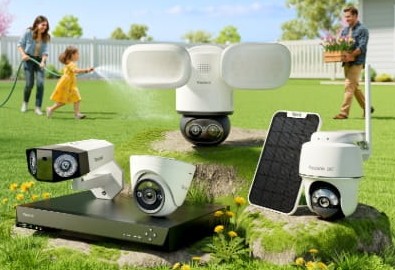
Reolink Spring Sale - Step Into Spring, Step Into Security!
Reolink Spring Sale is here! Grab top deals on security cameras, doorbells, and systems to keep your home safe this season.
Elite Pro Floodlight PoE vs. Elite Floodlight WiFi
The Elite Pro Floodlight PoE and Elite Floodlight WiFi share many things but differ in power and details. Both use two lenses for 180-degree views and have lights you can move. They give smart spots and no costs. But the PoE model fits wired networks, while the WiFi one suits quick changes.
Verdict
The Reolink Elite Pro Floodlight PoE does well for those who need full coverage. Its high quality and smart parts handle real cases well. While it costs more, not having monthly fees saves cash later. If you have PoE set, this camera lifts safety without trouble. It gets a strong yes for steady work.
Search
Subscribe for the Latest Updates
Security insights & offers right into your inbox