
Reolink Elite Floodlight WiFi: Overkill or Just Right?
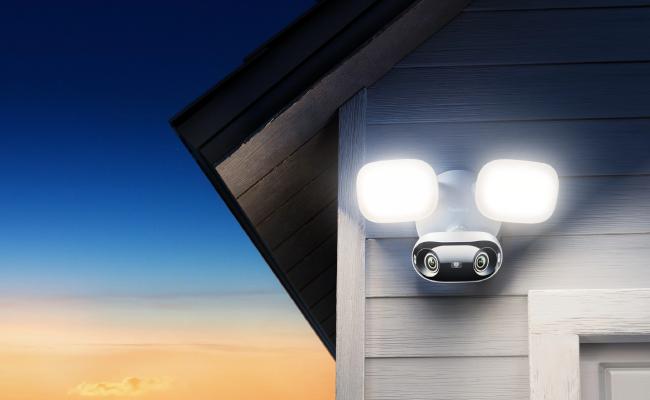
Pros:
- 4K 180° view covers a full driveway or yard from a single mounting point, no second camera needed
- 3,000-lumen floodlights with adjustable color temperature (3000K-6500K) replace a standard outdoor floodlight while adding active deterrence
- All AI detection (person, vehicle, animal, perimeter zones) runs on-device, no subscription required
- Wi-Fi 6 dual-band keeps the live stream stable even on busy home networks
- Local storage on microSD (up to 512GB) or Reolink NVR, footage stays on your property
- IP66-rated hardwired unit runs 24/7 with no battery maintenance
Cons:
- Hardwired installation required. For locations without mains wiring access, battery-powered security cameras offer wire-free 4K with AI detection.
- Apple HomeKit not currently supported. For HomeKit households, an alternative compatible Reolink model may be a better fit.
Best for:
- Homeowners replacing an existing outdoor floodlight at a wall junction box, the installation is straightforward and the hardware footprint matches a standard floodlight mount
- Wide-driveway or open-yard coverage where a single camera with a 180° lens eliminates the need for two fixed-angle cameras
- Anyone who wants AI person/vehicle alerts and perimeter protection without a monthly subscription
- Small business owners monitoring a storefront, parking bay, or building entrance who need both bright deterrence lighting and HD recording
- Reolink ecosystem users who want to add a hardwired floodlight camera alongside existing NVR or Home Hub storage
What is the Reolink Elite Floodlight WiFi

The Reolink Elite Floodlight WiFi is a hardwired outdoor 4K security camera that pairs an 8-megapixel dual-lens system with a 3,000-lumen LED panel. It is designed for homeowners who want wide coverage, bright deterrence lighting, and no monthly fees. It combines dual-lens 180° panoramic imaging with a 3,000-lumen LED panel, effectively replacing an old outdoor floodlight while adding a security camera, AI detection, and local video storage in one unit.
Within Reolink's catalog of products, this is one of the most discussed wired floodlight cameras available without a subscription and it works best when you're replacing an existing outdoor light at a junction box with solid WiFi coverage nearby.
Installation and Setup
Most installs replace an existing outdoor junction box or floodlight and the process should take roughly about 30 minutes. The Reolink app guides each step with clear visuals, and a temporary hanging wire is included so you're not holding the unit freehand while connecting wires.
- Switch off the breaker supplying the existing junction box or outdoor light.
- Remove the old fitting; if existing wires are short, extend with 18 AWG outdoor-grade cable.
- Attach the metal mounting plate to the junction box using the two provided screws; ensure the foam gasket sits flat.
- Connect line, neutral, and ground wires to the camera's color-coded pigtails; tighten wire nuts and wrap with electrical tape.
- Tuck the wires into the box and secure the camera body to the mounting plate; tighten the two thumb screws.
- Aim the camera head and LED panel, the camera tilts up to 90° and the panel up to 45°.
- Restore power at the breaker and wait 40 seconds for the startup voice prompt.
- Open the Reolink app → Add Device → scan the QR code on the camera. Connection typically completes within 15 seconds.
- Select your home Wi-Fi network, enter the password, and wait for the confirmation tone.
- Install any pending firmware update from the app notification; insert a microSD card if you're not using an NVR.
Key Features and Performance
Image quality
The dual-sensor system stitches two 8MP feeds into a single 5,120×1,552 frame at 20fps, wide enough to cover a full driveway or storefront from one mounting point. In daylight, the image retains license plate and facial detail even when digitally zooming into the edges of the 180° frame.
A small stitching seam between the two lenses is visible when you first look at the feed, but it's adjustable via the Reolink app. The 20fps frame rate gives motion a slightly smoother look than older 15fps cameras, though fast movement can still show some blur, acceptable for security use.
Across multiple third-party reviews such as Gizmodo, image clarity was described as "crisp" and "outstanding" in both day and night conditions. The 180° perspective introduces barrel distortion at the outer edges, straight lines curve near the frame edges, but the central 70% of the frame remains undistorted and sharp.
Brightness

At full power, the 3,000-lumen LED panel delivers security-grade illumination. This is bright enough to light up a two-car driveway.
Did You Know?: The Reolink product page rates floodlight coverage at up to 12 meters, but in real-world testing, Trusted Reviews found it illuminated a 30-meter garden, significantly beyond the spec sheet figure. At that output, the light is powerful enough to wash out close-range subjects, so brightness adjustment is important.
The app gives you a brightness slider from 10% to 100%, and three color temperature options across the 3000K-6500K range. 3000K warm light is closer in tone to a traditional halogen bulb, good for driveway ambiance without harsh glare. 6500K cool light delivers a daylight-bright white ideal for maximum visibility and deterrence.
Pro Tip: At 100% brightness, floodlights can wash out close-range footage and at street-facing angles, disturb neighbors. Here are a few practical adjustments you can make once you purchased a floodlight:
- Start at 50-70% brightness and increase only if coverage feels insufficient
- Angle the panel 15-20° downward to concentrate throw on your property rather than the street or neighbors' windows
- Use 3000K warm light for driveways adjacent to neighbors; reserve 6500K cool light for back-of-property or commercial setups where deterrence matters more than ambiance
- The floodlights turn off automatically 10 seconds after motion stops, the panel doesn't stay on all night by default
Recording modes
Motion-triggered recording is the default. The camera can also run on a schedule or record 24/7, and because it's hardwired, continuous recording doesn't drain a battery or throttle quality the way battery-powered cameras do. Motion clips range from 8 seconds to 5 minutes. A pre-recording buffer captures 2-10 seconds of footage before the trigger event, so you don't miss the moment that caused the alert.
Night vision
The Elite Floodlight WiFi has two distinct night vision modes and knowing which one applies in your setup matters.
IR mode (floodlights off): Nine 850nm infrared LEDs activate automatically via an IR-cut filter. Footage is black and white, with object visibility up to 30m (100ft) per official specs. This mode is silent and doesn't alert subjects to the camera's presence.
Floodlight color mode (floodlights on): When the camera is set to "auto" and AI detects a person, the floodlights fire and the camera switches from B&W IR to full-color footage mid-clip. Color coverage extends within the illuminated range (up to 12 meters). For deep backyards (30m+), IR mode serves as the primary night-vision solution, while the floodlights provide full-color coverage for the closer approach zone.
On "auto" mode, which is the recommended setting for most residential installations, the camera stays in quiet IR mode by default and only activates the bright floodlights when a person is detected. This saves energy, avoids unnecessary light pollution, and produces color footage precisely when you need it most: when someone is on your property.
Local storage
The microSD slot (behind a rubber cover on the bottom) accepts cards up to 512GB. A 128GB card holds roughly 16 days of 4K motion-only footage. Beyond microSD, the camera supports four storage options, no subscription required for any of them:
- microSD card up to 512GB - accessible remotely through the app
- Reolink NVR pairs with any compatible Reolink NVR for multi-camera, long-term storage
- Reolink Home Hub - encrypted centralized storage that is accessible from the Reolink app
- FTP / NAS server, stores footage on a home NAS via RTSP/ONVIF; requires PC/Mac to configure and manual storage management. Cloud storage plans are also available if you prefer off-site backup, starting at free (1GB, 7-day history) up to $10.49/month for 100GB across multiple cameras, but none are required to use the camera's full feature set.
AI Smart Detection

AI detection recognizes persons, vehicles, and animals, and goes beyond basic motion detection with three perimeter protection modes:
- Line Crossing Alert: triggers when a subject crosses a user-defined line in a specified direction, useful for monitoring a footpath or driveway entrance
- Zone Intrusion Alert: triggers when a subject enters a defined area within the camera's view
- Zone Loitering Alert: triggers when a subject lingers in a defined zone for longer than a set time threshold, particularly effective for monitoring shopfronts or car parks
You can draw up to three detection zones with independent sensitivity settings. Privacy masking is also available, specific areas can be blacked out in the recording if needed (for neighbor windows, for example)
Clips can be downloaded directly to your phone, viewed in the app timeline, or stored long-term on a Reolink NVR.
Other AI features
Reolink's on-device AI video search lets you type a description to find matching clips without scrubbing through footage manually. Search terms like "red truck" or "man in black shirt" pull up results from the last seven days.
Google Assistant integration lets you ask a Nest Hub or Chromecast-enabled TV to show the camera's live feed. For Alexa users, the integration is underway. The camera is also compatible with Home Assistant for core functions including live streaming, motion detection, and basic controls.
How Does It Compare to Other Reolink Cameras?
Reolink Elite Pro Floodlight PoE

The Elite Floodlight WiFi uses standard mains wiring (100-240V) for power and transmits video wirelessly over Wi-Fi 6. The Reolink Elite Pro Floodlight PoE on the other hand, runs both power and data over a single Cat5e/6 Ethernet cable. While they share a similar 180° panoramic form factor, the Pro PoE version steps up the video quality to a sharper 16MP resolution and features a slightly modified 2,800-lumen floodlight panel. See the full comparison on Reolink's site.
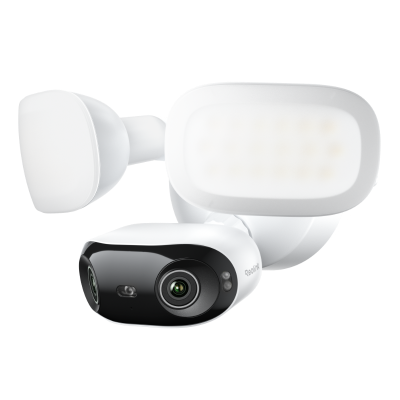
Smart 16MP PoE Dual-lens Floodlight Camera with 180° Panorama
16MP Ultra HD View, 180-Degree Ultra-Wide Panorama, 2800-Lumen Adjustable Floodlights, Adjustable Color Temperature (3000K–6500K).
Choose the WiFi version if you're replacing an existing outdoor floodlight at a wall junction box and have strong Wi-Fi coverage at the install location.
Choose the PoE version if you're running cable from scratch, want a wired network connection for maximum reliability, or have weak Wi-Fi at the mounting point.
vs battery-powered Reolink cameras
The Elite Floodlight WiFi is hardwired to mains power, so it records continuously at full quality with no battery cycles or power-saving trade-offs. The Reolink Argus 4 Pro and other battery-powered models offer wire-free placement flexibility, but require periodic recharging and may reduce recording performance under sustained heavy use.

4k 180° Wire-free Color Night Vision Camera
4K UHD 180° Blindspot-free View; Color Vision Day and Night; 30% More Battery Life; Dual-band Wi-Fi 6; Smart detection.
Choose the Elite Floodlight WiFi if you have an existing outdoor junction box and want 24/7 continuous recording, active deterrence lighting, and zero ongoing maintenance once installed.
Choose a battery-powered option if your install location has no mains wiring access and placement flexibility matters more than uninterrupted recording.
Buyer Decision Guide
The right floodlight camera depends on your installation setup, location, and recording needs. Here is a quick reference.
FAQs
1. Does the Reolink Elite Floodlight WiFi require a subscription?
No. All detection, alerts, and AI features including person/vehicle/animal recognition, perimeter zone detection, and ReoNeura text search run locally on the device. Video is stored on a local microSD card, NVR, or Home Hub with no recurring fee. Optional cloud storage plans exist if you want off-site backup, but none are required.
2. Is the Reolink Elite Floodlight WiFi hard to install?
Not if you're replacing an existing outdoor floodlight. The camera mounts on a standard junction box and the Reolink app guides the full wiring and network setup. Gizmodo's reviewer completed installation in approximately 30 minutes. If you're running new wire from scratch, basic electrical knowledge and a willingness to work at height are needed. For a no-wiring alternative, see the battery-powered options in the Reolink lineup.
3. Does the Reolink Elite Floodlight WiFi work with Apple HomeKit?
No. At launch, the camera supports Google Assistant and is Home Assistant compatible. Apple HomeKit is not currently supported.
4. How wide is the Reolink Elite Floodlight WiFi's field of view?
The Reolink Elite Floodlight WiFi's field of view is 180°. It is achieved through dual-lens stitching. From a mounting height of 8-10 feet, this covers the full width of a two-car driveway, the approach to a garage, and a portion of the surrounding yard, all from one camera, with no need for a second unit to eliminate blind spots.
5. Can the Reolink Elite Floodlight WiFi record continuously?
Yes. The camera supports 24/7 continuous recording, scheduled recording, and motion-triggered recording. Because it's hardwired, continuous recording doesn't drain a battery or trigger any throttling, it records at full 4K quality around the clock to a local microSD card or connected NVR.
6. Does the Reolink Elite Floodlight WiFi work in cold weather?
The operating temperature range is -10°C to +55°C (14°F to 131°F) per official specifications. For locations with sustained temperatures below -10°C, this lower threshold is worth checking against your local winter climate before purchasing.
Conclusion
The Reolink Elite Floodlight WiFi gives you sharp 4K wide-area coverage, 3,000 lumens of deterrence lighting, and subscription-free local storage in a single hardwired unit. For a garage or driveway with an existing junction box, it's a clean drop-in upgrade from an old floodlight, and its 180° lens means one camera does the job of two.
The no-subscription model is the core value proposition. All AI detection, person, vehicle, animal, line crossing, zone intrusion, zone loitering, runs locally on the device. ReoNeura text search adds a genuinely useful tool for finding specific clips fast. Notification speed (~4 seconds from trigger to phone alert) is faster than any battery-powered competitor at this price point.
However, alternatives should be considered if you need Apple HomeKit, wire-free battery installation, or a narrow fixed-angle view. For most homes and small shops with an existing outdoor wiring point, the Elite Floodlight WiFi is worth the price and the Reolink Elite Pro Floodlight PoE is the natural alternative if a single-cable PoE run suits your setup better.
Search
Subscribe for the Latest Updates
Security insights & offers right into your inbox