
Reolink Argus 2 Discontinued: Alternatives and Upgrade Options

The Reolink Argus 2 once served many homes as a wireless outdoor security camera. It ran on battery power and connected through Wi-Fi for simple home monitoring. Reolink discontinued this model, and owners now seek clear information on its status, practical alternatives, and upgrade paths from the Argus series.
This article reviews the camera itself along with the exact end-of-life details. It covers ongoing usability for current owners and the available support options. Accessory options and the strongest current Argus series cameras are explained in full.
- What Is the Reolink Argus 2?
- Is the Reolink Argus 2 Discontinued?
- Why Was the Reolink Argus 2 Battery Discontinued?
- Can You Still Use a Reolink Argus 2?
- Does Reolink Still Support the Argus 2?
- Are Reolink Argus 2 Batteries and Accessories Still Available?
- Should You Replace Your Reolink Argus 2?
- Support for Argus 2
- Best Reolink Argus 2 Alternatives
- Reolink Argus 2 vs. Newer Argus Series Cameras
- How to Choose the Best Argus Series Camera?
- FAQs
- Conclusion
What Is the Reolink Argus 2?
The Reolink Argus 2 is a compact, battery-powered security camera for outdoor placement. It records video when it detects motion and stores clips on a microSD card. Users watch live footage through the Reolink app on a phone or tablet.
The camera includes two-way audio so people can speak and listen from a distance. Many owners pair it with a solar panel to keep the battery charged without frequent removal of the battery pack. Installation requires no power cable or video cable in most outdoor setups, which made the Argus 2 a common choice for areas without easy wiring access.
Is the Reolink Argus 2 Discontinued?
Yes, Reolink discontinued the Argus 2 as an active product in the lineup. The company listed the camera as end of life on September 29, 2022. End of life means Reolink no longer manufactures new units of this model and no longer keeps the model in its active product lineup for sale.
Stores and online sellers may still list leftover stock from time to time. Yet official production and regular distribution of the Argus 2 have stopped.
Why Was the Reolink Argus 2 Battery Discontinued?
Reolink ends production of older models once newer cameras with improved features enter the lineup. The Argus 2 battery version reached that stage in the year 2022. The company posts product end-of-life notices on its official end-of-life page.
This helps customers track which models remain active in the current lineup. The notice for the Argus 2 simply confirms the September 29, 2022 date and removes the camera from current catalogs and from sales channels.
Can You Still Use a Reolink Argus 2?
Discontinuation does not switch off cameras that owners already installed at home. An Argus 2 continues to operate as long as its hardware stays sound, the battery holds enough charge, the Wi-Fi signal remains stable, and basic support resources stay online.
The following functions continue to work on existing units:
- Live viewing through the Reolink app each day.
- Motion detection that starts recording on the device itself.
- Motion-triggered recording and storage on a microSD card.
- Push notifications or email alerts for all motion events.
- Two-way audio conversations through the built-in speaker.
- Solar charging when a compatible panel is attached.
Each camera's future depends on its physical condition and the network environment. Reolink does not promise unlimited years of app updates, cloud services, or third-party software compatibility for this model. Owners should test their own units regularly and prepare for gradual changes.
Does Reolink Still Support the Argus 2?
Product availability and technical support are separate matters for this camera model. Reolink no longer sells new Argus 2 units in any market, yet the company still maintains a dedicated support section for the Argus 2 and Argus Pro.
That section contains guides on initial setup, charging methods, physical installation, motion detection settings, recording options, video playback, network connection steps, firmware checks, downloadable manuals, and frequently asked questions. Common troubleshooting steps are listed for owners who need quick help.
Argus 2 Firmware and App Support
Users open the Reolink app and look under the camera settings for updates. Some cameras display no downloadable file for a new firmware version, which means the unit already runs the newest firmware that Reolink released.
Always verify the exact hardware version printed on the camera or shown in the app before any manual update attempt. Contact Reolink Support before attempting a manual firmware install so the correct file is used. Reolink states that the absence of a firmware option usually means the camera is already on the latest available version.
Argus 2 Manuals and Troubleshooting
Official support pages list clear steps for the most common Argus 2 issues. Owners can follow these guides directly from the Reolink website without new hardware.
-
Charging and power problems - covered under the Power/Charging Issues section
-
Wi-Fi connection issues - listed under Connection Issues in the Argus 2 support hub
-
SD card recording setup - specific guide for the Argus 2 and Argus Pro
-
Motion detection zones and sensitivity - listed under Detection in the Argus 2 support hub
-
Installation guidance - covered under Initial Setup and installation steps
Are Reolink Argus 2 Batteries and Accessories Still Available?
Replacement batteries for the Argus 2 appear on some online listings and channels. Stock levels change by region and over time, so checks are needed before placing any order.
Compatible solar panels, wall mounts, magnetic mounts, protective skins or covers, and charging cables designed for the original battery pack also remain listed in places. Availability is not guaranteed in every country, so buyers should confirm current inventory before placing an order for any Argus 2 accessory item.
Should You Replace Your Reolink Argus 2?
The decision rests on how well the existing camera meets daily needs, not on the simple fact that a newer model exists.
Keep Using It If...
- The camera still delivers clear daytime and nighttime video for identification needs.
- The battery lasts through normal activity cycles without constant recharging each day.
- The Wi-Fi link stays steady and the app receives alerts without dropouts.
- The present features cover the area you need to watch on a daily basis.
- No repeated hardware failures such as failed recordings or power loss appear.
Consider Upgrading If...
- Battery runtime has shortened sharply and reliable replacement packs grow harder to locate.
- Image detail or night vision no longer meets the level of clarity required.
- Connection interruptions increase and cause missed alerts or incomplete recordings each time.
- A wider viewing angle, smarter detection, or remote pan and tilt would improve coverage.
- The unit fails to power on reliably or stops saving video to the memory card.
Support for Argus 2
Reolink continues to offer customer support for the Argus 2 through its website. Help center options and the in-app support tools remain open for owners. Owners can submit tickets, search the FAQ library, or follow the model guides.
Support staff handle questions about setup, firmware, and basic troubleshooting steps. They follow the company's standard procedures for discontinued products in this process.
Best Reolink Argus 2 Alternatives
Since Reolink officially retired the pioneering Argus 2, the wire-free security lineup has evolved significantly. While the Argus 2 relied on basic 1080p video, single-band Wi-Fi, and simple heat-based motion sensors, its modern successors offer massive leaps in clarity, wireless stability, and on-board intelligence.
1. Direct 1:1 Successor: Reolink Argus 3 Pro
If you liked the compact, fixed-lens form factor of the Argus 2 but want a modern performance boost, the Argus 3 Pro is your seamless replacement.
- Why it's a great alternative: It retains the familiar 100% wire-free setup but upgrades the Argus 2's dated 1080p resolution to crisp 2K Super HD. It adds a built-in spotlight for full-color night vision and introduces on-device AI smart detection (distinguishing people and vehicles) to virtually eliminate the false motion alerts that frequently plagued the older model.
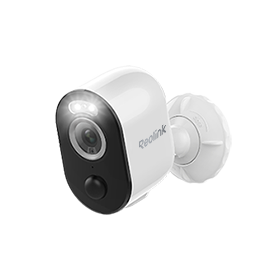
2K 100% Wire-Free Spotlight Camera
2K 4MP Super HD, Battery/Solar Powered, Person/Vehicle Detection, 5/2.4 GHz Dual-Band WiFi, Color Night Vision, Two-Way Audio.
2. Best Upgrade for Ultra-Wide Spaces: Reolink Argus 4 Pro
If you are tired of the limited 130-degree viewing angle of the Argus 2 forcing you to buy multiple cameras to watch a single front yard, the Argus 4 Pro is the ultimate upgrade.
- Why it's a great alternative: The Argus 4 Pro uses innovative dual lenses and on-device image stitching to deliver a seamless 180-degree panoramic view in true 4K Ultra HD. Even better, it features ColorX night vision tech, allowing you to see full, vivid color in the dark without needing harsh, battery-draining spotlights. It also leaps forward in wireless tech with Dual-Band Wi-Fi 6 for flawless 4K streaming.

4k 180° Wire-free Color Night Vision Camera
4K UHD 180° Blindspot-free View; Color Vision Day and Night; 30% More Battery Life; Dual-band Wi-Fi 6; Smart detection.
3. Best for Eliminating Blind Spots: Reolink Argus PT Ultra
If the fixed position of the Argus 2 left you with frustrating security gaps around the side of your home or driveway, motorized flexibility is the answer.
- Why it's a great alternative: The Argus PT Ultra introduces motorized 355-degree pan and 140-degree tilt controls directly from your smartphone app. It upgrades your viewing experience to crystal-clear 4K resolution, runs on a stable dual-band Wi-Fi connection, and includes automatic person/vehicle tracking so the camera can actively follow a target across your property.
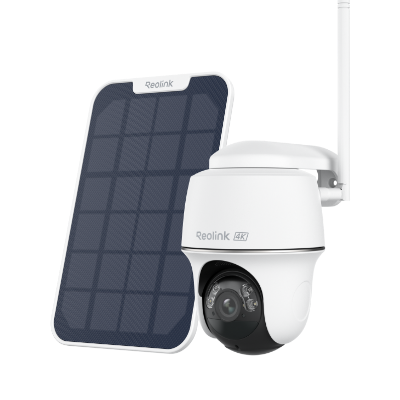
4k 100% Wire-Free PT Camera
4K 8MP Ultra HD; 5GHz/2.4GHz WiFi; Rechargeable Battery & Solar Powered; 355° Pan & 140° Tilt; IP65 Certified Weatherproof; Clear Night Vision; 2-Way Audio; 122° Wide Viewing Angle.
Reolink Argus 2 vs. Newer Argus Series Cameras
How to Choose the Best Argus Series Camera?
- Measure the exact outdoor area that needs monitoring and match the camera's field of view.
- Decide whether a fixed lens or a pan-and-tilt mechanism better fits the location.
- Select battery-only or solar-assisted power based on how easy it is to reach the camera for charging.
- Compare daytime resolution and night vision performance against the level of detail required.
- Confirm that the camera's Wi-Fi range and Reolink app features work with the network.
- Weigh the purchase price against the specific improvements each model offers for use.
FAQs
When Was the Reolink Argus 2 Discontinued?
Reolink listed the Argus 2 as end of life on September 29, 2022. This date marks when the camera left the active product lineup and regular production stopped.
Does the Reolink Argus 2 Still Work?
Existing units continue to function according to their individual hardware condition. They also depend on battery health and the network connection quality. Owners should test their units regularly and stay aware that app and firmware support may change over time.
Does Reolink Still Provide Support for the Argus 2?
Yes, Reolink keeps dedicated support pages, manuals, and troubleshooting guides available for the Argus 2. Firmware information remains open for the Argus 2 as well. Owners can access this support at the Argus 2 and Argus Pro support hub.
Conclusion
Owners of a working Argus 2 can keep the camera in service when it stays reliable and continues to meet monitoring needs each day. Official support resources supply the steps needed for setup, charging, connection, and basic repairs for the Argus 2 model.
An upgrade becomes practical once battery life, wireless stability, image quality, or detection performance limits usefulness over time. When selecting a replacement, match the new camera to the size and shape of the area that must be watched. Do not choose a model only because it is the newest release available.
Search
Subscribe for the Latest Updates
Security insights & offers right into your inbox