
Best Continuous Recording Security Camera 2026 Buying Guide
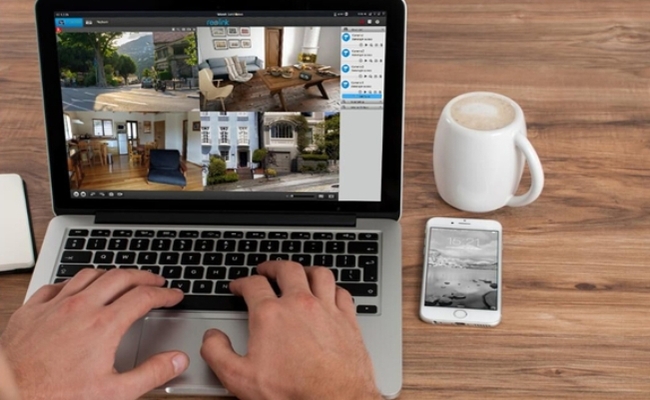
Continuous recording security cameras are essential for comprehensive surveillance。 These devices offer 24/7 monitoring of protected areas. However, 24/7 options can quickly become a headache for homeowners who realize that continuous filming means massive data storage demands, constant Wi-Fi bandwidth strain, or forced monthly cloud subscriptions just to look at their own footage. True security shouldn't come with a permanent monthly bill or a lagging home network.
To help you navigate these real-world challenges, this article breaks down the basics of continuous recording cameras, best Reolink models for different property setups. We will also explore five distinct recording options to build a security camera system that records 24/7 locally, reliably, and entirely subscription-free. Let's dive into the details.
- Are There 24-Hour Continuous Recording Cameras?
- What Are Common Types of Continuous Recording Security Cameras?
- 5 Best Continuous Recording Security Cameras
- How to Choose the Best Continuous Recording Security Camera?
- Buyer's Decision Table for Continuous Home Monitoring
- How to Set Up Security Cameras and System that Record 24/7?
- FAQs
- Conclusion
Are There 24-Hour Continuous Recording Cameras?
Yes, 24-hour recording security cameras exist, but their ability to stream and save footage continuously depends entirely on their power source and storage configuration. While traditional battery-powered cameras are restricted to motion-triggered clips to preserve power, plug-in wireless and Power over Ethernet (PoE) cameras are purpose-built for uninterrupted, 24/7 surveillance.
For example, certain local-storage systems are designed specifically around 24/7 continuous recording without requiring a monthly subscription. By pairing high-efficiency H.265 video encoding with local storage devices, these systems can reliably record crisp 4K resolution day and night.
What Are Common Types of Continuous Recording Security Cameras?
When selecting a security camera for 24/7 monitoring, understanding how the device is powered and connected determines how reliably it can record without interruption. Unlike standard battery cameras that sleep to save power, continuous recording models require constant energy and robust data pipelines. They can be categorized into the following three types.
1. Power over Ethernet (PoE) Wired Cameras
PoE cameras use a single network cable to deliver both high-speed data and electrical power, making them the most stable choice for uninterrupted 24/7 recording.
A single Ethernet cable runs from the camera to a central Network Video Recorder (NVR) or PoE switch. This completely eliminates Wi-Fi signal drops and battery charging hassles.
Best used for: Complete home coverage, large properties, and multi-camera systems where recording gaps cannot be tolerated.
2. Plug-In Wireless (Wi-Fi) Cameras
Plug-in wireless cameras use a traditional power cord for constant electricity but transmit their video footage over your home Wi-Fi network.
Because they plug directly into an electrical outlet, they have the power capacity to film 24/7, saving footage to an on-site microSD card or local storage drive.
Best used for: Indoor spaces, apartments, or outdoor areas where running network cables through walls is too difficult, provided there is a strong Wi-Fi signal.
3. Wired Video Doorbells
Wired doorbell cameras replace standard front door button systems. They use exist low-voltage wiring to achieve constant, subscription-free surveillance of your entryway.
Wired models hook directly into the electrical chime wires already inside your doorframe, giving them a non-stop power stream to record continuously without ever running out of battery.
Best used for: Homeowners looking for high-definition front porch security, package tracking, and a wide viewing angle without a permanent monthly fee.
5 Best Continuous Recording Security Cameras
To ensure true 24/7 coverage, choosing hardware optimized for constant data writing and power consumption is essential. Below are 5 top-tier continuous recording security cameras designed to deliver seamless monitoring without hidden subscription fees.
1. Best Outdoor Continuous Recording Camera No Subscription: Reolink Duo 3 PoE
The Duo 3 PoE is a dual-lens Power over Ethernet camera that delivers an expansive 16MP panoramic view, capturing crisp detail day and night with zero gaps in coverage.
The Duo 3 saves high-resolution video locally to an on-site microSD card (up to 256GB), meaning you maintain complete data ownership without a monthly cloud bill.
Through the companion app or desktop client, you can customize your schedule or run continuous recording indefinitely. Because it uses wired PoE technology, it eliminates the risk of Wi-Fi interference or battery death disrupting your footage.

Groundbreaking 16MP Dual-Lens PoE Camera
16MP UHD, Dual-Lens, Motion Track, 180° Wide Viewing Angle, Power over Ethernet, Color Night Vision.
Tech analyst Marius Bogdan highlighted that the Duo 3 PoE integrates natively with Synology Surveillance Station via the ONVIF protocol. This allows power users to stream and record massive 16MP continuous video directly to their own secure network-attached storage (NAS) devices.
2. Best 24-Hour Recording Security Camera System: Reolink RLK8-800B4
This complete Power over Ethernet (PoE) surveillance system offers centralized, multi-camera local continuous recording over a reliable wired network, ensuring high-speed data transmission and solid security.
Equipped with a pre-installed 2TB hard disk drive (HDD), this system can comfortably store days of non-stop, continuous footage across four 4K cameras simultaneously.
Utilizing physical Ethernet cables to power the cameras and transmit data, the system completely bypasses Wi-Fi congestion and signal drops, guaranteeing an uninterrupted 4K video stream to protect your privacy and data.
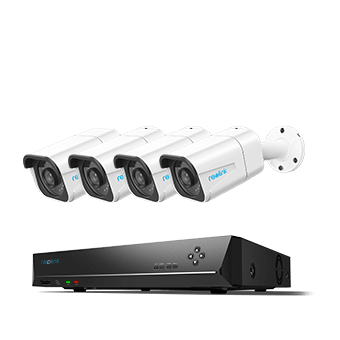
4K 8-Channel PoE Security System
4 pcs 4K Ultra HD Security Cameras; 2TB HDD 8-Channel NVR for 24/7 Recording; Person/Vehicle Detection; Plug & Play; 2 Network Solutions.
Long-term feedback highlights the system's impressive durability, with verified buyers noting it runs non-stop for over four years with zero hardware failures. Users switching from cloud-reliant brands frequently praise the RLK8-800B4 for its "plug-and-play" simplicity.
3. Best Plug-In 24/7 Recording Security Camera: Reolink Duo 3 WiFi
The Duo 3 Wi-Fi offers ultra-high-definition 16MP dual-lens resolution with a 180-degree field of view, blending the ease of a wireless network connection with the limitless recording potential of continuous plug-in power.
By plugging directly into a standard wall outlet, this camera bypasses the severe limitations of battery models, so it has the power required to monitor wide outdoor areas non-stop.
You can configure the device to continuous, motion-triggered, or scheduled recording via their preferred management interface.

Groundbreaking 16MP Dual-Lens WiFi Camera
16MP UHD, Dual-Lens, Motion Track, 180° Wide Viewing Angle, Plug-In WiFi, Color Night Vision.
According to the SafeWise review, the camera supports massive local storage via an on-site microSD slot accepting cards up to 512GB. Because continuous 16MP video files are exceptionally large, utilizing the maximum 512GB card capacity ensures you can look back through multiple days of 24/7 landscape footage without needing a paid cloud subscription or worrying about early data overwrites.
4. Best Wired Video Doorbell Camera for 24/7 Recording: Reolink Video Doorbell WiFi
This hardwired smart doorbell captures a 2K+ (5MP) vertical and horizontal field of view, replacing traditional front-porch button hardware with a subscription-free, continuous entryway monitor.
Put it at your front door and connecting it directly to existing low-voltage doorbell chime wiring or a dedicated power adapter gives the unit a non-stop energy flow to record around the clock.
Like other Reolink models, this doorbell also supports local recording to an on-site microSD card, Home Hub, or network video recorder. It effectively tracks incoming packages, vehicles, and visitors while maintaining local data privacy.
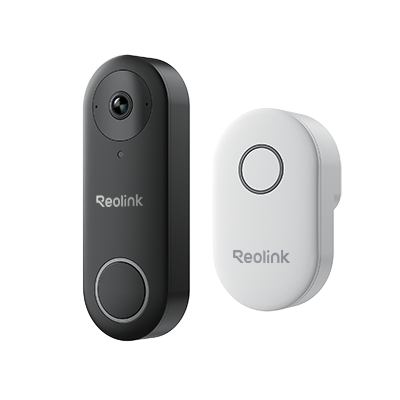
Smart 5MP Video Doorbell with Chime
5MP Super HD Day & Night, Person Detection, 2.4/5 GHz Dual-Band WiFi, 180° Diagonal Viewing Angle, Two-Way Audio, Rich Notification.
One of the standout features highlighted in PCMag's testing is the doorbell's built-in 6-second pre-roll capture. Because the hardware continuously caches video, it automatically pins the six seconds of action before a motion sensor triggers or a visitor presses the button. This provides invaluable context, ensuring you see exactly how an incident or delivery unfolded from the start.
5. Best 4K No-Drill Continuous Wireless Security Camera: Reolink Altas
The Reolink Altas breaks the industry mold as a wire-free, battery-powered security camera capable of true continuous recording without requiring structural drilling or access to an AC outlet.
Traditional battery cameras are strictly motion-triggered because continuous streaming would kill their power source within a single day. The Altas bypasses this limitation with a massive, industry-leading 20,000 mAh battery. This gargantuan capacity allows it to run nonstop for up to 8 to 14 days on a single full charge depending on your framework configurations, completely independent of the power grid.
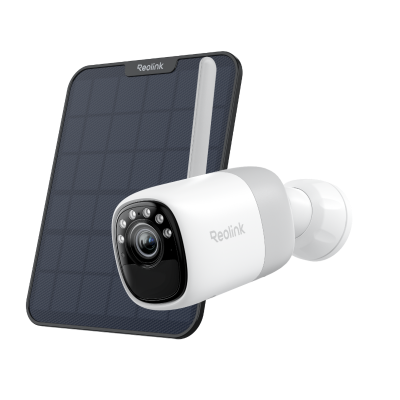
2K Pre-recording Bullet Camera with a Long Lasting Battery
2K 10s Pre-recording ; ColorX Night Vision; 20,000mAh Battery; Dual-band Wi-Fi 6.
In a hands-on review by PCWorld, tech expert Christopher Null highlighted that the Altas is "impervious to the ingress of particulate matter" with a rugged IP66 weatherproofing rating. Testing showed the camera was highly responsive and quick to load videos, thanks to its integrated dual-band Wi-Fi 6 adapter. PCWorld also praised the useful pre-recording feature, which captures the critical 10 seconds of action before a motion event is fully triggered so you never miss how an incident started.
How to Choose the Best Continuous Recording Security Camera?
Selecting a security camera for non-stop monitoring requires looking past basic marketing buzzwords. Because 24/7 monitoring places immense strain on hardware, storage, and home networks, your decision should come down to a few critical, measurable technical standards.
1. Power Supply (Wired vs. Battery Continuous)
The power source determines how reliably a camera can maintain a continuous recording state without causing system downtime or early hardware failure.
-
Hardwired PoE or AC Power: Power over Ethernet (PoE) and plug-in AC cameras are the traditional gold standard for 24/7 recording. They have an infinite power supply, making them ideal for heavy, uninterrupted data processing.
-
Continuous Battery Power: If you cannot drill or run wires, you must choose a camera specifically engineered with an ultra-large capacity battery (such as 20,000 mAh) and an efficient solar panel. Standard battery-powered cameras will die within days if forced to record continuously.
2. Video Compression Standards (H.265 vs. H.264)
High-resolution continuous footage creates massive files; the compression codec used by the camera determines how many days of history your storage can hold.
-
H.264 Encoding (Avoid for 24/7): Older compression models create massive file sizes that quickly clog your network and rapidly fill up local hard drives.
-
H.265 Encoding (Recommended): This modern standard compresses 2K and 4K footage to roughly half the file size of H.264 without sacrificing image quality. For a multi-camera system running 24/7, choosing an H.265 camera means your local hard drive or microSD card will last twice as long before overwriting old data.
3. Local Storage Methods
To avoid monthly cloud subscriptions and protect your privacy, you need an on-site storage method capable of handling constant data overwrites.
-
Standalone MicroSD Cards: Ideal for single-camera setups. Ensure the camera supports card capacities of at least 256GB to 512GB, and always buy "High Endurance" cards designed specifically for continuous security loops.
-
Centralized NVR (Network Video Recorder): The best option for multi-camera systems. A dedicated NVR houses a spacious hard drive (typically 2TB to 12TB) that centralizes all video streams locally, so you can review weeks of 24/7 footage with no monthly fees.
4. Smart AI Detection vs. Basic Motion Sensors
Constant recording means you have a massive amount of video to sort through; smart AI processing ensures you can actually find critical events when you need them.
-
Basic PIR Sensors: These sensors trigger alerts on any change in heat or movement, resulting in dozens of false notifications from blowing tree branches, rain, or passing animals.
-
On-Board AI Alerts: Advanced cameras process video locally to accurately identify people, vehicles, and packages. While the camera still records 24/7 in the background, the app filters your playback timeline so you can instantly jump to real security events instead of scrubbing through hours of empty footage.
Buyer's Decision Table for Continuous Home Monitoring
To help bring further clarity to what is best for your home, we created a Buyer Decision Table to make it easier for you to compare choices with confidence. This table covers the distinct technical paths to continuous surveillance.
Tips for Selecting and Finalizing Your Continuous Recording Setup
-
Check Your Infrastructure First: If your house already has low-voltage doorbell wires, a plug-in doorbell is a 20-minute installation victory. If you have access to an attic or crawlspace, a hardwired PoE NVR system offers the highest possible lifespan and data stability.
-
Evaluate Your Wi-Fi Environment: High-resolution continuous video creates a massive traffic footprint. If your router is heavily crowded, lean toward PoE systems to save your home network's bandwidth, or ensure your wireless choices leverage Wi-Fi 6 to handle the heavy continuous streaming load.
-
Verify the Video Codec: No matter which row in the table fits your project, double-check that the camera utilizes H.265 compression. This ensures your local hard drive or microSD card lasts twice as long before overwriting your historical footage.
How to Set Up Security Cameras and System that Record 24/7?
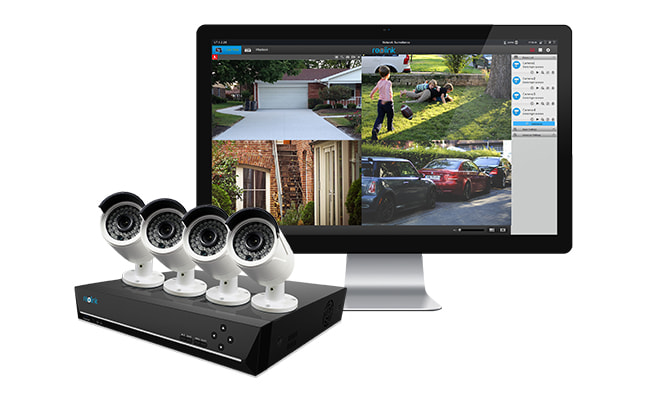
1. Record to DVR/NVR
The best way to use security cameras that record 24/7 without subscription is to use an NVR (Network Video Recorder) or a DVR (Digital Video Recorder).
Most NVRs and DVRs come with a built-in HDD with large capacity, such as 1TB, 2TB, 3TB, etc. And you can install an external hard disk drive via e-SATA on the NVR/DVR for more storage.
Here is video footage captured by Reolink RLK8-800B4, showing the whole process that a postman knocked over someone's trash can.
Recording 24/7 directly to an NVR hard drive will not "eat up" or congest your home’s primary Wi-Fi bandwidth. The system operates entirely offline and stays off your main local network. It will only access the internet when you intentionally open your smartphone app or computer client to stream live video remotely or playback recorded clips.
Steps for Streaming Continuous Video to NVR/DVR:
Viewing 24/7 camera recording's video and voice to the NVR/DVR HDD is very simple. Let's take Reolink cameras and NVR as an example.
- Connect the cameras to the recorder, NVR.
- Make sure the products have power supply. Now the cameras and the NVR are connected to each other, and they can start communication.
- Connect the NVR to a monitor (or an HD TV). The monitor will display the setting screen.
- Navigate to the video recording settings.
- You can set up the recording now, such as 24/7 recording, or motion detection recording (which means only when the cameras detect a moving action will the recording begin).
2. Recording to SD Card
Many IP cameras have a built-in SD card. The capacity of the SD card normally is 16GB or 32GB, and it's only for motion event recording. So choose cameras compatible with larger SD card for continuous recording.
Steps for Recording IP Cameras onto SD Card:
- Make sure your IP camera supports an SD card and has an SD card inserted.
- Connect the security camera to the network.
- On the computer with the same network, run the surveillance camera software/app.
- After the software connects to the camera, start all the settings you want.
- Normally, recording an IP camera to the SD card is a default setting. To 100% guarantee that, check if this option has been selected.
And even if the camera is offline, it can still record motion events to the SD card.
3. Recording on Laptop/PC Computer
The cheapest way to stream a security camera to a recorder is to record the footage on a laptop or a desktop computer.
Recording to a computer means recording the footage to the computer hard drive (and you can plug in a flash drive or a USB drive to record the security camera to it). The very important thing is to keep the computer running all the time. See the detailed steps below:
Steps for Recording a Security Camera to Laptop/Computer/Mac:
- Connect the security camera to the network.
- On the computer with the same network, run the surveillance camera software/app.
- After the software connects to the camera, navigate to the video recording settings.
- Set up the video recording, such as 24/7 recording and scheduled time recording.
- Select the recoding path where you want to save the footage.
- Keep the software and the computer running all the time. If you shut off the software or the computer, the recording will stop.
Editor's Note: Since we've covered all in the post: 5 Methods to Connect Your IP Cam to PC, you may refer to it to see all the information.
Here is the video showing you how to set up 24/7 continuous recording on your phone, laptop, and NVR. Follow it step by step and get things easily done.
4. Record on an FTP Server
If you want to remotely record a security camera, you can try to set up the recording to an FTP server. Recording the surveillance camera to an FTP server is similar to recording on a computer. You need to set up the settings via the software/app on a computer.
Check your camera's FTP compatibility before setting up.
Steps to Record Surveillance Cameras on an FTP Server Round-the-Clock:
- Connect the security camera to the network.
- On the computer with the same network, run the surveillance camera software/app.
- After the software connects to the camera, navigate to the video recording settings.
- Set up the video recording, such as 24/7 recording or motion detection recording.
- Select the recording path on the FTP server where you want to save the footage.
- Now you can close the software and the computer.
Do remember that you need to keep the FTP server running all the time during the recording.
5. Recording to Cloud
The most expensive way to record a security camera for 24/7 is to record the video to the cloud. You may have some free-trial storage/capacity in the cloud, but that's far not enough. You have to pay for more cloud storage to save the footage and that would be a big money.
Steps to Record a Security Camera to Cloud:
- Find a cloud storage service provider.
- Sign in to get an account.
- Select a plan according to your needs and budget.
- Contact the company for more details.
- Follow the guide offered by the company to record a security camera video to the cloud.
FAQs
How do I get my security camera to record all the time?
To record continuously, make sure your security camera has a storage device configured, such as a microSD card, NVR, or DVR, then change the recording mode from motion-triggered to continuous (24/7) recording in the camera app, client software, or recorder settings.
If you're using a microSD card, it's recommended to use a high-endurance card and format it before enabling continuous recording. Once the schedule is set to 24/7 recording and saved, the camera will record continuously as long as storage space and power are available.
What security cameras record 24/7 without subscription?
To achieve true 24/7 surveillance without being locked into a mandatory monthly cloud fee, you must look for hardware explicitly engineered to support local storage architecture. The primary types of subscription-free, continuous recording cameras include: PoE systems, plug-in cameras, and continuous battery camera with larger capacity.
Can security cameras record 24/7?
Yes, security cameras can absolutely record 24/7, but their ability to maintain an uninterrupted, non-stop recording state depends entirely on how they receive power and manage data storage.
Conclusion
Continuous recording security camera can offer several advantages and ensure comprehensive surveillance. As technology advances, more 24/7 recording security cameras will be on the market. Whether opting for cloud-based solutions, robust local storage, or innovative hybrid systems, choosing the suitable recording method and product is pivotal in achieving a seamless and effective surveillance strategy for residential and commercial settings.
Do you need a security cameras that record 24/7 without subscription? How does your security camera record video? Please share your ideas with us, and let's discuss them together!
Search
Subscribe for the Latest Updates
Security insights & offers right into your inbox