
ONVIF Doorbell Cameras: Ultimate Buyer’s Guide 2026
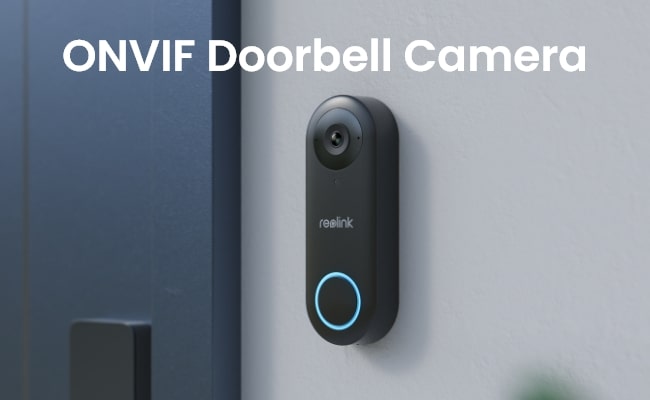
Homeowners who need more compatible and secure surveillance systems have turned to ONVIF doorbell cameras as a top option. Because they integrate seamlessly with so many different devices, they are a great way to keep an eye on their belongings.
In this guide, we’ll look at what an ONVIF doorbell camera is all about, along with its benefits, top products, and setup tips.
- What Is an ONVIF Doorbell Camera?
- Why Choose an ONVIF-Compatible Doorbell Camera?
- Real-World User Case Study: The Search for an ONVIF Doorbell Camera That Actually Works
- Best ONVIF Doorbell Cameras: Top 2 Picks
- How to Choose the Best ONVIF Doorbell Camera: 5 Key Features to Consider
- How to Set Up a Video Doorbell with ONVIF?
- FAQs
- Conclusion
What Is an ONVIF Doorbell Camera?
An ONVIF doorbell camera is a smart video doorbell that follows the ONVIF (Open Network Video Interface Forum) standard, allowing it to work with a wide range of NVRs, NAS devices, VMS platforms, and smart home systems.
Unlike many proprietary doorbells that only work within a single brand's ecosystem, ONVIF-compatible doorbells are designed to integrate with third-party surveillance software and local recording systems.
Common ONVIF doorbell features include:
- Local video recording through NVRs, NAS devices, or VMS platforms
- Two-way audio for visitor communication
- Motion detection and smart alerts
- High-resolution video monitoring
- PoE or WiFi connectivity
- Compatibility with Home Assistant, Blue Iris, Synology Surveillance Station, and other third-party platforms
For homeowners who want greater control over their security system, ONVIF compatibility provides flexibility that many cloud-dependent doorbells cannot offer.
Why Choose an ONVIF-Compatible Doorbell Camera?
The biggest advantage of an ONVIF doorbell camera is freedom. You can choose how your footage is stored, which software manages your devices, and how your security system evolves over time.
Local Recording Without Cloud Dependence
ONVIF doorbells can connect directly to compatible NVRs, NAS devices, and video management systems. You maintain ownership of your recordings, avoid monthly subscription fees, and continue accessing footage even if a cloud service changes or shuts down.
Compatibility Across Different Brands
ONVIF was designed to help security devices communicate using a common standard. You can build a surveillance system using cameras, recorders, and software from different manufacturers instead of being locked into a single ecosystem.
Integration with Third-Party Platforms
Many ONVIF doorbells work with popular platforms such as Home Assistant, Blue Iris, and Synology Surveillance Station. Advanced users gain greater control over automations, notifications, storage, and video management.
Centralized Security Management
An ONVIF-compatible doorbell can become part of a larger surveillance system rather than operating as a standalone device. Homeowners and businesses can monitor multiple cameras, review recordings, and manage security settings from a single interface.
Long-Term Flexibility
Security systems often evolve over time as users add cameras, storage devices, or automation platforms. ONVIF compatibility makes future upgrades easier because you're not limited to one manufacturer's hardware or software.
Real-World User Case Study: The Search for an ONVIF Doorbell Camera That Actually Works
To understand what buyers really want from an ONVIF doorbell camera, we analyzed discussions across Reddit communities focused on Home Assistant, Blue Iris, Synology Surveillance Station, and self-hosted smart home systems.
One pattern appeared repeatedly: most users weren't simply shopping for a video doorbell. They were trying to build a security system they fully controlled—without cloud subscriptions, vendor lock-in, or proprietary apps.
Case 1: The "Wireless ONVIF Doorbell" That Doesn't Exist
A homeowner upgrading to Home Assistant wanted a battery-powered doorbell that could connect directly to their NAS through ONVIF. On paper, this seemed like a simple requirement.
After researching multiple models, they discovered a fundamental limitation: battery-powered doorbells are designed to sleep most of the time to conserve power, while ONVIF integrations typically work best with continuous video streams.
Community members repeatedly explained that these two goals often conflict with each other.
Key takeaway: If ONVIF compatibility is your priority, a wired doorbell is usually more reliable than a battery-powered model.
Case 2: Smart Doorbell That Broke the Existing Chime
Another homeowner replaced a traditional wired doorbell with a smart ONVIF-compatible model. The video feed integrated perfectly with their NVR, but there was an unexpected problem—the home's original mechanical chime no longer worked.
Instead of hearing the familiar doorbell throughout the house, family members had to rely on smartphone notifications or a separate plug-in chime.
Key takeaway: Before purchasing an ONVIF doorbell, verify whether it supports your existing mechanical chime or requires an alternative notification method.
Case 3: Escaping Vendor Lock-In
Several users described moving away from cloud-dependent doorbells after software updates changed features they relied on. Some reported losing access to third-party integrations, while others worried that future firmware updates could restrict local access.
As a result, many users specifically prioritized ONVIF support because it allowed them to connect their doorbell to local NVRs, NAS systems, and home automation platforms.
Key takeaway: For many buyers, ONVIF isn't just about compatibility—it's about maintaining long-term control over their hardware and recordings.
Case 4: Reliability Matters More Than Features
A recurring theme across community discussions was that advanced features matter little if the hardware isn't dependable. Several users reported doorbells that worked flawlessly for months before developing power, weather-resistance, or boot-loop issues.
Interestingly, experienced users often recommended prioritizing stability and integration compatibility over having the longest feature list.
Key takeaway: The best ONVIF doorbell is often the one that continues working reliably after years of outdoor use, not necessarily the one with the most features.
What We Learned from the Community
The biggest surprise wasn't which ONVIF doorbell people recommended—it was how they evaluated them. Experienced users rarely focused on resolution alone. Instead, they asked four questions:
- Does it support stable ONVIF integration?
- Will it work with my existing NVR, NAS, or Home Assistant setup?
- Can I avoid cloud subscriptions?
- Will it remain reliable over the long term?
For buyers building a local-first security system, these factors consistently mattered more than smart-home branding or app features.
Best ONVIF Doorbell Cameras: Top 2 Picks
Not every ONVIF user has the same setup. Some prioritize stable local recording with an NVR, while others want easier installation and wireless connectivity. Here are two ONVIF-compatible doorbell cameras from Reolink designed for different needs.
Is Reolink Doorbell ONVIF Compliant?
Reolink’s video doorbell is ONVIF compliant, so it’s a great choice for any modern surveillance system. This compliance means seamless integration with a long list of NVRs, allowing users to manage feed and recording on a single platform.
The Reolink Video Doorbell PoE and WiFi models are directly ONVIF-compatible, whereas the new Reolink Video Doorbell Battery supports the ONVIF standard only through the Reolink Home Hub.
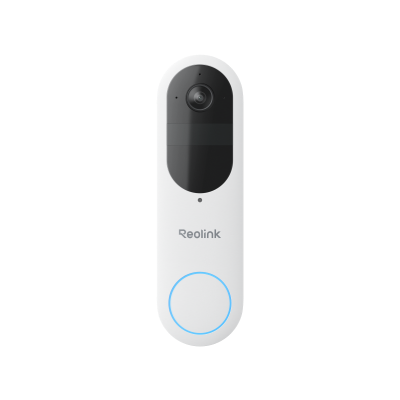
Smart 2K Dual-Band Wi-Fi Battery Doorbell
2K 4MP Head-to-Toe View; Person/Vehicle/Package Detection; Works with Reolink Home Hub & Wi-Fi NVR; 5/2.4GHz Dual-Band Wi-Fi.
Reolink PoE Video Doorbell: Best for Home Assistant, NVR, and Local-First Setups
If you're building a serious surveillance system around an NVR, NAS, Blue Iris, or Home Assistant, a wired PoE doorbell is often the most reliable choice.
Unlike wireless battery-powered doorbells, the Reolink PoE Video Doorbell provides continuous power and a stable video stream, making it ideal for ONVIF integrations and 24/7 recording. The 5MP (2K+) resolution captures clear details at your front door, while two-way audio and smart motion alerts help you stay connected to visitors in real time.
Key Features:
- Reliable PoE connection for power and data
- ONVIF compatibility for third-party platforms
- Works with NVRs for local recording
- 5MP video for clear visitor identification
- Real-time two-way audio and motion alerts
Best for: Homeowners who want a stable, local-first security system with NVR or Home Assistant integration.
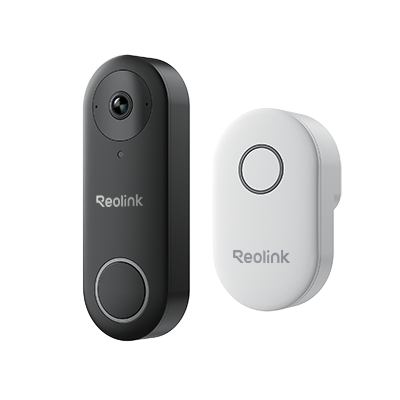
Smart 5MP Video Doorbell with Chime
5MP Super HD, Person Detection, Power over Ethernet, 180° Diagonal Viewing Angle, Two-Way Audio, High-Quality Night Vision.
Reolink Video Doorbell WiFi: Best for Easy Installation Without Sacrificing ONVIF Compatibility
Not everyone wants to run Ethernet cables through their home. If you prefer a simpler installation while still maintaining ONVIF compatibility, the Reolink Video Doorbell WiFi offers a practical alternative.
The doorbell supports both 2.4 GHz and 5 GHz WiFi networks for improved connectivity and delivers 5MP video with a wide field of view to cover your front porch and entryway. Smart detection helps reduce unnecessary alerts, while ONVIF support allows integration with compatible NVRs, NAS devices, and video management platforms.
Key Features:
- Easier installation than PoE models
- Dual-band WiFi connectivity
- ONVIF support for local recording systems
- Wide-angle 5MP video coverage
- Smart motion detection with fewer false alerts
Best for: Homeowners who want ONVIF compatibility and local storage without running Ethernet cables.
Smart 5MP Video Doorbell with Chime
5MP Super HD Day & Night, Person Detection, 2.4/5 GHz Dual-Band WiFi, 180° Diagonal Viewing Angle, Two-Way Audio, Rich Notification.
How to Choose the Best ONVIF Doorbell Camera: 5 Key Features to Consider
The best ONVIF doorbell camera isn't necessarily the one with the highest resolution. For most buyers, compatibility, local recording, reliability, and integration options matter far more in daily use.
1. ONVIF Profile Compatibility
Not all "ONVIF-compatible" doorbells offer the same level of integration. Before buying, verify which ONVIF profiles the doorbell supports and whether it works with your NVR, NAS, or VMS platform.
2. Local Recording Support
Local storage gives you full control over your footage without monthly subscription fees. Look for support for:
- NVR recording
- NAS storage
- microSD cards
Many ONVIF users specifically choose local recording to avoid cloud dependence and maintain ownership of their data.
3. Wired vs. Wireless Connectivity
Your installation method affects reliability more than most people realize.
- PoE doorbells provide continuous power and stable network connectivity.
- WiFi doorbells are easier to install but depend on wireless signal quality.
Community discussions consistently show that users with NVR and Home Assistant setups often prefer PoE for long-term stability.
4. Two-Way Audio and Smart Detection
A doorbell should help you communicate with visitors and reduce unnecessary alerts. Better detection means fewer false notifications and a better user experience.
Look for:
- Two-way audio
- Person detection
- Package detection
- Motion alerts
Better detection means fewer false notifications and a better user experience.
5. Third-Party Platform Integration
The best ONVIF doorbells work beyond their own mobile app. Popular integrations include:
- Home Assistant
- Blue Iris
- Synology Surveillance Station
- Third-party NVRs
- VMS platforms
Strong integration support gives you more flexibility today and makes future upgrades easier.
Quick Buying Tip: If your goal is simply monitoring visitors through a smartphone app, almost any smart doorbell can work. If you're building a local-first security system with an NVR, NAS, or Home Assistant, prioritize ONVIF compatibility, local recording, and reliable wired connectivity before anything else.
How to Set Up a Video Doorbell with ONVIF?
Setting up an ONVIF video doorbell means more than mounting it by the door. You need to place it correctly, connect it reliably, add it to your NVR or VMS, and test whether local recording works as expected.
1. Choose the Right Installation Spot
Install the doorbell where it has a clear view of your entryway, porch, and visitor approach path. Avoid placing it too high, too low, or behind objects that may block faces or packages.
2. Connect the Doorbell to Your Network
For a PoE doorbell, connect it to a PoE switch or NVR using an Ethernet cable for both power and data. For a WiFi doorbell, make sure the signal is strong at the front door before installation.
3. Add the Doorbell to Your NVR or VMS
Open your NVR, NAS, or video management software and add the doorbell using ONVIF. Confirm that live view, recording, and playback work inside your chosen system.
4. Configure Motion Detection and Alerts
Set motion zones around important areas such as the doorway, walkway, or package drop-off zone. Adjust sensitivity to reduce false alerts from cars, trees, shadows, or passing pedestrians.
5. Test Local Recording
After setup, test the doorbell by ringing it, walking past it, and reviewing the recorded footage. Make sure video, audio, alerts, and storage all work before relying on it for daily security.
Note: If your goal is stable 24/7 local recording, a PoE ONVIF doorbell is usually easier to manage than a WiFi model because it has more reliable power and network connectivity.
FAQs
What cameras are ONVIF compatible?
The ONVIF compatible cameras follow ONVIF standards with which they can be used with regular kind of NVRs, apps, and all kind of VMS platforms. These include many Reolink camera and doorbell models.
What is an ONVIF camera?
Network cameras that conform to ONVIF standards an ONVIF camera, which are interoperable with other ONVIF compliant devices or software.
How do I know if my camera is ONVIF compliant?
You can verify the manufacturer’s specifications or refer to ONVIF’s compliant devices list. Their user manuals also mention many cameras have ONVIF certification.
Conclusion
If you are looking for versatile, secure, surveillance solutions; ONVIF doorbell camera is a smart buy. These cameras are full of various features like seamless integration with NVRs and compatibility with third party apps. The model you choose either PoE or Wi-Fi, be sure it meets your needs. Tell us in the comments what your thoughts and experiences with ONVIF doorbell cameras.
Search
Subscribe for the Latest Updates
Security insights & offers right into your inbox