
NVR Storage Calculator: Estimate the Right Storage for Your CCTV System

Establishing a CCTV setup demands proper storage systems, among the top priorities to evaluate. Your surveillance footage will become wasted, and you will lose your security benefits if you lack sufficient storage space. An NVR storage calculator functions as a vital tool for this task.
An NVR calculator estimates the necessary CCTV storage width your NVR security system needs through considerations of different factors. The following guide will show you everything about NVR storage calculators, from their definition through their usage and calculation elements and their recommendation of software, including the Reolink NVR storage calculator.
What is an NVR Storage Calculator?
Users can determine the requirements of their Network Video Recorder (NVR) system hard drive with the help of an NVR storage calculator. The tool calculates storage requirements by evaluating the camera number, resolution selection and frame rate settings, compression method usage, and storage duration specifications.
The tool is vital in enabling CCTV systems to achieve optimal storage capacity, surpassing premature storage depletion.
How to Use an NVR Storage Calculator?
The usage process for NVR storage calculators remains uncomplicated despite users needing precise CCTV system information. The following sequence describes how to use an NVR hard drive calculator:
Step 1: Enter the Number of Cameras
You should enter the camera count connecting to your NVR system. The number of installed cameras will determine the total storage needs, which makes this step highly important.
Step 2: Specify Camera Resolution
Your next step should involve stating the resolution levels of your camera equipment. A system using 4K resolution needs a larger storage capacity than setups with 1080p resolution. Choose the accurate resolution setting for each installed camera.
Step 3: Set the Frame Rate
Frame rate measurements influence storage demands by being expressed through frames per second (fps). The video quality improves with higher frame rates, yet such rates require larger storage capacity. The most standard frame rates for video fall within 15 fps, 30 fps, and 60 fps.
Step 4: Choose the Compression Format
Storage needs depend heavily on the compression technologies H.264 and H.265 that are in use. H.265 compression technology leads to better efficiency, which minimizes storage requirements compared to H.264 technology. Choose the compression format that your camera systems currently utilize.
Step 5: Define the Retention Period
The period you wish to keep the footage running plays a role in the retention period. The method of storage retention may last between a few days and several months. The key to the retention period is to generate storage estimates.
Step 6: Calculate Storage
After completing the parameter entry, the NVR storage calculator estimates the necessary capacity. The calculator aids in selecting suitable hard drive sizes for your NVR system.
What Affects NVR Storage Calculation?
Multiple conditions determine how much storage an NVR system needs. Knowledge about these variables makes it possible to make well-informed decisions regarding your CCTV system setup.
Camera resolution
Camera resolution is the main element determining how much storage space your system requires. The storage requirements for a 4K resolution system are higher because it creates detailed video recordings. The video storage requirements decrease when you use 720p or 1080p resolution since these resolutions need less space yet do not offer full-resolution quality.
Frame rate
The recorded frames per second get their numbers from the frame rate specification. CCTV videos become more fluid at higher frame rates but use greater storage resources. When recording video at 30 frames per second, storage requirements surpass the amount needed to record at 15 frames per second.
Compression format
Storage efficiency heavily depends on compression formats, particularly H.264 and H.265. Different compression formats have different storage space requirements.
Number of Cameras
The number of cameras attached to your NVR determines the storage needs of your system. The storage capacity increases with every added camera since each one enriches the total storage requirement; therefore, you should determine the total number of cameras during storage estimation.
Retention period
The time interval determining how long video recordings stay in storage constitutes the retention period. The amount of necessary storage space increases with an extended period of storage. A 30-day footage storage period needs considerably higher storage capacity than 7 days.
How to Calculate NVR Storage Accurately?
To achieve accurate NVR storage calculations, you must include all the previously explained factors. You can determine NVR storage in several typical methods, which include:
- Determining NVR storage requirements becomes easier using web-based equipment that performs automatic calculation operations.
- The total storage space equals the result of manual calculation when bitrate multiplies retention period seconds before summing up each camera's output.
- You should check the user manual and camera specifications to determine storage recommendations.
- When you need to minimize your storage needs, you should implement H.265 compression technology.
Where to Find Storage Calculator for NVR?
NVR storage calculation accuracy depends heavily on finding an accurate and dependable calculator system. Because you need storage calculators, you can visit these sources to obtain them:
- Reolink's websites and other security manufacturers operate calculators that excel at determining storage requirements for their hardware products.
- Try the trusted NVR storage calculators available online through specific security forums and communities.
- Several third-party websites serving the surveillance industry enable users to access their free storage calculator tools for CCTV components.
- Several CCTV system management mobile apps have integrated storage calculators as a built-in feature.
Reolink NVR Storage Calculator
The NVR storage calculator provided by Reolink enables users to calculate storage requirements for their CCTV system. The required storage capacity becomes clear by quickly assessing camera bitrate and retention periods. Here is the formula you can use to calculate the recording duration for your NVR storage:
Hours of recording = (Storage Capacity (TB)×8×1024×1024×1024) / (BItrate (kbps) x 3600)
Insert your storage capacity in TB and the bitrate of your camera in kbps for recording the video then perform the calculations to get the number of hours for which you can record and store the video.
Reolink offers Home Hub with MicroSD card for users to get expandable local storage space while maintaining their surveillance footage. Check out Reolink Wireless Security Camera System for enhanced local stoarge capability!
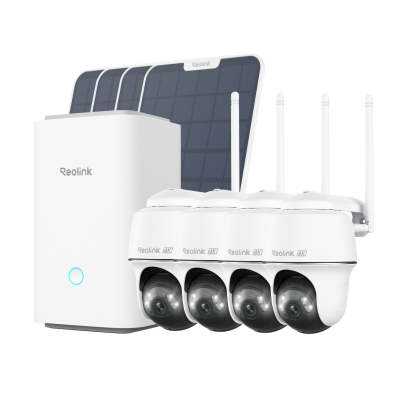
Wireless Security System With 4K PT Standalone Battery/Solar Wi-Fi Cameras
4K Color Footage Day & Night, 1 Year of Local Storage, Exclusive Anti-Theft Algorithms, 360° All-Around Coverage, Expandable System Up to 8 Reolink Cams.
FAQs
How long will a 2TB NVR record last?
The total recording time for a 2TB NVR depends on how high camera resolutions are set, frame rate options, and storage compression standards. The combination of 2TB storage and a 6144 bitrate allows the recording of thirty-two days of footage when operating a single camera.
How many hours of CCTV can 4TB hold?
A hard drive of 4TB technology stores approximately sixty days' worth of camera video captured at 6144 bitrates. Other recording variables, such as frame rate and compression format, affect the exact duration required by a 4TB NVR.
What happens when NVR storage is full?
An NVR system overwrites existing footage from the oldest recording points when its storage volume becomes full to accommodate new video recordings. Your system might permit the configuration of functions that trigger storage alerts and suspend recordings as your storage capacity reaches its threshold.
Conclusion
The NVR storage calculator is essential for everyone who has established CCTV systems. Identifying camera resolution, frame rate, compression format, and retention period enables you to accurately predict the storage requirements needed for your NVR.
The Reolink NVR storage calculator is useful for determining the right storage capacity requirements for surveillance purposes. Share how NVR storage calculators work with your peers through the comment section.
Search
Subscribe for the Latest Updates
Security insights & offers right into your inbox