
Megapixels vs. Resolution: Are There Any Differences Between Them?

Megapixels and resolution are the two most confusing terms when you look for a camera, TV, or computer. However, these are the most important specifications to define image quality.
In this article, we will discuss megapixels vs. resolution. We will explain both and what they mean. We will share some important factors you need to consider while buying a camera.
Let's start with the basics.
- Megapixels vs. Resolution: Brief Overview
- Megapixels to Resolution: How They Work Together?
- Megapixel vs. Resolution: What's the Difference?
- What Factors Affect Megapixels and Resolution?
- How Many Megapixels and What Resolution Do You Need?
- How to Choose Right Resolution and Megapixel Count for Security Cameras?
- High Resolution and Megapixel Security Camera Recommendation
- FAQs
- Conclusion
Megapixels vs. Resolution: Brief Overview
When shopping for security cameras, dash cams, smartphones, or TVs, you will constantly see the terms Megapixels and Resolution. While they are closely related, they describe two different aspects of an image sensor or screen.
What Are Megapixels?
The word "megapixel" literally means one million pixels. A pixel is the smallest individual dot of color that makes up a digital image.
Instead of writing out massive numbers to describe a camera's sensor size, the tech industry uses megapixels as a convenient shorthand.
- 1 MP = 1,000,000 pixels
- 8 MP = 8,000,000 pixels
Megapixel numbers are almost always rounded for simplicity. For example, a standard Full HD video frame actually contains 2,073,600 individual pixels, but manufacturers simply round this down to 2MP.
What Is Resolution?
While megapixels tell you how many total pixels there are, resolution tells you exactly how they are arranged. Resolution is always written as a grid grid formula: Width x Height (the number of pixels in each horizontal row multiplied by the number of pixels in each vertical column).
For example, a standard Full HD resolution is 1920 x 1080. This means the image is 1,920 pixels wide and 1,080 pixels tall.
Megapixels to Resolution: How They Work Together?
There is a direct mathematical relationship between the two. If you multiply a resolution's width by its height, you get the exact total pixel count, which you can then convert into megapixels.
Width x Height = Total Pixels→Megapixels
Let's look at a real-world example using 2K / Quad HD (1440p), which is the popular "sweet spot" resolution for modern cams.
-
Find the Width and Height (Resolution): A standard 2K video frame is 2560 pixels wide and 1440 pixels tall.
-
Multiply Width $\times$ Height (Total Pixels): 2560 × 1440 = 3,686,400 total pixels
-
Convert to Megapixels (Divide by 1,000,000): To find the megapixel (MP) value, you divide your total pixel count by one million: 3,686,400 ÷ 1,000,000 = 3.6864 MP
Here is how the most common resolution and megapixel standard formats break down:
Resolution and megapixels are directly proportional: the higher the resolution, the higher the megapixel count.
In a camera or dash cam, a higher number of pixels packed into the sensor allows it to capture finer details, cleaner lines, and crisper visuals—making it much easier to crop into a video clip to read a distant license plate or street sign.
Megapixel vs. Resolution: What's the Difference?
While both terms describe the detail a camera or screen can handle, they look at that data from entirely different angles. Here are the four fundamental differences:
1. Total Count vs. Structural Grid
- Megapixels tell you the raw volume of data. It is a single number representing the total sum of all pixels on a sensor or screen (e.g., "8.3 Million Pixels").
- Resolution tells you exactly how those pixels are organized. It specifies the physical grid layout of the image by breaking it down into horizontal rows and vertical columns (e.g., 3840 x 2160).
2. Finding the Aspect Ratio (Shape)
-
Resolution allows you to instantly calculate the shape or aspect ratio of a video or display. For instance, knowing a resolution is 1920x1080 tells you mathematically that it is a standard 16:9 widescreen layout.
-
Megapixels cannot tell you the shape of an image. A 12-Megapixel image could be a long panorama, a square Instagram photo, or a standard widescreen video—the total number alone gives zero clues about its physical dimensions.
3. One-Way Mathematical Conversion
-
You can always find Megapixels from a Resolution. If you are given the grid 2560x1440, you can multiply those numbers together to find that it equals roughly 3.7 Megapixels.
-
You cannot find Resolution from Megapixels. If someone tells you a camera captures "8 Megapixels," you cannot guess the exact resolution. Those 8 million pixels could be arranged as 3840 x 2160 (4K UHD), 4096 x 2160 (DCI 4K), or any other combination of width and height.
4. Overall Size vs. Precise Dimensions
-
Megapixels act as a shorthand rating for the overall resolution potential and data size of a camera sensor.
-
Resolution provides the specific "blueprint" of the image, giving you the precise spatial dimensions and pixel density needed to ensure a video fits perfectly onto a specific screen without being stretched or cropped.
Comparison Table
What Factors Affect Megapixels and Resolution?
1. Physical Sensor Size (The Most Critical Factor)
A megapixel is not a fixed physical size; it is just a unit of measurement. The size of the image sensor holding those pixels dictates how well they work.
-
Pixel Crowding: If you pack 8 million pixels (4K) onto a tiny sensor, each individual pixel has to be microscopic. Tiny pixels can't capture much light, leading to grainy, noisy footage.
-
Large Sensors: If you put those same 8 million pixels onto a physically larger sensor, each pixel is larger. Larger pixels absorb more light, resulting in much cleaner resolution, especially in low-light conditions.
2. Lens Quality and Glass Clarity
The highest-resolution sensor in the world is useless if the light passing through to it is distorted.
-
Optical Sharpness: Premium dash cams use multi-layer glass lenses to cleanly focus light onto the sensor. Cheap plastic lenses cause refraction and blurriness, effectively wasting the high megapixel count of the sensor.
-
Windshield Glare and Cleanliness: Environmental factors like a dirty windshield, dust on the lens, or intense sunlight glare can completely ruin an image's perceived resolution, blurring out details like license plates.
3. Video Compression and Bitrate
When a camera records video, it has to compress the file so it can fit onto a microSD card. This compression heavily affects the final resolution.
-
High Compression (Low Bitrate): To save space, a camera might aggressively compress a 4K video. This causes "artifacting"—blocky, pixelated patches in the video, especially when driving past complex objects like trees or brick walls.
-
Low Compression (High Bitrate): Preserves the true, crisp layout of the high-resolution grid, but results in much larger file sizes.
4. High Dynamic Range (HDR) and Exposure
Lighting conditions constantly change while driving. Going from bright sunlight into a dark tunnel affects how resolution is perceived.
-
Overexposure: Without HDR, bright light (like sun reflecting off a license plate or oncoming headlights at night) will "blow out" the pixels, turning the area into a solid white blur.
-
HDR Stabilization: HDR takes multiple exposures at once to balance the dark and bright areas of a scene. This ensures the pixels retain their color and contrast data, keeping the resolution sharp and readable.
5. Motion Blur and Frame Rate (FPS)
When a car is moving at 60 mph, motion blur can destroy high-resolution details.
-
Shutter Speed: If the camera’s internal shutter speed is too slow, moving objects will stretch across multiple pixels, creating a blur.
-
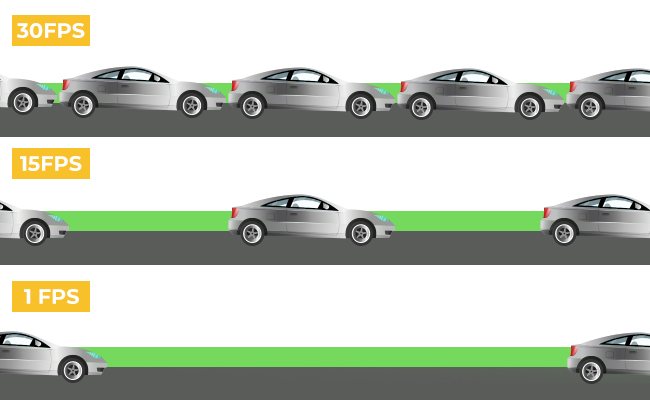
Frame Rate (FPS): A resolution recorded at 60 Frames Per Second (FPS) will look much sharper during fast motion than one recorded at 30 FPS, because there are twice as many individual image frames captured to freeze the action.
How Many Megapixels and What Resolution Do You Need?
For TVs/Displays
When buying a television or a computer monitor, your target resolution depends entirely on the physical size of the screen and how close you sit to it.
-
The Baseline Standard: 4K Ultra HD (3840 X 2160 / ~8.3 MP) is the ideal sweet spot for almost all home displays today. Because modern TVs are typically 55 inches or larger, 4K provides enough pixel density to keep the image sharp and lifelike up close.
-
Small Screens/Budgets: Full HD (1920 x 1080/ ~2 MP) is perfectly acceptable for smaller kitchen TVs (under 32 inches) or basic office monitors, where the smaller surface area prevents the lower pixel count from looking blurry.
-
The Premium Horizon: 8K Ultra HD (7680 x 4320 / ~33 MP) displays exist but are largely unnecessary for the average living room. The human eye cannot distinguish between 4K and 8K unless you are sitting inches away from a massive 85-inch+ screen, and there is very little native 8K content available to watch.
For Gaming Consoles
For gaming, resolution is a balancing act between image crispness and smooth performance (frame rate).
-
Current-Gen Flagships (PS5, Xbox Series X): These consoles are built to target 4K (3840 x 2160) output. If you want to experience games with sharp textures and cinematic realism on a large TV, you need a 4K display.
-
Performance vs. Resolution: Many modern games offer a "Performance Mode" that dynamically drops the internal game resolution down to 1440p (2K) or 1080p to ensure a buttery-smooth 60 to 120 frames per second.
-
Handheld & Budget Gaming (Nintendo Switch, Xbox Series S): These devices target 1080p when plugged into a TV, and handheld screens typically drop down to 720p (1280 x 720/ ~0.9 MP). Because a mobile gaming screen is so small, 720p or 1080p looks remarkably sharp while preserving battery life.
For Digital Cameras
In digital photography (DSLRs and mirrorless cameras), megapixels dictate how large you can physically print a photo or how deeply you can crop into an image without losing quality.
-
Casual & Everyday Photography: 24 Megapixels is the industry sweet spot. It provides more than enough detail to print beautiful, tack-sharp 16 x 20-inch physical posters or crop significantly into a photo while maintaining absolute clarity for online sharing.
-
Sports & Action: 20 MP to 24 MP is often preferred by action photographers. Lower megapixel counts mean smaller file sizes, allowing the camera to fire off rapid bursts of photos (20+ frames per second) without clogging the camera's internal memory buffer.
-
Studio, Landscape, & Commercial: 45 MP to 60+ MP cameras are utilized by professionals who shoot massive billboard advertisements or fine-art landscapes. These sensors capture every single blade of grass or fabric texture, but require massive storage drives and powerful computers to handle the files.
For Security Cameras
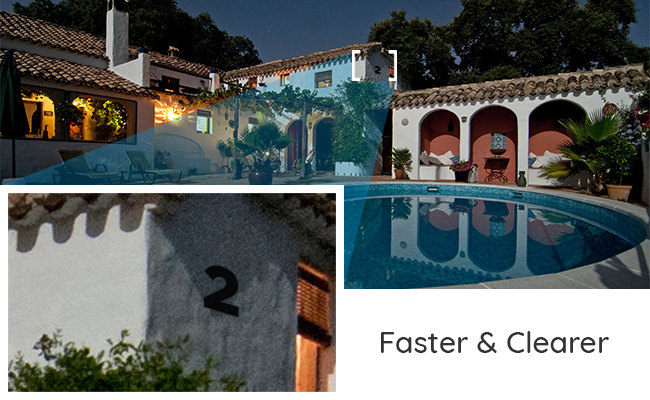
In security setups, megapixels and resolution dictate your "identification zone"—how far away a camera can be while still allowing you to zoom in to read a license plate or identify a face cleanly.
-
The Minimum Standard: 2 MP / 1080p (1920 x 1080) is acceptable for tight spaces, like a small indoor hallway or monitoring an entryway door frame where subjects pass directly in front of the lens.
-
The Practical Choice: 4 MP / 2K (2560 xs 1440) is the recommended baseline for outdoor home security (driveways, backyards). It offers nearly double the detail of 1080p, allowing you to clearly see facial features up to 20–30 feet away.
-
Maximum Protection: 8 MP / 4K (3840 x 2160$) is the best choice for wide areas like storefronts, large parking lots, or long driveways. The high megapixel count gives you the digital freedom to crop deeply into a video archive to catch a license plate down the street after an incident occurs.
How to Choose Right Resolution and Megapixel Count for Security Cameras?
To get the absolute best value for your money, you must match your camera specifications to your specific goals. High megapixel counts sound impressive on paper, but they are only worth the investment if your infrastructure and use case actually demand them.
Consider these four essential factors to choose exactly what you need:
1. Intended Use and Viewing Medium
Your primary goal and where the final images or videos will be viewed dictate your baseline needs. Higher megapixels mean more detail, but you don't always need it.
-
Mobile Screens & Social Media: If you are mostly sharing clips on social media or viewing footage on a smartphone, a 1080p (2 MP) or 2K (4 MP) camera is more than enough. Because smartphone screens are physically small, they pack pixels tightly together, making it nearly impossible for the human eye to notice a difference between standard HD and ultra-high 4K resolution.
-
Large Displays & Deep Zooming: If you need to view footage on a large 4K monitor, print photos on physical posters, or digitally crop deeply into a frame to find tiny details (like a distant license plate or a face in a crowd), you absolutely need an 8.3 MP (4K) setup. When an image is stretched across a large physical space, a lower pixel count will cause the image to look blocky and pixelated.
2. Physical Storage Capacity
More pixels equal larger file sizes. Before jumping straight to the highest resolution available, evaluate your storage limits:
-
A 4K video file eats up storage space up to four times faster than a standard 1080p file.
-
If you choose a high-megapixel camera, you will need to budget for much larger, high-end microSD cards or hard drives. You must also ensure the storage device has a fast enough write speed to handle the heavy stream of data without crashing.
3. Data Transfer and Processing Power
Handling high-resolution files requires modern digital infrastructure:
-
Transfer Speeds: Moving large 4K or 2K video files from a camera to your phone or computer wirelessly practically requires high-speed 5GHz Wi-Fi or a physical card reader. Trying to sync heavy files over older 2.4GHz bands will be painfully slow.
-
Editing & Playback: High-megapixel files require more processing power to view and edit. Older smartphones or laptops may lag, stutter, or freeze when trying to play back raw 4K footage.
4. Low-Light and Night Performance Requirements
Counterintuitively, a higher megapixel count can sometimes hurt image quality in the dark if the sensor chip isn't large enough.
-
If you pack too many pixels onto a tiny camera sensor, each individual pixel has to be microscopic. Tiny pixels struggle to absorb light, leading to grainy, noisy night footage.
-
If night visibility is a priority for you (such as for overnight security or night-time driving), you should look for either a moderate pixel count (like 2K) or ensure your 4K camera uses a premium, larger sensor designed specifically to handle low-light environments.
5. Budget
Last but not least is the budget. You don't always need a high-resolution camera, and we've already explained that in detail.
It would be wasting money on a high-resolution or megapixel camera if you are not going to use it for the purpose it is made for.
Depending on the usage, select a suitable camera in your budget. Go for the right brand that is reputable for offering what's advertised and the right camera sensor.
High Resolution and Megapixel Security Camera Recommendation
To monitor a large area effectively, a 16MP camera is an excellent choice. Reolink's 16MP lineup includes the flagship Duo 3 PoE. This camera features a dual-lens system for a 180-degree field of view and intelligent image stitching to minimize blind spots.

Groundbreaking 16MP Dual-Lens PoE Camera
16MP UHD, Dual-Lens, Motion Track, 180° Wide Viewing Angle, Power over Ethernet, Color Night Vision.
Unlike the Duo 3 PoE, which uses Power over Ethernet for both power and Internet connection, the new Reolink Duo 3 WiFi operates over dual-band WiFi 6 and also boasts 16MP resolution.Thus, you can select megapixels and resolutions depending on your use.

Groundbreaking 16MP Dual-Lens WiFi Camera
16MP UHD, Dual-Lens, Motion Track, 180° Wide Viewing Angle, Plug-In WiFi, Color Night Vision.
FAQs
1. What is MP for camera?
MP means megapixels, and it represents the total number of pixels in an image. For instance, if a camera is 1MP, it means it can take images having 1 million pixels. It defines the quality of a camera and the image/video it can take.
2. How many megapixels is 4K resolution?
4K UHD resolution has 3840 pixels in each row and 2160 pixels in each column. Therefore, the total number of pixels would be 8,294,400 pixels. It is approximately equal to 8.3 million pixels or 8.3MP. Some brands also round off the megapixels to 8MP.
3. Does higher MP mean better quality?
Higher MP means higher pixels in the image, which translates to more details and sharpness. It contributes to the quality of the image, but there are other factors, such as lens quality and sensor, that also play a role in defining image quality. But generally, a higher MP means better quality.
4. How do I convert resolution to megapixels?
You need to multiply the values in the resolution to get the total number of pixels and then divide the value by 1,000,000 to convert it into megapixels.
Conclusion
Megapixels and resolutions are the two important factors you need to look at while buying a camera, smartphone, or similar device. These define the image quality along with other factors. We have explained what megapixels and resolution mean and how these are related to each other. These give a better idea of the camera quality and the image.
- Camera Resolution Guide: Everything You Need to Know
- Security Camera Resolution: A Major Factor Contributes to Crisp Images
- 16 Megapixel Camera: Capture Brilliance
- Highest Resolution Camera: A Complete Overview
- How Many Pixels In 4K Resolution: 4K Clarity Unveiled
- What is a Megapixel? Pixel Power Explained
Search
Subscribe for the Latest Updates
Security insights & offers right into your inbox