
Best Jobsite Cameras 2026: Complete Buyer’s Guide
Managing security and monitoring progress on an active construction site requires surveillance built for harsh outdoor conditions and off-grid power constraints. Unlike standard home security systems, a jobsite camera must operate reliably without access to local Wi-Fi, traditional AC power outlets, or permanent mounting structures.
Choosing the right jobsite camera setup depends on whether your project requires 4G LTE cellular connectivity, continuous solar power, time-lapse progress tracking, or high-capacity local storage. This guide breaks down the essential types of construction cameras, key features to evaluate—such as AI motion detection and weatherproofing—and how to deploy the best security configuration for your jobsite.
What Is a Jobsite Camera?
A jobsite camera is a heavy-duty, off-grid security camera built to monitor active construction projects, equipment yards, and remote building sites without requiring a permanent power grid or Wi-Fi router.
These cameras combine rugged weatherproofing (typically IP65 or IP66) with 4G LTE cellular connectivity and solar power options, allowing project managers and property owners to track construction progress, deter equipment theft, and maintain continuous site security from anywhere.
What Are Common Types of Jobsite Cameras?
Selecting the right jobsite camera depends heavily on the stage of construction and the available infrastructure on-site. Below are the primary camera classifications based on power delivery, network connectivity, and environmental protection.
1. Wired vs. Wireless Jobsite Cameras
- Wired Jobsite Cameras: A wired jobsite camera receives power and network connectivity through fixed physical cables, such as a Power over Ethernet (PoE) setup. However, running Ethernet or power cables across an active build site carries the trade-off of higher installation costs and potential cable damage from heavy machinery.
Ideal for permanent, long-term construction projects with established utility lines.
- Wireless (Battery & Solar) Jobsite Cameras: A wireless jobsite camera operates completely wire-free using rechargeable batteries and attached solar panels to transmit video data without physical cables. While they offer rapid deployment and easy relocation across perimeter fences, battery models typically rely on motion-triggered recording rather than continuous 24/7 video streaming.
Best suited for early-stage earthwork or fast-moving projects where power outlets are unavailable
2. Wi-Fi vs. Cellular (Non-Wi-Fi) Jobsite Cameras
-
Wi-Fi Jobsite Cameras: A Wi-Fi jobsite camera transmits live video feeds and motion alerts over a local wireless router network. They work well in later construction phases—such as interior finishing—when temporary site trailers or local Wi-Fi networks are active. Their primary limitation is signal range; Wi-Fi signals struggle to penetrate thick concrete structures or reach distant site perimeters.
-
Cellular (4G LTE) Jobsite Cameras: A cellular jobsite camera uses a built-in nano SIM card to stream video and send alerts over 4G/5G mobile networks without requiring local Wi-Fi. They are essential for off-grid properties, rural developments, and early-stage construction sites where internet infrastructure is non-existent.
Note: Cellular cameras require an active mobile data plan to stream live feeds remotely.
3. Indoor vs. Outdoor Construction Cameras
-
Indoor Construction Cameras: An indoor jobsite camera is designed to monitor enclosed, weather-protected areas like tool storage trailers, finished interior rooms, and utility closets. They provide compact monitoring for high-value equipment indoors but lack the heavy-duty weather sealing needed for exterior exposure.
-
Outdoor Construction Cameras: An outdoor jobsite camera features an IP65 or IP66 weatherproof housing designed to withstand heavy rain, airborne dust, mud, and extreme temperatures. Equipped with long-range infrared (IR) night vision or spotlights, outdoor cameras monitor exterior perimeters, material drop zones, and heavy machinery parked overnight.
6 Key Features to Look for in the Best Jobsite Security Camera
Selecting a jobsite security camera requires evaluating features designed for harsh, off-grid environments. Below are the six critical features to check before deploying a surveillance system on an active construction site.
1. 4G LTE Cellular Connectivity (No Wi-Fi Needed)
A cellular jobsite camera uses mobile data networks to transmit live video streams and push alerts without relying on local Wi-Fi or landline internet.
Because early-stage construction sites lack internet infrastructure, choosing a camera with a built-in 4G LTE nano SIM card slot ensures continuous remote access.
-
3G vs. 4G/5G Networks: Always opt for 4G LTE or 5G coverage; older 3G networks have been fully phased out by major carriers, making 3G-only hardware obsolete.
-
Carrier Compatibility: Verify that the camera supports major cellular providers (such as AT&T, T-Mobile, or Verizon) to ensure strong signal strength across rural or isolated project locations.
-
Trade-Off: Remote streaming and cloud backups consume cellular data, requiring a dedicated monthly or prepaid SIM data plan.
2. Off-Grid Power Delivery (Battery & Solar Panels)
A combination of high-capacity rechargeable batteries and dedicated solar panels supplies continuous, self-sustaining power without needing on-site AC outlets.
Electrical power is rarely available during excavation and framing phases.
-
Battery Capacity: Look for large battery capacities (e.g., 6,000 mAh to 20,000 mAh) that can power the camera through several consecutive days of heavy rain or overcast weather.
-
Solar Panel Pairing: Pairing a camera with a 3W to 6W solar panel eliminates manual battery swap trips, keeping the system running indefinitely under direct sunlight.
Systems engineered around off-grid efficiency—such as Reolink’s 4G solar-powered outdoor cameras—allow construction managers to maintain full security coverage on remote perimeters without running generator cables or climbing ladders to recharge batteries.
3. IP66 Weatherproofing and Rugged Design
An IP66-rated weatherproof housing protects sensitive camera electronics from high-pressure water jets, blowing dust, mud, and freezing temperatures.
Construction sites generate heavy airborne dust, concrete debris, and exposed water splash back.
-
IP65 vs. IP66 Ratings: While IP65 handles standard rainfall, an IP66 rating ensures complete dust tightness and protection against heavy hose-downs or severe storms.
-
Operating Temperatures: Ensure the camera casing is rated for extreme industrial temperatures (typically -10°C to 55°C) so the unit does not overheat in direct summer sun or shut down during winter freezes.
4. Cross-Platform Remote Access and Instant AI Alerts
Remote monitoring applications give site managers, contractors, and owners real-time visibility into daily operations from any smartphone or computer.
-
Smart AI Motion Detection: Basic motion sensors trigger false alarms from blowing dust, wind, or small animals. Advanced AI filtering specifically identifies people and vehicles, alerting you only when a trespasser or unauthorized vehicle enters the site after hours.
-
Multi-User Access: Look for mobile apps and web platforms that allow site supervisors to share live feed access with sub-contractors, project engineers, and insurance inspectors.
5. Automated Time-Lapse Progress Recording
Time-lapse recording automatically captures snapshots at set intervals over weeks or months, condensing long-term construction progress into a short, digestible video clip.
-
Project Documentation: Time-lapse footage serves as valuable documentation for client updates, stakeholder reporting, and marketing materials.
-
Dispute Resolution: Having a visual, step-by-step timeline of site development helps settle timeline disputes, verify delivery dates, and confirm when specific trade work was completed.
6. Subscription-Free Local Storage Options
Local storage saves video footage directly onto an onboard microSD card or centralized local drive, avoiding mandatory monthly cloud subscription costs.
-
MicroSD Card Capacity: High-capacity local storage (supporting up to 128GB, 256GB, or 512GB microSD cards) allows the camera to record weeks of motion-triggered clips locally.
-
Cloud Backup vs. Onboard Storage: While cloud backups provide protection if hardware is physically stolen, onboard microSD cards ensure footage continues recording even if the 4G cellular signal drops temporarily.
Where to Buy or Rent a Jobsite Security Camera
Deciding whether to buy a jobsite security camera directly or rent hardware depends on your project timeline, total budget, and long-term surveillance needs. Below are the two primary procurement options for construction site surveillance.
1. Purchasing Directly from the Camera Manufacturer
Buying a jobsite camera directly from a reputable manufacturer is the most cost-effective option for long-term construction projects, multi-phase builds, and ongoing property management.
-
One-Time Hardware Ownership: Purchasing hardware eliminates recurring equipment lease fees. Once you own the camera, your only ongoing expense is an optional cellular SIM data plan if operating off-grid.
-
Scalability Across Projects: When one construction phase finishes, owned cameras can easily be unmounted, relocated, and deployed at a new jobsite without renegotiating lease contracts.
-
Subscription-Free Storage: Buying directly allows you to select cameras with onboard microSD card slots or local NVR recording, avoiding expensive per-camera cloud fees.
Manufacturers like Reolink offer direct-to-consumer 4G LTE and solar-powered jobsite cameras with no mandatory hardware contracts or software lock-ins, making total cost of ownership significantly lower over multi-year projects.
2. Renting a Jobsite Security Camera System
Renting a jobsite security camera is best for short-term construction projects (under 3 to 6 months), temporary specialty events, or large commercial builds requiring fully managed trailer rigs.
-
Understanding Rental Pricing: The average jobsite security camera rental cost typically ranges from $200 to $500 per camera per month for standalone units, while mobile surveillance trailers equipped with multi-camera arrays and solar masts can cost upwards of $1,500 to $3,000+ per month.
-
Full Service and Monitoring Included: Security camera rental packages often include professional installation, ongoing technical maintenance, replacement units for damaged hardware, and 24/7 live remote guard monitoring services.
While renting requires minimal upfront capital expenditure, long-term rentals quickly become far more expensive than purchasing hardware outright—especially if your construction timeline experiences delays.
Best Construction Jobsite Camera for Different Setups
Choosing the right jobsite camera depends on whether your project site has an active Wi-Fi connection or requires a fully off-grid cellular setup. Below are scenario-driven recommendations for both Wi-Fi-enabled and cellular-based construction monitoring.
1. Reolink Argus 4 Pro: Best for Wide-Area Coverage with On-Site Wi-Fi
Ideal for active building projects with temporary office trailers or established local Wi-Fi, where a single camera needs to cover a wide building perimeter or tool staging area without blind spots.
-
Key Strengths: Dual-lens integration seamlessly stitches together a 180° panoramic 4K field of view, allowing a single camera to replace two standard fixed cameras along a construction fence.
-
Performance: Features ColorX night vision technology, utilizing an ultra-large aperture sensor to record vibrant, full-color footage in low-light conditions without needing harsh, visible spotlights that draw attention after hours.
-
Features: Built with Wi-Fi 6 connectivity for faster live-feed streaming, rechargeable battery or solar panel power, IP66 weather resistance, and smart person/vehicle/animal AI detection.

4k 180° Wire-free Color Night Vision Camera
4K UHD 180° Blindspot-free View; Color Vision Day and Night; 30% More Battery Life; Dual-band Wi-Fi 6; Smart detection.
- Alternative Option (Argus PT Ultra): If your site setup requires motorized pan-and-tilt coverage (355° horizontal rotation) to track moving machinery, or built-in motion spotlights for an active visual crime deterrent, the Argus PT Ultra provides 4K wire-free coverage on 2.4/5GHz Wi-Fi networks.
2. Reolink Go PT Ultra: Best for Off-Grid 4K Perimeter Tracking
Ideal for early-stage earthwork, remote building sites, or material drop zones where Wi-Fi infrastructure and AC electrical power are entirely non-existent.
-
Key Strengths: Operates on 4G LTE cellular networks via a nano SIM card, transmitting live video and push alerts directly to your smartphone without relying on local internet connections.
-
Performance: Records in full 4K (8MP) Ultra HD resolution, giving site managers extreme zoom clarity to identify license plates, faces, or sub-contractor activity across open terrain.
-
Features: Includes 355° pan and 140° tilt coverage, continuous battery/solar power compatibility, smart AI detection, and onboard microSD card storage (up to 128GB) for subscription-free local recording.
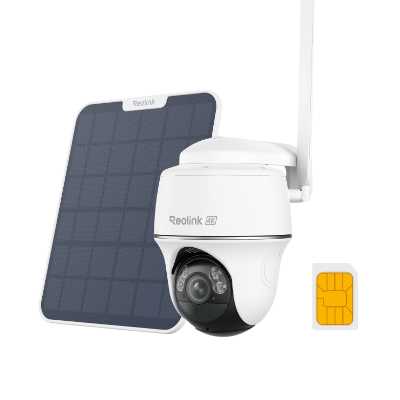
4K 8MP Wire-Free 4G LTE PT Battery Camera
4K 8MP; Smart Detection; 355° Pan & 140° Tilt; Battery/Solar Powered; Color Night Vision; Smart Real-Time Alert.
3 Reolink Go Plus: Best for Fixed Off-Grid Gate & Storage Monitoring
Ideal for securing fixed entry gates, tool storage containers, or equipment parking yards on off-grid job sites where a compact, directional 4G cellular camera is needed.
-
Key Strengths: Standalone 4G LTE cellular operation combined with a compact, heavy-duty body designed for mounting on fence posts, gate poles, or utility sheds.
-
Performance: Delivers sharp 2K (4MP) Super HD video resolution, capturing detailed motion-triggered clips while conserving overall cellular bandwidth and data usage.
-
Features: Equipped with intelligent person and vehicle detection to minimize false alarms from passing wind or debris, IP65 weatherproof housing, and support for continuous solar panel charging.
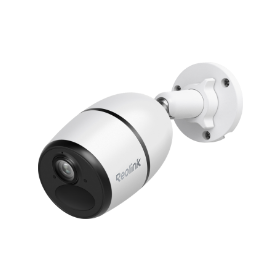
Smart Wireless 4G Battery Camera
Rechargeable Battery/Solar Powered, Person/Vehicle Detection, 2K 4MP Super HD, Two-Way Audio, High-Quality Night Vision, Live View Anytime.
Real-World Feedback on Jobsite Camera for Project Tracking
Real-world feedback from construction professionals suggests that jobsite cameras are most useful when they solve a specific problem rather than trying to replace on-site management.
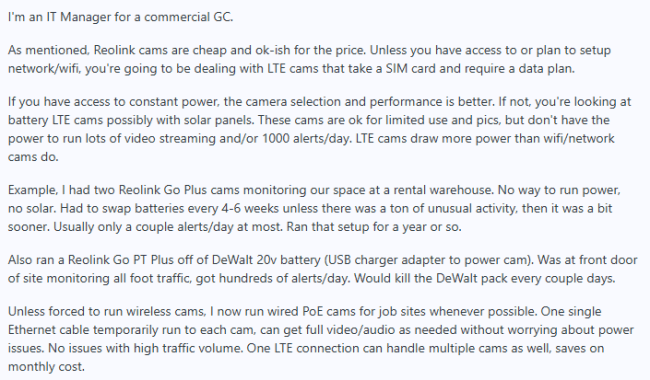
One commercial GC IT manager reported using Reolink LTE cameras where power wasn’t available, but noted that frequent alerts and streaming increase battery consumption substantially. They preferred wired PoE when possible because one Ethernet cable handles connectivity and power without the same battery limitations.
One construction manager said footage helped establish that a subcontractor damaged equipment and supported a substantial back charge. The same commenter said executives use the cameras to remotely check project progress.
FAQs
What is the best camera for a construction site?
The best camera for a construction site will depend on your specific needs and requirements. However, some popular options include the Reolink Go PT Ultra and the Reolink Go Plus, which offer robust cellular connectivity, advanced features, and reliable performance in harsh construction environments.
How much do construction camera systems cost?
The cost of construction camera systems can vary widely depending on factors such as the number of cameras needed, the features and capabilities of the cameras, and whether you choose to purchase or rent the equipment.
Do I need WiFi for Jobsite Security?
No, you don't necessarily need WiFi for jobsite security. Many modern jobsite cameras are equipped with cellular connectivity, allowing them to transmit video footage and data over 4G LTE or 3G networks without relying on a WiFi infrastructure.
Conclusion
In the ever-evolving world of construction, jobsite security cameras have become an invaluable tool for ensuring safety, efficiency, and accountability on job sites. From remote monitoring and crime deterrence to project progress tracking and legal protection, the benefits of implementing a robust jobsite camera system are undeniable.
We hope this ultimate guide to jobsite cameras has provided you with the knowledge and insights necessary to take the next step towards enhancing the safety and efficiency of your job sites. Share your thoughts and experiences with us, and let us know if you have any additional questions or concerns regarding jobsite security cameras.
Search
Subscribe for the Latest Updates
Security insights & offers right into your inbox