
How to Detect Hidden Listening Devices with iPhone?
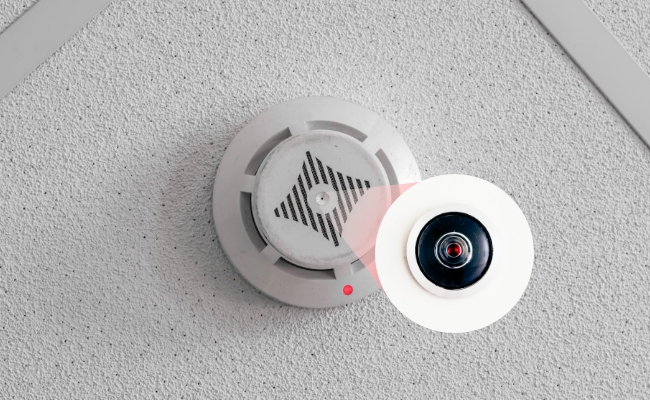
Privacy is a growing concern. Hidden listening devices can threaten personal and professional security. Fortunately, your iPhone can help detect these threats.
In this article, we will explore how to detect hidden listening devices with an iPhone. It will help you ensure your privacy wherever you go. From using built-in features to efficient apps, learn how to safeguard your space effectively.
Can iPhone Detect Hidden Listening Devices?
Yes, your iPhone can help detect hidden listening devices. Modern iPhones come equipped with advanced sensors and apps that can identify unusual signals. These tools can help you uncover devices that may be spying on you.
Using your iPhone’s built-in features, you can detect interference, infrared lights, and strange Wi-Fi signals. Additionally, third-party apps can enhance your iPhone’s capabilities. This makes it a powerful tool for ensuring your privacy.
How to Detect Hidden Listening Devices with iPhone?
Below are 7 practical methods on how to detect hidden listening devices with iPhone.
1. Make a Call to Check for Any Interference
One simple method to detect hidden listening devices is by making a call. During the call, listen for unusual noises or interference. Static, echo, or clicking sounds may indicate the presence of a listening device. Interference during calls is a common sign of nearby spy devices. If you notice disruptions, investigate further. This method is quick and requires no additional tools.
2. Check Two-Way Mirrors
Two-way mirrors can hide cameras or listening devices. Use your iPhone’s flashlight to check for reflections. If the mirror appears darker from one side, it might be a two-way mirror. It is useful in private spaces like dressing rooms or bathrooms. Always inspect mirrors in unfamiliar locations to ensure your privacy.
3. Use Camera to Look for Infrared Lights
Many hidden listening devices use infrared lights. Open your iPhone’s camera app and scan the room. If you see unusual lights, it could indicate a hidden device. Infrared lights are invisible to the naked eye but detectable through your iPhone’s camera. It is effective for spotting covert recording equipment.
4. Use iPhone’s Microphone
Your iPhone’s microphone can detect unusual sounds. Use the built-in voice memo app or any other recording app to listen to faint noises. These noises might come from hidden listening devices. It is particularly useful in quiet environments. It helps identify devices that emit low-frequency sounds.
5. Use an RF Detector
RF detectors can identify radio frequencies used by listening devices. Download an RF detector app on your iPhone. Scan the room for unusual signals that could indicate a hidden device. RF detector apps are highly effective for locating wireless spy devices. They help you identify signals that are otherwise undetectable.
6. Search Strange Wi-Fi Signals
Hidden devices often connect to Wi-Fi networks. Check your Wi-Fi settings for unknown networks. If you find strange signals, investigate further to ensure your privacy. It is crucial for detecting devices that rely on Wi-Fi for data transmission. Regularly monitor your network for unfamiliar connections.
7. Using Efficient Apps
Several apps can enhance your iPhone’s ability to detect hidden listening devices. Apps like Hidden Camera Detector and RF Signal Tracker are effective. These apps use your iPhone’s sensors to identify potential threats. Third-party apps provide additional features for detecting spy devices.
What Does a Hidden Listening Device Look Like?
Hidden listening devices are miniature microphones. They are quite small, and the size could be from a small button to a coin. They are available in different shapes, and they can be flat, cylindrical, circular, etc. They are usually made of plastic, and you’ll notice a tiny hole, just like the microphone on your smartphone. There could be wiring, small antennas, and small batteries inside.
The device catches the sound waves in the area and converts them into electrical signals. Then, it transmits the signals through Wi-Fi or radio frequency. Finally, the recording is saved at the receiving point, which could be a smartphone phone, cloud storage, etc. However, some devices could also have internal storage.
Where Are Hidden Listening Devices Usually Found?
Hidden devices are often placed in small or common objects to ensure they remain hidden from people. Here are some common objects that could contain a hidden listening device.
- Bulbs and fixtures
- Phone charges and mobile devices
- Smoke detectors
- Electronic devices like TVs, radios, etc.
- Mirrors
- Clocks
- Wall outlets
- Table lamps
- Cupboards and furniture
- Cable boxes
- Wi-Fi routers
- Extension boards
- Walls
Extra Security Tips to Prevent Hidden Listening Devices
Besides using your smartphone to detect hidden devices, consider improving your home security setup. Smart security cameras can monitor entry points and send alerts when unexpected movement occurs. Solutions like the Reolink TrackFlex Floodlight WiFi combine floodlights, motion detection, and wide-area coverage, helping homeowners protect their privacy and property more effectively.

Smart 4K 360° Coverage Wi-Fi Floodlight Security Camera
Local AI Video Search, 4K 8MP Ultra HD, 360° Coverage View, 6X Hybrid Zoom, Dual-Color Floodlight.
FAQs
Can I use my phone to detect hidden cameras and listening devices?
Yes, you can use your phone to help detect hidden cameras and listening devices, but with limitations. Smartphones can scan for unusual Wi-Fi or Bluetooth signals, detect infrared lights using the camera, or use magnetometer apps to find magnetic interference, but these methods are not foolproof and may miss well-hidden or wired devices.
Should I Rename My Wi-Fi Network?
You should rename your Wi-Fi name or network if there is any personal information. Change it often so that casual hackers can't identify your network easily.
How Do I Block Hidden Listening Devices?
Use signal jammers or RF blockers to disrupt spy device signals. Ensure compliance with local laws when using such tools.
Conclusion
Learning how to detect hidden listening devices with iPhone is both practical and effective. By using built-in features and third-party apps, you can protect your privacy. Regular checks and awareness are key to staying secure. With these tips, you can ensure your personal and professional spaces remain private.
Search
Subscribe for the Latest Updates
Security insights & offers right into your inbox