
How Often Do Stores Check Cameras? Retail Security Insight
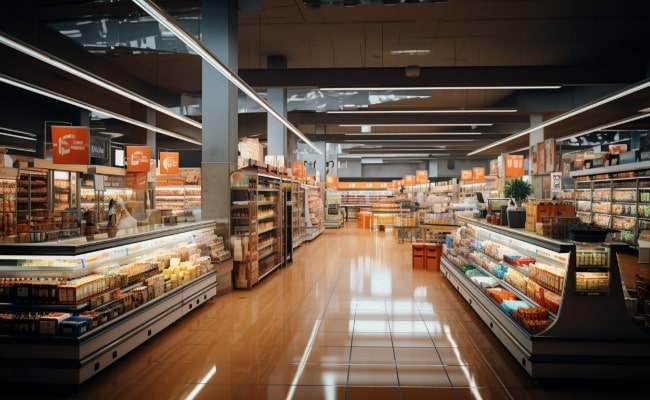
Surveillance cameras are ubiquitous in retail stores and shopping centers of all sizes. But with lenses covering every aisle, register, and corner, it raises a practical question: How often do retail outlets actually check the footage?
The short answer is that modern retailers almost never have a human sitting in a back room staring at a wall of video monitors. Instead, the retail industry operates on an Exception-Based Surveillance framework.
Video feeds are rarely reviewed unless an automated system logs a data anomaly, an alarm triggers, or a physical incident forces an investigation.
Do Stores Regularly Check Cameras?
Yes, but the frequency of camera oversight varies by retailer size and risk profile. Rather than constant manual scanning, modern retail security relies heavily on Exception-Based Surveillance (EBS).
Major department stores, big-box chains, and supermarkets utilize dedicated Loss Prevention (LP) personnel to review footage. However, their focus is highly targeted. Instead of monitoring empty aisles, they use real-time data triggers—such as high-value inventory shelf-sweeping or cash register cash-draw discrepancies—to tell them exactly which camera feed to open.
At the other end of the spectrum, small, independent "mom-and-pop" shops operate on a passive recording model. Because they lack the staff and budget for active surveillance, they rarely check their cameras on a daily basis. Footage is typically only audited retroactively when an incident—like a break-in, physical inventory shortage, or slip-and-fall liability claim—is officially reported.
How Often Do Stores Check Their Cameras?
The frequency and depth of camera audits vary drastically depending on the store’s size, inventory value, and available tech budget. The table below breaks down exactly how different retail tiers handle video review:
When Do Stores Check Cameras?
While most retailers do not continuously monitor cameras in real-time, they will consistently review footage in response to certain events and situations:
Unauthorized Access
If a store's alarm is triggered after hours, or there are signs of unauthorized entry or tampering, security video will be checked immediately. Cameras positioned at access points like doors and windows can help identify break-in perpetrators for police investigations.
Reports of Shoplifting or Theft
In response to suspected theft or shoplifting, either observed or reported by customers, stores will promptly review camera footage to try and identify the suspect. Timely video analysis is crucial for pressing charges and recovering stolen goods, so staff will prioritize footage review following theft incidents.
Disputes or Complaints from Customers
When a customer makes any claim against the store, such as a trip-and-fall accident or dispute with an employee, security video will be thoroughly reviewed as evidence. Footage often settles liability questions in these scenarios.
Reported Safety Incidents or Accidents
Video will be examined following injuries, violence, or accidents in the store, such as fires, assaults, or criminal activity. Camera footage aids insurance claim investigations and provides documentation of events.
Analyze Customer Traffic
Though not continuously monitored, store management may periodically spot check cameras to analyze customer traffic patterns and merchandising effectiveness. They identify high-traffic areas and dead zones, adjusting product placement accordingly.
Monitor Employees
Cameras act as a check on employees, and may be reviewed for policy violations, suspected theft, or other employee misconduct. Video has firing power if workers are caught mishandling merchandise, stealing, or violating safety policies.
How Big Retail Stores Like Walmart Monitor Cameras?
A common industry myth is that major chains employ massive rooms of security guards to watch thousands of cameras simultaneously.
Instead, retail giants utilize advanced Computer Vision AI to scale their monitoring.
According to retail data analytics filings, nearly one-third of total store shrinkage occurs directly at self-checkout lanes. Rather than relying on a human eye to catch these losses, AI models are integrated directly into the overhead camera feeds above the self-checkout terminals.
The system monitors behavior patterns in real time:
-
Missed Scans / Skip-Scanning: If a customer places an item directly into their shopping bag without passing it over the barcode reader, the AI detects the physical anomaly.
-
Ticket Switching: The system flags instances where the weight or visual profile of an item placed on the scale does not match the cheap barcode scanned (e.g., scanning a Kool-Aid packet but bagging a rack of ribs).
When an issue occurs, the AI instantly halts the checkout terminal screen and alerts a nearby floor associate via a handheld device, allowing them to resolve the "scanning error" before the suspect walks out the door.
How Reolink Matches Modern Retail Surveillance Needs
Because most retail stores operate on a passive or post-incident review schedule rather than hiring full-time guards, choosing the right surveillance hardware is critical. For independent retailers, small boutiques, or franchise owners, Reolink offers enterprise-grade automation features that eliminate the need for manual 24/7 monitoring.
When selecting cameras to match the surveillance workflows outlined in this guide, look for features that minimize false alarms and optimize storage capacity.
1. High-Traffic & Wide Coverage Areas: Reolink OMVI 3i PoE
Standard cameras require multi-angle installations to eliminate blind spots down long retail aisles, which quickly drains storage and doubles your installation budget.
The Reolink OMVI 3i PoE solves this with a 180-degree panoramic dual-lens view and a 4K PT lens. This allows a small business owner to monitor an entire storefront or cash wrap area with a single device.
Small stores often dim their lights overnight to save on utility costs. Traditional infrared cameras capture gray, grainy footage that makes it impossible to identify suspect clothing or hair color for a police report. The OMVI 3i PoE utilizes color night vision, capturing bright daylight-level color accuracy in near-total darkness without blinding, high-visibility spotlights that draw attention from the street.
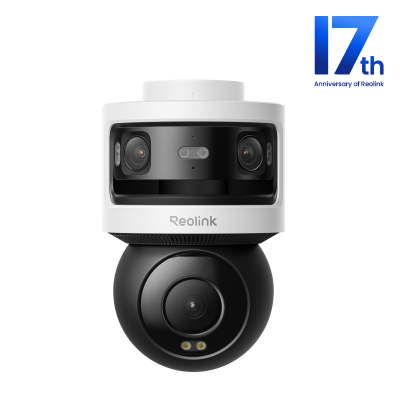
All-in-one Triple-Lens 180° Panoramic Pan-Tilt Security Camera
10MP Dual-Lens 180° View, 4K 360° Full Coverage, SyncTrack with auto framing & auto tracking, Local Storage (No Monthly Fees), Local AI Video Search.
2. High-Theft Aisles & Perimeter Patrol: Reolink Altas PT Ultra
For high-risk zones—such as electronics displays, designer apparel racks, or rear loading docks—passive, stationary cameras often miss the critical context of a fast-moving theft.
The Reolink Altas PT Ultra features a motor capable of panning and tilting.
Instead of an LP officer manually controlling a joystick, the camera utilizes advanced on-edge AI person and vehicle detection. It automatically tracks a moving subject across the store floor, providing continuous tracking while filtering out false motion alarms triggered by shifting window reflections, ceiling fans, or HVAC airflow.
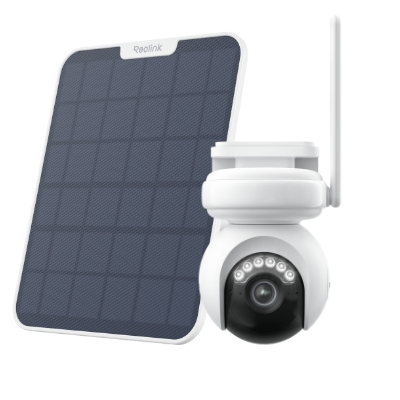
Industry-leading 4K Continuous Recording Battery Camera
4K UHD Continuous Recording; ColorX Night Vision; Pan & Tilt; Automatic Tracking; All Recordings Stored Locally.
3. Reolink Local Storage: Eliminating Subscription Fees
As detailed in our retail tier list, small to mid-sized businesses typically retain footage on a 14 to 30-day loop. Many mainstream security brands force business owners into costly monthly cloud subscriptions to store this data.
Reolink systems address this friction point by prioritizing robust local storage options (supporting high-capacity MicroSD cards locally and direct connection to dedicated Network Video Recorders, or NVRs). This ensures a secure, tamper-proof historical backup for retroactive incident audits without adding recurring monthly overhead to the business ledger.
FAQs
How often are security cameras checked?
Most retail stores review footage every 24-48 hours on average. Larger chains may have active real-time monitoring, while smaller shops only check sporadically when needed.
How long do stores keep shoplifting footage?
Shoplifting and theft footage is typically kept 30-90 days. Stores need to retain it long enough to identify suspects and support police investigations if desired.
Are security cameras actively monitored?
Only very large retail chains like Walmart have 24/7 real-time surveillance. Smaller stores cannot afford the staffing for continuous active monitoring and instead review footage as needed.
Conclusion
While security cameras are ubiquitous in retail environments, the actual monitoring of those cameras varies extensively. Larger chains invest heavily in 24/7 surveillance, while smaller shops review footage only as needed.
But across the board, cameras act as both a real and perceived asset for retailers, helping to secure merchandise, promote safety, and ultimately create a welcoming environment for shoppers.
Search
Subscribe for the Latest Updates
Security insights & offers right into your inbox