
How Many Cameras Can an NVR Support?
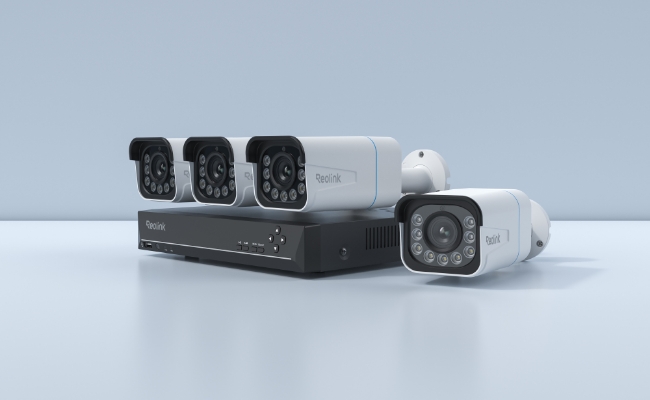
While buying an NVR, you might be wondering how many cameras you can connect to it. Each NVR has a fixed number, and it depends primarily on the channel capacity, but there are also some other factors, such as bandwidth and power limitations.
This guide will help you understand how many cameras you can actually connect to an NVR. We will explain the factors that determine the camera capacity. We will also help you add cameras to the NVR and select the right one for your needs.
How Many Cameras Can an NVR Support?
An NVR can support a fixed number of cameras, depending on its hardware. This is represented by the channel capacity, and each camera consumes one channel.
The common NVR camera capacities are 4, 8,16, 32, and 64 channels. However, they have different limits for PoE and Wi-Fi cameras.
For instance, RLN8410 is a 12-channel NVR. It has 8 built-in PoE ports, which means you can connect up to 8 PoE cameras directly. The remaining channels can be occupied by battery-powered Wi-Fi cameras. Secondly, you can connect up to 12 battery-powered Wi-Fi cameras. But if you want to connect more than 8 PoE cameras, you can use a PoE switch to expand the limit up to the channel capacity.
Pick a suitable NVR according to the use case and scenario, while keeping future scalability in mind.
- A 4-channel or 8-channel NVR is perfect for a small suburban home.
- A large home or small business might require a 16-channel or 32-channel NVR.
- For commercial businesses, warehouses, and large enterprises, a 64-channel or higher capacity NVR is needed.
Factors That Determine How Many Cameras an NVR Can Support
NVR Channel Capacity
The NVR channel capacity is the maximum number of cameras the NVR can support. It’s the ceiling, so the firmware can’t register more cameras.
Standard NVR model capacities are 4, 8,16, 32, and 64 channels. Even if you have more bandwidth or storage left, an 8-channel NVR cannot register a 9th camera. Therefore, it’s better to choose the channel capacity wisely and always go one tier higher than your needs.
Number of PoE Ports
The number of PoE ports shows the built-in PoE port count. It means if the PoE ports are four, you can connect up to 4 PoE cameras.
In some cases, the PoE ports are equal to the channel count. For instance, an 8-channel NVR has 8 PoE ports to connect 8 PoE cameras. In contrast, an 8-channel NVR could have 4 PoE ports and could support 4 Wi-Fi cameras. Check the channel capacity and PoE ports separately.
Network Bandwidth
An NVR has a total throughput limit, which is also known as the input bandwidth. Thus, there is a bandwidth ceiling, and each camera stream consumes a certain amount of bandwidth. You have to stay within the bandwidth limit with all streams.
It’s also possible that you might run out of bandwidth before connecting the maximum number of cameras to the NVR. It usually happens when you have high-resolution cameras.
While choosing an NVR, do the simple math. If a single 4K camera requires 8-16 Mbps, it means you need an 80 Mbps 8-channel NVR to connect four 4K cameras and some other lower-resolution cameras. If you need to run 4K cameras on all channels, choose the bandwidth limit accordingly.
Camera Resolution and Bitrate
Higher resolution means the camera will consume more bandwidth and storage. Therefore, you have to select the camera resolution according to what the NVR can handle. For instance, you can have high-resolution cameras for the driveway, front door, and other delicate locations. But for indoor monitoring or a shed, you can switch to a lower-resolution camera, such as 2K.
Bitrate is another important factor that determines the bandwidth that the camera consumes. Two cameras with the same resolution can have a different bitrate. A 4MP stream requires 4-6 Mbps and an 8MP stream averages 8-12 Mbps. Checking bitrate helps you select cameras within the NVR’s bandwidth limit.
NVR Recording and Decoding Capacity
An NVR’s recording capacity is exactly the maximum number of channels or cameras it can record at a time. If you have an 8-channel NVR, it will record the videos from all eight cameras.
However, it may or may not display or decode all of them. An 8-channel NVR might display only four cameras in full real-time resolution at once. The other camera feeds might have a lower quality. It varies with the NVR brand and model. In some cases, you might need to display all cameras at full resolution in real time. That said, check the decoding capacity along with other factors.
How to Add More Cameras to an NVR?
You can add more cameras to an NVR up to its channel limit. If the channel limit is 16, you can’t add a 17th camera, no matter whether you use a PoE switch, local network, or anything else.
If you have one or more spare channels, you can connect more cameras through the following ways.
Via a Spare PoE Port:
- Check if there is any spare PoE port on the NVR.
- Use an Ethernet cable of an appropriate length with connectors and connect the camera directly to the NVR.
- Power up the camera, and the NVR will assign an IP address.
- Open the NVR interface. Go to Settings > Camera Management > Channel List. It will take a few seconds to minutes to initialize and display the video.
Using a PoE Switch:
If you don’t have any PoE ports left on the NVR or you want to run across the LAN, you have to use an external PoE switch.
- Connect your external PoE switch to your local network router or main network switch. Turn it on using the adapter.
- Connect the cameras to the switch using an Ethernet cable.
- Assign subnet and IP addresses. Often, cameras do not grab a DHCP address automatically. Therefore, you have to connect a PC to the same network to activate the camera. Assign them static IP addresses within your main router's subnet range.
- Open the NVR interface. Go to Camera Management > Channel > Add Device. Search for the cameras on the local network. Select the camera and complete the setup.
What If Your NVR Has Reached Its Channel Limit?
You cannot increase the NVR’s channel capacity by any means. If the NVR’s channels are fully occupied, you have two options.
- You can replace it with a new model that supports more channels
- Use a second, independent NVR to expand the surveillance system.
How Many NVR Channels Do You Need?
Apartment, Small Home, or Small Office: You need a minimum of 2-3 security cameras for the security of small areas and a few locations. It’s to cover the front door, back door, and 1 interior area. A 4-channel NVR for an apartment is enough. For future scalability in small homes and offices, an 8-channel NVR is a better option.
Standard Single-family Home: To cover all locations in a standard single-family house, you need 5-6 security cameras. You can place cameras to cover all four exteriors, the driveway, and the porch. An 8-channel NVR would work best and also offer some room to add more cameras.
Large Multi-story Home or Rural Property: For such properties, you might have to use 9-12 security cameras. Getting a 16-channel NVR is the right decision.
Retail Shop: Depending on the size of the retail store and the number of cameras you need, opt for a 16-channel or 32-channel NVR. You can easily cover the perimeter, registers, aisles, and stockroom.
Warehouse, Mall, or Complex: A 32-channel or 64-channel NVR will be a better choice for warehouses, malls, complexes, and large public areas. You have to place cameras at entrances, docks, inventory areas, perimeter, etc.
Reolink NVRs for Different Camera Counts
RLN8-410 (12-Channel)
Supported Cameras: 8 PoE or plug-in Wi-Fi cameras plus 4 battery-powered Wi-Fi cameras, or 12 battery-powered Wi-Fi cameras.
RLN8-410 is a great choice for a small home, shop/business, apartment, or standard suburban home. You can connect up to 12 cameras in total, and it supports video resolutions up to 16MP.
It’s a PoE NVR, ideal for 24/7 recording, but it also supports wired Wi-Fi and battery-powered cameras. It has expandable storage up to 16TB (8TB SATA and 8TB eSATA), which is more than enough for continuous monitoring through multiple cameras.
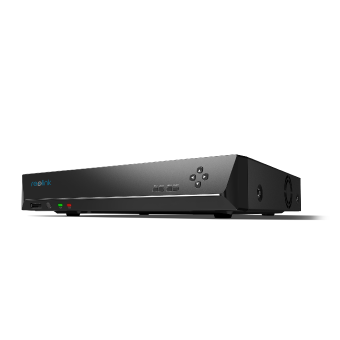
12-Channel PoE NVR
Supporting Up to 16MP, Power over Ethernet, 24/7 Continuous Recording, Expandable Storage Up to 16TB.
RLN16-410 (24-Channel)
Supported Cameras: 16 PoE or plug-in Wi-Fi cameras plus 8 battery-powered Wi-Fi cameras, or 24 battery-powered Wi-Fi cameras.
RLN16-410 is a 24-channel NVR suitable for large multi-story homes, rural properties, and even retail shops and small businesses. It can record 24/7 for robust security. You can connect high-resolution cameras up to 16MP to capture clear videos with rich details. The storage can be expanded up to 16TB (2×8TB SATA).
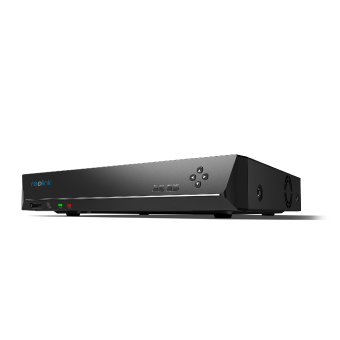
16-Channel PoE Security NVR
3TB Built-in HDD; Work with All Reolink 5MP/4MP Cameras for 24/7 Video Recording, Monitoring, and Management; Plug and Play.
RLN36 (36-Channel)
Supported Cameras: 36 PoE, plug-in Wi-Fi, or battery-powered Wi-Fi models.
If you want an NVR for a large space and to connect almost any type of Reolink camera to it, RLN36 is what you should get. It’s your complete security centre with eight alarm-in channels for linking extra wired sensors (temperature, IR, magnetic sensors, etc.) to detect events. Plus, there are 4 alarm-out channels for commanding controllers (door, light, siren switches, etc.) to execute actions.
The NVR also has built-in audio ports for two-way talk via the NVR. You can seamlessly communicate with on-site persons. It supports three 16TB HDDs, which is ample space for high-resolution cameras and continuous recordings.
FAQ
Can multiple NVRs be connected to the same network?
Yes, multiple NVRs can be connected to the same network. It’s a standard practice for large areas and properties. However, it requires unique static IP addresses, network port numbers, and separate internal subnets.
Is there a 12 channel NVR?
Yes, you can find 12-channel NVRs easily. Reolink RLN8410 is an excellent option, and it can support up to 8 PoE or plug-in Wi-Fi cameras plus 4 battery-powered Wi-Fi cameras, or 12 battery-powered Wi-Fi cameras.
How much does a 16 channel NVR cost?
A good 16-channel NVR costs around $350 to $550. However, the budget-friendly ones are around $180 to $300, and the high-end NVRs cost over $700+.
Conclusion
You can connect security cameras to an NVR according to its channel capacity. There is a fixed number that each NVR supports. Plus, it also depends on the number of PoE ports, network bandwidth, camera resolution & bitrate, and NVR recording & decoding capacities. We have explained all these factors in detail to help you select a suitable NVR for your home, business, or commercial property. There is also a quick overview or cheat sheet to decide how many NVR channels you actually need.
Search
Subscribe for the Latest Updates
Security insights & offers right into your inbox