
How Long Do Security Cameras Keep Footage? Storage Guide 2026
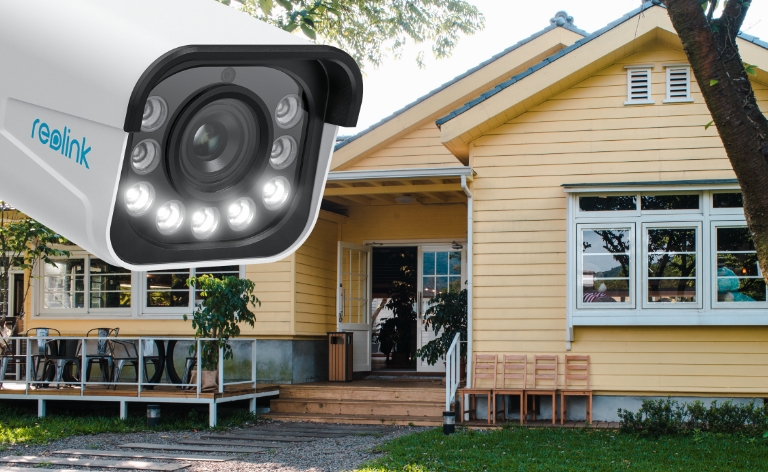
In the world of surveillance, the duration for which security cameras retain footage is a Security cameras typically keep footage for around 7 to 90 days, but the actual retention period can vary widely depending on how the video is stored and recorded. Cloud plans often use fixed retention periods, while NVRs, DVRs, and microSD cards keep footage based on available storage capacity.
Factors such as video resolution, bitrate, number of cameras, recording mode, and compression also affect how long footage lasts. This guide explains how long different security camera storage options can retain video and how to extend recording time when needed.
Key Takeaways
- Most security cameras keep footage for about 7 to 90 days, but the actual retention period varies by storage method, capacity, and recording settings.
- Cloud storage commonly keeps recordings for a fixed period based on the plan, while microSD cards, NVRs, DVRs, and Home Hubs retain footage according to available local storage.
- Continuous 24/7 recording uses storage faster than motion-triggered recording, so it generally provides a shorter retention period with the same storage capacity.
- Storage capacity, bitrate, resolution, frame rate, compression, and number of cameras are the main factors that determine how long security camera footage lasts.
- When local storage becomes full, many security camera systems automatically overwrite the oldest footage with new recordings.
- To keep footage longer, you can increase storage capacity, use motion or scheduled recording, choose efficient video compression, adjust recording settings, or export important clips before they are overwritten.
- How Long Do Security Cameras Keep Footage by Storage Type?
- What Determines Security Camera Retention Time?
- How to Calculate How Many Days a Camera Can Record?
- Continuous vs Motion Recording
- How to Keep Security Camera Footage Longer?
- How Long Do Reolink Cameras Keep Footage?
- Best Reolink Options for Longer Video Retention
- Storage Retention Decision Guide
- FAQs
- Conclusion
How Long Do Security Cameras Keep Footage by Storage Type?
The duration a security camera holds onto video recordings is determined by physical memory capacity, video resolution (1080p, 2K, or 4K), and whether the device captures footage continuously or through motion-triggered events.
Once local or virtual storage space fills up, standard surveillance systems automatically recycle capacity by overwriting the oldest saved files.
Footage Retention Comparison by Storage Type
MicroSD Card (On-Camera Direct)
On-board SD cards offer direct local storage with no monthly fees. When set to motion-triggered AI recording, a 128GB microSD card retains event clips for several weeks. However, writing non-stop 24/7 footage in high 4K resolution will take up a 128GB card within 2 to 3 days before overwriting begins.
Cloud Storage (Subscription Plan)
Cloud services store clip recordings on remote servers rather than physical local media. Storage retention does not depend on memory limits, but rather on subscription tiers—typically retaining a rolling history of 7, 14, or 30 days before clips auto-delete.
NVR / DVR System (Local Hard Drives)
Multi-channel Network Video Recorders utilize dedicated internal hard drives (2TB to 16TB) designed for heavy 24/7 video writes. A standard 2TB hard drive handling continuous feed from four 4K IP cameras typically yields about 10 to 14 days of continuous recording before loop overwriting starts.
Home Hub (Centralized Local Base)
Wi-Fi Home Hubs combine the subscription-free privacy of local storage with central management for up to 8 wire-free or plug-in cameras. Supporting local expansion (such as dual microSD cards or internal drives up to 2TB), a Home Hub operating on smart AI event detection can easily hold 1 to 6 months of motion history across multiple home zones.
What Determines Security Camera Retention Time?
Security camera retention time is determined by a simple rule: the volume of video data generated per second versus your available storage capacity. Higher resolution and continuous recording consume space rapidly, while modern compression formats and smart motion triggers extend retention.
Storage Capacity
The physical limit of your microSD card, NVR hard drive, or Home Hub is your baseline. Storage acts as a rolling buffer; once maximum capacity is reached, the system overwrites the oldest files to make room for new footage.
Recording Mode (24/7 vs. Motion Events)
Continuous 24/7 recording fills storage up to 10 times faster than event-based recording. Relying on AI motion triggers to capture only active events allows a single drive to retain weeks of footage rather than days.
Resolution and Frame Rate
Higher resolutions like 4K (8MP) or 12MP capture four to six times more visual data per frame than standard 1080p. Similarly, recording at 30 frames per second (fps) uses roughly 50% more storage than recording at a smooth 20 fps.
Bitrate
Measured in kilobits per second (Kbps), bitrate defines how much data is processed per second of video. A 4K camera set at a high bitrate of 8192 Kbps will exhaust storage twice as fast as the same camera running at a mid-tier 4096 Kbps setting.
Video Compression (H.264 vs. H.265)
Modern encoding standards drastically alter file sizes. H.265 compression reduces raw footage file sizes by roughly 50% compared to legacy H.264 without sacrificing image quality, effectively doubling your total retention time on the same hard drive.
Number of Active Cameras
Every camera connected to a centralized recorder shares the total storage pool. A 4-camera system recording continuously to a 2TB NVR hard drive will fill up four times faster than a single-camera setup using identical settings.
How to Calculate How Many Days a Camera Can Record?
To accurately estimate how much hard drive space your setup requires for continuous 24/7 recording, use this standard surveillance calculation formula:
Storage Space (GB) = [Bitrate (Kbps) × 86,400 × Number of Cameras × Days] ÷ [8 × 1,000,000]
Real-World Calculation Example:
If you run 4 cameras continuously at a 4K resolution setting (4096 Kbps bitrate) for 14 days, the formula calculates your required capacity:
Storage Space = (4096 × 86,400 × 4 × 14) ÷ 8,000,000 ≈ 2,477 GB (2.48 TB)
Result: You will need a minimum 3TB internal hard drive on your NVR system to reliably maintain a two-week rolling archive without losing continuous footage.
You can also use the Reolink Storage Calculator to estimate how much storage you need based on your camera bitrate, recording time, and number of cameras.
Continuous vs Motion Recording
How to Keep Security Camera Footage Longer?
To maximize security camera retention time without spending extra money on hard drives, optimize your system's recording behaviors and file management settings. Implementing a few targeted adjustments can easily double or triple your available footage history.
Switch to Motion-Activated or Scheduled Recording
Recording 24/7 continuously fills storage drives with hours of empty, inactive footage. Switching your system to motion-activated recording captures video only when activity occurs, extending a 128GB SD card's retention from 3 days to several weeks. Alternatively, set custom schedules—such as recording only outside business hours—to drastically cut unnecessary storage usage.
Enable Smart AI Detection and Motion Zones
Basic motion detection triggers on passing cars, wind-blown trees, or rain, generating hundreds of unnecessary clips. Enable AI detection (person, vehicle, or package filtering) and draw custom detection zones to ignore high-traffic public sidewalks, ensuring storage space is reserved exclusively for real events.
Upgrade to H.265 Video Compression
Ensure your camera's encoding setting is set to H.265 instead of legacy H.264. H.265 compresses video files up to 50% more efficiently without any loss in visual quality, effectively doubling the days of footage your hard drive or SD card can hold.
Fine-Tune Resolution, Bitrate, and Frame Rate Settings
While 4K resolution is ideal for critical entrance points, high-traffic areas where extreme detail is unnecessary can be safely reduced to 2K or 1080p. Dropping the frame rate from 30 fps to a smooth 20 fps and lowering the bitrate setting frees up substantial hard drive capacity while maintaining crisp, readable video.
Export Important Footage
Since local drives automatically overwrite the oldest files once full, manually download or export crucial incidents to a external drive, PC, or private cloud folder. Offloading critical clips preserves your evidence permanently without taking up valuable rolling storage space on your main camera system.
How Long Do Reolink Cameras Keep Footage?
Reolink cameras do not have one fixed footage retention period. How long recordings are kept depends on the storage capacity, recording mode, bitrate, resolution, and number of cameras in your setup.
Battery-powered Reolink cameras typically use motion-triggered recording, which can preserve footage for weeks or longer depending on activity and storage capacity. Compatible PoE and WiFi cameras can support 24/7 recording to a microSD card, Reolink NVR, or Home Hub, with footage retained until the storage fills up and older recordings are overwritten.
For example, according to Reolink's official NVR recording estimates, a 2TB HDD can store about 12 days of continuous footage from four cameras recording at 4096 Kbps each. Increasing the drive to 4TB extends the estimated retention to about 24 days, while a 12TB HDD can keep approximately 73 days under the same conditions. Actual recording time varies with bitrate, camera count, stream settings, and recording mode.
For longer multi-camera retention, a Reolink NVR with expandable HDD storage is generally the best option, while microSD cards and Home Hubs are well suited to standalone cameras or smaller setups.
Best Reolink Options for Longer Video Retention
Maximizing video retention history comes down to pairing large storage capacity with modern H.265 compression. Depending on whether your setup requires event-based motion clips or non-stop 24/7 continuous recording, these three Reolink models deliver high storage efficiency.
1. Best Wire-Free Event Retention: Reolink Argus PT Ultra
You need high-resolution outdoor coverage without running power or network wires, but want to retain months of motion history without paying monthly subscription fees.
The Reolink Argus PT Ultra is a wire-free, battery or solar-powered camera designed for extended local storage. Combining H.265 video compression with smart AI motion filtering, it filters out false triggers (like wind or passing animals) to reserve storage strictly for critical events.
- Key Specs & Retention: Supports onboard microSD cards up to 512GB. Set to smart motion triggers, a 512GB card can hold 3 to 6 months of event history locally. Uses H.265 encoding to cut file sizes by roughly half compared to older H.264 formats.
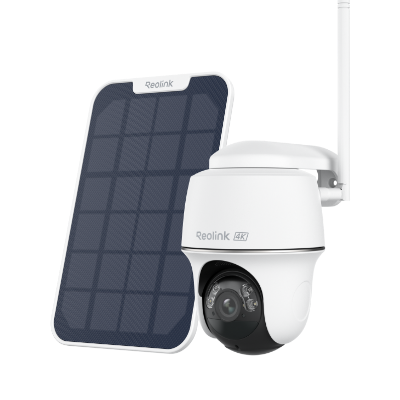
4k 100% Wire-Free PT Camera
4K 8MP Ultra HD; 5GHz/2.4GHz WiFi; Rechargeable Battery & Solar Powered; 355° Pan & 140° Tilt; IP65 Certified Weatherproof; Clear Night Vision; 2-Way Audio; 122° Wide Viewing Angle.
2. Best Standalone 24/7 Local Storage: Reolink RLC-823S2
You require non-stop 24/7 continuous recording for a high-traffic perimeter (like a commercial lot or driveway) without setting up a separate recorder hub.
The Reolink RLC-823S2 is a Power over Ethernet (PoE) outdoor PTZ camera. It delivers full 4K resolution with 360-degree continuous coverage, saving heavy 24/7 video feeds directly onto its internal memory card slot.
- Key Specs & Retention: Accepts microSD cards up to 512GB. Running continuous 24/7 recording in 4K, the 512GB capacity and H.265 compression provide approximately 7 to 10 days of uninterrupted video history before overwriting older files.
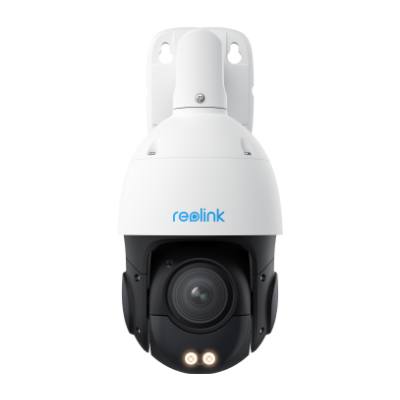
Smart 4K PTZ PoE Security Camera with 16X Optical Zoom
16X Optical Zoom, 360° Coverage in 4K UHD, Auto Tracking, Color Night Vision.
3. Best Scalable Multi-Camera System: Reolink RLK8-811B4-A
You need continuous 24/7 coverage across multiple zones and require weeks or months of rolling footage history saved in one central location.
The Reolink RLK8-811B4-A is an 8-channel 4K PoE camera system featuring four spotlight cameras and a central Network Video Recorder (NVR). It consolidates video feeds from up to 8 cameras onto dedicated surveillance hard drives without relying on cloud subscriptions.
- Key Specs & Retention: Includes a pre-installed 2TB internal hard drive. The internal SATA bay and external eSATA port allow expansion up to 12TB total capacity. Running the four included 4K cameras non-stop yields 10 to 14 days of 24/7 footage on the standard 2TB drive, expandable to over 60 days with fully upgraded hard drives.
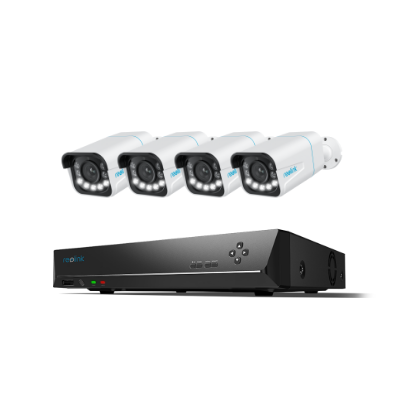
Smart 4K 8-Channel PoE Security System with Spotlights
4 pcs 4K Ultral HD Security Cameras with Person/Vehicle Detection & 5X Optical Zoom; 2TB HDD 8-Channel NVR for 24/7 Recording; Plug & Play.
Storage Retention Decision Guide
To help bring further clarity to what’s best for you, compare choices with confidence using this quick guide:
FAQs
1. Can overwritten footage be recovered?
Usually, overwritten security camera footage cannot be fully recovered because the original video data has been replaced by newer recordings. Once an NVR, DVR, microSD card, or other storage device writes new data over the same space, recovery becomes much more difficult and may be impossible.
If important footage has been deleted but not yet overwritten, recovery may still be possible with specialized data-recovery tools or professional services. To improve the chances of recovery, stop recording to the device immediately and avoid saving any new files to it.
2. Do home security cameras delete footage?
Yes, home security cameras can delete footage based on various settings and storage management configurations. Most modern security camera systems have features such as loop recording or overwrite functionality, which means that when the storage is full, the system automatically deletes the oldest footage to make room for new recordings.
3. How far back can a security camera go?
The duration for which a security camera can store footage depends on several factors, including the camera system's storage capacity, the video resolution, frame rate, compression settings, and whether it employs continuous recording or motion-triggered recording.
In general, security camera systems can store footage for a few days to several weeks. High-capacity storage devices, such as Network Video Recorders (NVRs) with large hard drives, can extend this duration. However, as the storage fills up, older footage may be automatically overwritten unless there's a specific configuration to save it for longer.
4. Do security cameras keep all footage?
Security cameras typically do not keep all footage indefinitely. The retention period depends on factors such as storage capacity, settings, and configuration. Most systems employ a loop recording or overwrite mechanism, where the oldest footage is automatically deleted to make room for new recordings when the storage is full.
Conclusion
Having the right storage duration for your security camera footage is important for your surveillance system. You need to determine the appropriate retention period for your needs and select the right storage options.
If you like this article and find it helpful, share it with your friends. Do you have something to say about "How Long Do Security Cameras Keep Footage"? Make sure you leave a comment below!
Search
Subscribe for the Latest Updates
Security insights & offers right into your inbox