
Home Automation Controllers: The Key to Smarter Living
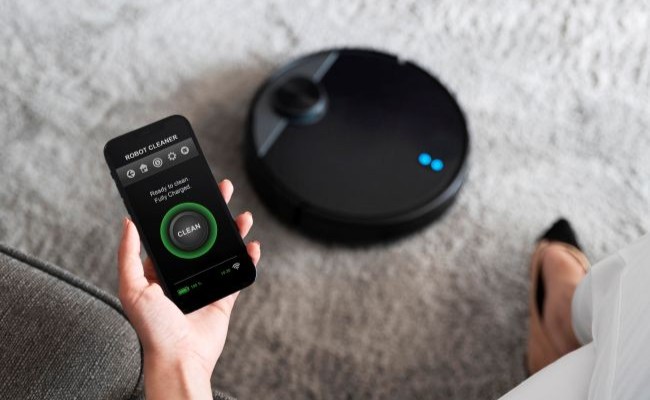
Modern living depends hugely on a home automation controller as the fundamental control system for smart homes during this technological period. These devices are the main control platform that manages access to multiple smart devices, including illumination and heating systems, e-security cameras, and speech recognition technologies.
A controller for home automation unifies different system technologies to provide users with enhanced control, convenience, and system effectiveness in home management. This article explains home automation controllers as devices, including their functionalities, and outlines the top selection criteria for your smart home system.
What is a Home Automation Controller?
A smart home requires a home automation controller as its primary controller software or hardware instrument. This device allows you to manage and connect smart devices effortlessly to perform synchronized operations. The single interface is accessible through a home automation controller. It gives you control over your lights, thermostat settings, and security camera monitoring.
The controllers commonly support multiple communication protocols, Wi-Fi and Bluetooth, to extend compatibility with various smart devices.
How do Home Automation Controllers Work?
The operation of home automation controllers occurs through wireless protocol connections that use Z Wave home automation controller protocol, Wi-Fi, and Bluetooth. After joining the system, the controller functions as the central processor for smart home management by exchanging control signals with devices. Smart bulbs receive direction from the controller to perform the requested command when you attempt to disable lighting.
Modern controllers provide connection capabilities with voice assistants Alexa, Google Assistant, and Siri to control all your devices with voice instructions. A mobile application usually includes controllers to allow users worldwide remote access and control capability.
Best Home Automation Controller
Today, multiple home automation controllers offer unique advantages to users. The market showcases multiple excellent options, among which we will discuss the best.
1. Samsung SmartThings
People love Samsung SmartThings for its popular position as an all-inclusive automation controller with simple operation features. The controller supports devices and communication protocols such as Z-Wave and Zigbee, Bluetooth, and Wi-Fi. The SmartThings application enables users to design automated sequences while providing home status updates and enables connections to Alexa and Google Assistant platforms.
Smart home enthusiasts select Samsung SmartThings because it combines an easy-to-use interface with a strong device network, which offers them a premium experience.
2. Amazon Echo
The Amazon Echo system functions through Alexa with the power to deliver both voice assistance capabilities and complete home automation command capability. You can control various smart devices through basic voice commands because the Echo features integrated Zigbee capabilities and supports thousands of connected devices.
Users gain extra control features through the Alexa app to customize their smart home management system remotely.
3. Apple HomePod
Users who prefer Apple products should consider the Apple HomePod since it seamlessly operates within the HomeKit environment. The device provides effortless management of all HomeKit-compatible devices, such as lights, thermostats, and security cameras.
HomePod connects to Siri, so users can operate their smart home by speaking to it. Through the Home app, users can access one application to oversee their devices and build automation systems while creating scenes.
4. Wink Hub
Wink Hub serves as a reliable home automation controller by controlling Z-Wave, Zigbee devices, and Wi-Fi gadgets. The system provides an easy-to-use application for smart home management and device scheduling and monitoring capability. Customers on a budget can choose Wink Hub because of its suitable pricing and wide support for major smart home product brands.
Your Reolink cameras can now be managed with a central controller. Explore the Reolink Home Hub and discover some of the best wireless security camera systems to protect your home!
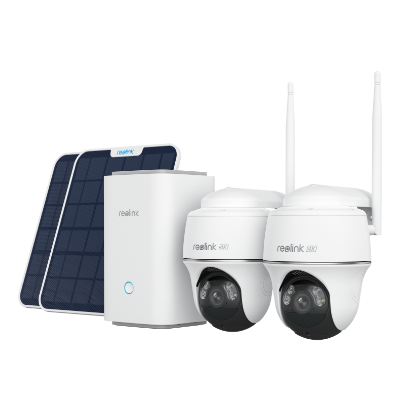
Wireless Security System With 4K PT Standalone Battery/Solar Wi-Fi Cameras
4K Color Footage Day & Night, 1 Year of Local Storage, Exclusive Anti-Theft Algorithms, Expandable System Up to 8 Reolink Cams
What to Consider When Choosing a Good Controller for Home Automation?
Home automation systems work best with the proper controller choice for easy device management. Your selection of a smart home automation controller makes controlling and joining multiple smart devices easier while enhancing security and power use. When shopping for a home automation controller, consider these as the main qualities to look for:
1. Centralized control
A top-quality home automation controller lets you manage every connected device from one central location. The device should allow you to manage smart appliances and gadgets, including lights, security setups, rooms, and other devices, through a single interface.
Using a smartphone app or voice assistant commands through Alexa or Google Assistant lowers the workload of monitoring and operating smart home devices into only one system.
2. User-friendly interface
Ease of use is crucial. Your smart home controller must display its controls clearly so anyone can use it without knowledge of technology. When a setup proves difficult to use because its interface contains too many buttons and features, the value of automation decreases.
3. Customizable settings and routines
Every high-quality home automation controller lets users create custom features matching their daily routines. The capacity to build everyday schedules and automatic processes helps users save time. When you walk through your door, the system should turn on your lights, and during the night, the thermostat should shift settings based on bedtime hours.
4. Remote access (via mobile app)
The main feature a good home automation controller requires is remote access. A mobile app helps you check and command your home devices no matter where you are, so you feel free and away from basic activities.
5. Security and privacy protections
Security matters most when making decisions. Select a controller with high-grade encryption, strong security updates, and unique log-in formats to guard your private information.
Consider these features when selecting your smart home automation controller, and you will get the best value for your investment. Such a controller will ease your life with a great automation experience.
How to Set Up a Home Automation Central Controller?
A basic process exists for implementing home automation central controllers. These are the steps needed to begin your setup procedure:
- Place the controller in a central position close to your Wi-Fi router to achieve maximum connectivity.
- The controller must connect to your home network through Wi-Fi or an Ethernet cable.
- Start by downloading the mobile app and using its preferred account creation process.
- Follow your mobile interface instructions to connect your smart devices to the controller.
- Create organized categories of devices through rooms or zones to simplify controller management.
- Create personalized schedules and automated functions according to your preferences.
- Test the system to verify all connected devices' correct operation and command response.
FAQs
Which controller is used in home automation?
Home automation controllers consist of four popular devices: Samsung SmartThings, Amazon Echo, Apple HomePod, and Wink Hub. Smart home devices get control functions from these devices, which operate as a central management system.
What are the different types of controllers in automation?
The market provides three main categories of home automation controllers: hub-based controllers (SmartThings and Wink Hub), voice assistants (Amazon Echo and Google Home), and software-based platforms (Apple HomeKit).
Which company is best for home automation?
Your choice of the best home automation company depends on the features you need and the parameters you have set. Samsung SmartThings, Amazon, Apple, and Wink are among the prime vendors leading the home automation controller market.
Conclusion
A home automation controller is a gateway device to access all possible functions of your automated residential space. Home automation controllers allow users to manage their home environment more efficiently. They work through integrated management systems, adjustable settings, and remote access capabilities.
Any one of the available controllers, such as Samsung SmartThings, Amazon Echo, Apple HomePod, and Wink Hub, can convert your living room into an efficient and smarter household setup. In the discussion area, please share how home automation controllers have influenced you and your home.
Search
Subscribe for the Latest Updates
Security insights & offers right into your inbox