
Cellular Security Cameras: 6 Things You Must Know (2026 Guide)
You buy a piece of property or a remote cabin to get away from it all, or you manage a construction site or rural farm to get things done. Then the anxiety sets in. You want to protect your investment, but when you look into security cameras, you hit a brick wall: No Wi-Fi. No electrical outlets. No power grid.
If you browse community forums like r/homesecurity or r/offgrid, you will find hundreds of users sharing the exact same loop. They buy a standard wireless camera, try to boot it up at a distant site, and watch it instantly fail because the router is too far away.
There is a smarter way to own your peace of mind. Cellular security cameras completely bypass the need for traditional internet by utilizing the exact same cellular data networks as your smartphone.
In this buyer's guide, we will break down the absolute best cellular security cameras on the market, look at real user feedback from the field, and give you a clear decision framework to keep your remote property secure.
- What Is a Cellular Security Camera?
- How Does a Cellular Security Camera Work?
- Why Choose Cellular Security Cameras for Remote Monitoring?
- 6 Key Features to Look for in the Best Cellular Security Camera
- 3 Common Mistakes to Avoid to Buying a 4G Cellular Security Camera
- Where to Install a Cellular Security Camera (with Scenario-Based Recommendations)?
- Installation and Setup Tips for Outdoor Cellular Security Cameras
- Cellular Security Camera Data Plans: Hidden Costs Explained
- FAQs
- Conclusion
What Is a Cellular Security Camera?
A cellular security camera is a standalone surveillance device that connects to the internet via a mobile data network rather than a traditional Wi-Fi router or physical Ethernet cable. By utilizing built-in cellular network modules, these cameras can protect properties located completely outside the reach of standard internet infrastructure.
Because cellular cameras are built to go where utility lines don't exist, these devices are almost always engineered as wire-free systems. They draw continuous energy from high-capacity rechargeable batteries and dedicated solar panels, while routing all video alerts over cellular frequencies.
How Does a Cellular Security Camera Work?
To transmit live video and send alert notifications, a 3G/4G LTE/5G security camera must be equipped with an active SIM card and a compatible cellular data plan. You can source this mobile service directly through major nationwide carriers such as Verizon, AT&T, and T-Mobile, or via the camera manufacturer's internal data bundles.
These devices operate in a manner nearly identical to your smartphone: a specialized cellular network module is integrated into the camera's main control panel, so it can send video, audio, and alert signals wirelessly over the air to monitoring stations or directly to your mobile app. Because these mobile-based security systems require a 3G, 4G LTE, or 5G cellular network to communicate, they are frequently referred to as 3G, 4G LTE, or 5G security cameras.
Why Choose Cellular Security Cameras for Remote Monitoring?
4G/5G cellular security cameras provide distinct advantages compared to traditional wired and WiFi systems. By cutting the cords to both the electrical grid and landline routers, these standalone devices solve the most stubborn remote surveillance challenges. Here are the major benefits of deploying cellular security hardware:
1. Location Flexibility
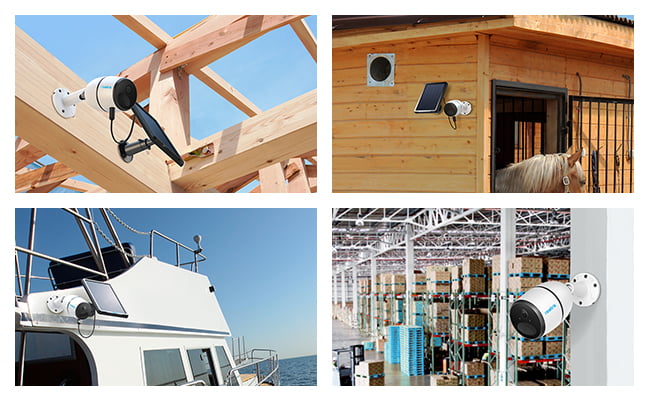
Cellular cameras can be installed and operated virtually anywhere on earth, provided the location has a basic mobile network signal.
Because these systems often come with high-capacity batteries and solar power, you do not need an electrical outlet or a Wi-Fi router to maintain 24/7 coverage.
When your project ends or security needs shift, you can simply unmount the wire-free hardware and relocate it to a brand-new site without dealing with messy cabling or structural wall drilling.
2. Enhanced Privacy and Power Redundancy
Cellular data transmission is inherently more resilient against local tampering, physical wire cutting, and home network cyber vulnerabilities than standard Wi-Fi setups.
Traditional WiFi-based cameras go dark the moment a storm or utility failure knocks out your home's power and router. Because battery and solar-powered cellular cameras carry their own power source and use cellular towers, they continue working even during unexpected power outages.
Advanced models add layers of security. They utilize point-to-point (P2P) technology, AES encryption, and SSL-TLS protocols to ensure your remote video stream stays private and secure from external digital interference.
3. Rapid, DIY Installation
Setting up a cellular system requires zero technical expertise and can be completed entirely by yourself in just a few minutes.
There are no complex network configurations or IP masking steps required. You simply power up the hardware, insert an activated nano-SIM card into the designated slot, and download the camera manufacturer’s customized mobile application. The app instantly pairs with the camera via a quick QR code scan, granting you immediate access to the feed.
4. Real-Time Remote Viewing from Anywhere
Unlike standard local-storage cameras that require you to be near the property to download video, cellular cameras deliver instant, live remote streaming over any distance.
Traditional surveillance setups without an active internet connection store footage locally but keep you completely blind to active intrusions. Cellular systems bridge this gap by using mobile data to push instant, real-time alert notifications and fluid live streams straight to your phone the exact second an asset yard or cabin perimeter is crossed.
6 Key Features to Look for in the Best Cellular Security Camera
Because cellular cameras operate in isolated environments without standard utility lines, their success depends on a few critical, measurable quality criteria.
1. Connectivity (Multi-Carrier 4G LTE/5G Modules)
Choose models with multi-carrier modules. This determines how reliably your camera can transmit video data across remote geographies and varying signal strengths.
The best models usually feature unlocked network modules that accept nano-SIM cards from multiple major carriers (such as Verizon, AT&T, and T-Mobile). This allows you to test and select whichever network provides the strongest local tower signal at your specific off-grid location.
While 5G is highly marketed, 4G LTE modules remain the gold standard for remote monitoring. Lower-frequency 4G LTE signals travel significantly farther and penetrate dense rural foliage, trees, and hilly terrain much better than high-frequency 5G bands, ensuring a more stable, uninterrupted connection.
2. Power Source (High-Capacity Battery & Solar Panel)
Because continuous or frequent off-grid recording places heavy demands on energy, an advanced choice must utilize a massive battery reserve paired with solar panel.
Look for hardware engineered with high-capacity internal rechargeable batteries (ideally ranging from 10,000 mAh up to an industry-leading 20,000 mAh). Standard low-capacity battery cameras will suffer severe downtime or require frequent manual recharging trips if deployed in high-traffic zones.
To achieve permanent, set-and-forget power independence, pair the camera with a weather-resistant 6W or 12W solar panel. Under optimal weather conditions, just a few hours of direct daily sunlight are highly effective at keeping the battery perpetually topped off, offering a completely maintenance-free security loop.
3. Image Quality (Resolution, Aperture, & Dual-Lens Panoramas)
High resolution alone does not guarantee a usable security image; sensor size, low-light aperture metrics, and field of view dictate true forensic visual clarity.
A resolution range from 2K (4MP) to 4K (8MP) is essential for identifying distant details. For expansive locations like asset yards or farm perimeters, choosing an advanced dual-lens system provides a 80-degree panoramic view that eliminates blind spots, effectively doing the work of two standard cameras.
Also pay close attention to the lens aperture rating. Cameras with a large f/1.6 or f/1.0 aperture capture up to twice the ambient light of standard f/2.0 lenses. In dimly lit environments or rural nightscapes, a larger aperture produces clear, vivid color night vision down to near-total darkness.
4. Remote Access & Smart Features (On-Board AI & Pre-Recording)
Cellular cameras must process data locally to filter out false alarms, ensuring they only consume network bandwidth to send you alerts that actually matter.
Basic motion sensors trigger on any change in movement, resulting in dozens of annoying false alerts caused by blowing tree branches, rain, or passing wildlife. Look for cameras with integrated on-board AI that accurately processes video locally to identify specific targets like people, vehicles, or animals before wasting cellular data to push a notification.
5. Weatherproof Ratings (IP66 vs. IP67 Standards)
Outdoor cellular security cameras are entirely exposed to shifting seasonal climates; their housing design must be fully certified to withstand prolonged moisture and temperature extremes.
-
IP66 Rating: This standard guarantees the device is completely dust-tight and can survive powerful, direct high-pressure water jets from any direction. It is perfectly suited for standard outdoor walls and fence lines exposed to heavy downpours.
-
IP67 Rating (Maximum Protection): An IP67 rating means the hardware is entirely dust-tight and can survive temporary immersion in up to one meter of water. If you are mounting your cellular camera in an environment plagued by driving wind-driven snowstorms, intense dust, or proximity to splashing garden hoses, upgrading to an IP67-rated housing ensures long-term operational survival.
6. Data Plans and Consumption Management
Managing cellular data costs requires separating your camera's network transmission activity from its master video storage path.
Ensure the camera app supports clear dual-stream toggles. When you check in remotely, the app should automatically load a highly compressed, low-bandwidth sub-stream (often labeled "Fluent") so your video never buffers—even on weak 1-bar cell tower signals. Meanwhile, the master copy records in full resolution directly onto your local on-site microSD card.
7. Local Storage First
To maintain the lowest possible monthly bill, prioritize cameras that support large standalone local storage via a high-capacity microSD card (up to 256GB or 512GB).
Keeping your 24/7 or heavy motion history stored locally on the physical hardware ensures your cellular data plan is only utilized when you stream live video or request an alert clip, keeping your cellular requirement down to a cheap, predictable 1GB to 2GB light-use tier.
3 Common Mistakes to Avoid to Buying a 4G Cellular Security Camera
Mistake 1. Overlooking the Total Cost of Ownership (Hardware + Data Plans)
Buyers often budget only for the upfront hardware and forget that 4G/5G cellular security cameras require ongoing monthly data plans. High-resolution live streaming and manual recordings will rapidly spike data consumption, leading to unexpected recurring costs.
So, when calculating your budget, put it in two distinct cost layers:
-
Initial Hardware Cost: You may find that most cellular security cameras are fundamentally more expensive than standard Wi-Fi models due to the advanced built-in cellular network technology.
-
Carrier Data Fees: You must purchase a dedicated mobile data plan, which varies in price based on the carrier and the data allocation size you choose (typically ranging from 1GB upward).
Mistake 2: Gambling on Cheap, Unknown Marketplace Brands
Purchasing unbranded cellular cameras often results in sudden signal degradation and zero customer support. Sticking to reputable, established security brands ensures a reliable network connection and access to technical help when troubleshooting.
Some cell-based security systems for sale come from completely unknown brands with sparse, highly arguable user reviews. This leaves you with no trustworthy reference framework to verify if the camera is worth your money.
For example, low-tier 3G/4G/5G cameras may work perfectly for the first few months, but begin to suffer internal hardware degradation later.
Key Takeaway: To secure the best cellular system, choose a reputable security brand like Reolink that stands behind its hardware with solid after-sales service. This ensures you get instant, 1-to-1 technical support the moment network or hardware issues arise.
Quick Comparison: Brand Name Reliability vs. No-Name Risk:
Mistake 3: Buying a Battery System Without a Sustainable Power Plan
Cellular cameras drain batteries faster than Wi-Fi models because they constantly maintain a cell tower connection. Buying a battery-powered unit without low-battery alerts or a solar backup plan causes frequent system downtime.
To keep your remote properties protected without your constant physical intervention, look for these power solutions:
-
Proactive Low-Battery Alerts: Ensure your 3G/4G/5G battery camera is programmed to send automated push notifications when power runs low, keeping you informed in time to recharge or replace the cell.
-
Add a Solar Panel if Outdoors: The solar panel generates a non-stop trickle charge, providing permanent, self-sustaining power without maintenance.
Where to Install a Cellular Security Camera (with Scenario-Based Recommendations)?
The core principle behind cellular security is simplicity: if your smartphone can make a call or send a text message at a specific location, a cellular security system will function there seamlessly. To help clarify the best setup for your needs, we have outlined real-world scenarios where cellular surveillance excels, paired with the optimal feature sets required to protect them.
1. Remote Property, Farm, or Acreage Monitoring
Monitoring expansive outdoor spaces like barns, ranches, rural farms, or isolated vacation cabins where Wi-Fi cannot reach and running cables is cost-prohibitive.
A system with wide spatial coverage, robust weatherproofing, and a self-sustaining power source to minimize physical maintenance visits.
For wide-area rural tracking, pan-tilt models that offer 360° situational awareness alongside solar-panel compatibility are highly effective. Solutions like the Reolink Go PT Ultra fit naturally here, delivering 100% wire-free 4K Ultra HD video, IP65 weatherproofing, and advanced night vision designed to capture fine details in complete darkness.
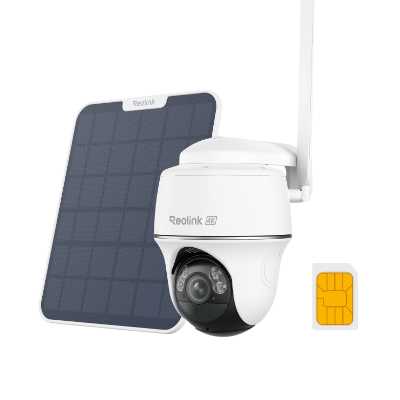
4K 8MP Wire-Free 4G LTE PT Battery Camera
4K 8MP; Smart Detection; 355° Pan & 140° Tilt; Battery/Solar Powered; Color Night Vision; Smart Real-Time Alert.
2. Off-Grid Wildlife Studies and Deep-Forest Surveillance
Observing wildlife or monitoring remote hunting grounds deep within forests or rural tracts where any visible light or camera glow would spook animals or tip off trespassers.
Specialist AI recognition that filters out false alarms caused by blowing leaves, paired with specialized night vision that remains completely invisible to the naked eye.
True off-grid environments demand dedicated trail and wildlife engineering. This scenario is perfectly answered by purpose-built models like the Reolink Go Ranger PT. As a native 4K 4G LTE wildlife camera with a 360° all-around view, it features specialized AI animal detection and recognition alongside no-glow infrared night vision for entirely discreet nocturnal recording.
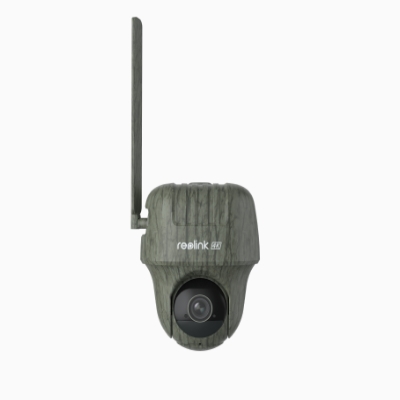
4K 4G LTE Wildlife Camera with 360° All-Around View
4G LTE Network, 4K 8MP Ultra HD, No-Glow IR LEDs, Person Detection, Animal Detection, Two-Way Audio, Battery/Solar Powered.
3. High-Risk Assets and Active Tracking Zones
Securing high-value, dynamic environments that experience shifting blind spots or require targeted asset tracking, such as construction sites, warehouses, commercial docks, or RV campsites.
High-resolution video capable of capturing legible license plates or other details, combined with intelligent tracking technology that follows a target as it moves across a frame.
When asset detailing is paramount, dual-lens setups offer a distinct advantage by providing both a wide viewing angle and a zoomed-in perspective simultaneously. Multi-lens systems designed with this capability—such as the Reolink TrackMix LTE—utilize auto-zoom tracking and onboard AI person/vehicle detection to keep moving targets sharply focused in 4K 8MP clarity.
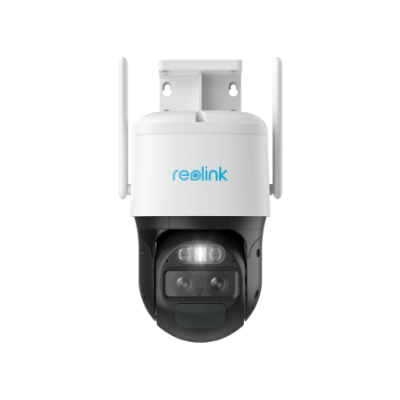
2K Dual-Lens PTZ Camera with Motion Tracking
2K 4MP Quad HD, Wide-Angle & Telephoto Lenses, Pan-Tilt-Zoom, Auto-Tracking, Person/Vehicle Detection, 4G LTE Network, Two-Way Audio, Time-Lapse.
Matching Your Scenarios to Cellular Camera Types
To prevent analysis paralysis when selecting your system, use this checklist to match your exact deployment location with the proper hardware specifications:
Installation and Setup Tips for Outdoor Cellular Security Cameras
Setting up an outdoor cellular security camera requires verifying local carrier signal strength before mounting and configuring smart power management. Because these cameras rely on cellular networks rather than local Wi-Fi router footprints, proper physical placement and setting optimization are critical to ensure continuous coverage and avoid rapid battery drain.
-
Check Cellular Signal Before Installation: Test signal strength at the planned mounting location using a phone on the same carrier or the camera app. A strong signal ensures stable connectivity and better battery life.
-
Optimize Solar Panel Placement: Position the solar panel for maximum sunlight exposure and keep it free from shade caused by trees, roofs, or other obstructions to maintain reliable charging.
-
Fine-Tune AI Motion Detection: Adjust PIR sensitivity, enable person/vehicle detection, and set motion zones to reduce false alerts, save cellular data, and extend battery life.
-
Install at the Right Height: Mount the camera 7–10 ft (2–3 m) above the ground to improve AI detection while keeping the device out of easy reach of vandals. Avoid overly steep downward angles.
Cellular Security Camera Data Plans: Hidden Costs Explained
How Much Data Does an Off-Grid Cellular Camera Need?
On average, an off-grid cellular security camera consumes between 2GB to 5GB of data per month under normal operation. However, data consumption is not fixed; it scales dynamically based on video resolution, the number of daily motion triggers, and how often you view the live feed.
Breaking Down the Hidden Costs
Most buyers assume a cellular camera uses data constantly, like a smartphone streaming music. In reality, cell-based cameras remain in a low-power standby mode to conserve battery and data, waking up only when motion is detected or when you manually open the app.
To expose the hidden costs of a data plan, you must understand exactly how video transmission translates into gigabytes:
- The Resolution: Streaming in 4K resolution requires roughly four times the data bandwidth of a standard 1080p stream.
- The Live-View: Manually opening your security app to "check-in" on your property pulls a live data stream from the camera.
- Over-Allocation Expense: Many carriers do not offer roll-over data for security SIM cards. If you buy a 10GB plan but your camera only uses 3GB during a quiet month, you forfeit the remaining 7GB while still paying the full monthly fee.
Real-World Community Data & Tracking Analysis
To provide a realistic decision framework that goes beyond standard manufacturer spec sheets, we aggregated real-world usage data from community testing notes and support forum feedback across platforms like r/homesecurity.
So, selecting the right streaming quality, optimizing your resolution, and fine-tuning motion sensitivity will drastically cut your ongoing cellular data and battery costs.
FAQs
What security cameras work with cellular data?
Cellular security cameras are designed to work with 4G LTE or 5G mobile networks instead of Wi-Fi. These cameras use a SIM card and data plan to transmit video and alerts, making them ideal for remote locations such as farms, construction sites, cabins, RVs, and off-grid properties.
Are cellular security cameras worth it?
Yes, cellular security cameras are worth it if you need surveillance in areas without reliable Wi-Fi or wired internet. They offer flexible deployment, remote access, and real-time alerts virtually anywhere with cellular coverage. While they typically require a data plan, they can provide reliable security where traditional cameras cannot operate.
Is there a monthly fee for cellular trail cameras?
Most cellular trail cameras require a monthly or prepaid cellular data plan to send photos, videos, and alerts over the mobile network. The cost varies by carrier, data usage, and camera activity. However, there are no additional subscription fees beyond the cellular service unless you choose optional cloud storage plans.
Conclusion
For properties lacking internet infrastructure, cellular security cameras provide the absolute best off-grid surveillance solution. By cutting the cord on both Wi-Fi and grid power, these systems deliver reliable, standalone protection where traditional cameras cannot operate.
Do you have any more questions about the cellular surveillance camera or its alternatives? Let us know if you do and be sure to check out the important things about 3G/4G LTE/5G security cameras above!
Search
Subscribe for the Latest Updates
Security insights & offers right into your inbox