
CCTV Cameras Without WiFi: 3 Real Setups Compared

Many people wonder whether security cameras, also called CCTV cameras, can work without Wi-Fi or an internet connection. The answer is yes.
Whether you're protecting a home, a business, or a remote property with no network coverage at all, several types of cameras and systems are built to keep recording with no connection whatsoever, and others simply don't need Wi-Fi even though they're still online.
This article walks through exactly which setup fits which situation, and which cameras we'd actually recommend for each one.
- How CCTV Cameras Work Without Wi-Fi or Internet
- What Happens If Wi-Fi Drops While a Camera Is Already Running?
- How to Connect CCTV Cameras to a PC or Mac Without WiFi
- Best Reolink CCTV Cameras That Works Without WiFi
- Is a Cellular CCTV Camera as Private as a Camera that Works on Wi-Fi?
- What Can You Gain by Adding WiFi
- FAQs
- Conclusion
How CCTV Cameras Work Without Wi-Fi or Internet
Every method below gets around Wi-Fi in a different way. Some replace it with a cable, some skip the network entirely and save straight to local storage, and one swaps it for a cellular signal instead. Here's how each one actually works, and which situation calls for it.
1. Use NVR/DVR CCTV Systems
An NVR (Network Video Recorder) or DVR (Digital Video Recorder) is a dedicated recording box that the cameras connect to directly over a cable, not over Wi-Fi or over your property's internet connection.
If you install an NVR CCTV system on a farm, cabin, remote shed, or any other property without internet, the system saves recordings directly to the NVR or DVR. Once powered on, the cameras and the NVR talk to each other over their own local network, so you get 24/7 continuous recording with no internet involved at all.
And if the property does have internet, this same setup still means the cameras themselves never touch Wi-Fi. Connect the NVR to your router by cable and you can get remote viewing too, without a single camera relying on a wireless signal.
2. Use CCTV Cameras with SD Cards
A CCTV camera with an SD card records motion-triggered events locally, with no NVR and no network needed at all.
When movement is detected, video clips are automatically saved to the card, so you won't miss important moments even without Wi-Fi. MicroSD capacity varies by model and most current mainstream Reolink cameras, like the Argus and RLC series, support up to 512GB, though older or budget models top out lower, and the Video Doorbell series caps at 256GB specifically.
Note: Cameras relying solely on an SD card record motion-triggered events only, not continuous 24/7 video, while offline.
3. Use Cellular CCTV Cameras
For remote monitoring with no traditional internet or Wi-Fi at all, cellular CCTV cameras are the right fit. These cameras run on 4G LTE or 5G cellular networks instead of Wi-Fi, and lets you check your property from your phone or computer from anywhere there's cell coverage. (3G isn't an option anymore, every major US carrier retired their 3G networks nationwide by the end of 2022, per the FCC's phase-out guide.)
They're a strong fit for off-grid locations like construction sites, vacation homes, or rural properties where there's no internet or Wi-Fi to connect to in the first place.
Quick Comparison: NVR/DVR vs. SD Card vs. Cellular
What Happens If Wi-Fi Drops While a Camera Is Already Running?
This is a different question from setting up a camera with no Wi-Fi from the start. It's worth answering on its own.
For Reolink cameras, the answer is straightforward. If the camera has a microSD card, it keeps recording locally the whole time the connection is down, confirmed on Reolink's own support page. Only three things pause until the connection comes back:
- Live viewing from your phone
- Remote access
- Push notifications
The footage itself is never at risk.
Reolink also doesn't sell a camera or NVR that automatically switches over to cellular data the moment Wi-Fi drops, that specific feature isn't part of the current lineup.
Do note that this isn't guaranteed to work the same way on every brand, though. Other brands might not have local storage at all, or only buffer a few seconds of footage without a live connection. If you're using a different brand, it's worth checking that camera's own specs before assuming it behaves the same way.
How to Connect CCTV Cameras to a PC or Mac Without WiFi
Follow these steps to connect your IP camera to a monitor, like a PC or Mac, without internet:
- Step 1. Make sure your security camera is powered and charged.
- Step 2. Use a network cable to connect the camera directly to the computer.
- Step 3. Open Reolink Client (Reolink's free desktop software) and let it auto-detect the camera's local address, or check the label on the camera or its box for the default address.
- Step 4. Change your computer's IP address to match the camera's network prefix. Once it's done, your camera and computer should be on the same small local network that enables you to watch live view and save recordings using the security camera software on your computer.
Best Reolink CCTV Cameras That Works Without WiFi
Reolink Go Plus
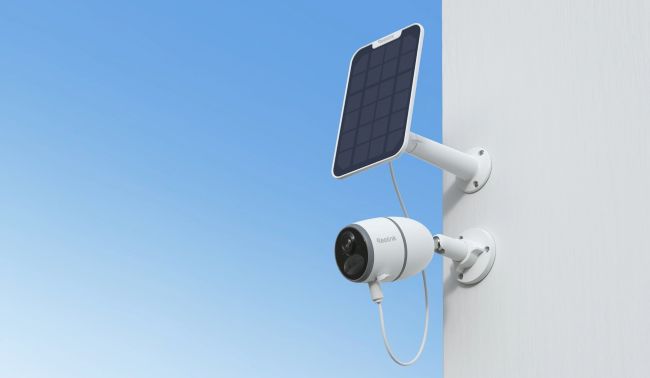
Outdoor Security Camera Designed to Work Without WiFi or Internet
The Reolink Go Plus is one of the best security camera options for a home or business without internet and without power cords.
You can set up remote viewing through your smartphone and check on your property even without an internet connection.
If someone unwanted breaks in, you can speak through the two-way audio and scare them off directly.
If you want a smart security camera that doesn't need an internet connection at all, this is the camera to get.
A user set up a Reolink Go Plus in his off-grid stable, where there's no internet and no power supply, and the footage is crystal clear. Watch the video below, recorded by this camera:
If you'd rather not think about charging at all, the Go Plus pairs with Reolink's Solar Panel, which Reolink describes as continuously topping up the battery rather than replacing charging outright.
How much it actually helps depends on how much direct sun the spot gets. Cloudy stretches and winter's shorter, lower-angle sunlight noticeably cut into that, so Reolink's own placement guidance is worth following: mount it in the sunniest spot available, tilted around 40 to 45 degrees, facing south if you're in the Northern Hemisphere, and clear of shade or overhangs.
Smart Wireless 4G Battery Camera
Rechargeable Battery/Solar Powered, Person/Vehicle Detection, 2K 4MP Super HD, Two-Way Audio, High-Quality Night Vision, Live View Anytime.
Reolink RLK8-810B4-A
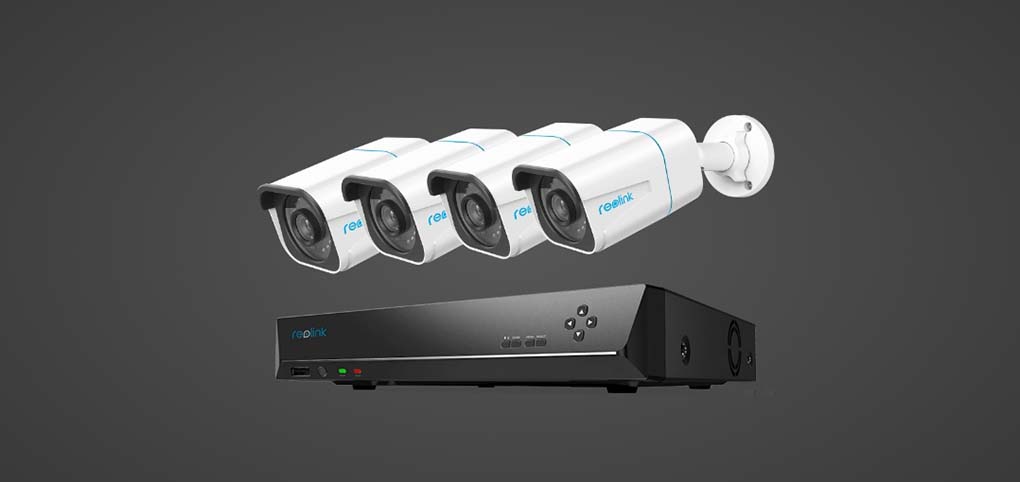
Standalone Security System That Works With or Without Internet
Reolink's RLK8-810B4-A is a PoE security camera system that's simple to install. If your property has no internet and you still want 24/7 recording, this is the system to start with.
The cameras and the recording NVR connect over their own dedicated cable network. Connect the NVR to a monitor over VGA or HDMI and you get 24/7 video surveillance, internet or not.
Watch the video below, captured by this system and shared by a real user:
Smart 4K 8-Channel PoE Security System
4 pcs 4K Ultral HD Security Cameras with Person/Vehicle Detection; 2TB HDD 8-Channel NVR for 24/7 Recording; Plug & Play.
Reolink Go PT Ultra
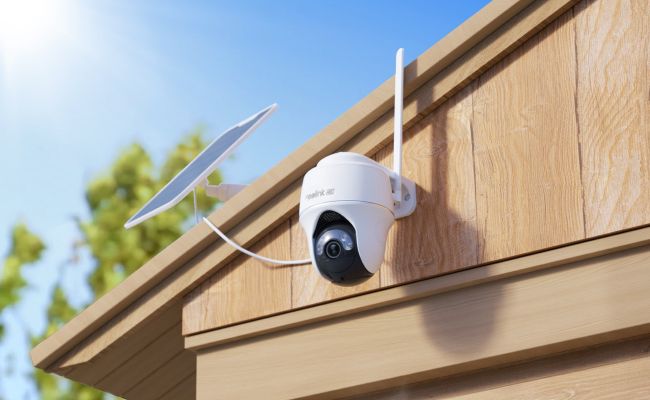
Pan-Tilt Cellular Camera for Home and Business Security
The Reolink Go PT Ultra runs on the same cellular setup as the Go Plus, but adds pan-tilt movement and auto-tracking, aimed at home and business property monitoring rather than a single fixed view.
The 355° pan and 140° tilt range, with auto-tracking and up to 32 saved presets, is the real difference from the Go Plus. Instead of covering one fixed angle, it can follow a person or vehicle across a wider area and cycle through preset positions on its own. This matters more the larger the property is, with a driveway or a business lot where one static angle wouldn't cover enough ground.
However, do note that even with that added movement, the same battery-and-cellular tradeoff applies as any camera in this category. More coverage and more activity will mean more battery and data used, so the solar-panel logic from the Go Plus is worth considering here too if the site is hard to get back to for recharging.
Compare the Options Side by Side
Is a Cellular CCTV Camera as Private as a Camera that Works on Wi-Fi?
Cellular data has one real security advantage built in and that's encryption between your camera and the cell tower. That is part of how LTE and 5G networks work by design, not something you have to set up yourself. Your home Wi-Fi's security, by contrast, depends entirely on how it's configured, and an open or weakly secured network is a real risk cellular doesn't share. That lines up with the FCC's own guidance that cellular data can be more secure than public or unsecured Wi-Fi for sensitive traffic.
However, that doesn't make a cellular camera immune to everything. Footage still passes through your carrier's network and, for remote viewing on your phone, through Reolink's own cloud or relay servers. So, no Wi-Fi doesn't mean no third party ever touches the data. Reolink documents AES encryption and TLS for traffic between its app, cameras, and servers, plus a separate file encryption feature for recordings stored locally.
What Can You Gain by Adding WiFi
Connecting your cameras or system to the internet unlocks a few genuinely useful extras. You get remote and local live viewing from any device, anywhere, through a security camera software, so you can check on your property from the office or while traveling.
You also get instant motion alerts through app push notifications and email, including snapshots or short clips, so you know what triggered the alert and can act on it, or keep the footage as evidence if there's a break-in.
And you get the option to back footage up off-site to an FTP server or the cloud, so a stolen or damaged camera doesn't mean losing the recording along with it.
None of this is required for a camera to work, it's what you gain on top of any of the three offline methods above if the property does have internet.
FAQs
Do CCTV Cameras Need Wi-Fi to Work?
Traditional Wi-Fi and PoE IP CCTV cameras need to be connected to the internet if you want remote live streaming, motion alerts, and other smart features. But even without internet, PoE and Wi-Fi cameras with an SD card can still record on-site, so you won't miss anything captured by a CCTV camera without Wi-Fi.
Cellular cameras are the exception, they run on 4G/5G cellular networks instead, so they can reach areas with no Wi-Fi and no internet at all.
Can Security Cameras Work When There's No Power?
PoE and traditional wired cameras stop working when the power goes out. Battery or solar-powered cameras don't need a power outlet at all, so they keep running through an outage. For the full breakdown, Flora, Reolink's top editor, covers this in detail in do security systems work when power is out.
Can an NVR Work Without an Internet Connection?
Yes, as covered in the NVR/DVR section above, an NVR keeps recording from its connected cameras with no internet involved at all, since the cameras and the NVR communicate over their own local connection rather than through the internet.
Do Wireless Cameras Need to Be Connected to Wi-Fi?
Not necessarily. "Wireless" usually just means there's no power or ethernet cable running to the camera, it doesn't mean the camera skips networking altogether. Most wireless cameras are actually Wi-Fi cameras, and they still need that Wi-Fi connection, and the internet behind it, for remote viewing and alerts, even without a cable in sight. A cellular camera is wireless too, but it uses a SIM card and cell signal instead of Wi-Fi, making it the one wireless option that genuinely doesn't need Wi-Fi at all.
Conclusion
No internet at your property doesn't mean no security. A battery-powered camera like the Go Plus can sit anywhere there's cell coverage and keep watching on its own. Need it to actually follow movement across a bigger space like a drive way or a business lot? The Go PT Ultra's pan-tilt tracking picks up where a fixed camera leaves off. And if you'd rather build out a full multi-camera setup that never touches Wi-Fi in the first place, the RLK8-810B4-A kit handles that end to end.
Whichever fits, the end goal remains the same and that's to have footage that keeps recording no matter what your internet connection is doing. Got a question we didn't cover? Drop it in the comments below.
Search
Subscribe for the Latest Updates
Security insights & offers right into your inbox