
Why is My Alexa Red? Troubleshooting Guide
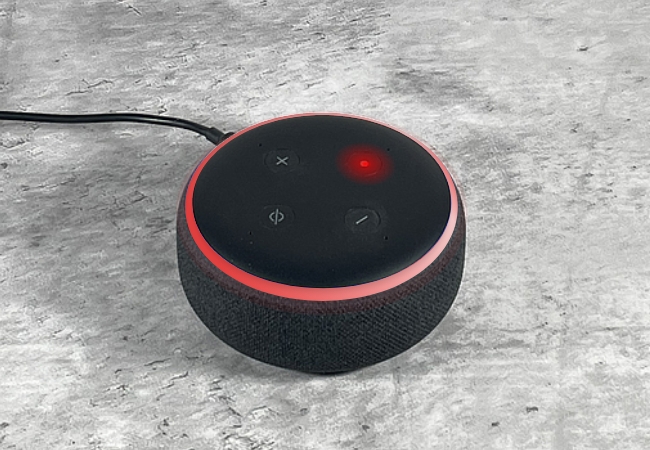
If your Alexa device is showing red, it means it is not listening. It won’t hear your voice and respond to it. It could be a frustrating situation for the user, but the issue can be fixed easily.
In this article, we will explain why your Alexa turns red. We will share how you can fix it through different methods.
What Is a Solid Red Light on Alexa?
If you see a red light on your Echo Pop, it means the microphone is turned off and the device is not listening. The microphone could be turned off from the device. But the red light also appears when the microphone is malfunctioning, or there’s a serious technical issue.
Why Is My Alexa Red?
The red light is a privacy feature, not an error—it simply means Alexa isn’t listening until you enable the microphone or camera again.
Microphone Muted (Most Common)
The most common reason Alexa turns red is that the microphone is muted. When this happens, Alexa can’t hear your voice commands.
Camera Turned Off (Echo Show Devices)
On devices like Amazon Echo Show, a red light can also indicate the camera is disabled for privacy.
Network or Connectivity Issues
In some cases, Alexa may show a red light or become unresponsive due to Wi-Fi problems or server issues.
Device or Hardware Problems
If your device was dropped or has internal issues, the microphone may stop working properly, causing the red light to stay on.
How to Fix or Troubleshoot Red Light on Alexa?
If your Alexa shows a red light, it usually means the microphone or camera is turned off, or there’s a connectivity or device issue. Try these quick fixes to fix red light on Alexa:
- Turn the microphone back on: Press the mic button once to remove the red light and restore voice control.
- Enable the camera (Echo Show devices): On Amazon Echo Show, check the camera shutter or settings and turn it back on if disabled.
- Check your Wi-Fi connection: Restart your router and make sure Alexa is connected to a stable network.
- Restart the device: Unplug Alexa for 30 seconds, then plug it back in to clear temporary glitches.
- Inspect for hardware issues: If the red light stays on after a drop or damage, the microphone may be malfunctioning.
- Reset if necessary: As a last step, perform a factory reset through the Alexa app.
In most cases, simply unmuting the microphone fixes the issue within seconds.
Use Alexa with Security Cameras
If you use Alexa as part of a smart home setup, the red light (mic off) may temporarily limit voice control of connected devices like security cameras.
For example:
- You may not be able to ask Alexa to show your live camera feed on Echo Show devices
- Voice commands like “show front door camera” may not work while Alexa is muted
To ensure smooth smart home control, keep Alexa unmuted when you rely on voice access to devices like indoor or outdoor security cameras. This helps you quickly check your home, monitor entry points, or view live footage hands-free.
Tip: Many users pair Alexa with smart cameras so they can say commands like “Alexa, show me the backyard camera” for instant viewing.
FAQs
Why is my Echo Dot red?
Your Amazon Echo Dot shows a red light when the microphone is muted, meaning it cannot hear or respond to voice commands. In some cases, it may also indicate the camera is disabled (on devices with a camera) or a temporary system issue. Press the microphone button to turn it back on.
Why is Alexa stuck on red?
Alexa is usually “stuck” on red because the microphone mute button is still enabled or the device has a software glitch. It can also happen if the device hasn’t properly restarted or if there is a minor hardware issue. Try unmuting the mic, restarting the device, or reconnecting to Wi-Fi.
What color is Alexa if someone is listening?
When Alexa is actively listening, it typically shows a blue light ring with cyan movement. A solid blue ring means it heard your wake word and is processing your request, while a spinning cyan light indicates it is responding or thinking.
Conclusion
Alexa devices show a red color when the microphone is muted or not working. In this case, your device will not hear your voice or respond to it. It also happens when there is a network issue and bugs. We have shared some common ways to fix the issue. You can try the step-by-step process and get rid of the red light.
Search
Subscribe for the Latest Updates
Security insights & offers right into your inbox