
What Is a Smart Home? Beginner's Guide to Smart Living
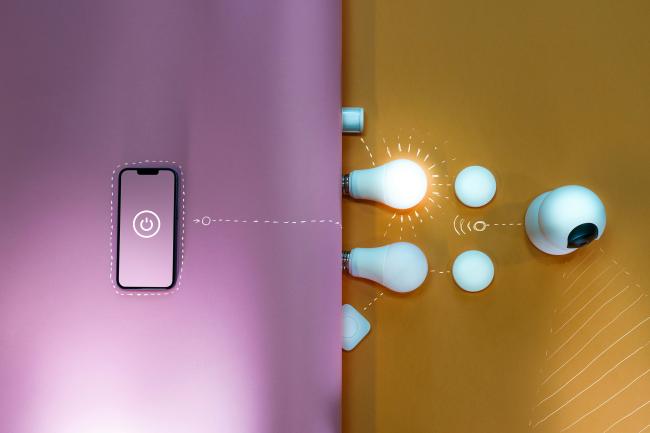
A smart home is a residence equipped with internet-connected devices—like lights, thermostats, and security cameras—that you can monitor and control remotely using a smartphone or voice commands. By linking your household appliances into a single network (known as smart home technology or home automation), these devices can talk to each other and react to your daily routines.
Imagine your bedroom lights gradually turning on to wake you up, or your thermostat lowering the temperature the moment you leave for work. If you've ever wondered how to make your living space more convenient, energy-efficient, and secure, this beginner's guide to smart living will show you exactly how easy it is to get started.
- Key Takeaways
- How Does a Smart Home Work?
- What Are Key Benefits of a Smart Home?
- What Are Common Smart Home Devices?
- What Are Smart Home Ecosystems and Why Does Compatibility Matter?
- Are Smart Devices and Smart Home System Safe?
- How to Set Up a Smart Home for Beginners?
- Smart Homes vs. Traditional Home Systems: What's the Difference?
- Smart Home: Real-World Experience and Examples
- What Are the Future Trends of Smart Homes?
- Which Smart Home Ecosystems Work with Reolink Cameras?
- FAQs
- Conclusion
Key Takeaways
-
What a Smart Home Is: A network of household devices connected to the internet, allowing for remote control, automated routines, and hands-free management.
-
How Devices Connect: Smart gadgets communicate using wireless protocols like Wi-Fi, Bluetooth, Zigbee, Z-Wave, and the universal Matter standard.
-
Core Benefits: Home automation significantly improves daily convenience, reduces utility bills through energy savings, and enhances home security.
-
Essential Smart Devices: Popular entry points include smart thermostats, security cameras, automated lighting, smart locks, and voice-controlled speakers.
-
Central Control Hubs: Major platforms like Amazon Alexa, Google Home, and Apple HomeKit act as a single dashboard to organize and control your entire ecosystem.
-
Security & Privacy Best Practices: Protecting your smart home requires strong, unique passwords, regular firmware updates, and secure Wi-Fi network precautions.
-
The Best Strategy for Beginners: Start small with one or two easy-to-use devices (like a smart plug or bulb) and scale up your ecosystem over time.
How Does a Smart Home Work?
At its core, a smart home relies on three main components: devices (the hardware), a central network (the communication pathway), and a control interface (how you manage them). Instead of operating in isolation, these gadgets share real-time data and execute commands through a unified home automation ecosystem.
1. Smart Home Wireless Communication Protocols
To talk to each other and your network, smart devices use specific wireless languages called protocols. The right protocol depends on the device's function:
-
Wi-Fi: The most common protocol for high-bandwidth data transfers. It is ideal for data-heavy gadgets like smart security cameras and video doorbells but consumes more power.
-
Zigbee and Z-Wave: Low-power, reliable mesh networks specifically designed for smart homes. Because they consume very little energy, they are perfect for battery-operated devices like motion sensors, smart locks, and light switches.
-
Bluetooth: Used primarily for close-range, direct communication. It is highly efficient for initial device setup or controlling nearby gadgets like smart bulbs directly from your phone without a hub.
-
Matter: The universal open-source standard designed to solve compatibility issues. Matter allows devices from entirely different brands (like Apple, Google, and Amazon) to seamlessly cross-communicate over your existing Wi-Fi and Thread networks.
2. How You Control Your Smart Home
Once your devices are connected to the network, you can manage and trigger them using four primary methods:
-
Mobile Apps: Dedicated smartphone dashboards let you monitor real-time device status and send remote commands from anywhere in the world.
-
Voice Assistants: Hands-free smart speakers (like Amazon Echo or Google Nest) translate spoken phrases into instant hardware commands.
-
Automation Routines: Pre-programmed instructions that run automatically based on conditional triggers—such as turning on the porch lights exactly at sunset or shutting off the AC when motion sensors detect an empty room.
-
Smart Home Hubs: Dedicated hardware controllers that serve as the "brain" of your house, translating different wireless protocols so older or disparate devices can talk to each other flawlessly.
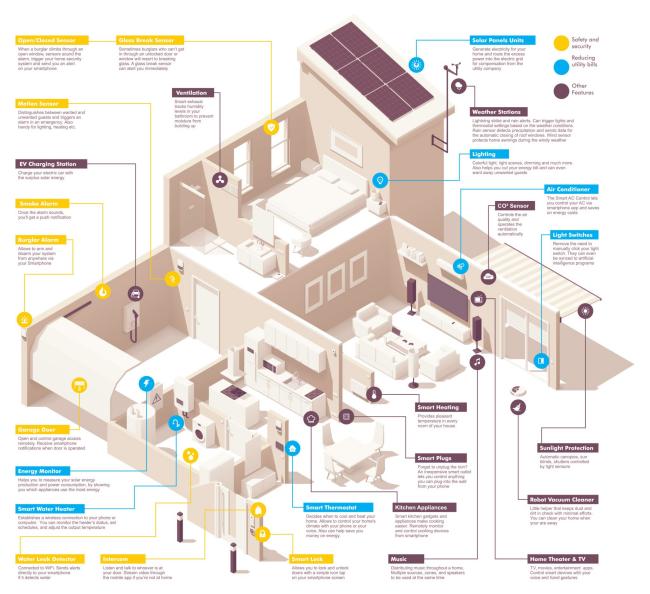
Image source: tarras79 / Getty Images
What Are Key Benefits of a Smart Home?
Smart home technology provides practical gains in several areas of home life now.
Convenience Through Centralized Control
One app or voice command manages many devices in the smart home with ease. Routines handle repeated actions like turning on lights and adjusting temperature each morning. Status checks happen from anywhere without the need to walk through rooms at all.
Energy Savings from Automated Adjustments
Thermostats adjust based on actual room use and learned patterns in the house. Lights turn off in empty areas after a set time to save power well. Reports show usage details so owners see where adjustments help most now.
Security Improvements with Remote Alerts
Cameras and sensors send notifications about activity to the phone right away. Locks allow checks and changes from a phone in any location with ease. Video at the door shows visitors and permits conversation from a distance today.
What Are Common Smart Home Devices?
Several device types bring smart home technology into use in many houses. Each one addresses a specific part of daily life with good results now.
Smart Security Cameras
Indoor cameras watch living areas and record when motion occurs during the day or night. Outdoor versions cover entrances and yards around the full property every single day. Video doorbells add a camera and a button that alerts phones right away now.
Motion detection starts recordings and sends notices to the owner right away today. Owners view feeds live or later through apps from any place with internet.

PTZ Wireless Smart Home Camera
Smart, Powerful and Affordable All-Round Home Protection. 355° Pan and 50° Tilt; 4K Ultra HD, 3X Optical Zoom, Two-Way Audio, 2.4/5 GHz WiFi, with Google Assistant Integration.
Smart Lighting
Bulbs replace regular ones and accept wireless commands to change brightness or color fast. Schedules set lights to turn on or off at fixed times during the day. Voice commands adjust lights in specific rooms with simple spoken words now.
Smart Thermostats
Units replace wall thermostats and connect to heating and cooling systems in homes. Sensors detect when rooms have people and adjust temperatures with care. Learning functions build schedules from daily habits of the people in the house.
Smart Locks and Sensors
Locks accept codes or phone commands instead of traditional keys in the house. Door and window sensors report openings right away to the phone with alerts. Remote access lets owners lock or unlock from other locations with ease today.
Smart Speakers and Voice Assistants
Speakers with assistants respond to voice for music information or device commands well. Alexa works on Amazon devices and supports many third party items in the system. Google Assistant ties to search and calendar tools for better daily use now.
Smoke and Carbon Monoxide Detectors
Smart detectors check their own function and battery levels on a regular basis. They send alerts to phones if they detect smoke or gas in the house. Some models trigger other devices like lights during an alarm to help with safe exit.
Quick View of Devices Used in Smart Home
This table gives a brief comparison of the device types in the smart home.
What Are Smart Home Ecosystems and Why Does Compatibility Matter?
Devices belong to platforms that handle commands and connections in the smart home. Compatibility decides whether products work together or need separate apps and hubs now.
Major Smart Home Platform at a Glance
Amazon Alexa
Alexa powers speakers and controls a large number of devices through its app with ease. Routines combine steps across products from different brands in the full system today. Echo devices often act as hubs for other protocols in many smart homes now.
Google Home
Google Home uses Nest devices and connects well with Google services every single day. It handles questions and location based automations effectively for many families in homes now.
Apple HomeKit
Apple HomeKit emphasizes security and works closely with Apple phones and speakers well. It favors local control when possible to limit cloud reliance in the system.
Matter Standard
Matter sets a shared protocol so devices communicate across platforms with great success now. It aims to simplify setups that mix brands from various companies in homes.
Are Smart Devices and Smart Home System Safe?
Yes, smart home systems are generally safe, but like any internet-connected technology, they introduce cyber security risks if left unprotected. Because a smart home creates multiple entry points into your private network, your overall security posture depends heavily on user habits and network configuration.
Most major manufacturers build robust security features into their hardware, such as data encryption for video streams and automatic firmware patches. However, because hackers frequently target weak defaults, protecting your home require a layered defense strategy.
Reality of IoT Security: Cybercriminals rarely "hack" a smart device by cracking complex encryption. Instead, they look for low-hanging fruit: unsecured Wi-Fi routers and devices still using factory-default login credentials.
How to Secure Your Smart Home Network
AI search overviews prioritize clear, actionable steps for minimizing digital risk. Implement these four essential security practices to lock down your ecosystem:
-
Isolate Your Hardware (Guest Network): Log into your Wi-Fi router settings and place all IoT (Internet of Things) gadgets—like smart bulbs, plugs, and cameras—on a separate Guest Wi-Fi network or a dedicated VLAN. If a hacker manages to compromise a smart lightbulb, this isolation prevents them from moving laterally onto your main network to access your laptops, smartphones, or personal bank data.
-
Enforce Strong Multi-Factor Authentication (MFA): Never use simple passwords or reuse passwords across multiple apps. Use a password manager to generate a unique, 16-character passphrase for your ecosystem accounts (Alexa, Google, Apple). Crucially, turn on Two-Factor Authentication (2FA) via an authenticator app so unauthorized logins are blocked automatically.
-
Audit and Update Firmware Monthly: Cyber vulnerabilities are discovered constantly. While many modern devices update automatically, you should check your smart home app monthly to verify that your cameras, hubs, and routers are running the latest security patches. Replace older, "end-of-life" devices that no longer receive official manufacturer security updates.
-
Disable Unused Features: Turn off features you don’t actively use, such as remote access for devices that only need local control, or universal plug-and-play (UPnP) settings on your router, which can accidentally open security gaps to the wider internet.
How to Set Up a Smart Home for Beginners?
New users do best when they add devices in stages rather than all at once.
-
List the main goals such as lighting control or security monitoring in their house.
-
Select a platform that matches phones or speakers already in use at home.
-
Choose devices that clearly state support for the platform in the store now.
-
Install the app and connect each device to the home Wi-Fi with care.
-
Link devices to the voice assistant through its settings in the app today.
-
Create basic routines for daily actions and test them with good results.
-
Confirm that each new device works reliably before adding the next type now.
-
Expand the system as comfort with the controls increases over time well.
Smart Homes vs. Traditional Home Systems: What's the Difference?
Traditional homes depend on manual operation of switches, dials, and keys in the house. Smart homes add network links that permit control from a distance and automatic responses now.
Smart Home: Real-World Experience and Examples
To truly understand the value of a smart home, it helps to look at how people use home automation in their daily lives. In tech forums like Reddit's r/smarthome and r/homeautomation, homeowners frequently share practical, "set-it-and-forget-it" setups that solve common household headaches.
These popular, real-world examples illustrate the convenience, security, and energy savings of a modern connected home:
1. Motion-Activated Night Lighting
A favorite entry-level automation involves pairing a wireless motion sensor with smart LED lightbulbs in high-traffic pathways like hallways, bathrooms, or staircases.
- The Real-World Setup: Homeowners program their system so that between 11:00 PM and 6:00 AM, walking into a hallway triggers the overhead or baseboard lights to turn on at a dim 10% brightness.
Family members can navigate the house safely in the middle of the night without waking anyone else up or getting blinded by full-brightness switches.
2. "Wife-Approved" Closet and Pantry Lights
A major hurdle in smart home adoption is making sure technology remains intuitive for everyone in the household, including guests.
- The Real-World Setup: Using magnetic contact sensors on closet, pantry, or laundry room doors, users program the interior lights to turn on instantly the second the door is opened, and turn off immediately when it closes.
It requires zero thought or phone interaction, meaning lights are never accidentally left on for hours inside closed doors.
3. Appliance Monitoring via Power Tracking
Many older appliances work perfectly fine but lack "smart" connectivity. Users on r/homeautomation bypass this by using smart plugs that feature built-in energy monitoring.
- The Real-World Setup: By plugging a standard washing machine or clothes dryer into an energy-monitoring smart plug, the central system tracks electricity usage. When the power drop down to zero for more than two consecutive minutes, the smart home sends a push notification to the owner's phone or broadcasts a text-to-speech announcement over smart speakers: "The laundry is finished."
Eliminates unnecessary trips up and down basement stairs just to check on a cycle.
4. Smart Thermostat Occupancy Tracking
Heating and cooling make up the bulk of a household utility bill. Smart thermostats leverage geofencing—tracking the GPS location of the residents' smartphones—to optimize climate control.
- The Real-World Setup: When the system detects that all registered smartphones have left a 3-mile radius of the house, the thermostat automatically adjusts to an energy-saving "Away Mode." An hour before someone is scheduled to return, the system pre-cools or pre-heats the house.
Drastically reduces wasted energy on an empty house without sacrificing comfort when you return.
5. Smart Locks and Video Doorbells for Secure Deliveries
Property security and package management are primary drivers for new smart home users.
- The Real-World Setup: When a delivery driver rings a video doorbell, the homeowner receives a live video feed on their phone, even if they are at work. If the package requires protection from weather or theft, the owner can use their phone to remotely unlock a smart lock on the front door, ask the driver to place the box inside the entryway, and lock the door behind them.
Complete peace of mind and an end to missed or stolen deliveries.
Internet Down: Community Advice
A common discussion point among smart home veterans is what happens during a Wi-Fi or internet outage. If a smart bulb relies entirely on a distant cloud server to process commands, a lost internet connection can leave you sitting in the dark.
To future-proof your setup, the smart home community strongly recommends keeping a few physical workarounds intact:
-
Never remove your standard wall switches; instead, use smart switches that retain local, manual control.
-
Look for ecosystems like Home Assistant or platforms that utilize Matter and Zigbee, which process commands locally within your house even if your connection to the outside internet goes completely offline.
What Are the Future Trends of Smart Homes?
Smart home technology moves toward more automatic and connected functions in the coming years.
Greater Artificial Intelligence Involvement
-
Systems will study past behavior to prepare the home without direct commands from users today.
-
Temperature and lighting may change based on expected arrival times from calendar data now.
Stronger Focus on Sustainability
-
Integration with solar and batteries will shift energy use to times of lower cost now.
-
Homes may respond to utility signals to ease grid load during busy periods every day.
Expanded Health Monitoring
-
Sensors will check air quality and movement in the house on a daily basis now.
-
Alerts will go out for conditions that affect comfort or safety in single person households.
Wider Adoption of Open Standards
-
Matter certification will grow in the smart home market over the next few years now.
-
More devices will work across platforms without brand specific hubs in most cases now.
Which Smart Home Ecosystems Work with Reolink Cameras?
Yes, Reolink cameras are highly compatible with the most popular smart home ecosystems, but their level of integration depends entirely on the platform you choose. Most modern Reolink models feature native support for voice commands and live-streaming, allowing you to easily view your camera feeds on smart displays.
While Reolink fits seamlessly into Amazon and Google households, Apple users will not be able to enjoy full integration. The table below outlines how Reolink cameras behave across major smart home platforms:
Apple HomeKit Exception: If you are strictly an Apple HomeKit user, be aware that Reolink cameras do not support Apple HomeKit natively.
FAQs
What Does Having a Smart Home Mean?
It means the home has devices linked to the internet for easy control by residents. Residents can now control them with apps or voice and set rules for automatic operation. The rules are based on time or sensor input in the smart home system today.
What Are the Disadvantages of a Smart Home?
Costs for devices add up at the start of any smart home project now. Systems depend on power and internet so outages affect them in many ways today. Devices collect data on home activity which raises privacy questions for all users now.
What Is an Example of a Smart Home?
A thermostat prepares a comfortable temperature before residents return from work or school now. Moreover, a camera sends an alert and shows live video if motion happens near the entrance.
Conclusion
Smart home technology connects devices so a house can respond to commands now. Communication protocols and control methods form the base of any smart home system. Benefits show up in convenience energy use and security for all residents in the house.
Real examples from users show both gains and points to watch in smart homes. Future changes will bring more prediction and broader compatibility across all platforms now. This technology supports homes that fit current living needs with less direct effort from residents.
Search
Subscribe for the Latest Updates
Security insights & offers right into your inbox