
What Is 2K Resolution? Definition, Applications, and Comparisons

In a more technical standpoint, ‘2K resolution’ is a term used to describe display resolutions of around 2,000 pixels horizontally. This is a very common resolution standard today used in digital television, digital cinematography cameras as well as computer monitors and other devices.
In this article, you will learn what 2K resolution is, check some examples, know whether 1440p is 2K, compare 2K with other resolutions, explore its applications, and answer some of the most common questions about it.
What Is 2K Resolution?
2K resolution refers to a display that has approximately 2,000 horizontal pixels. In digital cinema, 2K is precisely defined as 2048 × 1080 pixels, which represents the minimum standard for this resolution.
In high-end consumer electronics, 2K is often used more loosely to describe displays like 2560 × 1440 (QHD), which provide higher pixel density and sharper images for monitors, laptops, smartphones, and TVs.
Key Aspects Breakdown:
-
Pixels: A 2K resolution display contains approximately 2,000 pixels horizontally. The most common 2K resolution is 2048 x 1080 pixels. However, resolutions such as 2560 x 1440 (QHD) are also considered 2K since they also have around 2,000 pixels horizontally.
-
Dimension: 2K resolution has an aspect ratio ranging from 16:9 to 25:16. So in terms of dimensions, 2K resolutions are slightly wider than 1080p displays. They range from being moderately widescreen to very widescreen based on the exact resolution.
-
Size: Wondering what is 2k resolution size? 2K resolution sizes range from about 2.1 megapixels to 3.7 megapixels. The 2048 x 1080 resolution equates to around 2.2 megapixels. 2560 x 1440 is around 3.7 megapixels.
What Are Different 2K Resolution Standards?
2K resolution comes in several variations, depending on the device and use case. While digital cinema defines a strict standard, consumer electronics often use slightly different resolutions. Here’s a breakdown of the most common 2K resolutions:
2K isn’t just one resolution—it’s a range of resolutions suited for cinema, gaming, productivity, and entertainment. The most common 2K in consumer electronics remains 2560 × 1440
When to Use 2K Resolution?
In the tech world, 2K resolution (most commonly 2560 x 1440, or 1440p) has become the ultimate "sweet spot." It offers a massive visual upgrade over standard 1080p without demanding the intense processing power or premium price tag of full 4K.
Depending on the device you are using, the real-world experience of upgrading to 2K can range from a total game-changer to a subtle luxury. Here is how 2K performs across different devices based on actual user workflows:
1. Computer Monitors & Laptops
For office workers, writers, and creators, upgrading a 24-inch or 27-inch monitor from 1080p to 2K (2560 x 1440) is immediately noticeable.
Users frequently report that 2K completely changes their daily workflow because it dramatically increases "screen real estate." You can comfortably snap two full-sized browser windows side-by-side without text becoming blurry or truncated. It eliminates the pixelation seen on larger 1080p screens, making text incredibly crisp and reducing eye strain during long workdays.
2. PC and Console Gaming
For gamers on PC, Xbox Series X/S, and PlayStation 5, 1440p is widely considered the ideal resolution.
While 4K gaming sounds great on paper, it requires an incredibly expensive graphics card and often forces players to sacrifice their frame rates. Gamers love 2K because it delivers a remarkably sharp, detailed image while allowing mid-range hardware to maintain smooth, high frame rates (like 120Hz or 144Hz). In fast-paced multiplayer games, users overwhelmingly prefer the fluid motion of a 2K high-refresh-rate monitor over a slower, heavier 4K display.
3. Smart Home Security Cameras
In home surveillance, 2K resolution (2560x1440, often marketed as 4-Megapixel or 4MP) has largely replaced 1080p as the industry standard for reliable security.
Homeowners quickly realize that 1080p cameras often turn digital zooming into a pixelated mess, making it impossible to read a license plate or identify a face across the yard. Upgrading to a 2K sensor provides the exact digital pixel density needed to crop into a video clip without losing vital details.
This balance is perfectly illustrated by the Reolink Solar Floodlight Cam. Boasting a 2K 4MP resolution, it delivers enhanced, razor-sharp video quality. For users, this means that when the motion-activated floodlights kick on at night, the 2K sensor captures crisp, high-contrast facial features and vehicle details rather than a blurry silhouette.
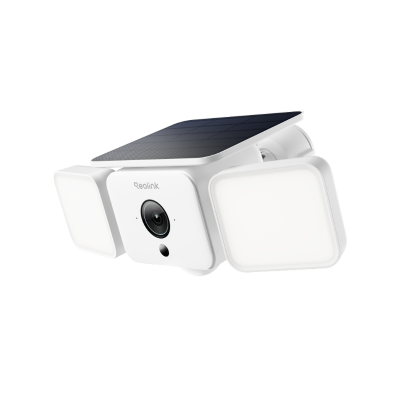
Smart 2K Solar Floodlight Security Camera
150° Ultra-Wide View, 2K 4MP HD Resolution, AI-Based Adaptive Floodlight, Endless Power with Reolink SolarEase™.
4. Smartphones and Mobile Devices
Many flagship smartphones utilize variations of 2K or Quad HD (QHD) displays to achieve incredibly high pixels-per-inch (PPI) counts.
Because smartphone screens are relatively small, the jump from 1080p to 2K is much more subtle here than on a massive monitor. Most users notice the difference primarily when reading fine text, viewing high-res photos, or using VR headsets. In fact, many mobile users manually lower their screen settings to 1080p in their phone’s software to preserve battery life, toggling 2K back on only when watching high-fidelity media.
5. Televisions: A Compatibility Bridge
True 2K (1440p) televisions are incredibly rare, as the TV market skipped straight from 1080p to 4K. However, 2K remains highly relevant in the living room as an input resolution.
Most modern 4K TVs feature intelligent upscaling engines designed to accept 2K signals from gaming consoles or streaming devices. When a PS5 outputs a 1440p gaming signal, a 4K TV will smoothly upscale the image. Users report that 2K content upscales so beautifully on modern television panels that it is almost indistinguishable from native 4K when viewed from a standard couch distance.
2K vs 1080p, 4K, and Beyond: Resolution Comparison
Here we will take a look at the comparison of 2K with other resolutions including 1080p, 1440p, 4K, and 8K.
2K vs 1080p
The main difference between 2K and 1080p is resolution - 2K resolutions have around double the number of pixels horizontally vs 1080p.
1080p refers to displays with a 1920 x 1080 resolution. 2K starts at 2048 x 1080 and goes up to 2560 x 1440. So 2K provides greater image clarity, sharpness and detail compared to 1080p. Text is crisper and images are more detailed.
However, the difference is not as dramatic as 4K vs 1080p. Some may have difficulty discerning between 2K and 1080p on smaller screens. But on larger displays, the additional resolution of 2K becomes more apparent.
2K vs 1440p
1440p and 2K resolutions are nearly identical. The terms are used interchangeably to refer to 2560 x 1440 resolution. So when it comes to monitors or televisions, there is no actual difference between a 2K display and a 1440p display. Both indicate a resolution of 2560 x 1440 pixels.
2K vs 4K
4K resolution provides a more significant jump from 2K. While 2K is approximately 2000 pixels wide, 4K quadruples that to around 4000 pixels horizontally. Common 4K resolutions include 3840 x 2160 and 4096 x 2160.
So 4K displays have twice the horizontal and vertical resolution compared to 2K displays. This produces an even crisper, more detailed image compared to 2K, with sharper textures and text. 4K is considered the new standard for ultra high definition displays and content.
However, 4K requires more powerful hardware for processing and rendering. 2K provides a nice mid-point balance of improved resolution at more feasible rendering requirements.
2K vs 8K
8K is the highest mainstream consumer resolution, with around 8000 horizontal pixels. This provides another dramatic leap over 4K, with four times the number of pixels overall. Resolutions include 7680 x 4320.
But 8K is currently still primarily found only on very high-end displays given the extreme hardware requirements. 2K and even 4K remain the more practical resolutions for widespread use.
Is 2K Resolution Right for You?
When considering a 2K display purchase, here are some factors to weigh:
- Screen Size - A 24-27 inch monitor is a good size to appreciate the benefits of 2K's extra resolution over 1080p. For larger screens, 4K may be more suitable.
- Viewing Distance - Sitting closer to your display allows you to better discern the resolution difference of 2K. Farther away, the difference is less noticeable.
- Hardware Requirements - 2K is more feasible to render and playback compared to 4K or 8K. But you still need a moderately powerful computer and GPU to utilize 2K well.
For most general use cases today, 2K quality provides a great blend of improved resolution, while still being practical to implement and utilize from a hardware and content availability standpoint.
2K Resolution in Security Cameras
In security cameras, 2K resolution refers to a video quality that typically measures around 2560 × 1440 pixels (also called 1440p). It offers a noticeable upgrade over 1080p Full HD, delivering sharper details, clearer edges, and better digital zoom performance.
Why 2K Matters for Security Cameras?
Higher resolution is especially important in surveillance because it directly impacts how much detail you can capture in critical moments.
With a 2K security camera, you can:
- Identify faces more clearly at medium distances
- Read license plates more reliably (depending on lighting and distance)
- Capture finer details like clothing, objects, or movement patterns
- Improve clarity when zooming into recorded footage
2K vs 1080p in Security Use Cases
Compared to 1080p cameras, 2K security cameras provide significantly improved clarity, especially in wider scenes such as driveways, backyards, or storefronts. While 1080p may appear sufficient in close-range monitoring, it often loses detail when you try to zoom in on recorded video.
2K vs 4K for Security Cameras
Although 4K offers even higher detail, it also requires more storage and higher network bandwidth. In many home and small business setups, 2K is considered a balanced option that delivers strong image quality without the heavy storage demands of 4K systems.
Best Use Cases for 2K Security Cameras
2K resolution is commonly used in:
- Home security systems (front doors, garages, backyards)
- Small business surveillance
- Indoor monitoring (offices, retail spaces)
- Budget-conscious systems that still require clear detail

🎉 Exclusive Limited-Time Security Deals
- Save Up to 50% on Bundles & Multi-Packs
- Official Anniversary Sale is live—shop now and save more!
FAQs
Is 2K 1080 or 1440?
2K is closer to 1440p, not 1080p. While 1080p (Full HD) has a resolution of 1920 × 1080 pixels, 2K typically starts at 2048 × 1080 in digital cinema but is most commonly used in consumer electronics to refer to 2560 × 1440 pixels, also called 1440p or QHD.
Is 2K the same as 1440?
Yes! 2K and 1440p are often used interchangeably in consumer electronics. When people talk about 2K displays for monitors, laptops, or TVs, they usually mean a resolution of 2560 × 1440 pixels, which is also called 1440p or QHD.
What resolution is 2560x1440?
The resolution 2560 × 1440 is commonly called 2K or 1440p, and it’s also known as QHD (Quad HD). It's commonly used in consumer electronics, like monitors, laptops, and security cameras.
Is 1920x1080 the same as 2K?
No, 1920 × 1080 is not the same as 2K. 1920 × 1080 is called 1080p or Full HD. 2K usually starts at 2048 × 1080 (digital cinema) and is most commonly 2560 × 1440 (1440p/QHD) in consumer electronics.
Conclusion
2K resolution, often called 1440p or 2560 × 1440, offers a sharp and clear viewing experience that sits between Full HD (1080p) and 4K. It’s widely used on monitors, laptops, and TVs, providing crisper text, more detailed images, and excellent clarity without the heavy hardware demands of 4K. For many users, 2K strikes the perfect balance between image quality, performance, and content availability, making it an ideal choice for gaming, productivity, and everyday viewing.
Search
Subscribe for the Latest Updates
Security insights & offers right into your inbox