
Reolink OMVI 3i Wi-Fi: Is a Triple-Lens Security Camera Overkill?
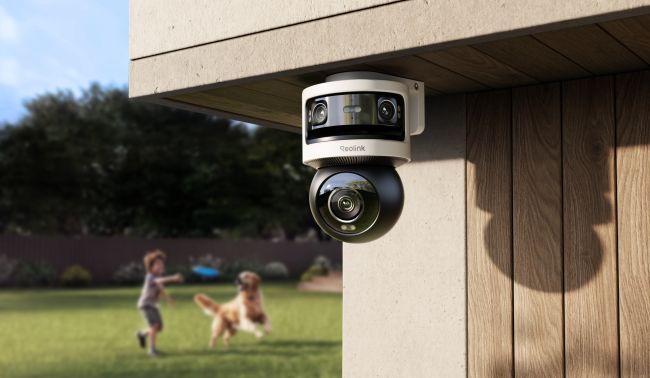
Covering outdoor areas of large properties requires multiple security cameras or a large security camera system. Reolink addresses this pain point of the users with its newly launched OMVI 3i Wi-Fi. This camera covers a large area at once and offers users a wireless option for robust outdoor security.
In this review, we will give you an overview of the OMVI 3i Wi-Fi and take you through its incredible features. We will explain how you can install the camera and set it up. We will also share the pros and cons and how the camera offers performance after real-world testing.
- Overview of Reolink OMVI 3i Wi-Fi
- What's Advanced Feature of Reolink OMVI 3i Wi-Fi
- Installation and Setup of Reolink OMVI 3i Wi-Fi
- Reolink OMVI 3i Wi-Fi: Pros and Cons
- OMVI 3i Wi-Fi Real-World Testing
- Reolink OMVI 3i Wi-Fi vs TrackMix Wi-Fi: Differences of Specs and Setup
- Verdict: Is It Worth to Buy Reolink OMVI 3i Wi-Fi
- FAQs
Overview of Reolink OMVI 3i Wi-Fi
Reolink OMVI 3i Wi-Fi is a combination of a PTZ and dual-lens panoramic security camera. It is designed to offer robust security in residential and commercial settings. This one camera can replace multiple security cameras as it covers a massive area.
It has a very unique design, which is divided into Upper and Lower sections. There are two lenses stacked together at the top of the camera. They capture a 180⁰ wide view and cover a massive area without any blind spots. Below the dual lens, there is a PTZ lens. It just works like a PTZ camera and rotates 360⁰ for full coverage.
Feature Specification Details
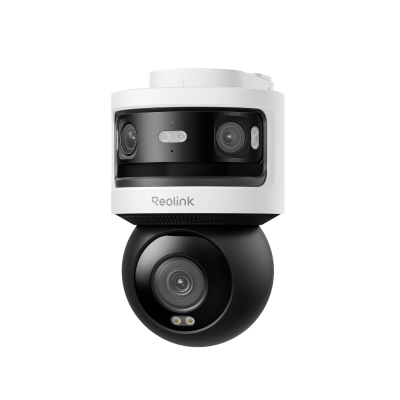
10MP+8MP Triple-Lens 360° Panoramic Pan-Tilt Camera
- 10MP Dual-Lens 180° View & 4K 360° Full Coverage
- Dual-Band WiFi 6 Connectivity & Local Storage
What's Advanced Feature of Reolink OMVI 3i Wi-Fi
Triple Lens, Dual Views
The upper cam has two lenses that offer a 180⁰ panoramic view. Both capture images, and the final image is stitched to offer a wider coverage without any blind spots. The lower cam tracks the motion of objects and offers a close-up view. Users can see both views at the same time.
18MP: 5MP + 5MP + 8MP
The total resolution of the camera is 18MP. The dual lenses capture videos in 5MP each, which totals to 10MP. The panoramic view is exceptionally clear and detailed. The lower PTZ cam records videos in 8MP resolution. It also unveils rich details, such as facial features and license plates.
SyncTrack
The notable feature of the OMVI 3i Wi-Fi is SyncTrack. The upper camera automatically detects persons, animals, and vehicles, and it commands the lower camera to lock on the object and track its motion. Because of this feature, users can see both the wide-angle perspective and the tracked subject at the same time.
Even if the object goes out of the upper cam’s panoramic field of view, the lower PT camera continues tracking the motion. Thus, both cameras keep a track of every moment and movement.
The best thing about the feature is Auto Framing. The camera not only follows the object, but it also frames it and digitally zooms into it. It ensures the object always remains in the center of the frame and is focused for better details.
Pinpoint
Pinpoint is another incredible feature that allows users to focus on any area instantly. Instead of moving the PT camera with buttons, the user just needs to tap anywhere on the panoramic view, and the lower camera automatically pans and tilts to focus on that area.
With this feature, users can look at the suspicious and critical spots immediately. They can capture high-resolution close-up views without wasting time.
Preset Points
The camera supports 64 custom preset points. Once you set that, each point records a particular angle or zoom level for later use.
After auto-tracking or reaching preset points, it automatically returns to the guard or home position you choose. Thus, you can easily switch between key areas with one tap for effective surveillance. It's excellent for keeping an eye on specific outdoor areas.
Patrol Route
The PT camera can also do patrolling. Users can set a specific patrol route or points. Then, the camera automatically pans and tilts to record every moment and movement happening in the area. It’s ideal for critical areas where you need robust security. It supports one patrol, and you can select up to 4 preset points.
Installation and Setup of Reolink OMVI 3i Wi-Fi
Reolink OMVI 3i Wi-Fi is best suited for large spaces, as this camera can cover a wider area. You can install it in your backyard, front yard, driveway, or any location where you need broad coverage.
Let’s see the step-by-step process of installing the camera in the backyard.
Location Selection: Once you have decided you have to install the camera in the backyard, it’s time to look for the best location. The camera can be installed on the wall, ceiling, and corner. Choose a location that offers maximum coverage with minimal obstructions. For better coverage, mount the camera at 8-11ft height.
Mount the Bracket: The bracket comes with the camera. Place the mounting template on the ceiling or wall and drill the required holes. Secure the bracket using screws and then mount the camera over it.
Power the Camera: OMVI 3i Wi-Fi is a plug-in security camera. So, you need to connect the adapter to the security camera and then connect it to a nearby wall outlet. Look for a nearby wall outlet in the backyard and utilize it. Once the camera is powered, turn it on.
Initialize the Camera: Download the Reolink app. Scan the QR code at the back of the camera. Complete the initialization process to set up the camera. You will be asked to connect to a Wi-Fi, name the device, and enter a password.
Storage: Insert a microSD card for the storage of videos. You can also connect the camera to NVR or cloud storage. Now, your camera is ready to secure the perimeter.
Usage Scenarios
- Driveway & Front Yard: With the OMVI 3i Wi-Fi, it's quite easy to cover the whole driveway and front yard using a single camera. You can keep an eye on the vehicles and persons entering your property.
- Backyard: It can secure your large backyard with pan and tilt motion and a 180⁰ panoramic view. Not only does it help in keeping an eye on the children and pets, but it also keeps the intruders away.
- Parking Lot: For parking lots, OMVI 3i Wi-Fi is an excellent choice. It captures a wider area and also follows the motion of vehicles without losing focus. It's perfect for capturing intricate details.
- Commercial Space: It can cover large commercial areas with fewer devices. It helps in keeping an eye on the area without leaving any blind spots. At the same time, the pan-and-tilt captures every motion and moment.
Reolink OMVI 3i Wi-Fi: Pros and Cons
Pros:
- The 18MP resolution brings incredible clarity and rich details in the videos, which is needed for robust security.
- It's a wireless security camera that does not require an Ethernet cable. You only need to power it from a nearby wall outlet.
- Covers a massive area because of its triple cameras. Doesn't leave any blind spots,
- SyncTrack tracks the motion of objects with perfect center framing.
- Offers local storage without any monthly fee. Users can enjoy all the advanced features, such as remote access, live feed, and real-time alerts, without a subscription.
- Has Local AI Video search, which allows users to find the desired event or video clip instantly using keywords.
- IP-66-rated, so it's ready to work outdoors in harsh weather conditions.
Cons:
- Has a bulky design
OMVI 3i Wi-Fi Real-World Testing
We tested OMVI 3i Wi-Fi to evaluate its performance in real-time and how it stands out from other security cameras.
Resolution & Coverage
The 18MP resolution of the camera unveils intricate details. It clearly shows facial features that help in recognizing persons. We have witnessed the incredible image quality of both cameras, and you can see every object clearly.
The upper camera covers a 180⁰ view and offers wider coverage. While the pan-and-tilt camera can rotate 360⁰, which means it can record areas that are not covered by the upper cam. It helped us capture two separate areas at the same time.
Color Night Vision
The color night vision of the camera illuminates the area with spotlights. It captures clear videos at night. We have tested in no ambient light, and it offered true colors with optimal clarity. It also deters intruders with motion-activated lighting.
Local Storage No Subscription
The best feature of the camera is its multiple flexible local storage options, such as a microSD card, Reolink NVR, or FTP/NAS server. You don't have to worry about the recurring fee or subscription. It supports microSD cards up to 512GB, which is more than enough.
Dual-band Wi-Fi
The camera offers smooth and reliable performance. It is equipped with dual-band Wi-Fi 6, which ensures fast performance and consistent connectivity. It makes installation easier and allows users to access the camera from any location and see the live feed without any lag.
Active Defense with Audio and Light Alarms
For deterring intruders, the camera has audio and light alarms. When it detects an intruder at night, it starts a siren and spotlights. It not only alerts through the notification on connected devices, but it also scares away the intruder. It's an ideal option for outdoor security.
Reolink OMVI 3i Wi-Fi vs TrackMix Wi-Fi: Differences of Specs and Setup
Differences in Specs
Reolink OMVI 3i Wi-Fi and TrackMix Wi-Fi differ a lot in terms of specifications.
The TrackMix Wi-Fi is a dual-lens security camera with pan and tilt motion. It records videos in 8MP resolution. One lens of the camera captures a wide-angle view, while the other records the close-up view. It covers 360⁰ with pan and tilt motion and captures intricate details with 6X hybrid zoom. Even at night, it records clear and colored videos with color night vision. Last but not least is its Wi-Fi 6 compatibility, which ensures fast and reliable connectivity.
The Reolink OMVI 3i Wi-Fi is a triple-lens security camera. It’s a combination of a panoramic and PT camera. The upper cam has two lenses that capture a 180⁰ panoramic view in 10MP, while the lower cam pans and tilts to cover 360⁰ in 8MP. Because of two cameras, the camera can cover two separate areas at the same time.
It’s equipped with SyncTrack, which automatically detects objects and follows their motion with auto-focus. Other than that, it offers perimeter protection, pinpoint, patrolling, and local AI video search. These incredible features make OMVI 3i Wi-Fi an excellent choice for robust security.
Differences in Setup
Even though both are plug-in Wi-Fi security cameras, there are some differences in the setup. The primary reason is the distinct design and capabilities.
Verdict: Is It Worth to Buy Reolink OMVI 3i Wi-Fi
Reolink OMVI 3i Wi-Fi is a 2-in-1 security camera. It captures a 180° panoramic view with its dual lenses and also offers a 360⁰ coverage with the pan-and-tilt camera. It's an excellent option for wider coverage. It can cover two separate areas at the same time in high resolution. The video quality is exceptional during the day as well as at night. It's totally worth it and a cost-effective option, as one camera can cover a massive property without leaving any blind spots and important areas uncovered.
FAQs
1. Where should I install the Reolink OMVI 3i Wi-Fi?
You can install Reolink OMVI 3i Wi-Fi in any large space, such as a driveway, backyard, front yard, parking lot, etc. You can place it on your wall, ceiling, or a corner. The recommended height is 8-11 ft.
2. Who should buy the Reolink OMVI 3i Wi-Fi?
Anyone who wants to cover a wider area with one security camera or monitor two separate areas at the same time. It is meant to ensure optimal security with high resolution, wider coverage, pan-and-tilt movement, and auto-tracking.
3. How wide is the OMVI 3i Wi-Fi field of view?
The upper camera covers 180⁰ horizontally and 65⁰ vertically. Its field of view remains fixed. The lower camera has pan and tilt movements to cover 360⁰. However, its field of view is 55⁰ horizontally and 30⁰ vertically.
Search
Subscribe for the Latest Updates
Security insights & offers right into your inbox