
Reolink NVR Series: Models, Features & Differences
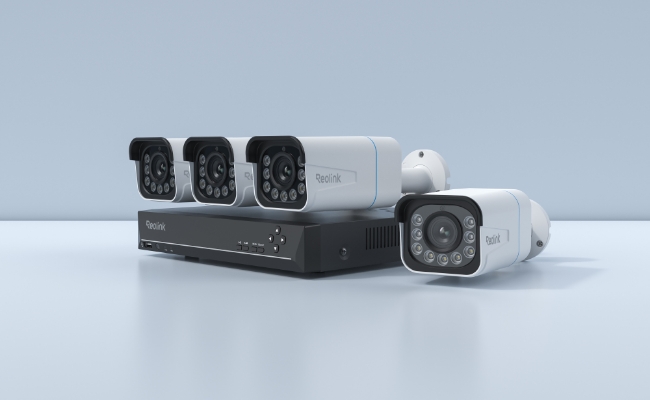
Reolink NVR series includes four NVRs: RLN8-410, RLN16-410, RLN36, and RLN12W. The key difference between these models is the connectivity type (PoE/Wi-Fi), number of channels, and maximum storage.
You have to pick an NVR according to your property size, camera requirements, storage options, and other factors. We will take you through different types of Reolink NVRs and discuss each model separately. We will explain which model fits where, and what you can select in your scenario.
Key Takeaways:
- PoE NVRs are suitable for optimal reliability, but they require proper Ethernet wiring
- If you can’t run Ethernet wires, you can opt for a Reolink Wi-Fi NVR
- Check the number of channels, maximum storage, PoE ports, I/O ports, and compatible cameras before buying an NVR
- Reolink RLN8-410 is best for small homes, RLN16-410 is best for larger homes and small businesses, RLN36 is best for large-scale camera installations, and RLN12W is best for Wi-Fi camera systems
What is Reolink NVR?
A Reolink NVR is a hardware hub to record, manage, and process videos from multiple security cameras. It creates a unified platform and a centralised local system. Users can configure cameras, set up motion zones, play recordings, adjust AI detection, and update firmware from a single interface.
It has plenty of storage and supports 24/7 recordings without any subscription. It also features HDMI and VGA ports, so you can display camera outputs directly on a monitor and view a multi-channel live feed.
Reolink PoE NVR
A Reolink PoE NVR has integrated RJ45 ports on the device, which means you can directly connect PoE cameras using an Ethernet cable. There are multiple ports, and each port handles one camera. They not only facilitate data transmission but also power the camera through a single cable.
Reolink PoE NVRs are available in different channel capacities, I/O ports, and other features, which allow users to pick according to their property size, number of locations they want to cover, and other factors. They offer optimal reliability and fast performance because of the wired connectivity.
For permanent installations, large homes, multi-story buildings, and commercial places where running Ethernet cables is feasible, Reolink PoE NVRs are an ideal option.
Reolink Wi-Fi NVR
Reolink Wi-Fi NVRs are equipped with external antennas that support wireless connectivity of cameras. All the cameras are powered by a battery or a nearby power point, and they communicate through Wi-Fi, so there is no need for an Ethernet cable.
Because of wireless connectivity, it’s easier to place the camera anywhere, and the installation is also simpler. They are ideal for temporary setups, homes, and places where running Ethernet cables is difficult.
Reolink NVR Overview
Reolink RLN8-410 – Best for Small Home Security Systems
Reolink RLN8-410 is a 12-channel security camera suitable for small to medium properties. You can connect up to 12 cameras in total and cover multiple locations on the property, including indoors and outdoors.
Keep in mind that it can connect 8 PoE or plug-in Wi-Fi cameras plus 4 battery-powered Wi-Fi cameras, or 12 battery-powered Wi-Fi cameras. So, if you need fewer than eight PoE cameras, you can go with it and record 24/7 without any subscription.
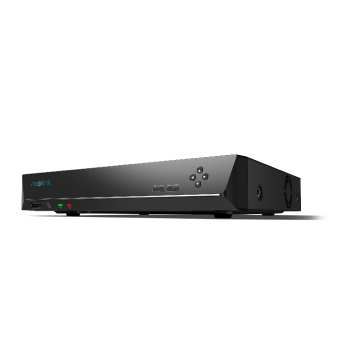
12-Channel PoE NVR
Supporting Up to 16MP, Power over Ethernet, 24/7 Continuous Recording, Expandable Storage Up to 16TB.
Reolink RLN16-410 – Best for Larger Homes and Small Businesses
For large properties and small businesses, you will need more security cameras. This 24-channel NVR, Reolink RLN16-410, is an excellent choice. It supports up to 16 PoE or plug-in Wi-Fi cameras plus 8 battery-powered Wi-Fi cameras, or 24 battery-powered Wi-Fi cameras. You can cover multi-story buildings and multiple areas in a small business.
It supports up to 16MP ultra-high-definition resolution, which means it can capture rich details with high-resolution cameras. It’s possible to capture clear facial features and number plates for robust security. You can use it for sensitive areas like your front porch, driveway, POS, store aisle, inventory area, warehouse, etc. The storage is expandable up to 16TB, so there is enough room for future expansion.
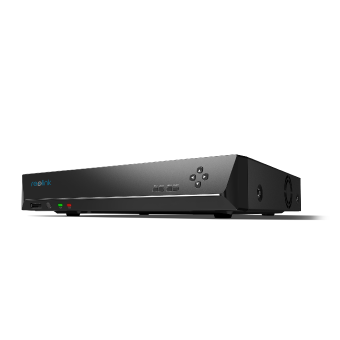
16-Channel PoE Security NVR
3TB Built-in HDD; Work with All Reolink 5MP/4MP Cameras for 24/7 Video Recording, Monitoring, and Management; Plug and Play.
Reolink RLN36 – Best for Large-Scale Camera Installations
If you want to cover large-scale businesses, offices, and commercial locations, you can go with Reolink RLN36. It’s a 36-channel NVR that can connect up to 36 PoE, Wi-Fi, or battery-powered cameras, and that’s perfect for covering multiple locations with optimal reliability.
The notable feature of the NVR is its 8 alarm input and 4 alarm output ports. That said, you can connect external security hardware, such as window sensors, door sensors, smart locks, sirens, or any other device. It does more than video recording and ensures robust security of the space.
It supports up to 16MP security cameras on all channels, and there is enough maximum storage capacity of 48TB. It’s perfect for 24/7 recording of large properties and businesses and capturing every moment to enhance security.
Reolink RLN12W – Best for Wi-Fi Camera Systems
RLN12W is a Wi-Fi NVR dedicated to wireless security cameras. You can directly connect up to 16 Wi-Fi cameras with a maximum resolution of 16MP. The best part is its dual-band Wi-Fi 6 support, which ensures 25% faster transfer rates than Wi-Fi 5. That said, you can see a smooth live view of multiple cameras.
It’s suitable for medium to large areas, not only because of the channels but also due to four external antennas that cover an area of up to 1,000 square meters. Plus, it supports the latest WPA3 encryption to protect your data and privacy, making your wireless network transmissions more secure and reliable.
It supports 24/7 local recording. That said, it stores recorded videos in the built-in 2TB storage, even if it is offline.
Reolink NVR Series Comparison
Apart from the Wi-Fi and PoE transmission type, Reolink NVR series primarily differ in the number of channels they support, storage capacity, and I/O ports. When buying one, you have to compare these factors.
Reolink NVR vs Other Typical NVR
If you are looking for an NVR for your home, office, or business, it could be difficult to select the right option, as there is a massive variety of models available.
Here is a quick comparison between Reolink NVRs and other brand NVRs to help you decide easily.
How to Set Up a Reolink NVR System?
Step 1: Power the NVR through the given adapter. Connect it to a nearby wall power point. Use an Ethernet cable and connect the NVR to the router. Insert one end into the LAN port of the NVR and the other into the router.
Step 2: Download the Reolink application on your phone and open it. Tap on the “+” button in the top right corner.
Step 3: Scan the QR code on your NVR. You can also enter the UID. Tap Next.
Step 4: Create a password for added security and tap Next.
Step 5: Name your device. Tap Next.
Step 6: The initialisation has been finished. You can start live view now.
Check out this video and follow the step-by-step process to connect and set up a Reolink NVR through different methods.
Which Reolink NVR Should You Choose?
You can decide the Reolink NVR you need based on the following factors.
Number of Cameras
An NVR’s channel count specifies the maximum number of camera streams it can record simultaneously. When choosing an NVR, always budget for a 20% to 30% channel buffer.
You can decide on the number of cameras needed for the locations; here are a few extra considerations.
Account for Blind Spots: Most installations require 1 or 2 extra cameras to eliminate the blind spot. It’s required in side alleys, garages, or rear gates.
Wider Area: For covering a wider area, such as the backyard and front porch, you might need more than one security camera or a dual-lens security camera.
Watch for Multi-Lens Cameras: Certain dual-sensor models (such as the TrackMix) output two separate video feeds and consume two channels on the recorder.
If you need 5 to 6 cameras, an 8-channel unit is the baseline. However, you can choose a 12- or 16-channel NVR. This way, you will have the option to add more cameras in the future.
Types of Cameras
Depending on the property constraints, decide which type of cameras you need. You can go with PoE, plug-in Wi-Fi, and battery-powered Wi-Fi cameras.
If you want to connect PoE cameras, you need a PoE NVR. Each PoE camera requires one PoE port. So, if you need to connect six cameras, you need 6 PoE ports. Keep in mind that an NVR may support a total of up to 12 cameras, but it might only be able to connect a maximum of 8 wired cameras (including PoE and plug-in Wi-Fi models).
While buying an NVR, check the total number of cameras it can support and how many PoE, plug-in Wi-Fi, and battery-powered Wi-Fi cameras you can connect to it.
Note: A PoE NVR might support more cameras than its PoE ports up to its channel limit, as some cameras can be connected through Wi-Fi.
Storage Requirement
For storage requirements, you have to consider four things.
Bit Rate: It’s the amount of data that the camera records and sends every second. It’s measured in Kbps. You need to know the bit rate of each camera or the bit rate at which you want to record.
Number of Cameras: It’s the total number of security cameras you want to connect to the NVR.
Storage Duration: You can retain the video for one week, two weeks, a month, etc. Decide how long you want to retain videos.
Storage Device: The storage device in your case is the NVR, which uses HDDs. Confirm the built-in HDD capacity and storage expansion options in the NVR.
Suppose you have 6 security cameras, and the bitrate is 2560 Kbps. To retain the video for 30 days, you will need 6TB of storage.
Here’s a quick overview of the storage you need.
To calculate the storage requirement in your scenario, use the Reolink Storage Calculator. Enter the values, and you will get the estimated storage.
Specific Scenarios
FAQ
Is Reolink a good NVR?
Reolink is a good yet affordable NVR you can use for home, office, or commercial space security. It’s easy to set up, install, and get started like a DIY device. You can monitor your property remotely, get real-time alerts, and control everything remotely without any subscription.
Can I Connect Wi-Fi Cameras to a Reolink PoE NVR?
Yes, you can connect both plug-in and battery-powered Wi-Fi cameras to a Reolink PoE NVR. You only need to connect both devices to the same local area network.
Can I Use Third-Party Cameras with a Reolink NVR?
You can use third-party cameras with a Reolink NVR if they support the ONVIF protocol. However, some cameras might have issues connecting due to outdated firmware, unsupported video encoding formats, etc.
Can I Upgrade the HDD in My Reolink NVR?
Yes, you can upgrade the HDD in your Reolink NVR, depending on its maximum storage capacity. Check the specific model to know how many HDDs and the maximum storage are supported.
Can I Mix Different Reolink Camera Models on One NVR?
Yes, you can mix different Reolink camera models on one NVR. It supports both PoE and Wi-Fi cameras of different models. However, you need to check the hardware/firmware compatibility for your specific NVR.
Final Words
Reolink offers a complete range of NVRs suitable for small homes, larger properties, businesses, and even commercial spaces. But you have to select according to your scenario, number of cameras needed, storage required, and other factors. We have discussed each Reolink NVR and explained where you can use them. You can connect different types of Reolink cameras with the Reolink NVR, but check the hardware/firmware compatibility before making a decision.
Search
Subscribe for the Latest Updates
Security insights & offers right into your inbox