
Reolink Home Hub vs. NVR: Full Comparison
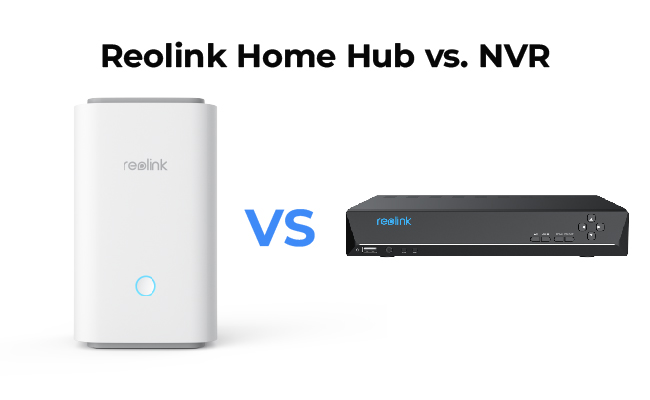
Choosing between the Reolink Home Hub and a standard NVR comes down to your camera type and how you want to store footage. The Home Hub suits wireless battery-camera setups in homes or small offices. Reolink NVRs are built for wired PoE systems that need higher storage capacity and 24/7 continuous recording.
This comparison covers connectivity, storage, camera compatibility, and setup time, giving you everything you need to pick the right central management device for your Reolink cameras.
- What Is the Reolink Home Hub?
- What Is a Reolink NVR?
- Reolink Home Hub vs. NVR: Key Differences
- Is the Reolink Home Hub Pro a Better Fit?
- Reolink Home Hub vs. NVR: Which One Should You Choose?
- Real World Reolink Home Hub and NVR Use Cases
- How Long Does It Take to Set Up Home Hub vs. NVR?
- Reolink Home Hub Kits Recommendation
- FAQs
- Conclusion
What Is the Reolink Home Hub?

The Reolink Home Hub is a wireless security management device that connects and manages up to 8 Reolink cameras over Wi-Fi. It stores footage locally on microSD cards (up to two 1TB cards for 2TB total) with AES-128 encryption, operates offline without an internet connection, and supports Amazon Alexa, Google Home, and Google Assistant. No monthly subscription is required.

Wireless Security Center with Encrypted Local Storage and Multi-Device Management
64GB microSD Card Included; Exclusive Anti-Theft Algorithms; Expandable System Up to 8 Reolink Cams; No Monthly Fees
Key features include:
- Local storage without subscription fees: The Reolink Home Hub offers true local storage with microSD cards, offline recording, and high-definition playback via the Reolink app, with no monthly fees.
- Smart alarms and instant notifications: The Home Hub sounds an alarm when any connected camera is triggered, and delivers instant push notifications of detected events.
- Expandability: The Reolink Home Hub connects to up to 8 cameras, all managed and monitored from a single device.
- Event summary: View daily, weekly, or monthly statistics of motion detection events through the Reolink app, with all events presented in chronological order for easy playback access.
Reolink Home Hub Pros and Cons
Pros:
- Simple setup in ~5 minutes via the Reolink app
- Compatible with PoE, plug-in Wi-Fi, and battery cameras
- AES-128 file encryption for enhanced storage security
- Security summary across all connected cameras
- Smart home integration: Amazon Alexa, Google Home, Google Assistant
- No monthly subscription fees
Cons:
- Limited coverage within the Wi-Fi range
What Is a Reolink NVR?

A Reolink NVR (Network Video Recorder) is a central recording device for IP security cameras. It receives video streams from connected cameras over Ethernet (wired PoE NVR) or Wi-Fi (wireless NVR), and saves footage to a built-in hard disk drive. Most Reolink NVR models support up to 6TB of HDD storage, high-resolution playback up to 16MP, and direct camera management via an HDMI-connected monitor, without needing the app.
Types of Reolink NVRs
Currently, Reolink offers two types of NVR systems:
- Wired NVR: Cameras connect directly to the NVR via Ethernet cables, which provide both video transmission and power (PoE), eliminating the need for separate camera power outlets.
- Wireless NVR: Cameras connect over Wi-Fi, with cables used only for power. This reduces cable runs but relies on Wi-Fi signal quality for recording stability.
Reolink NVR Pros and Cons
Pros:
- Supports up to 6TB+ HDD storage for long-term recording
- Clear video and footage up to 16MP resolution
- HDMI output for direct monitor management
- Future expandability with more camera channels
- Third-party ONVIF camera support
Cons:
- Limited smart home integration
- Wiring required for PoE camera deployments
How Do Reolink NVRs Work?
In daily surveillance, Reolink NVRs receive video streams from IP cameras via Ethernet cables or a Wi-Fi network. Cameras encode video before sending it to the NVR in digital format. The NVR then saves footage to its pre-installed hard disk drive. Take the Reolink RLN16-410-2 for example, users can use that NVR to manage connected cameras, view live footage, and play back recordings directly on a PC monitor or TV via HDMI, or remotely through the Reolink app.
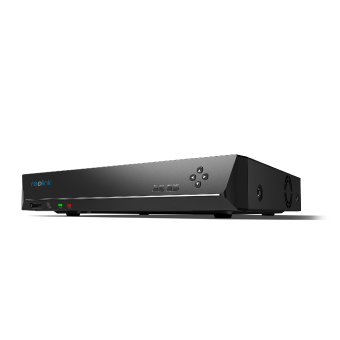
16-Channel PoE Security NVR
3TB Built-in HDD; Work with All Reolink 5MP/4MP Cameras for 24/7 Video Recording, Monitoring, and Management; Plug and Play.
Reolink Home Hub vs. NVR: Key Differences
There are a few differences worth noting between the two products. Below is a dimension-by-dimension comparison on the key differences.
How Do Home Hub and NVR Connect to Your Security Cameras?
The Reolink Home Hub connects to your router via a single Ethernet cable and uses its own dedicated Wi‑Fi network to communicate with cameras, eliminating the need for individual cable runs. Cameras can be added as long as they are within the hub’s wireless range.
In contrast, a wired PoE NVR requires a separate Ethernet cable for each camera, which increases installation effort but provides a stable connection and supports distances of up to 100 m per cable run.
A key advantage of the Home Hub is that it creates a dedicated Wi‑Fi network (SSID) for cameras. This keeps camera traffic separate from your main home network, reducing bandwidth competition with other devices and adding a basic level of network isolation.
Wireless NVRs are also available and avoid the need for camera cabling, but unlike the Home Hub, they typically do not encrypt stored footage.
Home Hub Connectivity: The Home Hub is the cleaner choice for renters and smaller setups where drilling is not practical.
NVR Connectivity: The NVR suits installations where cameras are spread across large distances or outdoors beyond reliable Wi-Fi range.
What Can Home Hub Do That an NVR Can't (and Vice Versa)?
The Home Hub offers built-in smart alarms, AES-128 encrypted local storage, and integration with Amazon Alexa, Google Home, and Google Assistant. Reolink NVRs support HDMI output for direct monitor viewing and allow full camera configuration without the app, making them better suited to larger, multi-camera installations managed from a fixed location.
The Reolink Home Hub lets you view high-definition playback through the Reolink app and includes a Security Summary feature that displays motion detection events chronologically. The Hub also has a built-in speaker and can sound custom alarm ringtones when a connected camera is triggered.
On the other hand, Reolink NVRs support HDMI connections for direct monitor viewing of live feeds. You can configure cameras through the NVR's own user interface without opening the Reolink app, which is useful for setups where someone manages the system on-site rather than remotely.
Home Hub Functionality: The Home Hub is the better choice for smartphone-first users who want smart home voice control.
NVR Functionality: The NVR suits those who prefer on-site management from a monitor, or who run a larger deployment where app-based management becomes cumbersome.
How Much Footage Can Home Hub or NVR Store?
The Home Hub stores footage on microSD cards (up to two 1TB cards for 2TB total storage). Reolink NVRs use hard disk drives, typically 2–6TB depending on the model. For multi-camera continuous recording, the NVR's HDD capacity provides significantly more recording headroom than microSD.
The Reolink Home Hub includes a 64GB microSD card in the box and supports two additional slots, each holding up to 1TB, for a maximum local storage of 2TB. Reolink NVRs save video onto pre-installed hard disk drives. While most models come with pre-installed storage, it is expandable up to 16TB (or more) on select models. Some higher-end Reolink NVRs support third-party HDD upgrades for even greater capacity.
Storage longevity depends heavily on resolution and recording mode. Based on community feedback from r/reolinkcam, users running 24/7 continuous recording across multiple 4K cameras report that 1TB can fill in approximately 1-2 weeks.
Pro tip: If you plan to run 24/7 continuous recording with 4 or more cameras, use Reolink's storage duration guide to estimate how quickly your microSD or HDD will fill before committing to a storage configuration.
Home Hub Storage: The Home Hub's 2TB microSD is well-suited for 1–4 cameras with motion-triggered recording.
NVR Storage: An NVR's HDD storage gives you significantly more room for 24/7 continuous recording across multiple cameras, before footage overwrites.
Which Reolink Cameras Work with Home Hub vs. NVR?
The Reolink Home Hub is compatible with all Reolink PoE cameras, plug-in Wi-Fi cameras, and most recently released battery Wi-Fi cameras, with the exception of 2MP battery cameras and 4G cameras. Battery cameras require a firmware update before connecting. See Reolink Home Hub Compatibility for the full list.
Reolink NVRs seamlessly support all Reolink PoE cameras and most plug-in Wi-Fi cameras. Third-party cameras that comply with the ONVIF standard can also be added to Reolink NVRs, an option not available on the Home Hub.
Note: Even on Reolink NVRs that support battery cameras (via newer firmware), battery cameras are limited to event-triggered recording only and cannot record 24/7. This is a hardware constraint by design as continuous recording would drain a battery camera within days. If 24/7 recording across all cameras is a priority, use plug-in or PoE cameras with an NVR.
Home Hub Compatibility: If you primarily use battery cameras, the Home Hub is the recommended choice.
NVR Compatibility: An NVR is the better fit for PoE-heavy setups, third-party camera integration, or 24/7 recording requirements.
Is the Reolink Home Hub Pro a Better Fit?

If the base Home Hub's microSD storage cap is the main reason you're considering an NVR, the Reolink Home Hub Pro may be the right middle ground. It keeps the wireless convenience of the Home Hub family while matching an NVR on storage capacity.
Reolink Home Hub vs. NVR: Which One Should You Choose?
The right choice depends on your camera type, setup size, and how you plan to use your footage.
Real World Reolink Home Hub and NVR Use Cases

A user on reddit highlights that the Home Hub completely eliminates monthly cloud fees by saving all footage onto dual internal SD cards, which ensures recordings remain safe inside the home even if an outdoor camera is stolen or destroyed. The device features smart functions like centralized alarm chiming, motion notifications, and a convenient web dashboard for monitoring camera health and viewing recorded clips.

Another user shares a highly positive assessment of their Reolink PoE camera system after months of testing multiple models connected to a 16-channel 4K NVR. They strongly advocate for a hardware NVR over computer-based setups, citing its flawless uptime, lower power consumption, and "set-it-and-forget-it" reliability that completely avoids unexpected OS updates or boot failures.
How Long Does It Take to Set Up Home Hub vs. NVR?
The Home Hub takes about 5 minutes to set up via the Reolink app. A wired PoE NVR setup requires running Ethernet cables to each camera location and typically takes 30–60 minutes or more depending on property size.
Setting Up Reolink Cameras with NVR
You need to download the Reolink App before starting the setup process.
- Connect your NVR to your router at the back LAN port with an Ethernet cable.
- Open the Reolink app. Tap the icon at the top right corner. Scan the QR code on your NVR, or tap Input UID/IP to enter the NVR's UID (a 16-digit number under the QR code). Then tap Next.
- Create a password and a name for your NVR as instructed.
- Connect the PoE cameras to the PoE NVR directly via an Ethernet cable.
Setting Up Reolink IP Cameras with Home Hub
Compared to a PoE NVR, the Home Hub setup is simpler, with no cable runs required. You will still need the Reolink App.
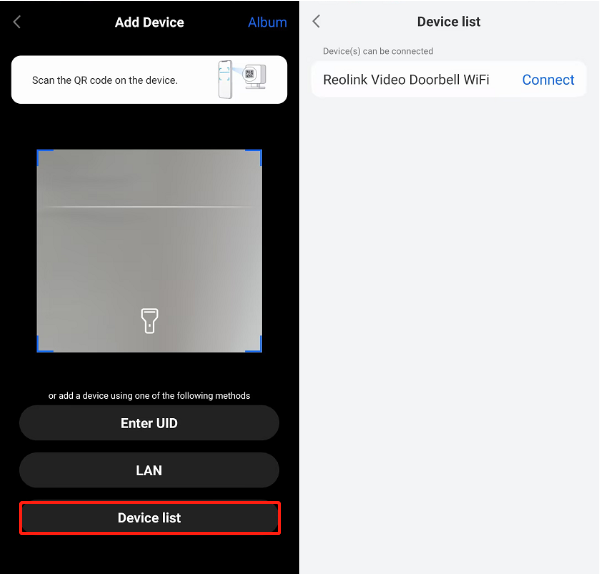
- Launch the Reolink App on your phone. Tap the "+" icon to add a new device. Scan the QR code on your Reolink Home Hub.
- Wait for the device to finish initializing.
- Create a username and password for your Hub.
- Click ">" to navigate to the Home Hub settings section and tap "+" to add cameras.
- Add cameras via "Device List" (if already in your app) or use the "LAN" option to detect all online cameras within your local network.
Reolink Home Hub Kits Recommendation
Home Hub with Argus PT Ultra
The Home Hub with Argus PT Ultra is a versatile wireless security system offering 360° color night vision. With dual-night vision capabilities, it ensures clear footage around the clock, even in low-light conditions. The advanced pan-tilt-zoom (PTZ) functionality allows for seamless monitoring of larger areas.
Perfect for large properties and businesses, it includes features like motion tracking and remote access. The Home Hub also supports encrypted storage for up to eight cameras, providing one year of local storage at no extra cost.
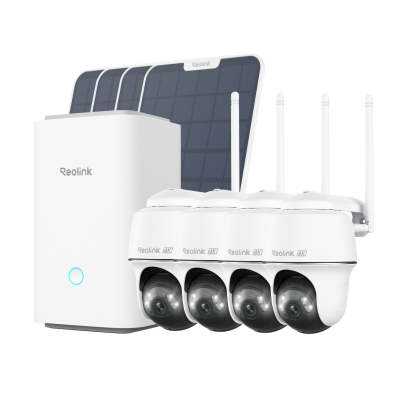
Wireless Security System With 4K PT Standalone Battery/Solar Wi-Fi Cameras
4K Color Footage Day & Night, 1 Year of Local Storage, Exclusive Anti-Theft Algorithms, 360° All-Around Coverage, Expandable System Up to 8 Reolink Cams.
Home Hub with Argus Eco Ultra
The Home Hub with Argus Eco Ultra is a top-tier security camera system featuring 4K color night vision. It captures true-color footage even in low light, and with its solar-powered design, it can be installed in areas without access to a power supply.
Equipped with motion detection and real-time alerts, the Argus Eco Ultra provides dependable surveillance. The Home Hub offers encrypted storage that can be expanded to support up to eight cameras, making it ideal for both home and business security.

Wireless Security System with 4K Wi-Fi Solar/Battery Standalone Camera Without Monthly Fees
4K Color Footage Day & Night, 1 Year of Local Storage, Exclusive Anti-Theft Algorithms, 360° All-Around Coverage, Expandable System Up to 8 Reolink Cams.
FAQs
What is the disadvantage of an NVR?
One of the NVR's key limitations is its reliance on network bandwidth and stability. Network congestion or interruptions can cause degraded video quality, frame loss, or recording failures. NVR systems are also more complex to install than standalone cameras or a Home Hub. A wired PoE NVR requires running Ethernet cables to each camera, which increases setup time and cost.
What is the difference between a Reolink NVR and a DVR?
A Reolink NVR (Network Video Recorder) works with modern IP cameras that encode video digitally before transmitting it over a network. A DVR (Digital Video Recorder) is designed for older analog cameras that send a raw analog signal. If you are using any current Reolink cameras (including cameras managed by the Home Hub), you need an NVR, not a DVR. DVRs are not compatible with Reolink's camera lineup.
What are the benefits of the Reolink Home Hub?
The Reolink Home Hub provides a unified interface for monitoring and controlling Reolink cameras through the app. It supports local microSD storage up to 2×1TB with AES-128 encryption, so footage stays private even if a card is removed. It also integrates with Amazon Alexa, Google Home, and Google Assistant, and requires no monthly subscription to use.
Does the Reolink Home Hub support 24/7 continuous recording?
Yes, the Home Hub supports 24/7 continuous recording for plug-in Wi-Fi cameras. Battery-powered cameras connected to the Hub are limited to motion-triggered recording, as continuous recording would drain a battery camera within days. For 24/7 recording across a larger camera lineup, the Reolink Home Hub Pro with its 2TB HDD (expandable to 16TB) is a stronger fit.
Conclusion
The Reolink Home Hub and NVR each serve a distinct type of user. The Home Hub is built for wireless setups: fast to deploy, encrypted by default, and natively connected to smart home platforms. A Reolink NVR is built for scale: wired PoE cameras, 24/7 continuous recording, and HDD storage that outlasts any microSD configuration.
If you're still deciding, use the "Choose X if..." table in the decision section above. Or if you want wireless simplicity with NVR-level storage, check out the Reolink Home Hub Pro.
Which do you prefer, the Home Hub or the NVR? Share your thoughts in the comments below!
Search
Subscribe for the Latest Updates
Security insights & offers right into your inbox