
Reolink Go Discontinued: What You Need to Know & Best 4G Alternatives
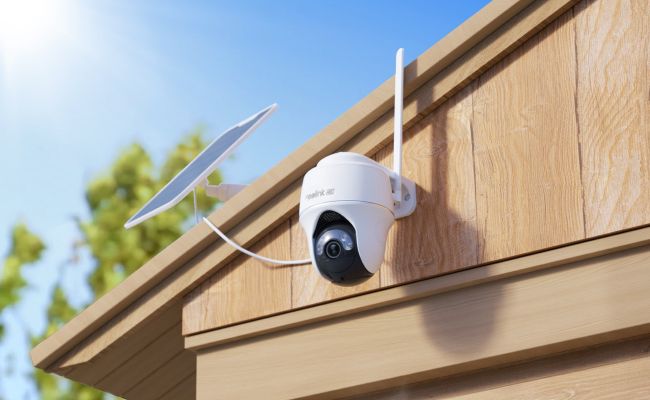
The original Reolink Go has been discontinued, but existing cameras may still work if the hardware, battery, SIM card, cellular network, and app connection remain functional. Reolink Go owners can continue using their cameras if performance meets their needs, or upgrade to newer 4G LTE security cameras with improved video quality, coverage, and features.
This guide explains whether you can still use Reolink Go, what support options are available, and which Reolink Go alternatives are best for different locations and security needs.
Key Takeaways:
- What Is the Reolink Go?
- Is the Reolink Go Discontinued?
- Why Was the Reolink Go Discontinued?
- Can You Still Use a Reolink Go?
- Does Reolink Still Support the Go Camera?
- Should You Replace Your Reolink Go?
- Best Reolink Go Alternatives
- Reolink Go vs. Newer Go Series Cameras
- How to Choose the Best Reolink Go Cellular Camera: 6 Core Steps
- FAQs
- Conclusion
What Is the Reolink Go?
The Reolink Go is a battery-powered 4G LTE security camera designed for locations without Wi-Fi or wired internet. It connects through a supported SIM card and mobile data plan, making it suitable for remote areas such as farms, construction sites, vacation homes, gates, and outdoor properties.
Key features include:
- Cellular connectivity without Wi-Fi
- Remote viewing through the Reolink App
- Motion detection and alerts
- Local recording with microSD card
- Two-way audio
- Solar charging support with compatible panels
Is the Reolink Go Discontinued?
Yes. Reolink discontinued the original Reolink Go, and the official product end-of-life information lists May 22, 2022 as its end-of-life date.
A discontinued product means it is no longer part of Reolink’s current product lineup. However, an end-of-life product may continue working if the camera hardware, cellular connection, and supporting services remain functional.
Why Was the Reolink Go Discontinued?
Reolink's end-of-life information confirms the date but does not give one camera-specific reason. The Go series now includes newer cellular models with higher image quality and wider viewing choices. Older models may be replaced by newer generations that offer updated hardware.
Can You Still Use a Reolink Go?
A Reolink Go may remain usable if its hardware, battery, SIM card, cellular service, storage, and app access still work. Its 3G or 4G connection depends on the camera version, local network, and carrier. Owners should test these functions often to confirm that remote monitoring remains reliable.
A working unit may still provide:
- 3G/4G connectivity based on the camera version and carrier support
- Live viewing through the Reolink app
- Motion detection
- Motion-triggered recording
- microSD card recording
- Push or email alerts
- Two-way audio
- Compatible solar charging where a panel is attached
Does Reolink Still Support the Go Camera?
Product availability and technical resources are separate matters. Reolink maintains a Go support section for setup, charging, installation, motion detection, recording, playback, networking, firmware, manuals, common questions, and problem solving.
Reolink Go 3G/4G Compatibility
The camera needs a supported SIM card, an active data plan, matching network bands, and a usable signal. Confirm the exact camera version and regional support before changing a SIM or carrier. Frequent live viewing uses more data than occasional alerts or short motion clips, so choose a plan that fits normal use.
Reolink Go Firmware and App Support
Check the camera's device information and update settings in the Reolink app. Record the exact model and hardware version because the wrong firmware can cause problems. Some cameras may not show a downloadable file.
Reolink states that the camera may already use the latest available version when no update appears. Contact Reolink Support for guidance before attempting any manual firmware installation. Keep the app current when the phone supports the update, then confirm that live view, alerts, and recordings still work.
Reolink Go Manuals and Troubleshooting
The official Go support hub contains help for the most common issues. Check the battery, signal, SIM status, and storage before resetting the camera because a reset removes its settings.
Should You Replace Your Reolink Go?
Should you replace your Reolink Go with other 4G Go series camers? The decision rests on how well the existing camera meets daily needs, not on the simple fact that a newer model exists.
Keep Using It If...
- The battery holds a useful charge and lasts through normal activity cycles.
- The cellular connection stays stable and delivers reliable remote access.
- The camera records the needed area clearly with good daytime and night image quality.
- Alerts, local storage, and image quality still meet the site's needs.
Consider Upgrading If...
- The battery drains quickly and reliable replacement options grow harder to find.
- The connection fails often or causes missed alerts and incomplete recordings.
- The site needs sharper video, wider coverage, or pan-and-tilt control.
- Newer detection options would improve monitoring at the current location.
Best Reolink Go Alternatives
If you are looking to replace or upgrade from the original Reolink Go, current cellular models offer clear performance improvements across different property types and monitoring needs.
1. Reolink Go Plus – Best for Fixed Off-Grid Entrances & Single Gates
You need reliable, off-grid cellular security to monitor a single entry point—such as a remote driveway gate, barn entrance, or construction site access road—without running power lines or Wi-Fi.
The Reolink Go Plus is the official direct replacement for the original Reolink Go. It provides a steady 2K 4MP fixed view, operates on 3G/4G LTE cellular networks, and pairs with a solar panel for continuous, maintenance-free power.
For fixed entryways where one direction covers all activity, models like the Go Plus deliver sharp 2K detail without complex setup requirements.
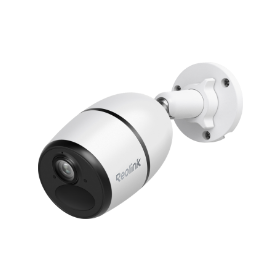
Smart Wireless 4G Battery Camera
Rechargeable Battery/Solar Powered, Person/Vehicle Detection, 2K 4MP Super HD, Two-Way Audio, High-Quality Night Vision, Live View Anytime.
2. Reolink Go PT Plus – Best for Open Yards, Equipment Depots & Farms
A fixed camera angle leaves blind spots across wide-open spaces like equipment yards, farm fields, or active job sites where activity moves around.
The Reolink Go PT Plus adds motorized pan-and-tilt capabilities (355° pan and 140° tilt) to 2K 4MP cellular monitoring. You can rotate the lens remotely via the mobile app to check every corner of your property from anywhere.
When wide coverage matters more than a static view, pan-and-tilt cellular options like the Go PT Plus eliminate the need to buy and mount multiple fixed cameras.
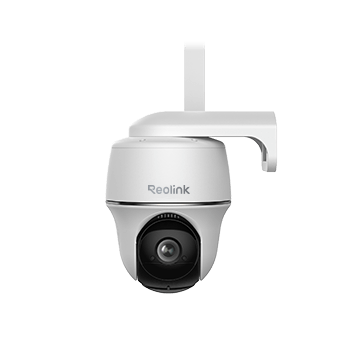
Wire-Free 4G LTE PT Security Camera
No WiFi or Power Connection Needed; Rechargeable Battery or Solar Powered; Person/Vehicle Detection, 355° Pan & 140° Tilt, 2K Super HD.
3. Reolink Go PT Ultra – Best for Large Properties Needing Maximum Detail & 4K Clarity
You are monitoring a expansive area where identifying faces, vehicle license plates, or fine details across long distances is critical to security.
The Reolink Go PT Ultra combines full 360° pan-and-tilt coverage with high-definition 4K (8MP) resolution and smart spotlight night vision over 4G LTE. It features advanced AI detection for people, vehicles, and animals to minimize false alerts.
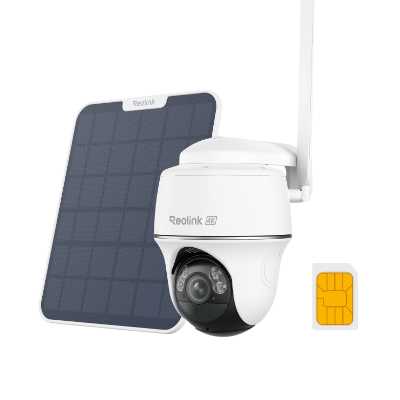
4K 8MP Wire-Free 4G LTE PT Battery Camera
4K 8MP; Smart Detection; 355° Pan & 140° Tilt; Battery/Solar Powered; Color Night Vision; Smart Real-Time Alert.
Reolink Go vs. Newer Go Series Cameras
Selecting the right 4G LTE cellular camera requires matching your property layout with network compatibility. Because legacy 3G/4G hardware can drop off carrier networks, always check regional network bands, active SIM card support, and current firmware versions before buying.
Comparison Overview
To help bring further clarity to how these models compare, we created a quick comparison table to help you evaluate choices with confidence.
How to Choose the Best Reolink Go Cellular Camera: 6 Core Steps
-
Verify Carrier Bands & Field Signal Strength: Confirm that the camera supports your local mobile carrier's 4G LTE bands. Test the cellular signal strength at the intended mounting spot using your smartphone before installation.
-
Select Fixed vs. Pan-Tilt Field of View: Choose a fixed model (like the Go Plus) if watching a single entrance or gate. Choose a pan-and-tilt model (like the Go PT Plus) if one camera must rotate to cover broad open ground.
-
Balance 4K Video Quality Against Data Limits: Select 4K resolution (Go PT Ultra) when fine visual detail is critical. Keep in mind that streaming uncompressed 4K video consumes more monthly SIM data and local storage than 2K streams.
-
Plan Solar Panel Placement & Battery Maintenance: Ensure solar panel mounting locations receive 3 to 4 hours of direct, unshaded sunlight daily—especially in winter or high-latitude regions—to keep the battery charged.
-
Set Up Smart Motion Detection to Save Data: Use onboard person, vehicle, and animal AI detection to record motion-triggered clips only, preventing false alerts from trees or wind from draining your cellular data plan.
-
Compare Local Storage & Warranty Terms: Check onboard microSD card limits (typically up to 128GB/256GB) and verify manufacturer warranty coverage for off-grid outdoor installations.
FAQs
How Much Does Reolink Go Cost Monthly?
Reolink does not set one monthly price for every Go camera. The main regular cost comes from the SIM card's cellular data plan, and the price depends on the carrier and data allowance. Local microSD recording does not require a storage subscription.
Can You Use Reolink Without Wi-Fi?
Yes, Reolink Go series cameras work without Wi-Fi because they use a supported cellular network, SIM card, and data plan. Remote viewing and app alerts still need a working mobile connection. Local motion recording may continue during a temporary connection loss if the camera has power and a microSD card is set up correctly.
Conclusion
Continue using the original Reolink Go when it remains reliable and meets current needs. Use official support resources for setup and problem-solving. Upgrade when battery, connection, image quality, or detection limits become inconvenient.
Choose a replacement according to the monitoring area instead of selecting it only because it is the newest model.
Search
Subscribe for the Latest Updates
Security insights & offers right into your inbox