
QHD vs OLED: Which One to Choose?
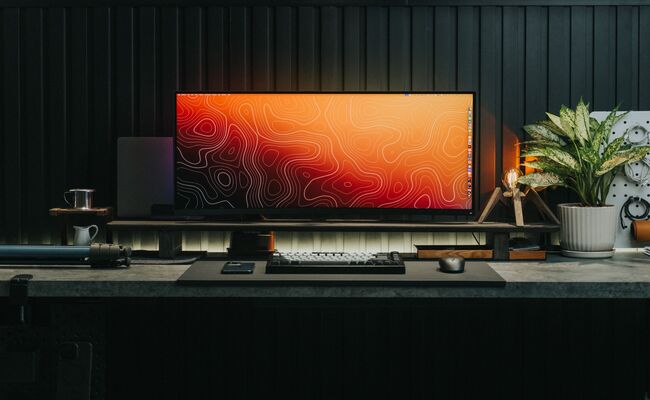
You are shopping for a new display. The specs say "QHD" and "OLED." But what do these terms actually mean for your daily experience?
Both these terminologies are completely different, and they represent distinct attributes. Let's understand what they are and what you should choose according to the application.
What Is QHD Display?
QHD stands for Quad High Definition. It has a resolution of 2560×1440 pixels, which is four times the detail of standard 720p HD. This is also commonly called 1440p or 2K. At 27 inches, a QHD display has a pixel density of approximately 109 pixels per inch (PPI), offering sharper images with rich details.
Pros of QHD:
- Sharper image: Noticeably clearer text and more detailed images than 1080p displays
- More screen space: You can fit more windows, tools, and content on screen at once
- Balanced performance: QHD is the sweet spot for gaming because it looks great without requiring the extreme GPU power of 4K
- More affordable: QHD monitors cost significantly less than 4K or high-end OLED options
Cons of QHD:
- Not true 4K: Cannot match the extreme detail of 3840×2160 for large screens or digital zoom
- Requires scaling on smaller screens: At 24 inches or less, text may be too small without scaling
- Demands better hardware than 1080p: Gaming at QHD needs a dedicated graphics card
What is an OLED Display?
OLED stands for Organic Light-Emitting Diode. Unlike traditional LCD screens that need a separate backlight, each pixel in an OLED display produces its own light. This fundamental difference creates the stunning visual quality OLED is known for. When a pixel needs to show black, it simply turns off completely, producing true, perfect black rather than the grayish-black of backlit screens.
Pros of OLED:
- Perfect blacks: Individual pixels turn off completely, delivering an infinite contrast ratio
- Vibrant, accurate colors: The self-emissive pixels produce richer, more lifelike colors
- Fast response times: OLEDs switch on and off much faster than LCDs, practically eliminating motion blur
- Wide viewing angles: Colors and contrast remain accurate even when viewed from the side
- Slimmer design: No backlight layer allows for thinner, more flexible displays
Cons of OLED:
- Burn-in risk: Static elements like taskbars or HUDs can leave permanent ghost images over time
- Higher cost: OLED monitors and TVs are significantly more expensive than LCD alternatives
- Lower peak brightness for some models: W-OLED panels can be dimmer than high-end LED displays in very bright rooms
- Potential text clarity issues: The unique subpixel layout can make text on a PC desktop appear less sharp
OLED vs QHD: What's the Difference?
OLED and QHD are completely different things about a display. QHD is a resolution that tells you how many pixels are on the screen (2560×1440). OLED is a panel technology that tells you how those pixels are lit. A display can be QHD without being OLED. Most QHD monitors use traditional LED backlighting. A display can also be OLED without being QHD, such as 4K OLED TVs.
The table below summarizes the key differences:
OLED vs QHD Using Scenarios: How to Choose?
The choice between prioritizing QHD resolution or OLED technology depends entirely on how you use your display. For general office work and media consumption, QHD offers practical benefits at a lower price. For immersive entertainment and color-critical work, OLED delivers unmatched visual quality. Here is how to decide based on your specific needs.
OLED vs QHD Monitor
When choosing an OLED vs. QHD monitor, think about your daily computer work. For office tasks like word processing, email, and web browsing, QHD resolution offers a clear advantage. The extra screen space (2560×1440) lets you view documents, browsers, and communication apps side by side without constant window switching. According to experts, for everyday productivity, the sharpness difference between QHD and 4K is minimal, but the extra workspace compared to 1080p is genuinely useful.
For creative professionals, the answer is different. If you do photo or video editing, an OLED vs. QHD monitor decision should favor OLED. OLED provides superior color accuracy, true blacks, and a wider color gamut, all critical for accurate previews. However, be aware of burn-in risk from static editing timelines and toolbars. Some professionals still prefer high-end IPS displays for this reason.
QHD vs OLED Gaming
The QHD vs. OLED gaming debate has two clear answers, depending on what you play. For competitive gamers, prioritize QHD with a high refresh rate. QHD resolution at 240Hz or higher "hits the sweet spot for getting high frames without needing an RX 7900 XT". The fast motion clarity and responsiveness matter more than perfect blacks in fast-paced shooters and battle royale games.
For immersive single-player gaming, the QHD vs OLED gaming choice shifts to OLED. OLED's perfect blacks, infinite contrast, and quick response time transform atmospheric games. Modern QHD OLED monitors now offer 240Hz refresh rates, giving you both resolution and panel quality in one display. OLED is no longer a luxury upgrade. It is the baseline for anyone serious about PC gaming.
Bonus: Why Display Quality Matters for Security Cameras
Display quality matters for security systems because you cannot identify what you cannot see clearly. A poor display hides crucial details. QHD resolution (2560×1440) offers clear, sharp visuals with less data usage than 4K, making it easier to manage for streaming and recording. This balanced image quality is ideal for monitoring multiple camera feeds simultaneously.
The higher the resolution is, the better it is. Instead of going with QHD, you can go with 4K and higher resolutions for better details and clarity. Reolink OMVI 3i PoE is a triple-lens security camera that offers 18MP resolution. The dual lenses record in 10MP and cover 180°, while the single lens offers 4K and covers 360°. It also frames objects automatically and tracks their motion. It uses AI for accurate object detection and finding videos instantly.
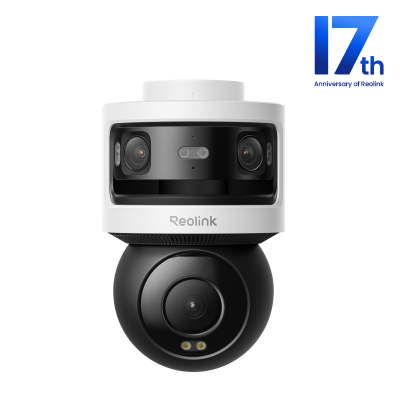
All-in-one Triple-Lens 180° Panoramic Pan-Tilt Security Camera
10MP Dual-Lens 180° View, 4K 360° Full Coverage, SyncTrack with auto framing & auto tracking, Local Storage (No Monthly Fees), Local AI Video Search.
FAQs
QHD vs FHD vs OLED: What's the difference?
FHD (1920×1080) and QHD (2560×1440) are resolutions that determine sharpness and screen space. OLED is a panel technology that determines black levels, contrast, and color accuracy. You can have QHD OLED, FHD OLED, or QHD LED displays.
Is QHD better or OLED?
They are different things. For image quality (contrast, blacks, colors), OLED is better than any non-OLED panel regardless of resolution. For sharpness and screen space at a given screen size, QHD is better than FHD.
Are QHD screens worth it?
Yes, for most users. QHD offers noticeably sharper text and more screen space than 1080p without the steep hardware demands of 4K. For monitors 27 inches and larger, QHD is highly recommended.
Which is better, OLED or QLED?
QLED (Quantum Dot LED) is a different technology that still requires a backlight. OLED produces true blacks and infinite contrast because each pixel emits its own light. QD-OLED combines both, using a blue OLED layer with quantum dots for enhanced color.
Conclusion
QHD vs OLED is not a direct comparison. They are different display attributes. The good news is you do not always have to choose. Modern QHD OLED monitors now offer both, combining the ideal resolution for gaming and productivity with the visual quality of self-emissive pixels. If you can afford it, QHD OLED is the best of both worlds. For budget-conscious buyers, prioritize QHD for productivity and OLED for media consumption. Either way, you are getting a significant upgrade over basic 1080p LED displays.
Search
Subscribe for the Latest Updates
Security insights & offers right into your inbox