
Pan Tilt Zoom Camera Control: Explain in Details
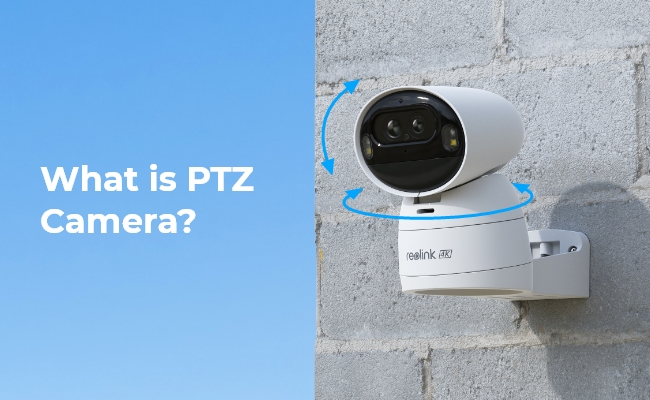
Pan, Tilt, and Zoom cameras are advanced and have the capability to cover a larger area. They offer more control to the users and unveil intricate details. Therefore, they are often preferred for security surveillance at homes and offices.
In this article, we will discuss what Pan, Tilt, and Zoom cameras are. We will explain how they work with manual and automated control. We will also share incredible PTZ cameras to help you select the best product.
What is Pan Tilt Zoom Camera Control?
Pan, tilt, and zoom are abbreviated as PTZ. These are the special controls in PTZ cameras.
Pan refers to the horizontal, and tilt refers to the vertical rotation of the camera lens. If a camera offers a 90⁰ pan, it means it can be rotated horizontally to that extent. Similarly, there is a range of tilt. That said, the user can rotate the camera in different directions to cover a larger area than normal cameras that remain still.
The zoom in the camera allows you to zoom into the object or person. It helps you take a close-up view and capture intricate details, such as the license plates of vehicles and the facial features of a person.
The PTZ control in a camera can be manual or automated. Let’s look at manual and automated controls in detail.
How to Activate Camera's Pan, Tilt, Zoom?
PTZ cameras can operate through either automated control or manual control, depending on the camera’s features and user preferences.
Automated Control
Some PTZ cameras support automatic pan, tilt, and zoom functions through built-in smart detection features. When automatic person or vehicle detection is enabled, the camera can respond to movement on its own.
For example:
- Once a person is detected, the camera automatically pans and tilts to follow the movement.
- The camera rotates left, right, up, and down to keep the subject within view.
- If auto zoom is available, the camera can zoom in automatically to capture more details.
Automatic PTZ control is useful for:
- Movement tracking
- Wider area coverage
- Hands-free surveillance
- Improved security monitoring
Some PTZ cameras also include an auto-patrol mode, allowing the camera to automatically rotate between preset monitoring points.
Even with automatic functions enabled, users can still switch to manual control whenever needed.
Manual Control
PTZ cameras without automatic tracking rely on manual operation for pan, tilt, and zoom adjustments.
In manual mode:
- The camera remains at a fixed viewing angle until the user changes it.
- It does not automatically follow people or moving objects.
- Users control camera movement using directional controls such as on-screen arrow keys.
For example, if the camera is viewing the far left side of an area, the user can manually rotate it to monitor the far right side.
Manual PTZ control allows users to:
- Adjust the viewing angle freely
- Monitor different parts of the area in real time
- Zoom in on important objects or activities
- Customize the field of view as needed
How to Control a PTZ Camera Remotely?
The pan, tilt, and zoom are controlled through the camera application. Anyone who has access to the camera can control them.
There are simple controls like the arrow keys, and users can easily change the field of view and zoom of the camera remotely.
Let’s see how you can control a Reolink’s PTZ camera.
- Open the Reolink app and enter the credentials of the camera to connect to it.
- Go to the live-view page and tap PTZ. You will see all the controls.
- Press and hold the arrow keys to rotate the camera. Set the field of view you want.
- Tap the Zoom button and adjust the zoom in and zoom out.
Top Options for Pan Tilt Zoom Camera
Here are some top options for pan, tilt, and zoom cameras you can consider for optimal security surveillance.
4K PoE PTZ Camera with Dual-Lens - TrackMix PoE
For users looking for a powerful PTZ security camera with flexible coverage, smart tracking, and detailed zoom capabilities, the Reolink TrackMix PoE is an excellent choice. Its biggest advantage is the combination of pan, tilt, and zoom (PTZ) with a unique dual-lens design, allowing the camera to monitor wide areas while simultaneously capturing close-up details.
Its PTZ functionality makes it ideal for monitoring large areas such as driveways, parking lots, warehouses, backyards, and business entrances. With Power over Ethernet (PoE), installation is also more stable and reliable since both power and data run through a single cable.

4K Dual-Lens PTZ Camera with Dual Tracking
4K 8MP Ultra HD, Wide & Telephoto Lenses, Pan & Tilt, Auto-Tracking, Person/Vehicle Detection, Power over Ethernet, Two-Way Audio.
4K Dual-Lens Wireless PTZ Camera - Argus Track
Argus Track is a dual-lens battery-powered PTZ camera with 355⁰ pan and 90⁰ tilt to cover a vast area. It offers 6X hybrid zoom to get a clear and close-up view of objects. It can detect persons and vehicles accurately and send instant alerts. Most importantly, it can auto-track and auto-zoom to record every moment with fine details.
Its 4K video quality is incredible, and you see clear and crisp videos with intricate details. Even at night, it offers colored and clear videos through its color night vision. It is a battery-powered camera that can also be powered through a small solar panel.
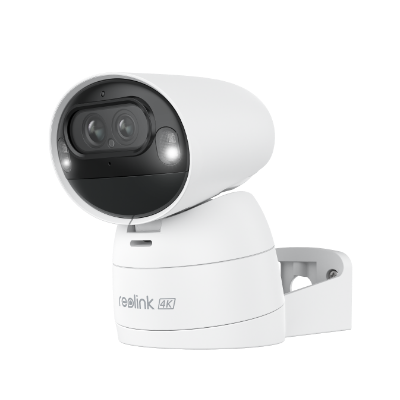
4K Dual-Lens Wi-Fi Solar/Battery Camera
4K 8MP Ultra HD, Auto-Zoom Tracking, Pan, Tilt & 6X Hybrid Zoom, Color Night Vision, Dual-Band Wi-Fi.
4K Dual-Lens WiFi PTZ Camera - Reolink TrackMix WiFi
TrackMix is a WiFi PTZ camera that offers 4K Ultra HD video quality. Its 355⁰ pan and 90⁰ tilt cover a wider area. The best part is its dual-tracking, which auto-tracks objects in panoramic and zoomed views at the same time, and you can see both videos simultaneously.
It can detect persons, pets, and vehicles automatically. You can also talk to the person in front of the camera using two-way audio. It records clear videos at night and offers two night-vision modes. Other than that, you can enjoy time-lapse, dual warning, flexible storage, and tons of features.

4K Dual-Lens PTZ Camera with Motion Tracking
4K 8MP UHD, Wide-Angle & Telephoto Lenses, Pan-Tilt-Zoom, Auto-Tracking, Person/Vehicle Detection, 2.4/5 GHz Dual-Band WiFi, Two-Way Audio.
FAQs
What does pan tilt zoom mean?
Pan, tilt, and zoom (PTZ) refers to a camera’s ability to move horizontally, move vertically, and zoom in or out to monitor different areas and capture more detail.
- Pan means rotating the camera left and right.
- Tilt means moving the camera up and down.
- Zoom means adjusting the lens to get a closer or wider view of the scene.
PTZ cameras are commonly used for security surveillance because they can cover large areas and track movement more effectively than fixed cameras.
What goes with pan tilt zoom?
Pan, tilt, and zoom usually work together with features like auto tracking, remote control, motion detection, and wide-area surveillance in PTZ security cameras. These functions help the camera follow movement, adjust viewing angles, and zoom in for more detailed monitoring.
Which platform can be used to control a pan tilt zoom camera?
Pan, tilt, and zoom (PTZ) cameras can be controlled through several platforms, including mobile apps, desktop client software, web browsers, and NVR systems. These platforms allow users to remotely adjust the camera’s view, zoom in or out, and manage settings. Some PTZ cameras also support integration with smart home platforms like Google Assistant or Alexa for added convenience.
Can I control a PTZ camera from a PC?
Yes, you can control a PTZ camera from a PC if the camera system supports desktop software or web access. Most PTZ cameras allow users to pan, tilt, and zoom through a dedicated client application installed on a Windows or Mac computer, or directly via a web browser interface. This lets you adjust the camera view, manage settings, and monitor live footage in real time.
Conclusion
Pan, tilt, and zoom cameras give you more control. You can rotate the camera in different directions and zoom into anything you want. These cameras can also track the motion of moving objects automatically and even zoom in for close-up videos. They are ideal for covering a larger area and offer extra features compared to normal cameras.
Search
Subscribe for the Latest Updates
Security insights & offers right into your inbox