
NVR Camera: Buyer's Guide
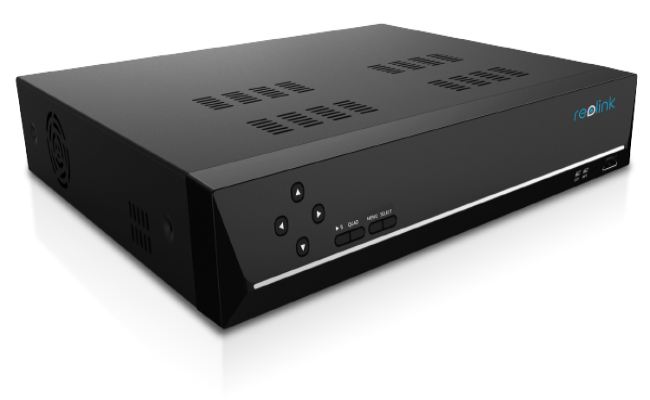
Installing a network video recorder (NVR) security camera system is one of the best ways to monitor your home or business. An NVR system consists of connected IP cameras that transmit footage to a central NVR device for recording and management.
Choosing the right NVR-compatible cameras and recorder is key to building an effective system tailored to your needs. This buyer's guide will cover everything you need to select the ideal NVR camera setup.
What is NVR Camera?
An NVR camera refers to a security camera that is compatible with a network video recorder (NVR). An IP camera NVR is not a specific type of camera but rather indicates that the camera can connect to and work with an NVR system.
Modern NVR cameras are almost always IP cameras, meaning they connect to a network and transmit data digitally. Specifically, most security camera NVR nowadays are PoE cameras. PoE stands for Power over Ethernet, indicating that the camera is powered and transfers data through an Ethernet cable. This allows a single cable to provide both power and connectivity between the camera and the NVR system. So now you know what is NVR camera.
How does NVR and PoE Camera Work?
An NVR security camera system consists of IP cameras, network cables/wires, and a network video recorder (NVR). Here is an overview of how the system components work together:
- PoE IP Cameras - The IP cameras connect to the NVR system via Ethernet cables. The cables provide both power and a data connection to each security NVR camera using PoE technology, eliminating the need for external power sources for the cameras.
- Network Cables – Cat5e or Cat6 Ethernet cables run from each IP NVR camera location back to a central spot where the NVR is located. This creates a closed circuit network just for the security system.
- Network Video Recorder (NVR) – The NVR is the central hub and recording device for the system. It is connected to a router via Ethernet cable, which allows it access to the same network the IP NVR security cameras are connected to. The NVR discovers the cameras on the network and establishes connections with them.
In operation, the IP NVR cameras capture video and send digital footage back to the NVR through the Ethernet cables. The NVR receives all the camera feeds and records the footage, usually to an internal hard drive.
Users can then access live remote footage as well as recorded video playback through the NVR using software like mobile apps. The NVR essentially enables centralized management, recording, and live viewing of multiple security cameras through one device.
Best NVR Camera Recommendation
One of the latest and most advanced NVR cameras is the Reolink Duo 3 PoE security camera. This innovative dual-lens camera delivers extraordinary 180° panoramic views in stunning 16MP resolution. Key features that make this camera an exceptional option include:
- Dual-lens design stitches two camera feeds into a seamless singular view for expanded field of view without image overlap
- Captures extremely wide 180° perspective to see more of your property in one shot
- Gorgeous 16MP ultra HD video provides 7680x2160 live footage
- H.265 video compression reduces file sizes while retaining image quality
- Rugged IP67 weatherproof housing allows indoor/outdoor installation
- Power over Ethernet (PoE) enabled for simple, low-voltage DC power connectivity

Groundbreaking 16MP Dual-Lens PoE Camera
16MP UHD, Dual-Lens, Motion Track, 180° Wide Viewing Angle, Power over Ethernet, Color Night Vision.
With game-changing expanded views in mesmerizing 16MP definition – the Reolink Duo 3 PoE takes NVR camera performance to bold new heights. It's an innovative flagship camera that's redefining possibilities for monitoring spaces in brilliant fidelity across an immersive, panoramic landscape.
Best NVR Camera Systems
When selecting a complete NVR system, you want an NVR that can record sharp, detailed footage and effectively manage all the connected cameras. Here are two top-rated systems:
1. Best 4K NVR Camera System
One of the top-rated complete 4K NVR camera systems is the Reolink RLK8-800B4 kit. Key highlights of this robust 4K NVR security camera system include:
- Records ultra-sharp 8MP 4K footage with exquisite clarity and detail
- Smart person and vehicle detection features use AI to reduce false alerts
- 8 weatherproof PoE NVR camera system provide wide 87° coverage with 100ft night vision
- Pre-installed 2TB HDD for ample onboard storage with an expansion bay
- Reliable continuous video recording with flexible scheduling options
- Intuitive mobile and desktop access for full remote system controls
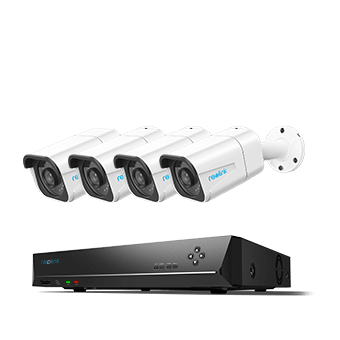
4K 8-Channel PoE Security System
4 pcs 4K Ultra HD Security Cameras; 2TB HDD 8-Channel NVR for 24/7 Recording; Person/Vehicle Detection; Plug & Play; 2 Network Solutions.
With leading-edge 4K cameras powered by intelligent detection, substantial included storage, and user-friendly management tools – the Reolink RLK8-800B4 checks all the boxes for an exceptional modern 4K best NVR camera system. Crystal-clear H.265 encoded 4K surveillance and robust AI alert technology combine in a professional-quality package that simplifies securing your premises.
2. Best NVR Camera System for Home
For homeowners who want reliable 24/7 surveillance, the Reolink RLK16-1200D8-A (New Version) is a powerful NVR camera system designed for comprehensive property protection.
Featuring an advanced 16-channel PoE NVR and eight high-resolution security cameras, this system delivers sharp video quality, continuous recording, and centralized management from a single platform. Unlike wireless systems that depend on signal strength, the PoE design provides stable video transmission and power through a single Ethernet cable, making it an excellent choice for large homes and multi-camera installations.
The RLK16-1200D8-A (New Version) combines professional-grade performance with easy remote access, intelligent detection features, and expandable storage, making it one of the best NVR camera systems for homeowners who prioritize reliability and image quality.

🎉 2026 Prime Day Sales Highlight: 12MP UHD PoE Security System with Advanced Perimeter Protection
- 12MP UHD resolution with vivid color night vision
- Perimeter protection for smarter intrusion alerts
Notable benefits of this NVR camera system include:
-
16-channel NVR supports future camera expansion
-
Stable PoE connection for reliable power and data transmission
-
High-resolution video for clear identification of people and vehicles
-
Smart detection reduces false alerts from non-important motion
-
Continuous 24/7 recording for complete property coverage
-
Centralized management of multiple cameras from one system
-
Remote live view, playback, and alerts through the Reolink app
-
IP67 weatherproof cameras for year-round outdoor use
For homeowners looking to secure multiple entry points, driveways, yards, and indoor spaces, the RLK16-1200D8-A (New Version) provides a scalable and dependable surveillance solution without monthly subscription fees.
Bonus Tips: How to Install and Set Up NVR Camera System
Installing an NVR security camera system takes planning but is worthwhile for keeping your property monitored. Here are some top tips:
- Map out camera placement - Determine the key areas you want to cover and sketch a layout identifying camera fields of view. Consider lighting, power sources, and sheltered spots.
- Connect NVR hub - Place your recorder in a clean, ventilated area with room to connect monitors/mice. Hook up to your router via Ethernet to join the camera network, otherwise your IP camera not detected by NVR.
- Run Ethernet cables – Run cables from your NVR location to each camera mount area. Leave slack, and use cable raceways to keep organized and protected. Terminate with PoE Injector if needed.
- Mount cameras – For each camera, attach and aim to view intended coverage zones. Many camera stands allow adjustable multi-axis positioning. Make small adjustments to refine the angle.
- Activate NVR - Add cameras to the NVR system using the desktop client or mobile app. Tweak settings like resolution and frame rate. Set recording schedule retention policy.
With some handy DIY skills, you can set up a professional-looking multi-camera NVR system customized exactly for monitoring your property.
FAQs
Do WiFi cameras work with NVR?
Yes, WiFi cameras are able to connect with an NVR. However, the NVR would need WiFi capability or a PoE to WiFi converter. Wired PoE cameras have faster speeds and more reliable connections. But WiFi cameras allow flexible wireless placement. Many NVR systems support a mix of PoE and WiFi cameras.
What are some components of NVR camera systems?
Typical components of the NVR camera system include the IP cameras, NVR recorder, Ethernet cables, Power adapters, Viewing monitors and Mounts.
Can I connect any camera to NVR?
Generally, no, the camera needs to be compatible with the NVR model and specs. Key factors you should know include IP Network Camera, NVR Hardware Ports, Video Format, Resolution/FPS, and Brand Interoperability.
So, the camera must have the right data transmission format, specs, and ports that are compatible with the target NVR system. Match brands when possible.
Conclusion
NVR security systems offer reliable video surveillance by connecting multiple IP cameras with a central NVR recorder. Choosing POE cameras provides simplicity while supporting WiFi adds flexibility. With some planning for your coverage zones and connectivity needs, installing an NVR system is a worthwhile DIY project that will result in the robust monitoring of your property.
Do you prefer NVR security camera systems? Tell us your thoughts in the comment section below! Let's discuss them together!
Search
Subscribe for the Latest Updates
Security insights & offers right into your inbox